
How to Add Interactive AI Game Experiences to a WordPress Website
A WordPress site can publish a tutorial, showcase a portfolio and sell a product, but interactive experiences often require a separate development process. A designer may want to demonstrate a game mechanic, an agency may want to build a campaign microsite and a creator may want readers to explore a story rather than scroll through it. The technical gap between a web page and a playable experience can make those ideas feel too expensive to test.
AI game makers are beginning to close that gap. They provide a way to move from a short brief or visual reference to a playable prototype, then share the result with a link. For WordPress publishers, the value is not that every page becomes a game. It is that an interactive idea can be validated before the team commits to custom engineering.
Why interactive content is a web design problem
A successful interactive feature still needs the same fundamentals as a good WordPress page: a clear purpose, readable hierarchy, fast access to the main action and a reliable experience on different screens. The game layer adds input, feedback and state, but the publishing questions remain familiar.
What should the visitor do first? How long should the experience take? What happens when the visitor finishes? Can the feature be shared, embedded or linked from a campaign page? Thinking through those questions early helps a team choose the right level of complexity.
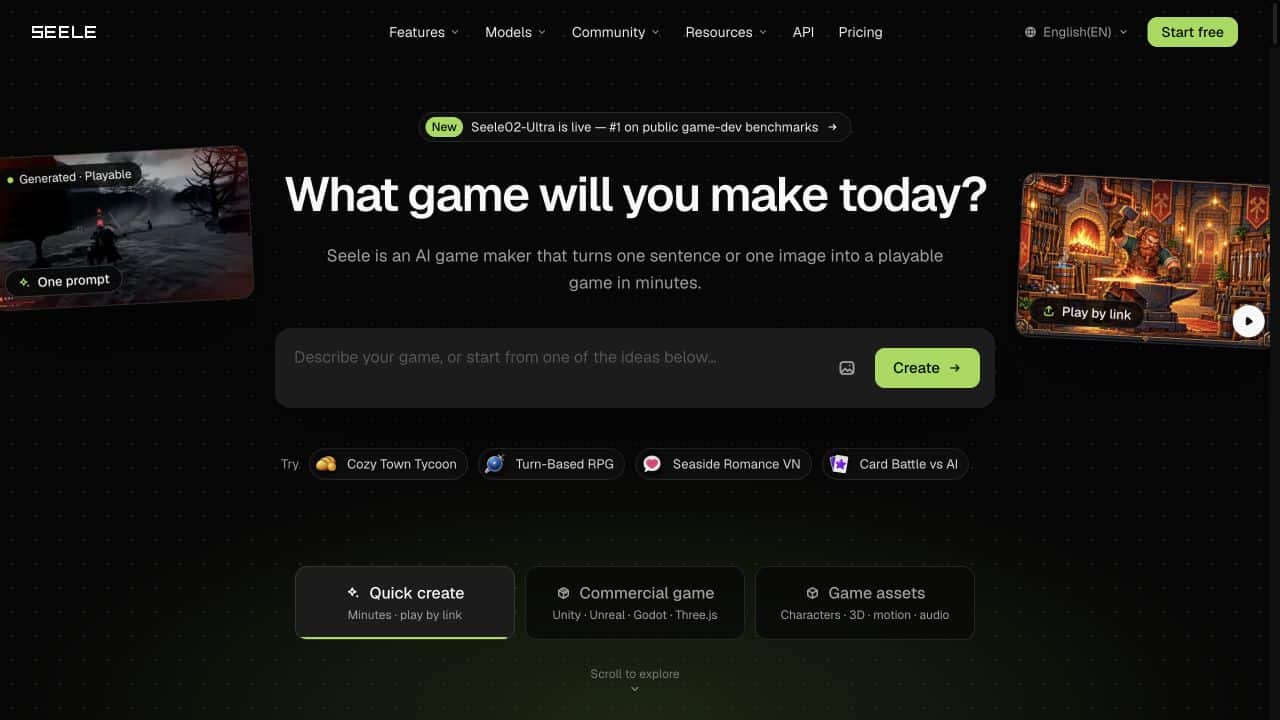
SEELE AI offers a useful starting point because a creator can describe a game or upload an image and receive a browser-playable build. The project can then be revised through conversation. A WordPress team can use that process to explore a small interactive element before asking a developer to turn the concept into a polished production feature. The SEELE AI platform is designed for this prompt-to-play workflow.
Four WordPress use cases
1. A playable product demonstration
A software company can turn a workflow into a compact simulation. Instead of showing a static screenshot, the page can link to a small experience that lets visitors try the decision or sequence the product supports. The prototype does not need to reproduce the entire application. It needs to make one benefit tangible.
2. A campaign microsite
A brand campaign can use a short game to give visitors a reason to stay and return. A simple collection challenge, branching story or environment tour can reinforce the campaign message while creating a shareable result. AI prototyping helps the marketing team test several concepts before investing in custom art and engineering.
3. An educational or editorial story
A history site, museum blog or online course can use an interactive scene to let readers explore context. A visitor might choose how to allocate scarce resources, navigate a historical setting or inspect clues in a virtual room. The learning objective should remain explicit, but the interaction can make the material easier to remember.
4. A portfolio piece for a creative studio
Agencies and independent designers can use a browser-playable prototype to show how a visual identity behaves in motion. A concept that begins as a mood board can become a small world, interface or game mechanic. The result gives clients something concrete to discuss during a pitch.
A practical publishing workflow
A WordPress team can keep the process manageable by separating content planning from implementation:
- Define the page goal. Decide whether the feature should demonstrate, teach, entertain or collect leads.
- Choose one interaction. A single mechanic is easier to test than a collection of disconnected features.
- Generate a playable draft. Use a prompt, visual reference or project brief to create a first version.
- Test the link on desktop and mobile. Check load time, controls, orientation and the handoff back to the WordPress page.
- Add context around the experience. Explain what visitors are about to do, how long it takes and where to go next.
- Measure the right behavior. Track starts, completion, return visits and meaningful clicks rather than page views alone.
This workflow preserves the strengths of WordPress: editorial control, search visibility, navigation and analytics. The interactive experience becomes one part of a larger content journey.
Design details that matter
The first screen should communicate the purpose of the experience without forcing the visitor to read a long instruction panel. Controls need to be discoverable, especially on touch devices. Audio should be optional or muted by default. If the experience is embedded, the surrounding page should make it clear how to return to the article or product information.
Accessibility also needs to be considered at the page level. Provide a text explanation of the activity, a visible fallback link and a concise description of what the visitor will encounter. If the game carries essential information, publish that information in an accessible format outside the interactive layer as well.
Performance is another reason to begin with a small prototype. A lightweight browser game can be shared easily; a large asset-heavy build may create friction for mobile visitors. Testing the smallest useful version gives the team evidence about whether the interaction earns its bandwidth cost.
Where AI helps and where editing remains essential
AI can reduce setup work, generate alternatives and help non-specialists see an idea in motion. It cannot decide whether an interaction supports a brand promise or a learning objective. The WordPress team still needs to edit the copy, review the visual language, test the experience and make sure the page works for the intended audience.
That division of labor is healthy. The tool handles repetitive assembly; the publisher handles meaning, context and quality. When the first draft is playable, those editorial decisions become easier because the team can react to an actual experience.
A more interactive web is easier to plan when the first draft is cheap
WordPress has always lowered the cost of publishing. AI game makers can lower the cost of testing interactive ideas. Together, they allow a publisher to ask a better question before a full build: does this experience help the visitor understand, remember or enjoy something?
For teams exploring that question, the SEELE AI platform can turn a prompt or image into a shareable game prototype and support conversational iteration. The strongest result may be a small game, a visual demo or a short interactive story. What matters is that the idea can be tested while it is still easy to change.
A content architecture that scales
The same planning method works when the interactive feature becomes part of a larger content library. Give the page a stable URL, a descriptive title and supporting copy that explains the experience in plain language. Link to related tutorials, case studies or product pages so visitors can choose their next step after playing. If the experience changes over time, keep the introduction current and record the version or update date.
For site owners, this creates a useful division between the content management layer and the interactive layer. WordPress can handle editorial review, search metadata, navigation and calls to action, while the game prototype can evolve on its own release cycle. A clear handoff between the two keeps the page understandable even when the game is updated.
Plan the return journey before launch
An interactive page needs a clear ending. A visitor who completes the activity should understand whether to replay, read a related guide or return to the product page. Write that next step before commissioning the experience. Otherwise, the game can feel disconnected from the rest of the site, even when the activity itself is enjoyable. Match the wording on the launch button, the game introduction and the return link so the visitor understands the journey.
A WordPress editor can test this journey with a simple draft page. Place a short introduction above a screenshot and a clearly labeled play link. Explain whether the experience opens in a new tab and include a visible route back. Do not assume that an external game will work in an iframe: embedding depends on the hosting service, browser policies and the capabilities available for that particular build. A direct link is a practical starting point while those details are checked.
Finally, give one person responsibility for the page and another for the interactive build, even if the same person fills both roles. Record who approves copy changes, checks broken links and tests the experience after an update. This small ownership decision makes maintenance more predictable and prevents an appealing experiment from becoming an abandoned page. Review the page on the devices your audience actually uses, and keep the essential explanation available even if the interactive content cannot load.
