
Bakery WordPress Themes


Bakery WordPress Themes for Bakeries, Cake Shops, Cafes and Pastry Brands
Bakery WordPress themes are pre-built website designs made for people who bake, decorate and sell sweet and savory treats. A local bakery, a cake shop, a patisserie, a cupcake counter, a coffee shop or a home bakery can use one to open a digital storefront that shows freshly baked goods, lists prices and takes orders.
These themes come with menu displays, product galleries, order forms, testimonials, opening hours and WooCommerce compatibility, so customers can see your signature cakes and artisan breads before they ever walk through the door.
This guide starts with the 3 designs in our bakery category at GraceThemes, shown with prices and demo links and followed by a review of each. From there, we define bakery themes, compare them with online ordering platforms, show why a bakery needs its own site, list the advantages of starting from a template and help you plan, from startup costs to cottage food rules.
The middle part covers must-have features, online ordering, pre-orders and delivery, a matching table and guides for bread bakeries, cake shops, patisseries, cupcake and cookie shops, home bakers, ice cream parlors, bakery cafes and gluten-free specialists.
Later sections turn to menu and product pages, trust signals, the pages every bakery site should have, homepage elements, design, accessibility, search visibility, speed and safety, tracking results, promotion, fresh content ideas and the errors bakers make most. The guide wraps up with a free-versus-premium comparison, a short buying checklist, setup steps, our three price plans, related designs and a bakery FAQ.
Key Takeaways
- Bakery WordPress themes give bakeries, cake designers and dessert brands a design built for mouthwatering visuals and easy browsing.
- Our bakery category holds 3 premium themes at $29 per theme: Chamiers PRO, Cafeteria PRO and Creamery PRO.
- Creamery PRO lists an online order form, Chamiers PRO lists an online booking section, and Cafeteria PRO supports restaurant menus and WooCommerce.
- Show high-quality photos, clear pricing, allergen information and your pickup and delivery options on every product page.
- Custom cakes need a proper custom order form with date, size, flavor, design and lead time rules.
- All three come with free installation and setup plus free lifetime support and theme updates.
Our Bakery WordPress Themes at a Glance
Our bakery category features three premium designs right now. Whether you need a cake WordPress theme, a pastry WordPress theme or a WooCommerce bakery theme, one of them should fit. Each sells for $29 with no renewal fee. Select a theme name to open its product page and live demo.
| Theme (details and live demo) | Price | Best for | Page builder | Online store | Stand-out detail |
| Creamery PRO | $29 | Bakeries, cake shops, ice cream parlors, sweets shops, dessert cafes | Drag-and-drop builder, Visual Composer | WooCommerce integration | Online order form and order shortcode, 600+ Google Fonts |
| Cafeteria PRO | $29 | Cafes, coffee shops, restaurants, catering, food blogs | Drag-and-drop builders, Gutenberg | WooCommerce compatible | Restaurant menu styles, 30+ shortcodes, opening hours |
| Chamiers PRO | $29 | Coffee roasters, cafes, tea shops, bakeries | Page builder plugins | WooCommerce gallery fix in changelog | Online booking and product selection sections |
Bakery Theme Reviews
All three designs serve food businesses, yet each one suits a different kind of bakery. These reviews explain who should choose which.
Creamery PRO: Built for Bakeries and Dessert Shops
Creamery PRO is our food bakery WordPress theme and the closest match for a classic bakery. Its product page lists bakeries, cake shops, sandwich, muffin and ice cream parlors, sweets shops, dessert cafes, pastry chefs, gift shops and restaurants, and its feature list also mentions pizza parlors and coffee shops.
It supports a drag-and-drop page builder plugin, with Visual Composer listed among compatible plugins, and it offers WooCommerce integration for an online bakery store. You get 600+ Google Fonts, Font Awesome icons, a Nivo Slider, a color picker and shortcodes for pricing tables, galleries, contact forms, testimonials and online orders.
The page mentions an online order form but no table reservation system. For languages, it lists the qTranslate plugin family, which is no longer maintained, so use an actively updated translation plugin such as WPML or Polylang and check compatibility with us.
Cafeteria PRO: For Bakery Cafes and Food Businesses
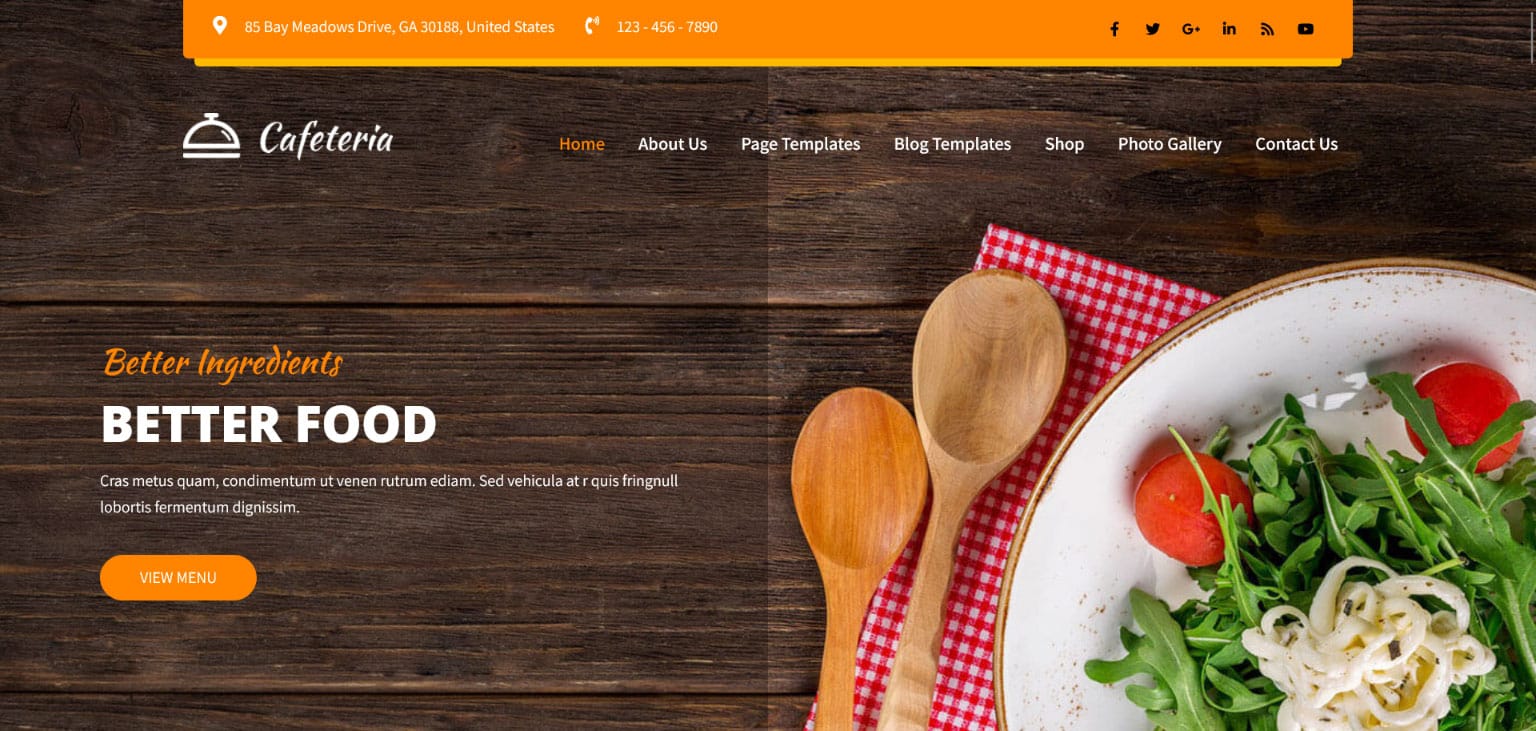
Cafeteria PRO is our food WordPress theme for cafes, restaurants, pubs, fast food, coffee shops and catering businesses. Its page adds that a food blog or recipe magazine fits the design too, which makes it a strong pick for a bakery cafe that also shares recipes.
Editing works through drag-and-drop builder plugins as well as the Gutenberg block editor, and it has WooCommerce compatibility for selling food products online. The theme is described as translation-ready and multilingual. Its menu tools stand out: different restaurant menu styles, a special dishes area and opening hours.
It also lists 30+ shortcodes, 600+ Google Fonts, Font Awesome icons with unlimited color options, and compatibility with Revolution Slider, WPForms, Contact Form 7, MailChimp, Gravity Forms and Google Maps. Its page does not mention online reservations.
Chamiers PRO: For Coffee Shops and Cafe Bakeries
Chamiers PRO is our coffee shop WordPress theme. Its description names coffee roasters, cafés, coffee shops, tea shops, bakeries and restaurants. It suits a cafe that sells coffee and pastries side by side.
Its homepage sections include online booking and online product selection, and the page suggests showing home delivery services. It is described as compatible with popular page builder plugins, though no builder is named.
The page does not claim WooCommerce support or multilingual plugins, although its changelog mentions a fix for the WooCommerce product gallery. Version 1.1 also added a blog single layout option and fixed a sticky header issue on mobile. If you need a full online shop or several languages, confirm your plan with our team first.
What Are Bakery WordPress Themes?
Think of a WordPress theme as the shop fitting for your website. It sets the header, navigation menu, homepage sections, footer, fonts and colors. A multi-purpose theme tries to please every trade at once. A bakery theme is designed around food, photos and orders.
Bakery WordPress themes, and every WordPress bakery template inside them, arrive with demo content full of layer cakes, croissants, macarons, sourdough loaves and cupcakes. Their sections fit the trade: a menu page, product categories, pricing tables, image galleries, team members, customer reviews, location maps and order forms. With WooCommerce, they can also become an online bakery with a shopping cart and secure checkout.
Who Uses Bakery Themes
Bakery themes suit a wide range of food businesses:
- Artisan bakeries, wood-fired bakeries, a specialty bakehouse or any craft bakery that sells freshly baked bread daily.
- Cake shops, custom cake designers and wedding cake specialists.
- Patisseries, a pastry cafe or a dessert bar.
- Cupcake shops, cookie shops, donut shops and pie shops.
- Home-based bakers working under cottage food permits.
- Ice cream shops, candy stores, chocolate boutiques and sweet shops.
- Cafe bakery owners, coffee shops, tea shops and bistros.
- Vegan, organic and gluten-free bakeries with diet-specific items.
Bakery Theme vs Online Ordering Platform
A theme controls your site’s design and pages. An online ordering platform or bakery ordering system handles the busy back end: time slots, lead time management, delivery zones, order notifications, kitchen printer tickets and order tracking. Some bakeries run both, using the theme for the brand site and an ordering link or embed code for orders.
For many small bakeries, WooCommerce plus a few plugins is enough. A busy bakery with daily delivery may prefer a dedicated ordering tool. We explain both options in the online ordering section below.
Why a Bakery Needs a Website
People decide where to buy cakes and bread long before they reach your counter. A website helps them choose you.
Customers Search “Bakery Near Me”
When someone wants a birthday cake or fresh croissants, they search for a bakery near me, look at photos and check opening hours. A clear site with real photos, prices and directions captures these local searches and turns online visitors into customers at your physical bakery. Without one, a passer-by online simply chooses another shop.
Custom Cakes and Pre-Orders Start Online
Celebration cakes, wedding desserts and large orders need planning. A website lets customers browse a cake gallery, read your lead time rules and send a custom cake request at any hour. That saves you long phone calls, gives you customer details and order details in writing and makes convenient online ordering part of your service.
Your Story Sells Your Bread
Many customers choose a bakery for its people and values: family recipes, locally-sourced ingredients, from-scratch baking and handcrafted products. Your about page, chef portraits and behind-the-scenes content add a personal touch and create an emotional connection that a supermarket shelf cannot match.
Benefits of Using Bakery WordPress Themes
Starting from a finished design keeps both your budget and your launch date under control.
Quick launch. Demo import, page templates and predesigned pages help you launch your site quickly and skip the hassle of building from a blank page.
Affordable. A $29 theme costs far less than a custom website, and WordPress itself is free. Your budget can go to photography and ingredients.
Built for food. Bakery themes include menu layouts, product showcase pages and image gallery layouts that make delectable treats look their best.
Easy updates. You can change prices, add seasonal baked goods, post holiday hours and share bakery news yourself with no coding required.
Room to grow. Add a WooCommerce shop, gift cards, subscription bread shares or online classes later without rebuilding.
Planning Your Bakery Website
A few decisions before you pick a theme will save you hours later.
Set Your Main Goal
Most bakery sites focus on one of these goals: more in-store visits, more online orders, more custom cake orders or more catering requests. Choose the one that matters most and design your homepage around it. A target such as “20 custom cake requests per month” keeps you focused.
Know Your Customers
Different customers need different things. Busy parents want quick birthday cake ordering. Health-conscious customers want ingredient lists and dietary options. Couples planning weddings want cake designs, tastings, cake photography and pricing guidance. Office managers want catering and wholesale details. Write down your main groups and what each should find on your site.
Budget and Timeline
Website costs cover a domain name, web hosting, the theme itself, product photography and any extra plugins for ordering or delivery. A template-based site can go live in a few days. Allow extra time to photograph your best-selling items and write product descriptions.
Check Cottage Food and Local Rules
If you bake at home, read your state’s cottage food laws before you sell online. Rules differ by state and often cover what you may sell, whether you may ship, labeling requirements and allergen labeling. Larger bakeries may need a commercial kitchen license, a local business license and sales tax registration.
Your website should reflect these rules, for example by offering local pickup only when shipping is not allowed. Check with your state health department for the current requirements.
Market Research and Startup Costs
If you are opening a new or online bakery business, do some market research first. Look at nearby bakeries in a short competitor analysis: what they sell, their prices and how they take orders. Define your target customers and your unique selling points, such as artisan sourdough, celebration cakes or gluten-free options.
Put the numbers in a simple business plan. Include startup costs such as baking equipment, baking ingredients, packaging materials, refrigeration storage and the website. Add overhead costs like rent and utilities if you have a shop. It also helps to pre-calculate costs for each product, including mixing and baking, baking time and cooling time, so your online prices cover your real work.
Domain, Hosting and Going Live
Choose a short business name and a matching custom domain name (your bakery domain), ideally with a common top-level domain such as .com. Domain registration is usually a small yearly fee. Pick a reliable hosting provider, then connect your domain by updating its DNS settings. Before you go live, spend time on site testing: place test orders, check forms and view every page on desktop and mobile. Only then publish the site and announce it.
Questions to Answer First
- What should a visitor do first: order, call, visit or request a quote?
- Do you sell ready-made items, made-to-order cakes or both?
- Do you need delivery or pickup options, and what is your delivery radius?
- How much lead time do custom orders need?
- Will you take deposits or full prepayment?
- Do you offer catering, wholesale or bread-making workshops?
- Are you comfortable with a particular builder plugin, or will you learn one from scratch?
- Should your menu appear in a second language for visitors or tourists?
- Which team member keeps menus, prices and photos current each week?
Must-Have Features in Bakery WordPress Themes
These features matter most for bakeries. Use them as your checklist.
Mobile-Friendly Layout
Most people look up bakeries on cell phones, so mobile responsiveness is not optional. A responsive bakery theme that keeps photos large, menus readable and buttons easy to tap is essential. Scroll through each demo on a phone while standing in your own shop to see what customers will see.
Menu Display and Product Showcase
Your menu is your best salesperson, so good bakery menu design matters. Look for menu styles that show items, prices and short descriptions clearly, plus product categories for breads, cakes, pastries and drinks. Cafeteria PRO offers different restaurant menu styles and a special dishes area, while Creamery PRO includes pricing table shortcodes.
Order Forms vs Full Ordering Systems
An order form collects a request that you confirm by email or phone. It suits custom cakes and small daily volumes. A full online ordering system shows live menu availability, takes payment at checkout, books delivery slots and sends automated confirmations. Creamery PRO lists an online order form and order shortcode, and Chamiers PRO lists an online booking section. For time-slot scheduling or delivery dispatch, add a dedicated ordering plugin.
Galleries and Sliders
Bakeries sell through the eyes, so visual appeal is everything. A homepage slider, masonry gallery, filterable gallery or lightbox gallery lets customers browse cakes, breads and your shop, and clear photo gallery organization keeps it tidy. Creamery PRO includes a Nivo Slider, and Cafeteria PRO works with Revolution Slider.
Page Builder Compatibility
Builder plugins let you move sections around with drag and drop instead of code. Creamery PRO lists Visual Composer, Cafeteria PRO supports the Gutenberg editor and drag-and-drop builders, and Chamiers PRO works with popular page builder plugins. Pick the one that matches the tools you already know.
WooCommerce Store
A WooCommerce shop lets you sell cakes, cookie boxes and other baked goods directly from your site. It handles product pages, shopping cart, secure checkout, payment methods and shipping options. Creamery PRO and Cafeteria PRO list WooCommerce support.
Layout Options to Look For
Compare layout options as well as looks. Useful choices include several header styles, multiple homepage layouts, ready inner pages, a boxed layout or wide layout, a full-width header, a sticky header and custom widgets.
Extras such as parallax scrolling, a video background and gentle scroll animations add charm, while custom post types keep menus, team members and testimonials organized. Developers who edit templates should work in a child theme, while small style tweaks belong in custom CSS.
Fonts, Colors and Branding
Your site should match your shop sign, boxes and labels. Creamery PRO and Cafeteria PRO each offer 600+ Google Fonts, and Cafeteria PRO adds unlimited icon color options. These controls help you build consistent branding around your bakery brand colors.
SEO, Speed and Support
Choose an SEO-friendly theme, compress images and use good hosting. Strong speed and performance support both rankings and sales. Every theme in this category includes free installation and setup, documentation, a support forum and lifetime support and updates.
Online Ordering, Pre-Orders and Delivery
Online orders can become a large share of bakery sales. Plan them carefully so they run smoothly in the kitchen.
Build a Custom Cake Order Form
A good custom order form collects everything you need in one step. Plan your order form fields around these details:
- Event type, date and desired pickup date or delivery date.
- Cake size, number of servings and tiers.
- Cake flavor, filling and frosting.
- Cake design notes, with an option to upload a reference photo.
- Dietary needs and allergy info.
- Budget range and contact details.
State your lead time clearly, such as one week for decorated cakes. Many bakeries ask for a down payment when they confirm the order, which reduces no-shows. Complex designs usually get case-by-case pricing.
Pre-Orders and Scheduled Offerings
Pre-orders help you bake the right amount and cut waste. Popular ideas include weekly bread pre-orders, holiday pie orders and a bread share subscription model. Set preorder days, a cut-off time and clear pickup windows. Mark items as sold out or coming soon so customers know what to expect.
Ordering Tools and Kitchen Workflow
Behind every smooth online order is a clear workflow. Good order management shows each new order in an order queue, updates the order status and sends order notifications to staff by email, SMS notifications or WhatsApp notifications. Some bakeries print tickets on a kitchen printer so bakers see orders without checking a screen.
Keep menu availability accurate. A centralized menu with quick menu updates prevents customers from ordering items you have already sold out of. At checkout, accept the payment methods your customers prefer, including cards, digital wallets and, for pickup orders, offline payment methods. A reliable payment processor, automatic tax calculations and an optional minimum order for delivery keep checkout simple and profitable.
Point of Sale, Inventory and Apps
Busy bakeries often connect their website to the tools at the counter. A POS system or restaurant POS records in-store sales, while inventory tracking and a menu management system keep stock and prices in sync between the shop and the site.
Some kitchens use a Kitchen Display System instead of printed tickets. In the cafe, a QR code menu on each table can link straight to your online menu. Larger brands sometimes add a mobile app for iOS and Android with a built-in loyalty program, while most small bakeries do well with a fast, branded website and a couple of trusted delivery partners.
Pickup and Delivery
Offer in-store pickup, local delivery or both. Show your service area, delivery radius, fees and time slots. If you ship, explain packaging, insulated shipping for delicate items and which products travel well, such as shelf-stable products like cookies.
For local delivery, set shipping zones and shipping rates in WooCommerce, or use delivery management tools that handle delivery calculations, delivery drivers and delivery tracking. Offer ASAP delivery only if your kitchen can truly meet it.
Direct Orders vs Delivery Apps
Third-party delivery apps bring reach but charge commission. Taking direct orders on your own site through WooCommerce or a commission-free ordering tool keeps more of each sale and keeps the customer data with you. Many bakeries use both and gently steer regular customers to their own site.
Gift Cards, Upsells and Add-Ons
Gift cards create a valuable revenue stream, especially around holidays. At checkout, offer product add-ons such as candles or greeting cards, and use order bumps to raise average order value. Keep these offers light so checkout stays quick.
Matching a Theme to Your Bakery
This table gives a quick starting point. Each guide below ends with our pick for that type of bakery.
| Bakery type | Main website goal | Suggested themes |
| Classic bakery or cake shop | Show products and take orders | Creamery PRO |
| Patisserie or dessert cafe | Show menus and pastries | Creamery PRO, Cafeteria PRO |
| Bakery cafe or coffee shop | Show menu, hours and atmosphere | Chamiers PRO, Cafeteria PRO |
| Ice cream or sweet shop | Show flavors and sell online | Creamery PRO |
| Home baker | Show work and take requests | Creamery PRO |
| Bakery with recipes or blog | Share recipes and sell products | Cafeteria PRO |
| Catering bakery | Show packages and take inquiries | Cafeteria PRO |
Website Guides by Bakery Type
Each kind of bakery needs a slightly different website. These guides show what to include.
Artisan Bread and Sourdough Bakeries
An artisan bakery sells craft and patience. Explain your sourdough fermentation, your sourdough culture, organic bread flours and locally-sourced wheat. Show artisan loaves and fresh bread coming fresh out of the oven, list daily bake times and offer weekly pre-orders so regulars never miss out.
Name your bread loaves, mini loaves, banana bread and healthy bread clearly, and explain the quality ingredients behind them. A neighborhood bakery can also share which nearby cafes and grocery stores stock its bread. A bread-making workshop page can add income and community.
Best theme fit: Creamery PRO covers bakeries with order forms and galleries, and Cafeteria PRO suits bakeries that also run a cafe.
Cake Shops and Custom Cake Designers
A cake shop website should lead with a strong cake gallery organized by occasion: birthday cakes, children’s birthday cakes, wedding cakes and special event cakes. Show starting prices or a price guide, explain tastings and lead times, and link every gallery to your custom order form.
Introduce your cake decorator or team of cake designers, since many couples choose a custom cake shop for the artist as much as the cake. Testimonials from couples and parents build confidence.
Best theme fit: Creamery PRO lists cake shops and includes galleries, pricing tables and online order shortcodes.
Patisseries and Dessert Cafes
A patisserie website sells elegance. Use a refined layout, elegant typography and close-up photos of French macarons, tarts, croissants and specialty pastries. A Parisian-inspired style with soft colors suits many patisseries. List seating, opening hours and seasonal menus.
Best theme fit: Creamery PRO names dessert cafes and pastry chefs, and Cafeteria PRO offers menu styles for sit-in service.
Cupcake, Cookie and Donut Shops
These shops sell fun, color and gifting, from cake pops and chocolate chip cookies to fresh donuts and muffins. Bright layouts, playful photos and clear box sizes, such as a dozen cupcakes, work well. Offer gift boxes, party orders and local delivery. Daily specials and limited flavors create scarcity marketing that brings people back.
Best theme fit: Creamery PRO lists muffin parlors and sweets shops and supports WooCommerce.
Home-Based and Cottage Food Bakers
A home-based bakery needs a simple, trustworthy site. Show your work, explain how ordering works, state your pickup location (a general area until an order is confirmed) and note any cottage food permit details your state requires.
A clear allergen disclaimer and ingredient labeling protect you and your customers. Some states also require a home baking business to hold a food handler’s certificate or other food business permits. If you sell at farmer’s markets, list your market days and stall locations too.
Best theme fit: Creamery PRO’s order form and galleries suit a small home bakery.
Ice Cream Parlors and Sweet Shops
Ice cream shops, candy shops and chocolate shops sell flavors and experiences, whether that means a scoop, a bag of candy or a box of truffles. Show a rotating flavor list, seasonal specials and party packages. If you ship chocolates, explain storage and shipping seasons, since heat can damage products.
Best theme fit: Creamery PRO names ice cream parlors and sweets shops.
Bakery Cafes and Coffee Shops
A bakery cafe sells atmosphere as much as food. Show your cozy bakery ambiance, seating, Wi-Fi, weekend brunch and the pairing of coffee with warm pastries. A full menu with prices, opening hours and a map matter most.
Best theme fit: Chamiers PRO targets coffee shops and bakeries with online booking and product selection sections, and Cafeteria PRO offers menu styles and opening hours.
Vegan, Gluten-Free and Organic Bakeries
A specialty bakery, whether a vegan bakery, an organic bakery or a gluten-free bakery, serves customers with specific needs. Label every product clearly as vegan, gluten-free or organic, list full ingredients and explain how you prevent cross-contact. Filters by diet help shoppers find safe options fast. Detailed dietary options build deep customer loyalty.
Best theme fit: Creamery PRO or Cafeteria PRO, both with WooCommerce support for product categories and filters.
Catering, Wholesale and Event Desserts
Many bakeries earn steady income from catering requests, office orders and wholesale accounts. A dedicated catering and wholesale page should list event treats, platters and event desserts, minimum quantities and lead times.
For cafes and shops that want to stock your bread, explain delivery days and trade pricing. Include an inquiry form that asks for the event type, date, guest count and flavor options, so you can quote quickly for custom special orders.
Best theme fit: Cafeteria PRO lists catering businesses and offers menu styles that suit catering packages.
Merchandise, Classes and Digital Products
Bakeries with loyal fans often sell more than food. Branded merchandise and bakery merchandise such as t-shirts, mugs and branded aprons add income and spreads your name.
A cooking school corner can sell online classes, in-person workshops and recipe ebooks. WooCommerce handles both physical products and digital products, so one shop can sell a sourdough loaf, a gift card and a recipe download.
Best theme fit: Creamery PRO and Cafeteria PRO both list WooCommerce support for a mixed shop.
Menu and Product Pages That Sell
Your menu and product pages turn browsers into buyers. Make each one clear and tempting.
Write Helpful Product Descriptions
Good product description writing covers taste, texture, size, servings and occasions. Mention key ingredients, allergen information and storage tips. Keep the tone warm and simple. “Buttery, flaky croissant made with cultured butter, baked fresh every morning” sells better than a bare product name.
Show Prices and Availability
Clear pricing information and pricing details build trust. Show prices on menus and products, note sizes and mark out-of-stock items. For custom cakes, show a starting price or price range.
Photograph Your Products Well
Product photography makes or breaks a bakery site. Use natural lighting, a clean background and close-ups that show texture. Shoot from several angles and include a few lifestyle shots, such as a cake on a party table.
Even smartphone photos can look great with good light. These simple product photography tips and image lighting tips create the appetizing food imagery and tempting food photos that sell. Compress images before upload to keep pages fast.
Organize Menus Logically
Group items into clear menu categories: breads, cakes, pastries, cookies, drinks and seasonal items. Use a filtering system for diet, occasion and price on larger shops. Keep the digital menu updated whenever items change.
Product Variations and Shop Settings
WooCommerce gives you tools that suit baked goods. Use product variations for sizes and flavors, and units of measure for items sold by weight or by the dozen. Add product labels such as “new,” “seasonal” or “vegan.” On larger shops, plugin features such as Ajax shop filters, product sorting, a quick view popup and a mini cart make browsing faster.
Offer both a grid layout for photo-led browsing and a list layout for quick ordering. If you only want to show products without online sales, a catalog mode plugin displays items and prices without a cart.
Trust Signals for Bakeries
Trust turns a first visit into a regular habit. Add these signals across your site:
- Customer testimonials and Google reviews with names and occasions.
- Awards, local press and publications that featured your bakery.
- Your founder story, family recipes and years in business.
- Staff photos and the faces behind products.
- Clear allergen information, ingredient sourcing and food safety practices.
- Real photos of your kitchen, display cases and finished orders.
- Simple contact details, opening hours and a map.
Pages Every Bakery Website Needs
Customers come with a handful of questions: what do you sell, what does it cost, when are you open and how do I order. These pages answer them.
Homepage. Introduce your bakery with large high-quality images, featured items, reviews and opening hours. The next section lists the homepage elements that turn visits into orders.
Menu or Shop. List all menu items with photos and prices, organized by category, on a fast shop page.
Custom Orders. Explain your process, lead times and pricing, then show the custom order form.
About Us page. Share your bakery story, mission, team photos and shop photos.
Gallery. Show cakes, breads, events and your shop.
Catering and Wholesale. Describe packages for offices, events and cafes, with an inquiry form.
Contact and Location. Show your business address, phone, email, store hours, an integrated map with get directions link and parking notes.
FAQ page. Answer questions about ordering, delivery, allergens, deposits and holiday hours.
Policies. Add a privacy policy, terms and conditions and clear pickup, delivery and cancellation terms.
Homepage Elements That Turn Visitors Into Customers
Your homepage decides in seconds whether a visitor stays. These elements make it work harder:
- A hero banner with your most tempting product and one clear call-to-action button.
- Two main clear CTAs, such as “Order Online” and “View Menu.”
- A rotating banner or banner slider for seasonal specials, used sparingly.
- A sticky navigation menu so the order button stays visible while visitors scroll.
- A countdown timer for holiday pre-order deadlines.
- Quick contact through a WhatsApp button or Facebook Messenger link.
- Full-width sections and section dividers that separate menu, story and reviews.
- A back-to-top button on long menu pages.
Keep any intro animation short. Hungry visitors want food photos and an order button, not a long loading effect.
Design for Bakery Websites
Good design makes your products look as good as they taste.
Choose a Style That Matches Your Bakery
Bakeries use many styles. A rustic style with wood textures and earthy color tones suits bread bakeries. A Parisian-inspired look with pastels suits patisseries. A whimsical design with bright colors suits cupcake and candy shops. A minimalist design with lots of white space suits modern dessert brands. Choose one style and use it consistently.
Pick Warm Colors and Readable Fonts
Warm colors such as cream, caramel, soft pink and chocolate brown feel inviting. Pair a decorative heading font, such as a handwritten script, with a clean sans serif body font for easy reading. Keep strong color contrast for text.
Let Photos Lead
Large photos, plenty of whitespace and a clean minimal design keep attention on your products and create distraction-free browsing. Avoid busy backgrounds and too many effects. A short looping video of bread coming out of the oven can be a lovely hero section, as long as it loads quickly.
Build a Recognizable Bakery Brand
Your website is part of your bakery branding. Use your custom logo, brand colors and fonts on every page, and keep them in a simple website style guide or brand kit so packaging, signs and social posts match. Color psychology helps here: warm caramel and cream tones feel comforting, while pastels feel playful and refined.
Thoughtful font pairing, such as serif fonts for headings and sans serif for text, gives your site a distinct brand personality. Over time, this visual identity builds brand recall, so customers recognize your boxes before they read the name.
Accessibility and Privacy
A welcoming bakery should have a welcoming website. Good web accessibility helps every customer, including people with low vision. Add alt text to images, keep strong color contrast, use a comfortable text size and choose readable fonts. Make buttons large enough to tap.
Protect customer information as well. Use reCAPTCHA or another spam prevention tool on forms, offer cookie preferences and privacy controls where required, and review GDPR compliance if you serve European visitors. Collect marketing consent before adding anyone to your email list.
SEO for Bakery Websites
Search engines bring hungry customers to your door.
Local SEO
Claim your Google Business Profile, add photos, menu links and hours of operation, and keep your name, address and phone consistent everywhere. Use location-based keywords such as “custom cakes in [city]” and “best bakery near me” naturally on key pages. Reviews and local photos strengthen your local visibility.
On-Page SEO
Give each page a clear meta title and meta description with a relevant phrase. Target phrases people actually search, such as “online cake shop in [city]” or “cake delivery website,” and give seasonal offers their own bakery landing page. Write descriptive headings, keep URLs short and add alt text to every product photo, such as “chocolate raspberry layer cake.” Link related pages, for example from a wedding cake gallery to the custom order form.
Technical SEO
Submit a sitemap, keep pages fast and add schema markup for your bakery, products and FAQs. A mobile-friendly website with good page load speed supports both rankings and sales.
Helpful Content
Start a bakery blog with baking tips, seasonal content, ingredient stories and guides like “how to store sourdough.” Share downloadable recipes or simple baking tutorials. Helpful posts bring search traffic and make customers feel part of your bakery.
Speed, Security and Maintenance
Food photos are large, so speed needs attention. Use fast-loading images, lazy loading and reliable web hosting with high uptime, and avoid heavy plugins. Check your core web vitals and page load time after every big change. Test major updates on a staging environment first, and apply security updates promptly. Install an SSL certificate and take regular backups.
Review your site every month for website performance and accuracy. Update seasonal menus, remove expired offers, check that the order button works and test the full order process on a phone. A broken form or a dysfunctional order button can cost a day of sales.
Measuring Your Website’s Success
Use WooCommerce reports or a free analytics tool to track visits, orders, form submissions and clicks on your phone number. Watch which products and pages bring the most orders. Track repeat orders, online bakery sales and average order value to see whether loyalty and upsells are working. These numbers support data-driven decisions about menus and marketing.
Look at customer behavior across your sales funnel: how many visitors view the menu, add items to the cart and finish checkout. Improving each step lifts sales conversion without extra traffic. Simple performance analytics each month show which photos, products and offers deserve more space.
Marketing Your Bakery Website
Baked goods are made for sharing, online and offline.
Email and Newsletters
Collect emails with a newsletter signup on your homepage and checkout. Send weekly specials, new flavors and holiday order reminders. A mailing list subscription is one of the most reliable ways to fill pre-order slots and keep loyal customers close. Use email campaigns for holidays and SMS campaigns for same-day specials, and let marketing automation send birthday offers from your customer database.
Social Media
Post reels and stories of decorating, slicing and fresh bakes on Instagram and your other bakery social media channels, and add social icons to your site. Link every post to your menu or order page. Use your channels to engage your audience, announce specials and build relationships with regulars. Food photos are naturally shareable, which helps word-of-mouth spread.
Local Partnerships and Events
Sell at farmer’s markets, sponsor local events and partner with coffee shops, offices and wedding planners. Invite local food bloggers and local influencers to taste new items. Offer free samples at events with a card that points to your website, and ask tasters to follow you online.
Local event sponsorship, booths at local fairs and festivals and a charity bake sale build brand awareness and a loyal following. Small pay-per-click advertising campaigns around holidays can also bring quick orders.
Loyalty and Repeat Business
A simple rewards program, birthday treats or a loyalty program keeps customers returning. Email coupons to subscribers for slow weekdays to balance demand.
Content Ideas for Bakery Websites
Fresh content keeps your site lively. Try these ideas:
- Behind-the-scenes videos of the donut-making process or bread shaping.
- Seasonal menus and holiday specialties.
- Guides to choosing a wedding cake or birthday cake.
- Cooking tips and storage advice for bread and cakes.
- Recipe collections for simple home bakes.
- Video recipes, paid online classes or ebooks that mix free and paid resources.
- A featured recipes section with recipe filtering by occasion or diet.
- Staff spotlights and your founder story.
- Event recaps and customer celebration photos.
Common Mistakes to Avoid
These errors cost bakeries orders and trust.
Poor photos. Dark, blurry images make delicious treats look unappealing. Invest in good light.
Hidden prices. First-time visitors hesitate when they cannot see prices. Show them or give ranges.
Missing lead times. Unclear rules lead to impossible requests. State lead times on every custom order page.
No allergen details. Missing allergen labeling can harm customers and your reputation.
Outdated menus. Old seasonal items and expired offers confuse buyers. Update often.
Slow mobile pages. Huge images frustrate phone users. Compress every photo.
Even the best bakery WordPress themes need careful upkeep to avoid these problems and keep your brand trust strong.
Free vs Premium Bakery WordPress Themes
A free theme can work for a very simple page. Premium themes add design depth, features and support.
| Factor | Free WordPress themes | Our premium bakery themes |
| Cost | $0 | $29 one-time per theme |
| Bakery demo content | Rare | Built for bakeries, cafes and dessert shops |
| Menu and order tools | Limited | Menu styles, order forms or booking sections |
| Store support | Varies | WooCommerce support in selected themes |
| Customization | Basic | Theme options, 600+ fonts, shortcodes |
| Setup help | Usually none | Free installation and setup |
| Support and updates | Community forums | Free lifetime support and theme updates |
A hobby baker who only shares recipes can manage with a free design. Once your income depends on orders, pre-orders and celebration cakes, the support, menu tools and store features of a paid design quickly earn back $29.
How to Choose Among Bakery WordPress Themes
Use this checklist when you compare bakery WordPress themes side by side.
- Define your main goal. Orders, cafe visits, custom cakes or catering each point to different features and make your bakery theme selection easier.
- Find your row in the matching table. It narrows the list to the design or two that fit your bakery.
- Open each bakery theme demo on your phone. Check how photos, menus and buttons look on a small screen.
- Match your tools. Pick a theme that works with your preferred page builder.
- Check ordering needs. Decide whether an order form is enough or whether you need a full ordering plugin, and ask us to confirm compatibility.
- Think about growth. Choose a design with enough layouts for seasonal menus, catering and an online shop.
Installing and Setting Up Your Theme
Getting a bakery online takes nine short steps.
- Buy your theme and download the ZIP file.
- In the WordPress admin area, go to Appearance, then Themes, and select Add New.
- Choose Upload Theme, pick the ZIP file, then install and activate it.
- Activate the recommended extras, for example WooCommerce for selling or your builder plugin.
- Import the XML file of demo content so your site matches the preview.
- Add your bakery logo, brand colors and fonts, and build your menus.
- Replace sample products with your own photos, prices and descriptions.
- Complete store setup, payment setup and shipping setup, then configure pickup and delivery options and policies.
- Place a test order on your phone before you announce the site.
Too busy at the ovens? Ask us and we will install and configure your theme free of charge. You can reach the team by email, live chat or the support forum.
Bakery Website Launch Checklist
Before you announce your new site, run through this website launch checklist:
- Introduce your bakery on the homepage and share your story on the About page.
- Organize products into clear categories and manage availability for sold-out items.
- Integrate payment options and, if needed, integrate delivery or pickup scheduling.
- Test ordering process steps on a phone, from cart to confirmation email.
- Add an online order button and simple customer contact options to every page.
- Claim your profile on Google and link social media accounts in the footer.
- Set up a form to collect emails, then plan to send regular updates.
- Decide how you will handle pickups, including labels, shelves and opening hours.
- Track performance from day one with analytics and order reports.
Pricing and Licensing
Pick the plan that matches how many sites you need.
| Plan | Price | What you get |
| Single theme | $29 one-time | One theme, lifetime updates and support, free installation |
| All Theme Package | $79 per year | All 100+ premium themes for one year, one year of updates, lifetime support |
| Lifetime Package | $99 one-time | All 100+ premium themes, lifetime updates and support |
A single bakery usually needs one theme. If you also run a coffee shop, a catering arm or an online sweet shop, a package gives you every design. The yearly plan includes one year of updates, while the Lifetime Package includes updates for as long as you use it. Every plan allows unlimited site usage, live chat help and free installation.
Explore Related Categories
Bakeries often overlap with catering, grocery, gifts and organic food. These designs from other categories may help.
| Related area | Theme | Link |
| Catering | DineRoyale PRO | https://gracethemes.com/themes/catering-services-wordpress-theme/ |
| Grocery store | Groceem PRO | https://gracethemes.com/themes/grocery-store-wordpress-theme/ |
| Gift shop | GiftHeart PRO | https://gracethemes.com/themes/gift-shop-wordpress-theme/ |
| Flower shop | Floret PRO | https://gracethemes.com/themes/flower-shop-wordpress-theme/ |
| Organic farm | Agronomics PRO | https://gracethemes.com/themes/organic-farm-wordpress-theme/ |
Frequently Asked Questions
What are bakery WordPress themes?
They are designs created for bakeries, cake shops, patisseries, dessert cafes, coffee shops and sweet shops, with menus, photo galleries, product pages and order or booking sections built in.
What should a cake shop choose?
Creamery PRO lists cake shops and bakeries and includes galleries, pricing tables and an online order form.
Can I take online orders?
Yes. Creamery PRO lists an online order form and WooCommerce integration, and Cafeteria PRO supports WooCommerce. For time slots and delivery scheduling, add an ordering plugin.
Which theme suits a coffee shop that sells pastries?
Chamiers PRO targets coffee shops and bakeries with online booking and product selection sections. Cafeteria PRO is another good option with menu styles and opening hours.
Can I show my menu with prices?
Yes. Cafeteria PRO offers several restaurant menu styles, and Creamery PRO includes pricing table shortcodes.
Are these themes multilingual?
Cafeteria PRO is described as translation-ready and multilingual. Creamery PRO lists an older translation plugin, so use WPML or Polylang instead. Chamiers PRO’s page says nothing about translation plugins.
Can I offer pickup time slots?
Yes, with the right plugin. None of our bakery themes lists a built-in time-slot scheduler, so add a WooCommerce delivery or pickup plugin that lets customers choose a delivery slot or pickup window.
Can I sell merchandise and gift cards too?
Yes. With WooCommerce on Creamery PRO or Cafeteria PRO, you can sell branded items, gift cards, classes and digital recipe downloads alongside your baked goods.
How much do bakery WordPress themes cost at GraceThemes?
Each theme is $29, paid once. The All Theme Package costs $79 per year, and the Lifetime Package costs $99 one-time.
Do I need coding skills?
Not at all. Bakers change text, photos and prices through visual builders and simple settings, and our team installs the theme at no charge.
Final Thoughts
Customers taste with their eyes first, which is why bakery WordPress themes put photos at the center of every page. A warm, fast and well-organized website shows your bakes at their best and makes ordering easy. Our bakery WordPress themes give bakeries, cake designers, dessert cafes and coffee shops a head start with menu layouts, galleries, order forms and store support.
Pick the design that suits your kind of bakery, load your own bakes into it and write clear, honest ordering rules. Keep your menu fresh, share your story and your website will bring new customers to your counter every week.
