
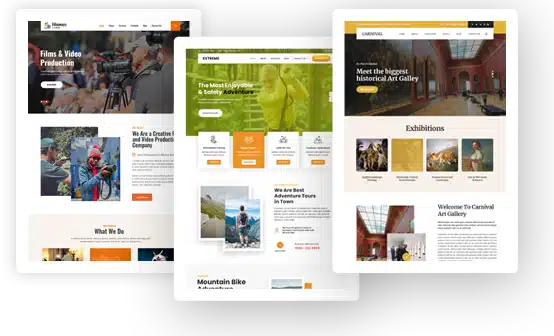
Automotive WordPress Themes


Automotive WordPress Themes for Car Dealers, Repair Shops and Auto Services
Automotive WordPress themes are pre-designed WordPress layouts made for companies that sell, fix, rent or move vehicles. An auto repair shop, a car dealership, a car rental agency, a car wash, a tire shop or a towing company can use one to build a digital showroom without paying for a custom website.
These themes come with service sections, appointment buttons, image sliders, Google Maps integration and WooCommerce support, so car owners can compare your services, book work or buy auto parts from any phone.
First, you will meet the 3 designs in the GraceThemes automotive category, each listed with its price and demo link and followed by a straight review. Then we cover what these themes are, how they differ from car listing plugins, why auto businesses need a website, the benefits of a ready-made design and how to plan your project.
The middle part covers must-have features, inventory and dealer tools, a business-type matching table and practical guides for repair shops, dealerships, rentals, detailing, parts stores, towing and fleet services. After that come customer communication and shop tools, trust signals, essential pages, design, local SEO, site speed, security, analytics, marketing, content ideas and common mistakes.
The final stretch compares free vs premium themes, walks you through choosing and installing a theme, explains our three price plans, points to related themes and answers common questions.
Key Takeaways
- Automotive WordPress themes give garages, dealers, rental firms and transport companies a design that already looks and sounds like the automotive industry.
- Our automotive category holds 3 premium themes at $29 each: AutoCraft PRO, Car Fix PRO and Shifters PRO.
- A theme handles design, pages and booking buttons. Large vehicle inventory, VIN decoder and finance calculator features usually come from a separate car listing plugin.
- Repair shops need tap-to-call buttons, clear service pages, online estimate requests and real customer reviews.
- Local SEO decides who wins “auto repair near me” searches, so keep your NAP details consistent everywhere.
- Every premium theme includes free installation and setup, lifetime support and unlimited domain usage.
Our Automotive WordPress Themes at a Glance
Three premium themes currently sit in our automotive category. Each costs $29 as a single payment and has a live demo. Each name links to the product page, where you can try the demo before you purchase.
| Theme (details and live demo) | Price | Best for | Page builder | Online store | Stand-out detail |
| AutoCraft PRO | $29 | Mechanics, garages, bike repair, spare parts vendors | Elementor | E-commerce with secure payment gateways | Ajax search, Slider Revolution and Swiper support, video backgrounds |
| Car Fix PRO | $29 | Car repair, brake shops, car wash, car rental, parts stores | Drag-and-drop builder plugins | WooCommerce compatible | Multilingual translation enabled, full-screen slider |
| Shifters PRO | $29 | Transport, delivery, freight, moving, warehousing | Drag-and-drop builder | WooCommerce updates in changelog | Header appointment button, three header layouts |
Automotive Theme Reviews
All three designs serve vehicle-based businesses, but each one leans toward a different job. These reviews will help you narrow the choice.
AutoCraft PRO: Built for Mechanics and Repair Shops
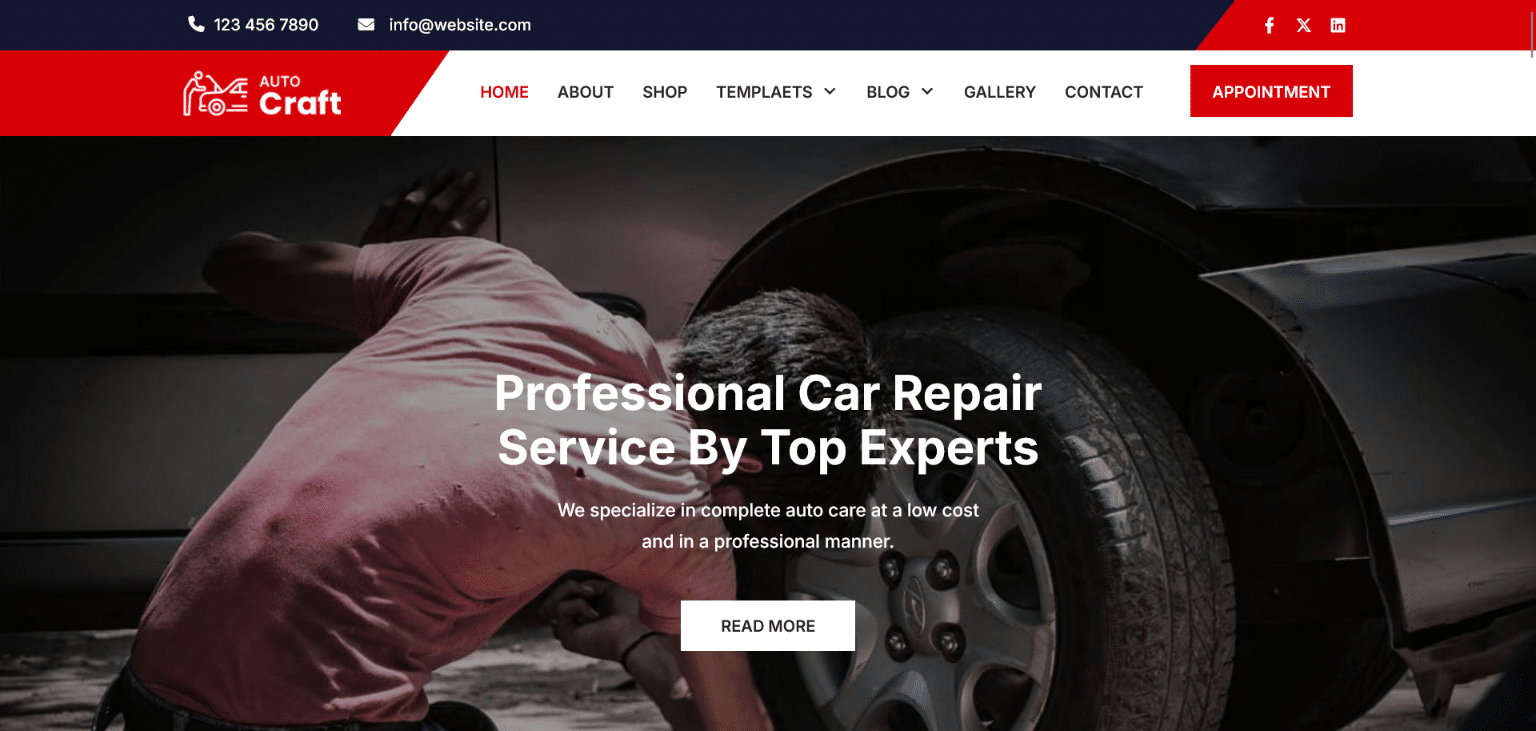
AutoCraft PRO is our auto mechanic WordPress theme for car and bike repair shops. Its product page names mechanics, garage owners, spare parts vendors and repair centers as its audience. It is an Elementor-based theme, which makes editing visual and quick.
The feature list is strong for a modern mechanic website: retina image support, Slider Revolution and Swiper Slider compatibility, Ajax search, lazy loading, parallax and video backgrounds, a responsive design, shortcodes and custom widgets.
The page states that it includes e-commerce capabilities with secure payment gateways, and its latest changelog notes an update for the newest WooCommerce version. It also mentions chat support and appointment scheduling integration, though it does not describe how that scheduling works, so check the demo or ask our team before you rely on it. The page does not mention multilingual plugins.
Car Fix PRO: For Car Repair, Car Wash and Rentals
Car Fix PRO is our car repair WordPress theme. Its description covers car dealers, car rental services and car stores that sell spare parts, and the body text adds car shops, brake shops, car wash providers and car rental businesses. That range makes it the most flexible choice in this category.
It supports drag-and-drop page builder plugins and is WooCommerce compatible, so you can sell items such as spark plugs or wiper blades online. The page says multilingual translation is already enabled, and it supports Contact Form 7. Design features include a full-screen image slider, a sticky header, parallax scrolling, built-in shortcodes for sliders, columns, buttons, toggles, tabs and Google Maps, custom post types, a boxed or full-width layout, unlimited font colors with Google Fonts, and several page, blog and footer layouts. It is described as SEO-friendly and requires WordPress 4.5 or above.
Shifters PRO: For Transport, Fleets and Moving Firms
Shifters PRO is our logistics WordPress theme. Its page lists transportation, delivery, freight, shipping and moving companies, plus truck services, air cargo, movers and packers and warehousing. It suits automotive businesses that move goods or vehicles rather than repair them, such as fleet operators and car transport firms.
The header can show opening times and an appointment button, and the theme offers three header layout variations. Sections cover services, projects, testimonials and team members, with a contact form and Google Maps.
It works with Contact Form 7, WPForms, Gravity Forms, MailChimp and Revolution Slider, and its changelog includes WooCommerce product page fixes. For translation, the product page names qTranslate X, a plugin WordPress.org pulled in August 2021 over security problems. Plan on WPML or Polylang instead, and ask us to confirm they work with your setup.
What Are Automotive WordPress Themes?
A WordPress theme controls the look and structure of every page: the header, navigation, homepage layout, footer, fonts and colors. A multipurpose theme tries to fit every industry. An automotive theme is built for the way vehicle businesses sell.
Automotive WordPress themes ship with demo content that shows engines, tires, service bays, tow trucks and shiny cars rather than generic office scenes. Their sections fit the trade: service listings, pricing tables, technician profiles, testimonials, opening hours, appointment buttons and location maps. Many add WooCommerce support for selling car accessories and auto parts.
Who Uses Automotive Themes
The audience is wide. Common users include:
- Auto repair shops, mechanics, body shops and collision centers.
- Car dealers, independent lots, national franchises, used car lots and motorcycle dealers.
- Car rental agencies, limo services and taxi services.
- Car wash services and auto detailing studios.
- Tire stores, wheel stores and auto parts stores.
- Towing companies and emergency roadside assistance providers.
- Driving schools, EV charging providers, fleet maintenance firms and enterprise fleet operators.
- Moving companies and freight operators that run vehicle fleets.
Automotive Theme vs Car Listing Plugin
This difference matters for dealers. A theme controls how your site looks and which sections it offers. A car listing plugin or inventory management system adds the database features dealers need: vehicle listings, advanced search filters, vehicle detail pages, VIN decoding, finance calculators and bulk CSV import.
None of our three automotive themes describes a built-in vehicle inventory system on its product page. They are strongest for service-based businesses such as garages, car washes, rentals and transport firms.
A dealership can still use one, but anyone planning an online car dealership or a professional car dealer website should add a dedicated listing plugin, often called a vehicle inventory module, and confirm compatibility first. We explain these dealer tools in detail later in this guide.
Why Auto Businesses Need a Website
Drivers rarely pick a garage or a car at random. They search, compare and read reviews first. A clear website turns that research into calls, bookings and visits.
Car Owners Research Before They Visit
When a check engine light comes on or the brakes start squealing, most people reach for their phone. They search “car repair near me,” check hours of operation, look at prices and scan Google reviews. This pre-visit research separates casual browsers from ready-to-buy customers with real buying intent.
Car buyers do the same over weeks of online research, comparing models, prices and dealers before they step onto the lot. A dealer website that supports that online car research brings qualified customers who already know what they want. If your business has no website, or a slow and outdated one, those buyers move on.
Trust and Transparency
Many drivers worry about being overcharged. A website eases that worry with transparent pricing, clear service descriptions, ASE certifications, warranty information and photos of your workshop facilities. Before-and-after pictures of body work or detailing show real results. This service transparency builds customer trust before anyone calls.
Bookings and Sales After Hours
Your phone stops ringing when the shop closes, but your website keeps working. Online appointment scheduling, estimate request forms and an online store collect business after hours. For a busy shop where everyone is under a car all day, these after-hours requests are valuable.
Benefits of Using Automotive WordPress Themes
A ready-made design saves time, money and stress compared with a custom build.
Faster launch. Demo content, page templates and pre-built sections make your website launch quick, so you can go live in days instead of waiting for a multi-month agency build.
Lower cost. At $29, a premium theme costs a fraction of custom design work. WordPress itself is free, so your budget goes to hosting, photos and marketing.
Full control. You can update prices, add services, post seasonal specials and change hours yourself. Your content stays yours, with no lock-in to a closed website builder.
An industry look. With codeless design and plenty of design flexibility, automotive themes use bold layouts, strong headings and high-quality images that suit the trade, giving you a professional appearance from day one.
Room to grow. As you expand, you can add multiple locations, a parts shop, online payments or a listing plugin without rebuilding the site.
Planning Your Automotive Website
Good planning prevents a pretty site that brings no work. Answer these points before you compare automotive WordPress themes, and your theme selection becomes much easier.
Set Clear Goals
Most auto websites have one main job. A garage wants booked estimates and service appointments. A dealer wants test drive requests and finance inquiries. A rental firm wants online reservations. A parts store wants online sales. Name your main goal and set a simple target, such as “40 online bookings per month.”
Know Your Customers
Think about who visits. Busy parents want quick booking and pick-up and drop-off options. Car enthusiasts want specs, photos and technical detail. Fleet managers want reliability, reporting and fleet services. First-time visitors want proof that you are legitimate, such as an address, photos and reviews.
Your customer demographics also shape design. A shop serving commuters should stress fast service and online booking. A specialist classic car restorer should stress craftsmanship and project galleries. A brick and mortar business near a busy road should make directions and parking easy to find.
Budget and Timeline
Plan for a domain name, web hosting, the theme, photos and any plugins, such as a booking or listing plugin. A theme-based site can be live within a week. Leave time to gather photos of your shop, staff and vehicles, since real images matter more than any design choice.
Questions to Answer First
- What is the single most important action a visitor should take?
- Do you need simple appointment forms or a full online booking system?
- Will you sell parts or accessories online?
- Do you need a searchable vehicle inventory?
- Do you serve one location or several?
- Do you offer towing, shuttle service or loaner cars?
- Which page builder do you already know?
- Do your customers speak more than one language?
- Who will update prices, offers and photos?
Must-Have Features in Automotive WordPress Themes
Some features matter far more than others for auto businesses. Focus on these.
Mobile Layout and Tap-to-Call
Many drivers search from the roadside or a parking lot, so mobile users come first. A mobile-friendly design with large, tappable buttons and a tap-to-call button in the header turns that search into a call. Keep forms short so they work with one-thumb navigation.
Appointment Buttons, Forms and Scheduling
There is a big difference between an appointment button, an appointment request form and a full online booking calendar. A button or form collects a request that your team confirms later. A complete booking system shows real-time availability, confirms instantly and sends automated reminders.
Shifters PRO shows an appointment button in the header, and AutoCraft PRO mentions appointment scheduling integration. If you want customers to pick a free slot, pay a deposit or get reminders, you will need a separate scheduling plugin.
Sliders, Galleries and Video
Vehicles sell through visuals. A full-screen slider, image gallery and video section let you show finished repairs, detailed cars or your fleet. AutoCraft PRO supports Slider Revolution, Swiper Slider and video backgrounds, while Car Fix PRO offers a full-screen image slider and parallax scrolling.
Page Builder Compatibility
With drag-and-drop editing, you move blocks around the page visually instead of touching code. AutoCraft PRO is built on Elementor. Car Fix PRO and Shifters PRO support drag-and-drop builder plugins, though their pages do not name specific builders, so check the demo or ask us which builders they work with.
WooCommerce Parts Store
A WooCommerce store lets you sell car accessories, tires, oil, brake pads and gift cards. It handles product pages, shopping cart, payment gateways and stock. Car Fix PRO is WooCommerce compatible, AutoCraft PRO includes e-commerce with secure payment gateways, and Shifters PRO’s changelog shows WooCommerce product page fixes.
Multilingual Support
If your customers speak different languages, translation matters. Car Fix PRO states that multilingual translation is enabled. To publish full versions of your site in other languages, rely on an actively updated tool such as WPML or Polylang, and check with us that it runs well with your chosen design.
Search, Menus and Navigation
Clear website navigation helps drivers find a service in seconds. Use a simple menu with your main services, a top menu for phone and hours, and quick links in the footer.
A sticky header keeps the call and booking buttons visible while visitors scroll. Larger parts stores benefit from live search and search filters, while a mega menu can organize hundreds of product categories. AutoCraft PRO lists Ajax search, and Car Fix PRO offers a sticky header.
SEO, Speed and Support
Look for SEO-friendly code, lazy loading, retina-ready images and good page load times. Every theme here includes free lifetime support and theme updates, documentation, a support forum and free installation and setup.
Inventory, Listings and Dealer Tools
Dealers have needs that go beyond a service business. Knowing which features come from a theme and which come from a plugin saves money and frustration.
What Dealers Need
A dealership website usually needs:
- A searchable vehicle inventory with list and grid views.
- Car search filters for make and model, fuel type, year and body type, plus a mileage filter, price filter, doors filter and color filter.
- Vehicle detail pages with vehicle photos, car specs, vehicle condition and MPG details.
- A finance calculator or loan calculator that shows loan terms and monthly payment estimates.
- Test drive request, trade-in appraisal and make an offer forms.
- A car comparison page with side-by-side specs and saved favorites for shoppers who are still deciding.
- Vehicle data import through CSV upload or XML upload, which allows automatic data entry, plus inventory sync with your dealer system.
- Featured and sold labels to manage the lot.
Where These Features Come From
These are dealership functionality features, and they usually come from a car listing plugin or a dealer platform rather than the theme. Our automotive themes provide the design, service pages, sliders, forms and store support around them. If you run a large lot, choose the theme for its look and service pages, then test your preferred listing plugin with it before launch.
Make Inventory Pages Work for Search
Inventory pages can be a dealer’s biggest content asset or its biggest SEO problem. Thousands of near-identical pages with copy-paste descriptions create duplicate content and weak rankings. Treat inventory as content asset instead:
- Write people-first descriptions that mention real features buyers care about, such as a panoramic sunroof, a spacious trunk or a layout that suits large families.
- Use a clean URL structure with year make model in the slug and a canonical URL on filtered result pages.
- Add vehicle schema markup with condition, availability, price and mileage.
- When a car sells, keep the page live with a “sold” note and similar inventory, or use a redirect, instead of a 404 error.
- Compress listing photos at scale so a 30-image gallery still loads fast.
Some platforms now offer AI-generated descriptions to produce unique content per vehicle. Always review them for accuracy, since a wrong spec can cost a sale or create a dispute.
Classifieds and Marketplaces
Some sites let private sellers or several dealers post cars, much like a classifieds website. These need front-end submissions, user accounts, paid listings, seller ratings and moderation. This is a specialist build that relies on a multi-vendor plugin or listing platform, so plan it carefully and confirm compatibility before you commit.
A full vehicle marketplace usually needs user registration, user profile pages, listing submission forms for user-submitted car listings, dealer reviews, paid listing upgrades with multiple pricing tiers and online payment collection. Each feature adds listing monetization options but also more moderation work, so start small and grow.
Matching a Theme to Your Automotive Business
This table gives a quick starting point. You will also find our pick for every business type at the end of its guide below.
| Business type | Main website goal | Suggested themes |
| Auto repair shop or mechanic | Book estimates and repairs | AutoCraft PRO, Car Fix PRO |
| Brake, tire or body shop | Show services and take bookings | Car Fix PRO, AutoCraft PRO |
| Car wash or detailing | Show results and sell packages | Car Fix PRO |
| Car rental agency | Show the fleet and take reservations | Car Fix PRO |
| Car dealer | Show stock and capture leads | Car Fix PRO plus a listing plugin |
| Auto parts store | Sell parts online | AutoCraft PRO, Car Fix PRO |
| Towing, transport or moving | Show services and take requests | Shifters PRO |
Website Guides by Business Type
Each auto business needs different content. These guides cover what to put on your site.
Auto Repair Shops and Mechanics
A repair shop website must answer three questions fast: what you fix, how much it costs and how to book. Good auto repair web design puts this repair service information on every service page, which helps you turn searches into estimates.
Create separate service pages for brake repair, oil change, engine diagnostics, transmission repairs, A/C repair, suspension repair, battery replacement and tire rotation. Each page should explain symptoms, the fix, typical time and a price range or estimate button.
Add ASE certifications, years in business, warranty terms and photos of your diagnostic equipment. Offer pick-up and drop-off, shuttle service or loaner cars if you can, and say so clearly. A digital vehicle inspection report with photos, explained in the tools section below, also builds trust and leads to more approved repairs.
Some shops add extra pages for logbook servicing, EFI diagnostics, fleet services and major repairs such as engine services. If you handle warranty claims or work with third-party coverage, explain the process in plain words. A short diagnostic form where drivers describe the noise, warning light or problem saves time at the counter and helps your technician prepare.
Best theme fit: AutoCraft PRO was built for mechanics and repair centers, and Car Fix PRO covers car shops and brake shops.
Car Dealerships
A dealership website is a virtual showroom. Its most important pages are the search results page (SRP) and the vehicle detail page (VDP). Each VDP should carry 20+ photos per vehicle where possible, a unique description instead of copied manufacturer copy, clear pricing, financing options and a test drive booking button.
Dealers also need pages for new cars, used cars, certified pre-owned stock, trade-in value, financing, the service department and parts. Use SEO-friendly URLs and follow the inventory SEO tips in the dealer tools section above, so every sold vehicle page still helps rather than hurts.
Give buyers several easy ways to reach you. Lead forms on every vehicle page, dealer inquiry forms, finance inquiries, purchase budget requests and downloadable PDF brochures all capture interest at different stages of the buying journey. Not every buyer fills in a form, so keep the phone number, showroom hours and directions visible for walk-ins too.
Best theme fit: Car Fix PRO lists car dealers among its users. Pair it with a dedicated listing plugin for inventory, filters and calculators.
Car Rental Agencies
A car rental website must show the fleet, prices and availability clearly. Group cars into vehicle categories such as economy cars, SUVs and luxury cars. List rental prices, rental duration options, pickup location and drop-off location details, and rental extras like child seats or GPS.
A reservation system with an availability calendar and a short booking flow turns browsers into bookings. Many renters book on their phones, so mobile booking must be quick and simple on vehicle hire websites. If you serve one town, highlight local pickup. If you run a nationwide fleet, add search by location.
Watch for booking abandonment. Long forms, hidden fees and unclear insurance terms make renters quit halfway. Show total prices early, keep the reservation process to a few steps and offer one-click reservations for returning customers. Let visitors search by category, search by price and search by availability so they find the right car fast.
Best theme fit: Car Fix PRO names car rental businesses among its users. Add a rental booking plugin for live availability.
Car Wash and Detailing
Car wash and detailing services sell visible results. Use before-and-after pictures, short videos and clear package deals with prices. Offer memberships or monthly plans if you run them, and show opening hours, wait times and location prominently. Mobile detailing services should list their service area.
Best theme fit: Car Fix PRO lists car wash providers among its users and offers galleries and parallax sections.
Tire Shops and Auto Parts Stores
A tire shop or auto parts store needs strong product pages. Organize stock by vehicle, part type and brand, and add a search bar with filters. Show fitting prices for tires and offer online ordering with in-store pickup. Clear warranty information and return terms reduce questions.
Best theme fit: AutoCraft PRO names spare parts vendors and includes e-commerce. Car Fix PRO is WooCommerce compatible for car stores with spare parts.
Towing and Roadside Assistance
Towing and emergency roadside assistance businesses depend on speed. Put a large emergency hotline number at the top of every page, and keep a roadside assistance request form short. List your service area, hours (especially 24-hour cover) and the services you offer, such as jump starts, lockouts and flat tire repair.
Best theme fit: Shifters PRO suits transport and fleet services, with an appointment button and opening times in the header. Car Fix PRO is another option for local recovery firms.
Moving, Transport and Fleet Services
Car transport, moving companies and fleet maintenance providers serve both consumers and businesses. Explain routes, vehicle types, insurance and how quotes work. A request-a-quote form, case studies and client logos help win business contracts.
Best theme fit: Shifters PRO lists transportation, freight, moving and warehousing businesses.
Specialty Shops
Diesel repair shops, RV repair shops, motorcycle workshops, EV service centers and classic car restorers attract owners who search for specialists. Explain exactly which vehicles you work on, show relevant equipment and share project galleries. Specialist content, such as hybrid vehicles care or diesel specialists advice, helps you stand out.
Best theme fit: AutoCraft PRO covers car and bike repair, which suits motorcycle and specialist workshops.
Customer Communication and Shop Tools
Your website is the digital front door, but the tools behind it decide how smoothly a job runs. Many repair shops connect their site to a shop management system or estimate software. These tools are separate from your theme, yet they shape what you put on your pages.
Two-way texting. Customers increasingly prefer text over phone calls. Two-way texting cuts phone tag and speeds up approvals.
Digital inspections and approvals. A digital vehicle inspection sends photos and notes to the customer, who gives digital approvals for recommended work. Clear photos lead to higher approvals and fewer customer disputes.
Automated reminders and follow-ups. Automated reminders for oil changes and inspections, and automated follow-ups after a repair, bring customers back on schedule and invite reviews.
Flexible payments. Text-to-pay, card payments and buy now pay later options make large repairs easier to approve. If you offer financing for customers, say so on your service and pricing pages.
CRM integration. A CRM integration keeps customer history, vehicles and job history in one place, so your team can give maintenance recommendations at the right time.
When you choose automotive WordPress themes, look for clean forms, clear buttons and room for embedded widgets, so these tools fit neatly into your pages.
Trust Signals for Auto Businesses
Trust is the deciding factor for most drivers, and car owner trust grows from proof, not promises. Add these trust signals and trust-building reviews across your site to strengthen your brand credibility:
- Real customer reviews and video testimonials with names and vehicles.
- Certifications, such as ASE, and state registration details.
- Warranty information, for example parts and labor coverage terms.
- Years of experience and your shop story, especially for a family-owned business.
- Your identity, whether you are a third-generation family business, a veteran-owned shop or a modern tech-forward garage.
- Staff photos and team profiles with roles and specialties.
- Clear pricing or price ranges, and written estimates before work begins.
- Photos of workshop facilities, clean bays and modern equipment.
These details give first-time visitors the confidence to book and turn one-time customers into repeat customers.
Pages Every Automotive Website Needs
A focused structure helps visitors reach key information in a few taps. Most automotive WordPress themes include templates for the pages below, so you only need to fill them in.
Homepage. Use a strong hero video or slider, a clear headline, your main service and a bold call to action, such as “Book a Service” or “Get a Free Estimate.” Show reviews, certifications and your phone number above the fold.
Services. Create a main service menu and separate pages for major services. Detailed service-level pages rank better and answer more questions.
About us page. Share your history, values and team. Mention years in business, ownership and community involvement.
Gallery. Show customer vehicles, completed jobs, your shop and your fleet.
Shop. If you sell parts or accessories, keep the shop simple, fast and searchable.
Specials. List seasonal specials, first-time customer specials, coupons and promo codes.
Contact. Include your physical address, phone number, email, working hours, an embedded map, clear map and directions and a short contact form.
FAQ. Answer questions on pricing, warranties, wait times, payment methods and financing for customers.
Design for Automotive Websites
Design shapes how drivers judge your quality. Keep it clean, bold and easy to use.
Choose a Style That Fits Your Brand
Repair shops often use bold reds, oranges or yellows with dark grays for an energetic, workshop feel. Dealers and detailers often prefer black, white and silver for a premium design. Rental and transport firms usually suit blues and greens that suggest reliability. Whatever color schemes you choose, keep one accent color for clickable buttons so every CTA button stands out and your homepage design guides the eye.
Use Real, High-Quality Photos
High-quality photos of your own shop, staff and vehicles beat stock images. Shoot cars from several car angles, show clean service bays and include people at work. Compress images before upload to protect speed.
Keep Layouts Clean
Avoid a cluttered website with flashing banners and too many offers. A clean layout, a simple menu, readable fonts and plenty of white space make your site feel organized, which is exactly how you want customers to think about your shop.
Balance Looks and Function
A flashy design with autoplay music or heavy animation may look exciting, but it slows pages and distracts from essential functionality. A minimalist aesthetic with a short video homepage clip, a color palette of two or three colors and clear buttons usually converts better. Rental and transport firms may prefer a soothing color scheme that signals calm reliability.
SEO for Automotive Businesses
Search engines are one of the main ways new customers find auto businesses. These basics make a big difference.
Local SEO
Claim and complete your Google Business Profile, add photos and post updates. Keep your NAP (name, address and phone number) identical on your site, map listings and online directories. Fresh reviews also feed your local ranking, and we cover how to earn them in the marketing section.
Strong local signals help you appear in the map pack for “brake service near me” and similar searches. If you serve several towns, create service area pages with genuinely local content.
Build local citations on trusted auto directories and review sites, and keep every business citation accurate. This NAP consistency across local listings is one of the clearest location signals you can send. Near me searches reward businesses that search engines trust to be nearby and open.
Use location modifiers in your content, such as “automotive repair in [city]” or “auto diagnostics in [zip code],” so you match the way people search. For neighborhood targeting, mention landmarks, nearby cities and the local lingo your customers use. Coverage in local newspapers and community sites adds valuable local links. Some drivers now ask full questions by voice, so short, direct answers to natural language queries help with voice search too.
On-Page SEO
Give every page a unique meta title (your title tag) and meta description that match search intent and use location-based keywords, such as “auto repair in [city].” These geographic modifiers tell search engines exactly where you work. Use one H1 heading per page, a logical heading hierarchy, descriptive URL slugs and image alt text on every photo. When you link pages together, use descriptive anchor text. Add internal linking between related services, such as brake repair and tire rotation.
Start with keyword research based on real customer language, not industry jargon. Drivers search for “squealing brakes,” not “brake pad wear indicator.” Mix your main terms with long-tail keywords and natural keyword variations, and avoid keyword stuffing, which makes pages harder to read and can hurt rankings.
Technical SEO and Schema
Submit a sitemap, fix broken links and keep pages fast. Run a simple SEO audit every few months. Check Google Search Console for crawl issues, orphaned pages and pages that are not indexed.
Use schema markup for your business, services, reviews and FAQs, so search engines receive structured information instead of guessing. Dealers can add Vehicle Schema to vehicle pages to help search engines understand make, model, mileage and price. Structured data can help pages earn rich results with star ratings.
Helpful Content
Write about the questions drivers ask: maintenance tips, tire care, battery maintenance, fuel efficiency, what a check engine light means and when to replace brake pads. Helpful posts attract organic traffic and show your expertise. Clear, direct answers also help your content appear in AI-generated answers and voice search results.
Speed, Security and Maintenance
Fast, secure sites keep customers and protect your data.
Speed. A fast-loading website starts with good web hosting, image compression, lazy loading and no heavy scripts. Better loading speed keeps impatient drivers on the page. Test on a phone, since most urgent searches happen on mobile.
Security. Install an SSL certificate, apply software updates to WordPress, your theme and plugins promptly, use strong passwords and take regular backups. Use secure forms for estimates and payments.
Maintenance. Review your site each month. Update prices, remove expired offers, fix broken links and add fresh photos. A stale site suggests a closed business.
Measuring Your Website’s Success
Install analytics tools and track what matters. Watch calls from the website, form submissions, bookings and online orders. Use conversion tracking to see which pages and ads bring results.
Check bounce rates on key pages. A high rate on a service page often means missing prices, weak photos or no clear button. Review website traffic and conversion rate monthly and improve one page at a time. These data-driven decisions beat guesswork.
Useful engagement metrics include time on page, form submission rates and clicks on your phone number. Tag call buttons and forms with Google Tag Manager so you can measure them in Google Analytics. For ads, compare ad performance by campaign so your budget goes to the channels that bring real work.
Marketing Your Automotive Website
A good site works best with steady promotion.
Email Newsletters and SMS Offers
Service reminders are covered in the shop tools section above. For marketing, send a short newsletter with seasonal advice, new services and limited-time offers, and use SMS messaging sparingly for time-sensitive deals, such as a weekend tire sale. Keep each message useful, so customers stay subscribed.
Social Media and Video
Post short videos of repairs, detailing transformations or new stock on Instagram, Facebook and YouTube. An engaging video of a tricky repair shows skill better than any sales copy. Link each post to a booking, estimate or inventory page. Consistent social media marketing builds familiarity, while targeted ads reach drivers in your area who have never heard of you.
Reviews and Reputation
Review management is marketing. Encourage reviews after every job, respond promptly and politely to criticism, and fix problems quickly. Good online reputation turns searches into calls.
Paid Ads and Community
Google Ads and social media advertising can promote seasonal specials or new services. Local car shows, community events, traditional advertising and local partnerships with nearby businesses build awareness offline. Always point people back to your website.
Track paid campaigns carefully. Watch cost-per-lead and return on investment for each pay-per-click campaign, and use A/B testing on landing pages to see which headline or offer works best. A short seasonal campaign, such as a winter tire check, often performs better than a year-round generic ad.
Offline marketing still matters for local businesses. Put your website URL on business cards, brochures, flyers and invoices, and bring a QR code to your booth at car shows or trade shows. Word-of-mouth referrals grow faster when happy customers can easily share your site.
Content Ideas for Automotive Websites
Content freshness signals an active business, and educational content answers questions before customers call. Try these ideas:
- Winter preparation and summer road-trip checklists.
- Guides to common vehicle problems and warning signs.
- Before-and-after repair stories with photos.
- How-to guides for simple tasks, such as checking tire pressure.
- Explanations of mechanic jargon in plain language.
- Car maintenance tips and maintenance advice by season or mileage for your auto repair blog.
- Repair videos and educational videos that show common jobs.
- Infographics on service intervals and DIY tips for safe home checks.
- Q&A articles that answer one customer question in depth.
- Staff spotlights and shop news.
- New arrivals, clearance events, end-of-year clearance sales, financing tips and seasonal sales for dealers.
Common Mistakes to Avoid
These errors cost auto businesses calls and bookings.
Hidden phone numbers. Drivers in trouble need to call fast. Put your number in the header.
No prices at all. Fully hidden pricing creates doubt. Show prices or ranges where you can.
Slow pages. Large images and heavy sliders slow mobile pages. Optimize them.
Copied descriptions. Dealers who paste OEM copy create duplicate content. Write unique descriptions for each vehicle.
Outdated offers. Expired coupons and sold cars hurt trust. Update weekly.
Weak mobile design. Test booking forms, menus and checkout on a phone before launch.
Even the best automotive WordPress themes need regular care to avoid these problems.
Free vs Premium Automotive WordPress Themes
Free themes can work for a basic one-page site. Premium themes offer more layouts, features and help.
| Factor | Free WordPress themes | Our premium automotive themes |
| Cost | $0 | $29 one-time per theme |
| Automotive demo content | Rare | Built for repair, rental and transport businesses |
| Appointment features | Usually none | Appointment button or scheduling integration in selected themes |
| Store support | Varies | WooCommerce or e-commerce support |
| Customization | Basic | Theme options, sliders, shortcodes and layouts |
| Setup help | Usually none | Free installation and setup |
| Support and updates | Community forums | Free lifetime support and theme updates |
A hobby car blog may start with a free theme. A shop, dealer or rental business that depends on bookings and leads gets better value from a premium design with support.
How to Choose Among Automotive WordPress Themes
Follow these steps to pick the right design.
- Name your main job. Repairs, rentals, sales or transport each point to a different theme.
- Check the matching table. Shortlist one or two themes for your business type.
- Test each theme demo on a phone. Look for a visible phone number, clear service sections and a fast load. A side-by-side theme comparison on your own device reveals more than any feature list.
- Confirm your builder. Choose Elementor-based AutoCraft PRO if you already use Elementor.
- List your plugins. Write down any listing, booking or translation plugin you rely on, and send that list to our team so we can check it against your chosen theme.
- Plan for expansion. A second location, a parts counter or a fleet contract should fit without a redesign, so favor themes with flexible layouts.
Installing and Setting Up Your Theme
Getting your automotive site live is straightforward.
- Purchase the theme and download its ZIP file.
- In your WordPress dashboard, open Appearance, then Themes, and choose Add New to begin the theme installation.
- Upload the ZIP file, install it and complete theme activation.
- Install the plugins the theme recommends, such as Elementor or WooCommerce.
- Import the XML demo content so your site looks like the demo.
- Upload your logo and pick your brand colors, typefaces and menu links.
- Swap the sample content for your own service list, prices, shop photos and staff.
- Add your booking, estimate, contact and shop settings.
- Test every page on a phone and a computer, then publish.
Prefer to skip the setup? Our team includes free installation and setup with every premium theme. Contact us through email, chat or the support forum.
Pricing and Licensing
Choose the plan that fits the number of sites you run.
| Plan | Price | What you get |
| Single theme | $29 one-time | One theme, lifetime updates and support, free installation |
| All Theme Package | $79 per year | All 100+ premium themes for one year, one year of updates, lifetime support |
| Lifetime Package | $99 one-time | All 100+ premium themes, lifetime updates and support |
A single garage or rental firm usually needs just one theme. A group that runs a repair shop, a parts store and a transport arm can save with a package. The $79 plan includes updates for one year, while the $99 Lifetime Package keeps updates coming permanently, which makes it the better value if you plan to keep several sites running. No matter which plan you choose, you can use it on unlimited sites, reach us by live chat and get the theme installed for free.
Explore Related Categories
Many vehicle businesses also touch logistics, insurance, finance or retail. These designs from other categories may suit a second site or a sister brand.
| Related area | Theme | Link |
| Shipment tracking | SmartTrack PRO | https://gracethemes.com/themes/shipment-tracking-wordpress-theme/ |
| Insurance | Insurer PRO | https://gracethemes.com/themes/insurance-company-wordpress-theme/ |
| Finance and loans | Online Consulting PRO | https://gracethemes.com/themes/finance-wordpress-theme/ |
| Industrial | Indostic PRO | https://gracethemes.com/themes/industrial-wordpress-theme/ |
| Electronics store | Electro Mart PRO | https://gracethemes.com/themes/electronics-store-wordpress-theme/ |
Frequently Asked Questions
What are automotive WordPress themes?
They are website designs for car repair shops, dealers, rental agencies, car washes, parts stores and transport companies. They include automotive layouts, service sections, galleries and store or booking features.
Which theme is best for an auto repair shop?
AutoCraft PRO was built for mechanics, garage owners and repair centers, and it is based on Elementor. Car Fix PRO is a strong alternative that also covers brake shops, car washes and rentals.
Can I list cars for sale with these themes?
Yes, but to run a full car listing website you will need a dedicated car listing plugin for inventory, filters and calculators. None of our automotive themes describes a built-in vehicle inventory system, so confirm plugin compatibility with our team first.
Can customers book appointments online?
Shifters PRO includes an appointment button in the header, and AutoCraft PRO mentions appointment scheduling integration. For a live calendar with reminders, add a booking plugin.
Can I sell auto parts online?
Yes. Car Fix PRO is WooCommerce compatible, and AutoCraft PRO includes e-commerce with secure payment gateways.
Are these themes multilingual?
Car Fix PRO states that multilingual translation is enabled. Shifters PRO names qTranslate X, which has been discontinued, so go with WPML or Polylang for that theme. AutoCraft PRO does not mention multilingual plugins.
How much do automotive WordPress themes cost at GraceThemes?
A single automotive theme is 79) or the Lifetime Package ($99, paid once, updates forever).
Do I need coding skills?
No. Most changes happen through drag-and-drop blocks and simple settings panels, and if you would rather not touch anything, we set the theme up for free.
Final Thoughts
Drivers judge an auto business long before they see the shop or the lot. A clear, fast and honest website wins that first impression. Our automotive WordPress themes give garages, car washes, rental firms and transport companies a strong starting point, with automotive layouts, sliders, store support and booking buttons ready to customize.
Choose the theme that matches your main job, test its demo on your phone and fill it with real photos, fair prices and genuine reviews. Add the right plugins for listings or bookings if you need them, keep your offers current and your site will keep bringing cars through your door.
