

What Is an IP Address? How Does It Work?
Imagine sending a letter to a friend who lives on the other side of the world. You write their name, add the street address, and trust the postal service to carry your message to the right doorstep.
The internet works in a surprisingly similar way, except the letters are digital, the roads are invisible, and the delivery often happens in the blink of an eye.
Every time you open a website, stream a movie, send a message, or check your email, your device participates in a vast network of digital conversations.
Behind many of those conversations sits a small but essential piece of information called an IP address. You may never see it while scrolling through social media, but without it, internet communication would become a very confusing affair.
So, what is an IP address, and how does it work? Is it the same as your device’s identity? Can someone find your location through it? And why do some addresses begin with 192.168 while others look like long strings of letters and numbers?
Let’s unpack these questions in plain English, with practical examples that make even the technical bits easier to understand.
What Is an IP Address? Understanding the Basics
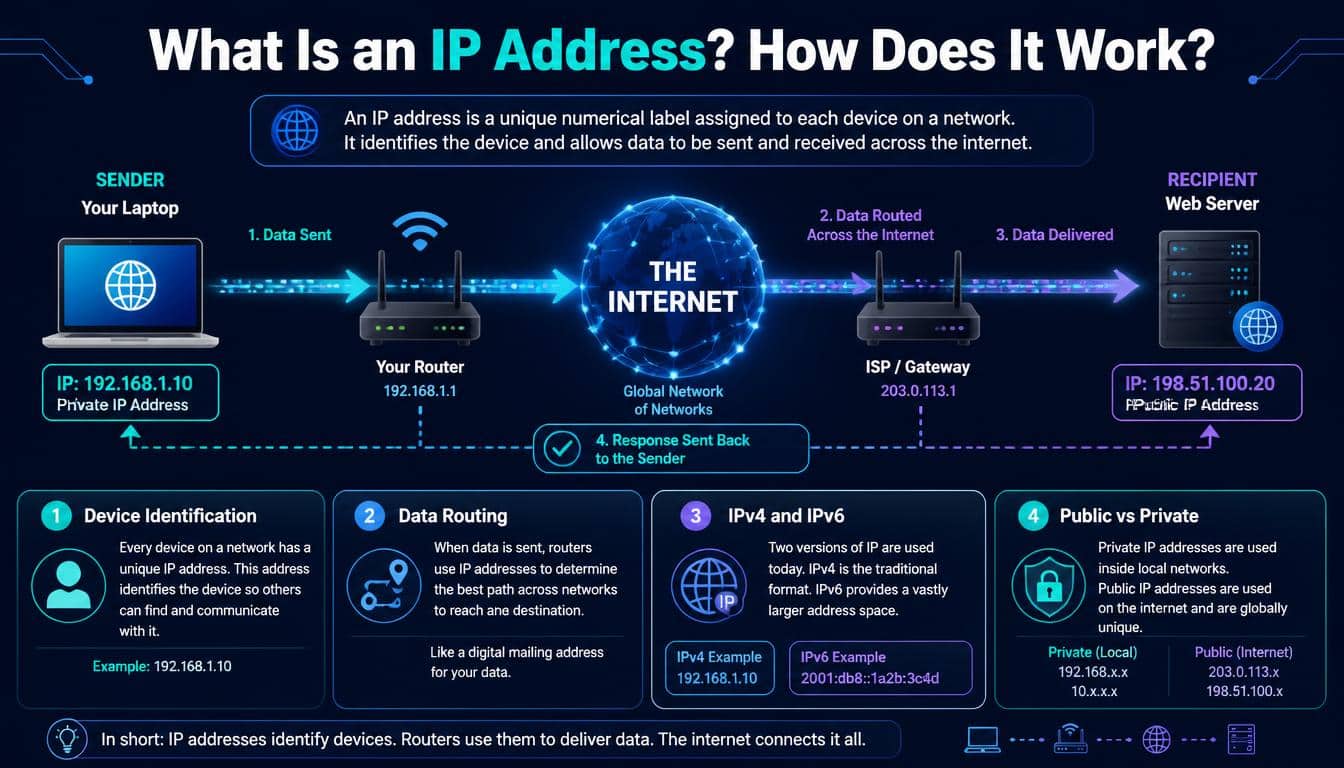
An IP address, short for Internet Protocol address, is a numerical address assigned to a network interface so that devices can send and receive data across an IP network. Think of it as the destination information written on a digital parcel. It helps network equipment determine where a packet should go.
Your laptop, smartphone, smart television, and other connected devices rely on IP networking to communicate. A device may use a private address inside your home network and share a public-facing address with other devices when communicating over the internet.
An IP address isn’t necessarily a permanent identity for a particular device. It can change when you reconnect to a network, restart your router, or move between Wi-Fi and mobile data. Some addresses stay fixed, while others are assigned temporarily.
For example, an IPv4 address might look like 192.168.1.25. Another might look like 8.8.8.8. Both are valid-looking IPv4 addresses, but they serve different purposes depending on their network configuration and assignment.
The important thing to remember is that an IP address helps identify a network interface’s location within an IP network. It does not, by itself, reveal someone’s name, exact home address, or complete online identity.
How Does an IP Address Work?
The easiest way to understand how IP addresses work is to follow a simple everyday activity: opening a website.
You type a website’s name into your browser, press Enter, and a page appears. It feels almost magical, honestly, but several technical steps happen behind the scenes.
- Your device connects to a network. Your phone or computer uses Wi-Fi, Ethernet, or a mobile connection to reach the internet.
- The website’s name is translated. The Domain Name System (DNS) helps find an IP address associated with the requested domain name.
- Your device prepares data packets. Information is divided into manageable units, with network information that helps guide each packet toward its destination.
- Routers forward the packets. Network devices examine destination addresses and forward packets toward the appropriate next hop.
- The destination responds. The server processes the request and sends data back through the network.
- Your browser displays the result. It assembles the received information and presents the webpage you wanted to see.
This process usually happens so quickly that you don’t notice any of it. Even a website hosted thousands of miles away can respond in a fraction of a second, depending on the connection and server conditions.
The process is governed by Internet Protocol (IP), which provides addressing and packet-forwarding rules. Other protocols, including TCP, help manage communication when reliable, ordered delivery is needed. Together, these technologies form part of the Transmission Control Protocol/Internet Protocol (TCP/IP) networking suite.
One small but important detail: IP doesn’t promise that every packet will arrive successfully or follow the same route. Higher-level protocols and applications handle other communication requirements.
What Are the Different Types of IP Addresses?
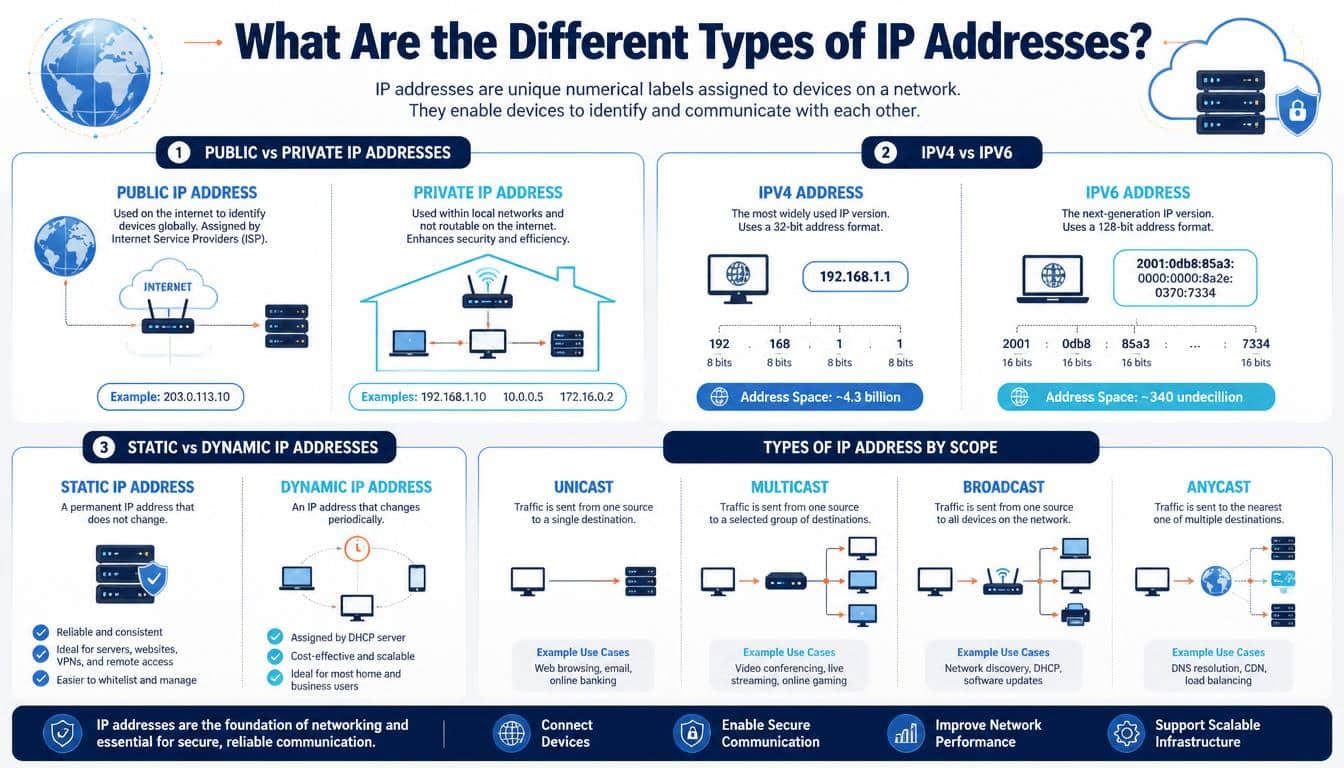
Not every IP address performs the same role. Some are visible to the wider internet, others work only within local networks, and some are designed for particular networking functions.
Understanding the types of IP addresses helps you make sense of your router settings, internet connection, and online privacy.
Public IP Address
A public IP address is globally routable and used for communication across the public internet. Your internet service provider (ISP) typically assigns a public address to your connection, although some providers use carrier-grade network address translation, meaning multiple customers may share a public IPv4 address.
When you visit an online store or watch a video, the service generally sees the public-facing address from which your connection arrives. If your router performs Network Address Translation, the service may see the router’s public address rather than the private addresses of individual devices.
Public addresses must be coordinated to prevent conflicting global assignments. They are an essential part of how internet traffic finds its way between networks.
Private IP Address
A private IP address is used within a private network, such as your home, school, or office. These addresses are not directly routable across the public internet.
Common examples include:
- 168.1.10
- 168.0.25
- 0.0.15
IPv4 private addresses fall within three reserved ranges:
- 0.0.0 to 10.255.255.255
- 16.0.0 to 172.31.255.255
- 168.0.0 to 192.168.255.255
Your home router might assign your laptop 192.168.1.10 and your phone 192.168.1.11. Both devices can access the internet through the router without needing separate public IPv4 addresses.
Private addresses can be reused across countless unrelated networks. Your neighbor’s laptop and yours could both use 192.168.1.10, and there would be no conflict as long as the devices are on separate networks.
Static IP Address
A static IP address is configured to remain the same until someone changes the configuration or the network provider changes the arrangement.
Businesses often use static addresses for servers, remote-access systems, security equipment, and services that need a predictable destination. A company hosting its own website, for instance, benefits from having an address that does not change unexpectedly.
Static addresses are also useful when configuring certain firewall rules or remote connections. However, a static address isn’t automatically safer or more dangerous than a dynamic one. Security depends on how the network and services are managed.
Dynamic IP Address
A dynamic IP address is assigned automatically and may change over time. Home internet connections commonly use dynamic public addresses, while routers often assign dynamic private addresses to devices inside the home.
A protocol called Dynamic Host Configuration Protocol (DHCP) makes this process easier. A DHCP server can provide a device with an IP address, subnet mask, default gateway, DNS server information, and a lease duration.
Imagine a busy hotel assigning room numbers to guests. When one guest checks out, the room can eventually be assigned to someone else. DHCP works a little like that, though its address leases follow specific networking rules rather than hotel policies.
Dynamic addressing reduces the need to configure every device manually and helps networks manage their available address pools efficiently.
What Is IPv4? The Familiar Address Format
Internet Protocol version 4 (IPv4) is the older and still widely used version of IP. It uses a 32-bit IP address, usually written as four decimal numbers separated by dots.
For example:
192.168.1.25
Each number represents eight bits, or one byte, and ranges from 0 to 255. Together, the four groups create the familiar IPv4 address format, also known as dotted-decimal notation.
Computers ultimately process these values using binary numbering, which consists of zeros and ones. An IPv4 address contains 32 binary digits even though we usually write it using four much shorter decimal groups.
With 32 bits, IPv4 provides 2³² possible bit patterns, or approximately 4.3 billion addresses. That sounded like a huge number when the internet was much smaller. Today, however, the number of connected devices and services makes the available public IPv4 address pool insufficient for universal one-to-one public addressing.
Several techniques help stretch the available space, including private addressing, Network Address Translation, and careful address allocation. Still, IPv4 address exhaustion was one of the main reasons the internet community developed a newer version.
IPv4 Address Classes and Special Addresses
You may come across terms such as Class A, Class B, and Class C when studying networking. These are part of the older classful IPv4 addressing system, which divided addresses into broad groups based on their leading bits.
Modern networks generally use Classless Inter-Domain Routing (CIDR) instead, allowing network prefixes of different lengths. Even so, historical classes sometimes appear in textbooks and older configuration guides.
Some special IPv4 addresses are worth recognizing:
- 0.0.1 is the familiar loopback address, which lets a device communicate with its own networking software.
- 0.0.0 can represent an unspecified address and has special meanings in different networking contexts.
- 255.255.255 is the limited broadcast address used to reach devices on the local network segment.
- 254.0.0/16 is the IPv4 link-local range, commonly used when a device cannot obtain an address through normal configuration.
These examples are not interchangeable with ordinary public addresses. Their meanings depend on the networking context, which is why a little technical knowledge can save a lot of troubleshooting time.
What Is IPv6? Why the Internet Needed More Addresses
Internet Protocol version 6 (IPv6) was developed partly to address the limited supply of IPv4 addresses. It uses 128-bit addressing, giving it an enormous address space.
An IPv6 address might look like this:
2001:4860:4860::8888
Unlike IPv4, IPv6 uses hexadecimal notation and separates groups with colons. A complete address contains eight groups of four hexadecimal digits, although certain groups of zeros can be shortened according to standard formatting rules.
That long address format can look intimidating at first. Once you become familiar with the colons and shortened zeros, though, it becomes much less mysterious.
IPv6 supports an address space of 2¹²⁸ possible bit patterns, which is vastly larger than IPv4’s address space. This makes it possible to allocate addresses generously across networks and connected devices.
IPv6 also introduces improvements in areas such as address autoconfiguration and network-layer functionality. It does not, however, automatically make every connection secure. Encryption, authentication, firewalls, and good security practices are still necessary.
IPv4 vs. IPv6: What’s the Difference?
The distinction between IPv4 vs. IPv6 comes down to more than the way an address looks.
- Address length: IPv4 uses 32 bits; IPv6 uses 128 bits.
- Notation: IPv4 uses dotted-decimal notation; IPv6 uses colon-separated hexadecimal groups.
- Address capacity: IPv4 has roughly 4.3 billion possible addresses, while IPv6 has an enormously larger address space.
- Broadcasting: IPv4 supports broadcast addressing; IPv6 uses multicast and other mechanisms instead of broadcast.
- Configuration: Both support automatic configuration, but IPv6 has additional mechanisms, including Stateless Address Autoconfiguration (SLAAC).
- Compatibility: IPv4 and IPv6 are separate protocols and are not directly interchangeable. Networks often use dual-stack configurations or other transition techniques to support both.
The move to IPv6 is gradual. Many networks still rely heavily on IPv4, and devices may support both protocols at once. You don’t need to choose one manually every time you connect to the internet; your device and network handle much of this complexity.
Public vs. Private IP Addresses: What’s the Real Difference?
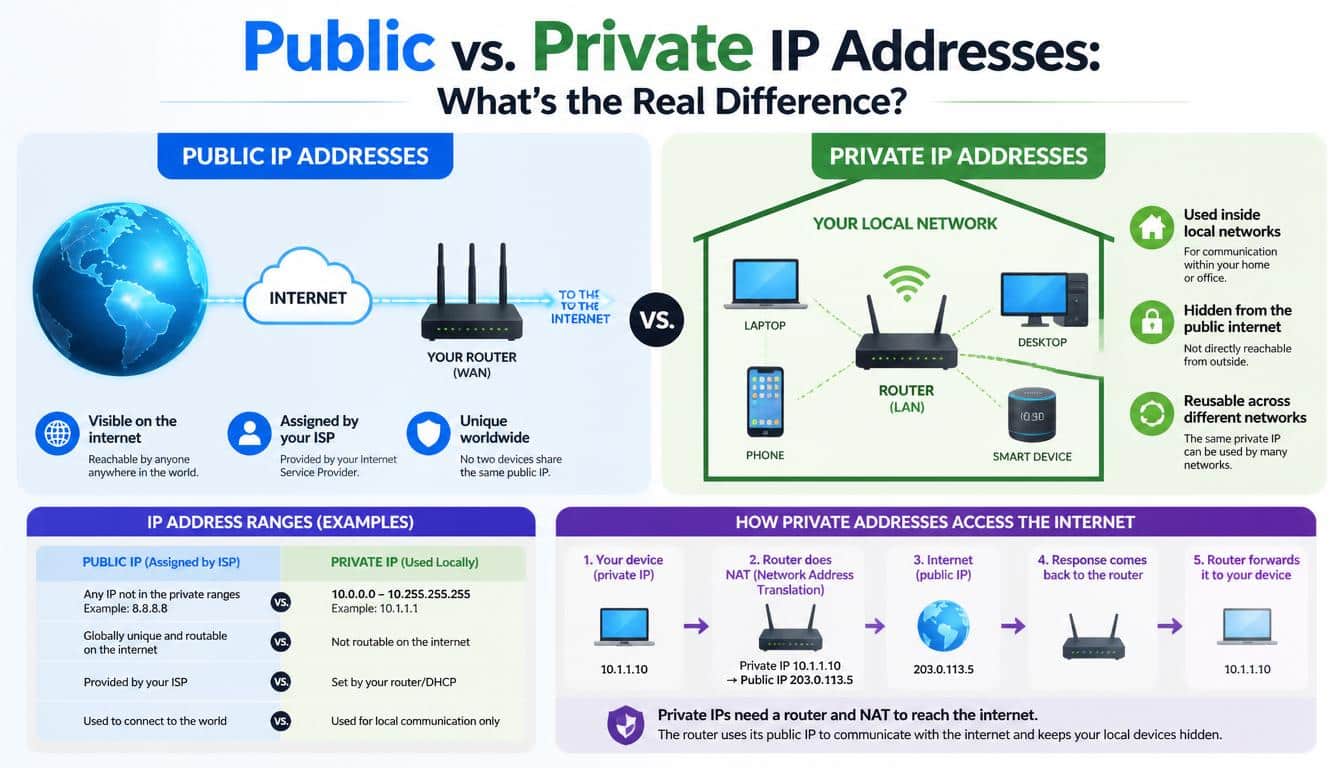
The difference between a public IP address vs. private IP address becomes clearer when you imagine your home network as an apartment building.
Every apartment has its own internal number, but visitors outside the building need the building’s street address to find it. Similarly, devices use private IP addresses within a local network, while a public-facing address can represent the connection to the wider internet.
Your router commonly performs Network Address Translation (NAT), translating between internal private addresses and a public IPv4 address. It tracks outgoing connections so returning traffic can be directed to the correct device.
This is why several people in a household can stream videos, browse websites, and play online games at the same time using one public IPv4 address.
However, NAT should not be mistaken for a complete security solution. A router’s stateful firewall and security settings help control unwanted incoming connections, while NAT itself primarily handles address translation.
In IPv6 networks, devices may have globally routable addresses without requiring traditional IPv4-style NAT. Proper firewall configuration remains important, even when the network uses a very large address space.
Static IP vs. Dynamic IP: Which One Do You Need?
The difference between static IP vs. dynamic IP is mainly about whether an address is intended to stay fixed or be assigned automatically and potentially change.
For most everyday internet users, dynamic addressing is perfectly adequate. Your ISP and router manage the assignment process in the background, so you can browse, message friends, and stream content without worrying about address configuration.
Static addresses are more useful when a service needs a consistent endpoint. For example, a business might require a fixed public IP address for a remote-access system, a server, or an allowlisted connection to another organization.
Here is a practical comparison:
- Dynamic addressing: Convenient, commonly automatic, and well suited to ordinary home networks.
- Static addressing: Predictable and useful for certain servers, remote-access arrangements, and network-management tasks.
- Static private addresses: Helpful when a device on a local network needs a consistent address, such as a network printer.
- Dynamic private addresses: Useful for assigning addresses automatically to phones, laptops, and guest devices.
Neither type offers complete privacy by itself. A dynamic address may change, but it does not guarantee anonymity. Likewise, a static address is not automatically vulnerable simply because it stays the same.
How Are IP Addresses Assigned?
Have you ever wondered who decides which device gets which address? It isn’t a single person sitting in a giant internet control room, assigning numbers one by one.
IP address allocation operates through several layers of coordination. The Internet Assigned Numbers Authority (IANA) coordinates important parts of the global numbering system, including large address allocations to regional internet registries.
Those registries distribute address resources to internet service providers and other organizations according to established policies.
The Internet Engineering Task Force (IETF) develops and maintains technical standards that define how internet protocols operate. These standards help equipment from different manufacturers communicate reliably, even when the devices have never encountered each other before.
Inside your home, your router often runs a DHCP server. When your phone connects to Wi-Fi, it may request network configuration and receive an available private IP address from the router.
The process generally includes discovering a DHCP server, requesting an address, receiving an offer, and obtaining a lease. The details can vary, but the result is straightforward: your device receives the information it needs to communicate on the local network.
An ISP may separately assign a public IP address to your router or connection. That assignment can be dynamic or static, depending on the provider and service plan.
What Is a Subnet and Why Does a Subnet Mask Matter?
A subnet, or subnetwork, is a smaller logical section of an IP network. Dividing a large network into subnets helps organize devices, manage traffic, and apply appropriate network policies.
A subnet mask tells an IPv4 device which portion of an address represents the network and which portion identifies an interface within that network. CIDR notation expresses the same idea using a prefix length.
Consider this example:
192.168.1.25/24
The /24 prefix means the first 24 bits identify the network portion. In conventional IPv4 subnetting, the corresponding subnet mask is 255.255.255.0.
Devices on the same subnet can often communicate directly at the local network level, provided the required configuration and policies allow it. When the destination is outside the local subnet, the device typically sends the traffic to a default gateway, commonly your router.
Subnetting is especially useful in offices, schools, data centres, and larger networks, where keeping everything in one enormous network would be difficult to manage.
IP Address vs. MAC Address: Are They the Same?
An IP address and a Media Access Control (MAC) address both help network communication, but they operate at different layers and serve different purposes.
An IP address is a logical network-layer address used to route packets between networks. A MAC address is generally a link-layer identifier associated with a network interface on technologies such as Ethernet and Wi-Fi.
Think of an IP address as the destination’s network location and a MAC address as the local delivery identifier used on a particular network link. It isn’t a perfect postal analogy, but it helps explain why both are useful.
When an IPv4 device needs to send a packet to another device on its local network, it may use the Address Resolution Protocol (ARP) to discover the MAC address associated with the destination’s local IP address. IPv6 uses Neighbor Discovery for similar local-link functions.
If the destination is on another network, the sender usually delivers the packet to its default gateway’s MAC address for the next local hop. The IP packet still carries the ultimate destination address, even as link-layer addresses change along the route.
MAC addresses can also be randomized by modern phones and computers for privacy. Neither a MAC address nor an IP address should be treated as a perfect, permanent identifier for a person.
How to Find Your IP Address on Different Devices
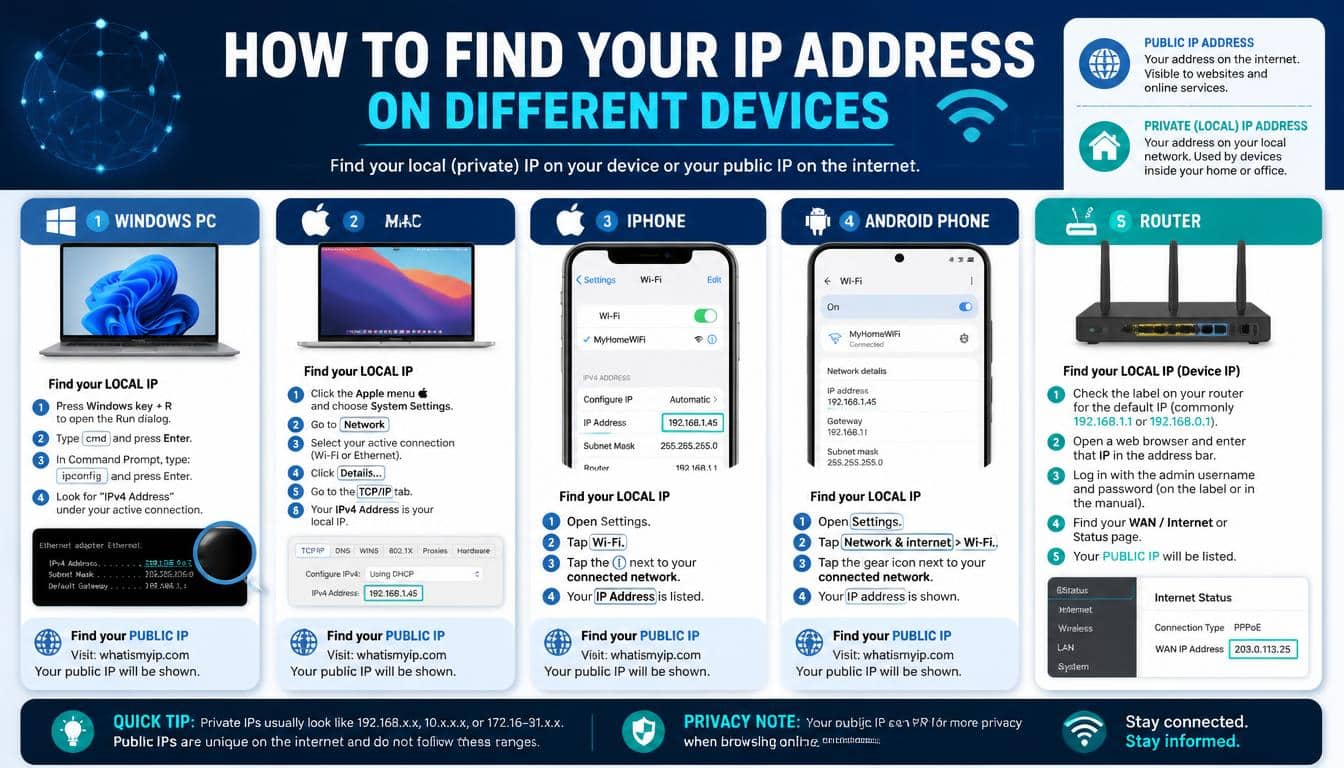
Finding your IP address is easier than many people expect. The main thing is to understand whether you want your private address on the local network or your public address as seen by internet services.
How to Find Your IP Address on Windows
Open Settings, select Network & internet, and choose your active Wi-Fi or Ethernet connection. Look for the network properties section, where Windows displays your IPv4 and, if available, IPv6 addresses.
You can also open Command Prompt and enter ipconfig. The output lists network adapters and their configuration, including local IP addresses and the default gateway.
If you see several adapters, don’t panic. Virtual machines, VPN software, and other network services can create additional entries.
How to Find Your IP Address on a Mac
On macOS, open System Settings and select Network. Choose your active Wi-Fi or Ethernet connection to view its network details.
For more technical information, you can use Terminal and enter ifconfig. The output includes interface details, though you’ll need to identify the active interface and distinguish IP addresses from other information.
How to Find Your IP Address on a Phone
On an iPhone, open Settings, tap Wi-Fi, and select the information button beside your connected network. The network details display the device’s local IP address.
On many Android phones, open Settings, select Network & internet or Connections, and inspect the connected Wi-Fi network. Exact menu names vary between manufacturers and Android versions.
Remember that your phone may use a different public-facing address when connected to mobile data instead of Wi-Fi.
How to Check Your Public IP Address
The simplest method is to use a reputable IP-checking website or search for a public IP lookup service. The page generally displays the public-facing IP address associated with your request.
If you are connected to a VPN or proxy, the result may show the VPN or proxy’s public address rather than the address assigned directly to your normal internet connection.
A public IP lookup may also show an approximate geographic area or the name of an internet provider. These results are estimates, not guaranteed proof of a person’s exact location.
Can Someone Track You Through Your IP Address?
This is where a little knowledge can make you more confident online. An IP address does reveal some information, but it does not give strangers magical access to your entire digital life.
An IP address lookup may identify the ISP, the network associated with an address, and an approximate location. Sometimes the result points to a city or nearby region; in other cases, it may identify the provider’s infrastructure rather than the user’s actual location.
Your public IP address alone usually does not reveal your precise home address, private messages, saved passwords, or complete browsing history.
Access to subscriber identity information generally requires additional records held by the ISP and, depending on the circumstances and jurisdiction, appropriate legal procedures.
Still, IP address privacy matters. Cybercriminals may use exposed addresses as one element in a broader attack, especially when a device has vulnerable services exposed to the internet.
Potential risks include:
- IP-based location tracking: Estimating your general region or identifying the provider serving your connection.
- Targeted network attacks: Attempting to exploit an exposed service or poorly secured device.
- Distributed denial-of-service (DDoS) attacks: Flooding a connection or service with traffic to make it unavailable.
- Social engineering: Combining network information with other publicly available details to create convincing scams.
- IP address spoofing: Forging the source IP field in certain packets, which can be used in attacks but does not automatically grant control over the device whose address is copied.
These risks depend on the circumstances. Merely knowing someone’s IP address does not mean a person can hack their phone or read their private conversations.
How to Protect Your IP Address and Improve Online Privacy
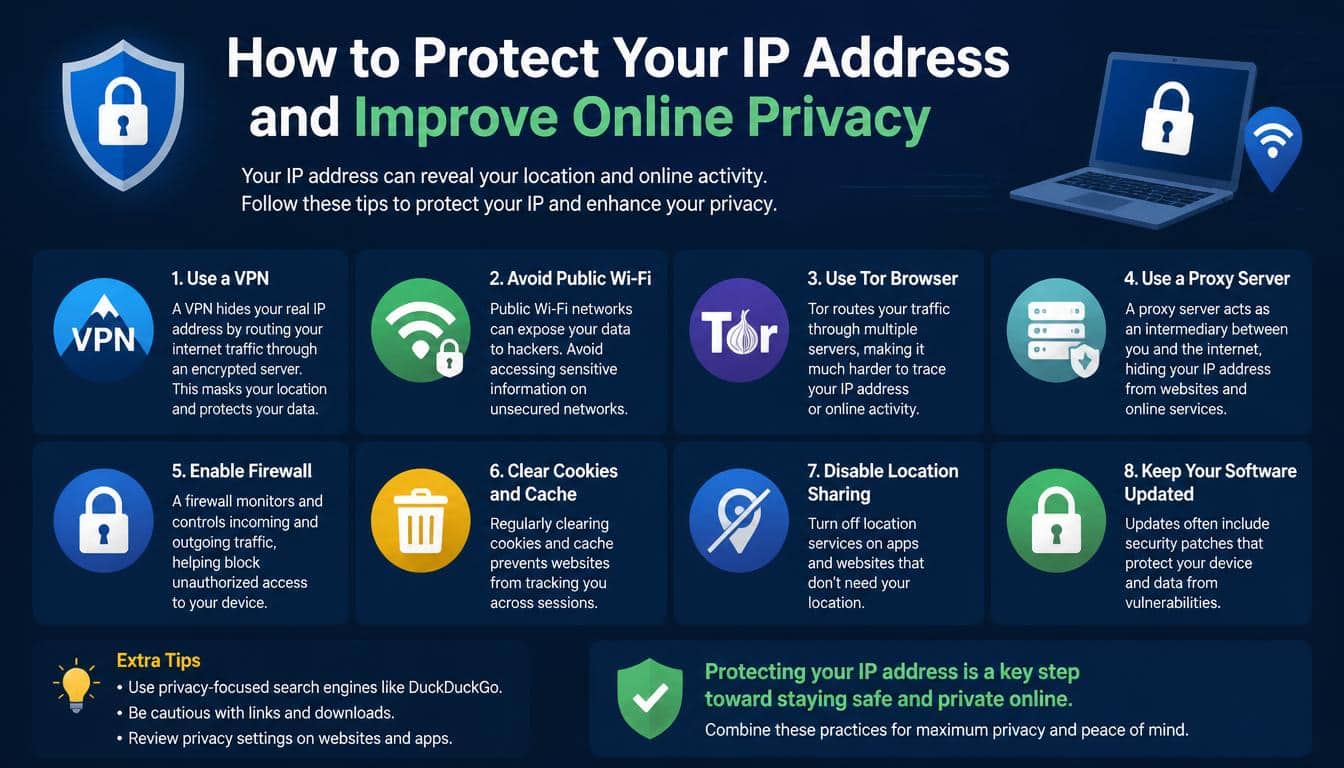
Good online security isn’t about hiding every technical detail. It’s about reducing unnecessary exposure and making sure your devices and connections are properly protected.
A few sensible habits can make a real difference.
Use a reputable VPN. A Virtual Private Network (VPN) routes supported traffic through a VPN server, so websites generally see the VPN server’s public IP address instead of your original public address. Your internet provider can still see that you are connecting to the VPN, and the VPN provider may have visibility into certain connection metadata.
Secure your router. Change default administrator credentials, install firmware updates, and disable remote administration if you don’t need it. A well-maintained router helps reduce the risk of unauthorized access to your home network.
Keep devices updated. Operating-system and application updates fix vulnerabilities that attackers might otherwise exploit. This matters much more than simply changing your IP address now and then.
Review firewall settings. A properly configured router firewall can restrict unsolicited incoming connections. Avoid exposing remote desktop services, cameras, and other devices directly to the internet unless you understand the risks and have secured them.
Be careful with suspicious links. Clicking an unfamiliar link does not automatically give someone complete access to your device, but malicious websites can attempt to collect information or exploit software vulnerabilities.
Use secure remote access. If you need to access a computer or home network while away, choose well-maintained tools with strong authentication. Avoid opening unnecessary ports just because a setup guide says it’s convenient.
A proxy server can also act as an intermediary for particular applications or web requests. However, unlike a full-device VPN configuration, a proxy may cover only the traffic configured to use it. Choose privacy tools based on what they actually protect rather than assuming every tool hides everything.
Common IP Address Questions Answered
Can Two Devices Have the Same IP Address?
Two devices on the same local network generally should not share the same assigned unicast IP address, because an address conflict can disrupt communication.
However, devices on separate private networks can use the same private address without a problem. Your home laptop and a laptop in another country could both use 192.168.1.10, since their networks are independent.
Public IP addressing has different requirements. Network providers may use NAT or carrier-grade NAT to allow many customers to share one public IPv4 address.
What Does an IP Address Starting With 192.168 Mean?
An IPv4 address beginning with 192.168 falls within the private address range 192.168.0.0/16. It is commonly used for local networks, including home Wi-Fi.
It doesn’t identify a particular house or internet provider by itself. Millions of routers use addresses from this range, so the address is meaningful only within the relevant network.
Does Restarting a Router Change Your IP Address?
It might, but it isn’t guaranteed. A router with a dynamic public address may receive a different address after reconnecting, while an ISP may continue assigning the same address.
Your router’s private address settings may remain unchanged after a restart. If your goal is to troubleshoot a connection, restarting can help in some cases, but it isn’t a reliable privacy strategy.
What Is the Purpose of 127.0.0.1?
The address 127.0.0.1 is a commonly used IPv4 loopback address. It directs traffic back to the local device, allowing developers and administrators to test network applications without sending that traffic to another computer.
The hostname localhost commonly resolves to a loopback address. IPv6 has its own loopback address, ::1.
Does a VPN Make You Completely Anonymous?
No. A VPN can hide your original public IP address from many websites and protect traffic between your device and the VPN server, depending on the setup. But websites may still recognize you through account logins, browser identifiers, cookies, and other information.
A VPN is one privacy tool, not an invisibility cloak. Safe browsing, updated devices, strong passwords, and careful sharing of personal information remain important.
Why IP Addresses Matter More Than You Think
IP addresses are easy to overlook because most modern technology handles them quietly in the background. You don’t need to memorize numerical ranges to send a message or enjoy your favourite show, and that’s precisely the point: networking is designed to work without demanding your attention every minute.
Yet understanding the basics helps you troubleshoot Wi-Fi problems, recognize suspicious network activity, configure devices, and make more informed decisions about online privacy.
An IP address is not a person’s entire digital identity. It is one part of a larger system that allows network interfaces to exchange information across local and global networks. IPv4 and IPv6 provide the addressing foundation, routers forward packets, DHCP helps configure devices, and DNS connects familiar domain names with the addresses needed to reach online services.
Once these pieces fit together, the internet becomes a little less mysterious. What once looked like a random collection of numbers starts to resemble a carefully coordinated system, carrying information from one destination to another.
Frequently asked Questions
What is an ip address
An IP address (Internet Protocol address) is a unique numerical label assigned to a device connected to a network. It helps devices identify each other and send data to the correct destination over the internet or a local network.
IP
IP stands for Internet Protocol, a set of rules that allows devices to communicate over networks. An IP address identifies a device or network connection so data can be routed to the right destination.
What is a ip address
An IP address is a numerical identifier assigned to a device connected to the internet or a local network. It allows computers, smartphones, and other connected devices to communicate and exchange data.
IP address meaning
The meaning of an IP address is Internet Protocol address, a numerical label used to identify a device or network interface. It helps route information between devices across the internet or local networks.
What’s an ip address
An IP address is a unique numerical identifier that helps your device communicate with websites, servers, and other connected devices. Depending on the network, it can be public or private and may be static or dynamic.
Read More: https://gracethemes.com/what-is-crc-networking/
Final Thoughts: Understanding Your Digital Address
Every online action leaves you interacting with an intricate network of devices, services, and protocols. An IP address is one of the quiet details that makes these connections possible, helping data travel to the right destination even when the journey crosses several networks and continents.
You don’t need to become a network engineer to understand it. Start by learning the difference between public and private addresses, recognize how IPv4 and IPv6 differ, and know where to find your own network information when troubleshooting is needed.
Most importantly, remember that useful knowledge beats unnecessary fear. Protect your devices, keep your router secure, use privacy tools thoughtfully, and be mindful of what you share online.
The next time a webpage opens in an instant or a video begins playing without a fuss, you’ll know there’s a little more happening behind the screen than meets the eye. And that understanding is a small but worthwhile step toward becoming a more confident, informed internet user.
