

What Is Docker?
Imagine spending days building a software application, carefully installing every library, configuring dependencies, and making sure everything works perfectly. Then you hand it over to another developer, only to hear those frustrating words: “It works on my machine, but not on yours.”
For software developers, this situation is almost painfully familiar. Different operating systems, software versions, configurations, and dependencies can turn a seemingly simple deployment into a complicated mess. And this is exactly where Docker enters the picture.
Docker has changed how developers build, package, test, and deploy applications. Instead of worrying about whether an application will behave differently on another computer or server, developers can package the application together with everything it needs to run.
The result? More consistent environments, faster deployments, and fewer unexpected surprises.
But what exactly is Docker? How does it work? What makes containers different from virtual machines? And why have technologies such as Kubernetes, Docker Compose, and containerd become so important in modern software development?
Let’s explore the Docker ecosystem from the ground up, without making the technical side feel like a completely different language.
What Is Docker?
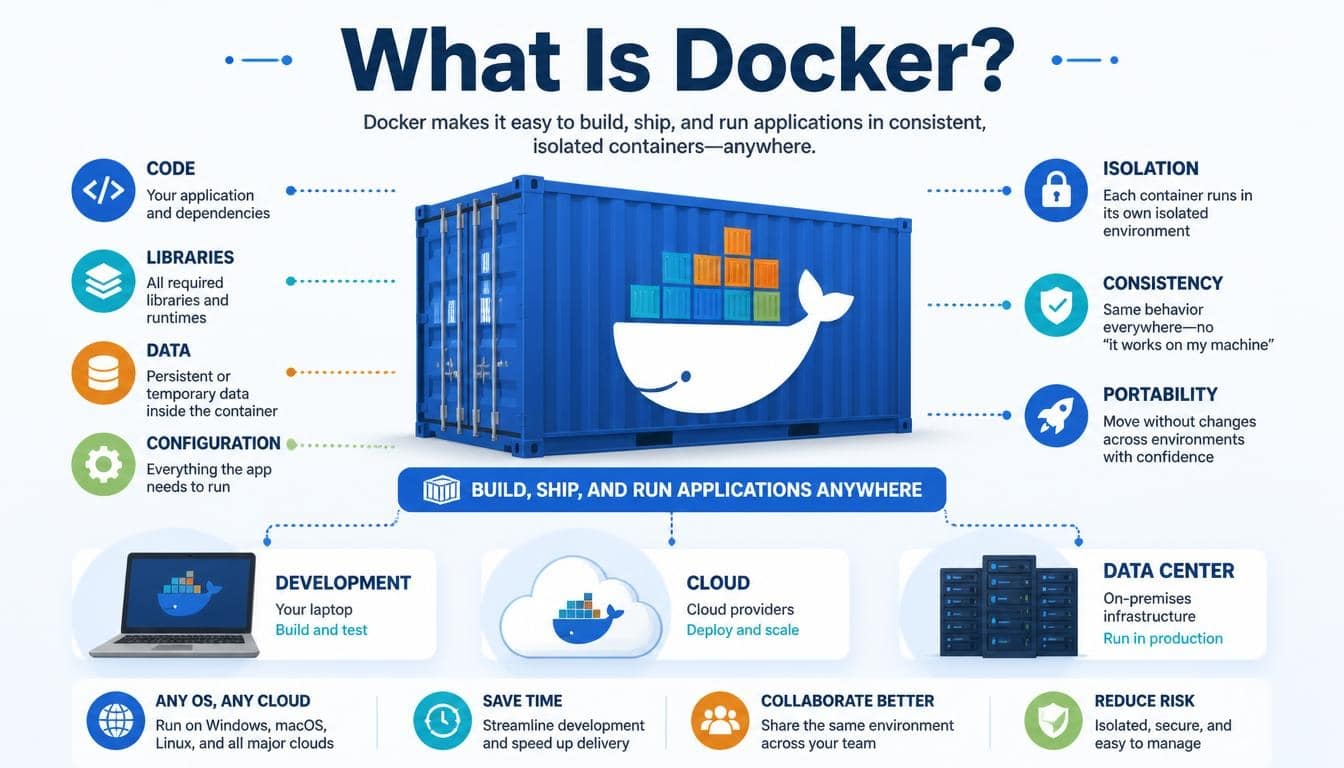
Docker is an open-source platform that allows developers to build, package, distribute, and run applications inside isolated environments called Docker containers.
These containers include an application and its required dependencies, such as libraries, configuration files, system tools, and runtime components.
This means an application can run consistently across different computing environments, provided the necessary container runtime and compatible host infrastructure are available.
Think of Docker as a shipping container for software.
A shipping container holds different goods in a standardized package that can travel by truck, ship, or train. It doesn’t matter what is inside or which transportation method carries it. The container provides a consistent way to move everything around.
Docker applies a similar idea to applications.
A developer can package a website, database, or background service into a container image and run it on a laptop, a company server, or a supported cloud environment.
The central idea behind Docker containerization is simple: package the application and its dependencies so that the software behaves consistently wherever it runs.
Docker is widely used in DevOps, cloud computing, microservices architecture, software testing, and modern application deployment.
What Is Docker Containerization and Why Does It Matter?
Before container technology became popular, developers often struggled with differences between development, testing, and production environments.
For example, an application might work perfectly on a developer’s laptop because it uses Python 3.11 and a particular database library. However, the production server might have an older version of Python or a different system configuration.
Suddenly, the application stops working.
Containerization helps solve this problem by packaging applications with their required dependencies into portable containers.
A Docker container provides an isolated environment for running an application while sharing the host operating system’s kernel.
Here is what makes containerization useful:
- Application portability: Applications can move between supported development machines, servers, and cloud environments.
- Consistent environments: Developers can use similar software configurations during development, testing, and production.
- Faster deployment: Containers can generally start much faster than traditional virtual machines.
- Efficient resource utilization: Multiple containers can share the same host operating system kernel.
- Simplified application management: Applications and their dependencies can be packaged and managed in a standardized way.
- Improved collaboration: Development teams can share container images instead of manually reproducing complex environments.
In practical terms, Docker helps developers spend less time fixing environment-related problems and more time improving the actual software.
How Does Docker Work?
Understanding how Docker works becomes much easier when you look at its basic workflow.
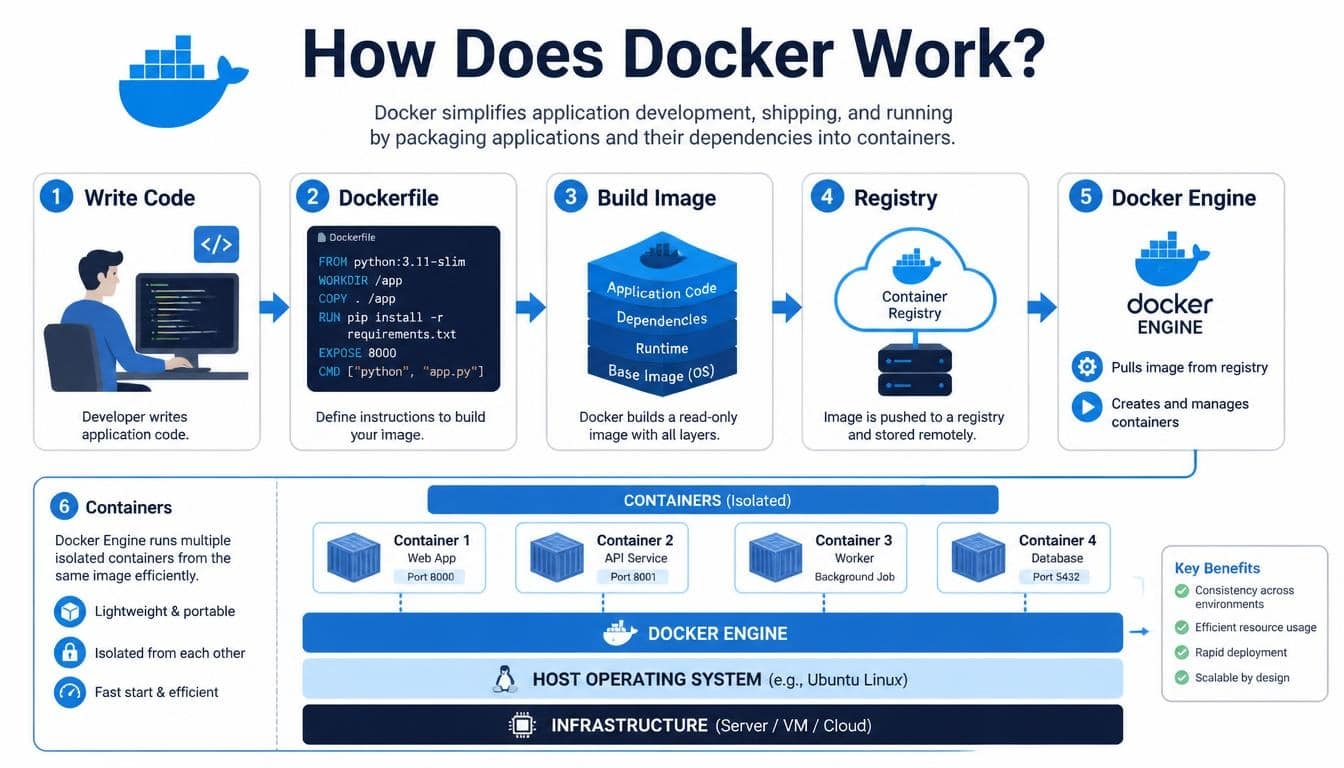
Docker uses images and containers to package and execute applications. Developers create an image containing the application and its dependencies, then use that image to launch one or more containers.
The Docker Engine manages much of this process.
A typical Docker workflow looks something like this:
- A developer writes application code.
- A Dockerfile describes how the application environment should be built.
- Docker builds an image using those instructions.
- The image is stored locally or uploaded to a container registry.
- A container is created from the image.
- The container runs the application in an isolated environment.
For example, imagine building a small web application using Node.js.
Instead of asking every developer to install the same Node.js version, configure dependencies, and manually prepare the environment, you can create a Docker image containing the necessary components.
Another developer can download that image and start the application using Docker.
The setup becomes much more predictable, which is a big deal when several people are working on the same project.
Understanding Docker Architecture
The Docker architecture follows a client-server model. Its major components communicate through an API to manage images, containers, networks, and storage.
Understanding these components helps explain what happens behind the scenes when someone runs a Docker command.
Docker Client
The Docker Client is the interface through which users communicate with Docker.
Most developers interact with Docker through the command-line interface, commonly called the Docker CLI.
For example:
bash
docker run hello-world
This command asks Docker to run a container using the hello-world image.
The client sends the request to the Docker daemon through the Docker API.
Docker Daemon
The Docker Daemon, also known as dockerd, is a background service responsible for managing Docker resources.
It handles tasks such as:
- Building Docker images.
- Creating and managing containers.
- Managing networks and storage volumes.
- Communicating with container registries.
- Handling container lifecycle operations.
When a user sends a Docker command, the daemon processes the request and coordinates the necessary operations.
Docker Engine
The Docker Engine is the core technology responsible for building and running containers.
It includes the Docker daemon, the Docker API, and the Docker CLI.
The engine provides the environment needed to create images, start containers, and manage their resources.
On Linux, Docker Engine commonly uses containerd and runc as part of its container execution architecture.
Docker API
The Docker API allows the Docker client and other applications to communicate with the daemon.
It provides an interface for managing containers, images, networks, and volumes.
This is particularly useful when developers want to automate Docker operations or integrate container management into other software tools.
Docker Desktop
Docker Desktop provides a graphical interface and development environment for working with containers on Windows and macOS, as well as Linux.
It makes Docker easier to install, configure, and manage, especially for beginners who are not yet comfortable working entirely through terminal commands.
Docker Desktop also includes useful tools such as Docker Compose and container management features.
What Are Docker Images?
A Docker image is a read-only template used to create Docker containers.
It contains the application code, dependencies, libraries, and instructions required to run the application.
You can think of an image as a recipe and a container as the prepared meal.
The recipe describes what is needed, while the container represents the running result.
Docker images are generally built using multiple layers. Each layer represents a set of filesystem changes, and Docker can reuse existing layers when building other images.
This layered structure improves efficiency and can reduce unnecessary downloads and rebuilding.
For example, a Node.js application image might contain:
- A Linux-based base image.
- A Node.js runtime.
- Application dependencies.
- Source code.
- Configuration instructions.
- A command that starts the application.
Images can also be tagged to identify different versions.
For example:
bash
docker pull nginx:latest
This command downloads the latest image tagged for Nginx from the configured registry.
For production systems, using carefully selected and version-pinned image tags is generally more predictable than relying on a moving latest tag.
What Is a Dockerfile?
A Dockerfile is a text file containing instructions for building a Docker image.
It tells Docker what base image to use, which files to copy, which dependencies to install, and what command should run when the container starts.
Here is a simple example:
dockerfile
FROM node:22
WORKDIR /app
COPY package*.json ./
RUN npm install
COPY . .
EXPOSE 3000
CMD [“npm”, “start”]
Let’s understand what these instructions do.
- FROM selects the base image.
- WORKDIR defines the working directory inside the image.
- COPY transfers files into the image.
- RUN executes commands during image building.
- EXPOSE documents the port the application is expected to use.
- CMD specifies the default command executed when the container starts.
Once the Dockerfile is ready, developers can build an image using:
bash
docker build -t my-node-app .
This command creates an image named my-node-app.
A Dockerfile makes application environments easier to reproduce, modify, and share across development teams.
What Are Docker Containers?
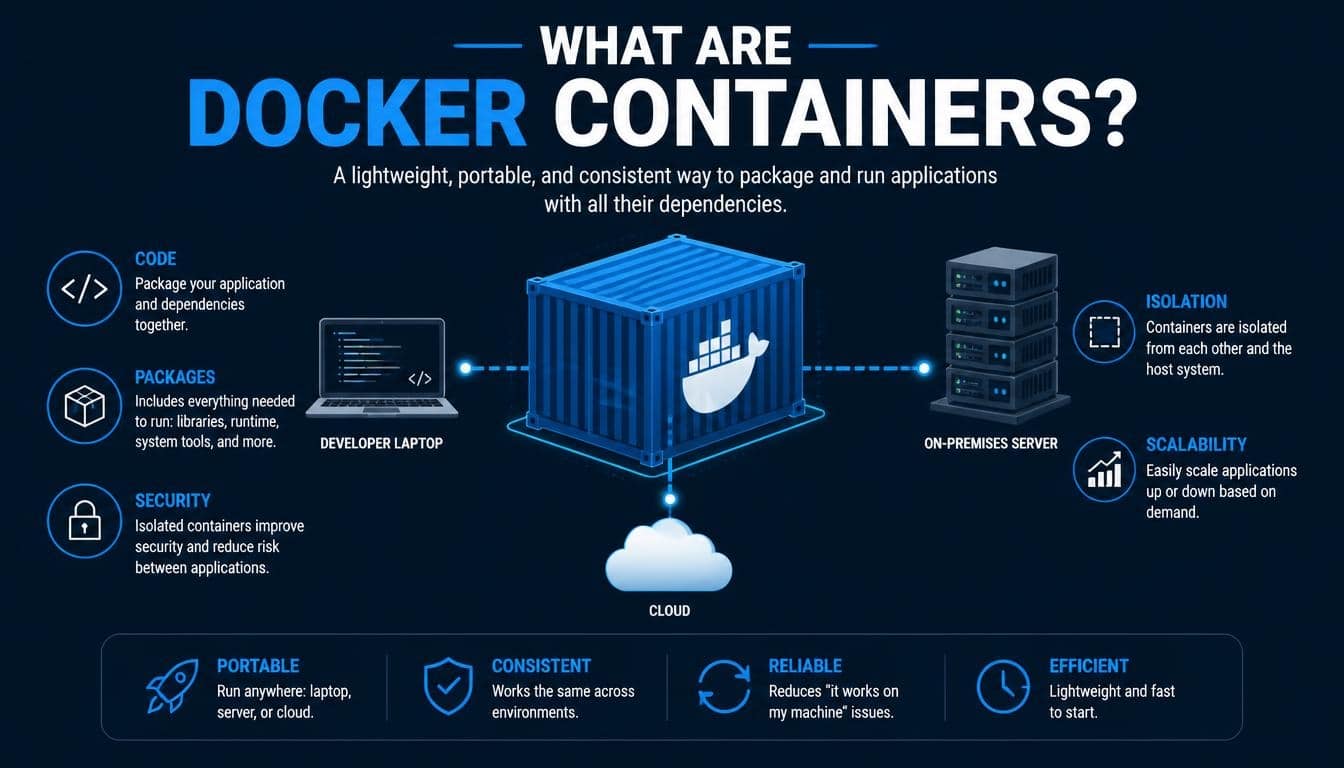
Docker containers are running or stopped instances created from Docker images.
While an image provides the application blueprint, a container provides the actual execution environment.
Containers are isolated from one another through operating system features such as namespaces and control groups on Linux.
Namespaces help separate resources such as processes, networking, and mount points. Control groups help manage and limit resource consumption.
This makes it possible to run multiple applications on the same host without requiring a separate full operating system for each application.
For example, a company might run:
- One container for a website.
- Another container for its backend API.
- A third container for a database.
- Another container for background processing.
Each container can have its own configuration and lifecycle.
A container can be started, stopped, restarted, removed, or recreated whenever needed.
One important detail: containers are generally considered ephemeral. If a container is removed, data stored only inside its writable container layer may disappear. This is why persistent storage is important for databases and applications that need to retain information.
Docker vs Virtual Machines: What Is the Difference?
Docker containers and Virtual Machines (VMs) both provide isolated computing environments, but they work differently.
A virtual machine uses a hypervisor to run a complete guest operating system on virtualized hardware.
A container, on the other hand, shares the host operating system kernel while keeping application processes and resources isolated.
Here is a simple comparison:
| Feature | Docker Containers | Virtual Machines |
| Operating system | Share host kernel | Usually include guest OS |
| Startup time | Generally seconds or less | Often longer |
| Resource usage | Usually lightweight | Usually higher |
| Isolation | OS-level isolation | Hardware virtualization |
| Portability | Portable with compatible runtime | Portable with compatible hypervisor |
| Deployment | Often quick and flexible | Often more resource-intensive |
| Best suited for | Application packaging | Full OS environments |
Neither technology makes the other unnecessary.
Containers are excellent for lightweight application deployment, while virtual machines can provide stronger isolation boundaries and support different operating systems on the same physical machine.
Some production environments even run Docker containers inside virtual machines, combining both approaches.
What Is Docker Hub?
Docker Hub is a cloud-based container registry used to store, share, and distribute Docker images.
It works somewhat like a library where developers can find images for commonly used applications and development environments.
For example, Docker Hub provides images for:
- Nginx web servers.
- MySQL databases.
- PostgreSQL databases.
- Redis.
- Node.js.
- Python.
- Ubuntu Linux.
Developers can download images using commands such as:
bash
docker pull python:3.12
They can also upload their own images to a registry, making it easier for teammates or deployment systems to access them.
Docker Hub includes official images, verified publisher images, and community-maintained images.
However, downloading an image doesn’t automatically make it trustworthy. Developers should check image publishers, maintenance history, versions, and security information before using images in important environments.
What Is Docker Compose?
Running one container is relatively straightforward. But real applications often depend on several services working together.
For instance, a web application might need a frontend, backend API, database, and caching service.
Managing all these containers separately can become tedious.
This is where Docker Compose becomes useful.
Docker Compose is a tool for defining and managing multi-container applications through a YAML configuration file.
A basic example might look like this:
yaml
services:
web:
image: nginx:latest
ports:
– “8080:80”
database:
image: postgres:16
environment:
POSTGRES_PASSWORD: example
The configuration defines two services: a web server and a database.
Developers can start the application using:
bash
docker compose up -d
Docker Compose helps organize containerized applications, manage service dependencies, configure networking, and simplify local development workflows.
It is especially useful when several developers need to run the same application environment on their computers.
What Is Docker Swarm and How Does It Work?
Docker Swarm is Docker’s native container orchestration technology.
It allows developers and infrastructure teams to manage multiple Docker hosts as a cluster.
Instead of manually managing individual containers across several machines, Docker Swarm provides features for coordinating services and workloads.
Its major capabilities include:
- Container service management.
- Cluster management.
- Service scaling.
- Load balancing.
- Service discovery.
- Desired-state management.
- Node management.
Docker Swarm uses two main node roles.
Manager nodes coordinate the cluster, maintain its desired state, and schedule services.
Worker nodes execute the container workloads assigned to them.
Docker Swarm can be useful for relatively straightforward container orchestration requirements, although Kubernetes is more widely adopted for complex cloud-native environments.
Docker vs Kubernetes: Understanding the Difference
Docker and Kubernetes are often mentioned together, which sometimes confuses beginners.
They are related technologies, but they do different jobs.
Docker is primarily associated with building, packaging, and running containers.
Kubernetes is a container orchestration platform designed to manage containerized applications across clusters of machines.
For example, Docker can help developers package an application into a container image. Kubernetes can then manage the deployment, scaling, networking, and recovery of that application across a cluster.
| Feature | Docker | Kubernetes |
| Primary purpose | Container development and management | Container orchestration |
| Image building | Supports image building | Does not provide a native general-purpose image-building workflow |
| Container management | Manages individual containers and services | Coordinates workloads across clusters |
| Scaling | Supports container and service management | Provides advanced workload scaling |
| Networking | Provides container networking | Provides cluster networking |
| Common use | Development and packaging | Production orchestration |
One technical detail worth remembering: Kubernetes does not require Docker Engine as its container runtime. It commonly uses containerd or other compatible runtimes through the Container Runtime Interface.
Docker-built images can still be used with Kubernetes because modern container platforms share standardized image formats.
What Are the Main Uses of Docker?
Docker is useful in many areas of modern software development. Its flexibility makes it relevant to startups, large enterprises, independent developers, and cloud engineering teams.
1. Microservices Architecture
Microservices architecture divides an application into smaller, independently manageable services.
Each service can run inside its own container, making development, deployment, and scaling more flexible.
For example, an online shopping platform might have separate services for payments, product management, user accounts, and order processing.
Docker helps package these services and maintain consistent execution environments.
2. DevOps and CI/CD Pipelines
Docker supports DevOps practices by providing standardized environments throughout the software development lifecycle.
In a CI/CD pipeline, applications can be built, tested, packaged, and deployed using container images.
This makes automated testing and deployment workflows more predictable.
Development teams can also integrate Docker with platforms such as GitHub Actions and other automation tools.
3. Cloud Computing
Docker supports cloud computing by making applications easier to package and deploy across compatible cloud infrastructure.
Organizations can use containerized applications on platforms such as:
- Amazon Web Services (AWS).
- Google Cloud.
- Microsoft Azure.
This flexibility can support hybrid cloud and multi-cloud deployment strategies.
4. Automated Software Testing
Developers can use Docker containers to create temporary testing environments.
For example, a testing pipeline might start a PostgreSQL container, execute application tests, and remove the container after testing finishes.
This approach makes it easier to perform parallel testing without constantly changing the main development environment.
5. Machine Learning and Artificial Intelligence
Docker is also useful for machine learning, data science, and artificial intelligence applications.
A developer can package Python, machine learning libraries, model-serving software, and other dependencies into an image.
This makes experiments easier to reproduce and helps teams deploy AI applications across compatible environments.
Containerized tools such as Ollama and applications built around frameworks such as LangChain can also be incorporated into development workflows.
Advantages and Disadvantages of Docker
Docker offers many benefits, but it is not a magical solution to every infrastructure problem.
Understanding its limitations is just as important as understanding its strengths.
Advantages of Docker
- Lightweight containers: Containers generally consume fewer resources than full virtual machines.
- Application portability: Images can be moved between compatible environments.
- Faster deployment: Containers can start quickly, helping streamline software delivery.
- Consistent development environments: Developers can reproduce application configurations more easily.
- Improved scalability: Containerized services can be replicated when additional capacity is needed.
- Efficient resource utilization: Multiple workloads can share the same operating system kernel.
- Simplified testing: Temporary environments can be created and removed on demand.
- Better collaboration: Teams can share images and configuration files.
Disadvantages of Docker
- Security risks: Misconfigured containers and vulnerable images can expose applications to security threats.
- Networking complexity: Connecting multiple containers and managing external access can require additional knowledge.
- Storage challenges: Persistent data needs proper volume and backup management.
- Learning curve: Beginners may find Docker commands, networking, and image management confusing initially.
- Kernel dependency: Containers sharing a host kernel do not provide the same isolation as separate virtual machines.
- Orchestration complexity: Managing large numbers of containers requires additional infrastructure and operational expertise.
- Resource management: Poorly configured workloads can consume excessive CPU, memory, or storage.
Docker is most effective when teams understand both its capabilities and the operational responsibilities that come with container management.
Docker Security: How to Keep Containers Safe
Docker security should be part of the development process from the beginning, rather than something added after an application has already been deployed.
Containers provide useful isolation, but they are not automatically secure.
A vulnerable image, excessive permissions, or an improperly configured Docker daemon can create serious problems.
Here are some important container security practices.
Use Trusted Docker Images
Choose official images or images from reputable publishers.
Avoid downloading random images without checking their source, update history, and security information.
Scan Images for Vulnerabilities
Use image scanning tools to identify known vulnerabilities in application dependencies and operating system packages.
Regular scanning helps teams discover problems before images reach production.
Avoid Running Containers as Root
Whenever possible, configure applications to run with nonroot users.
Limiting privileges reduces the potential impact of certain security incidents.
Manage Secrets Carefully
Never place passwords, API keys, or other sensitive information directly inside Dockerfiles or publicly accessible images.
Use appropriate secret management systems, such as Docker Secrets in supported Swarm environments or external solutions such as HashiCorp Vault.
Limit Container Resources
Set suitable CPU and memory limits to reduce the risk of one container consuming excessive host resources.
Keep Docker Components Updated
Update Docker Engine, container runtimes, base images, and application dependencies regularly.
Security is an ongoing responsibility, not a one-time configuration task.
Organizations may also consult CIS security benchmarks and container security guidance when developing their security policies.
Docker and the Open Container Initiative (OCI)
An important part of the modern container ecosystem is the Open Container Initiative (OCI).
The OCI is an open governance project focused on developing standards for container formats and runtimes.
Its work helps different container tools communicate through common specifications.
Two important OCI specifications are:
- OCI Image Specification: Defines how container images are structured and distributed.
- OCI Runtime Specification: Defines how containers should be configured and executed.
Technologies such as runc and containerd play important roles in the container ecosystem.
These standards are valuable because they reduce dependence on a single vendor and support interoperability between different container platforms.
What Are Docker Alternatives?
Although Docker is one of the most recognized container technologies, it isn’t the only option available.
Several tools provide alternative ways to build, run, and manage containers.
Podman
Podman is a container management tool developed by Red Hat and the wider open-source community.
It supports Docker-compatible command-line workflows and offers features such as daemonless container management and rootless containers.
It is a popular alternative for developers and administrators who want additional flexibility around container execution.
containerd
containerd is an industry-standard container runtime that manages container lifecycle operations.
It handles tasks such as image transfer, container execution, and storage management.
It is widely used in modern container infrastructure, including Kubernetes environments.
nerdctl
nerdctl is a Docker-compatible command-line interface for containerd.
It allows users to interact with containerd using familiar Docker-style commands.
Linux Containers (LXC)
Linux Containers (LXC) is a Linux-based container technology that provides operating-system-level virtualization.
It focuses on creating isolated Linux environments and differs in some ways from Docker’s application-oriented container workflow.
Rancher Desktop
Rancher Desktop provides a desktop environment for working with containers and Kubernetes.
It can be useful for developers who want local Kubernetes capabilities alongside container management tools.
OpenShift
Red Hat OpenShift is an enterprise container application platform built around Kubernetes.
It offers additional capabilities for application deployment, cluster management, security, and enterprise operations.
The right alternative depends on project requirements, existing infrastructure, security policies, and team experience.
How to Get Started With Docker
If you’re new to Docker, the best way to understand it is to actually run a few containers.
You don’t need to build a complicated application on your first day. Start with something simple.
Step 1: Install Docker
Download and install Docker Desktop for Windows or macOS, or install Docker Engine on a supported Linux distribution.
Step 2: Check Your Installation
Open your terminal and execute:
bash
docker –version
This displays the installed Docker client version.
Step 3: Run Your First Container
Execute:
bash
docker run hello-world
Docker downloads the hello-world image if it isn’t available locally, creates a container, and runs it.
You’ll receive a message confirming that Docker is working.
Step 4: Explore Available Containers
Run:
bash
docker ps
This displays currently running containers.
To display stopped containers as well, use:
bash
docker ps -a
Step 5: Explore Docker Images
Run:
bash
docker images
This shows the images available on your local machine.
Step 6: Learn Container Management
Try a few basic commands:
bash
docker start container_name
docker stop container_name
docker restart container_name
docker logs container_name
docker rm container_name
These commands help you manage container lifecycles and inspect application output.
With a little practice, the commands that initially seem unfamiliar start feeling surprisingly natural.
How to Make the Most of Docker in Real Projects
Learning Docker commands is only the beginning. The real value appears when you start using containerization to solve everyday development problems.
For instance, rather than manually installing databases and application dependencies on every developer’s machine, create a reusable Docker Compose configuration.
Rather than deploying software with different dependency versions across servers, build a versioned image and use it consistently throughout your CI/CD pipeline.
And instead of treating containers as permanent storage locations, use volumes and suitable backup strategies to protect important application data.
A few thoughtful decisions during development can save hours of troubleshooting later.
It is also worth learning about container networking, image layers, environment variables, resource limits, and persistent storage. These concepts make a significant difference once your projects become more complex.
Frequently Asked Questions About Docker
Is Docker Free to Use?
Docker offers free and paid products and subscription plans. Docker Engine is open source, while Docker Desktop has its own subscription terms and licensing conditions.
Personal users and eligible small businesses may qualify for free Docker Desktop usage under its applicable terms.
Is Docker an Operating System?
No. Docker is a containerization platform, not an operating system.
It uses operating system features to create isolated environments for running applications.
Does Docker Work on Windows and macOS?
Yes. Docker Desktop supports Windows and macOS, using virtualization or other platform-specific technologies to provide a suitable Linux container environment when needed.
Docker Engine also runs natively on supported Linux systems.
Are Docker Containers Virtual Machines?
No. Containers and virtual machines use different isolation approaches.
Containers share the host operating system kernel, while virtual machines generally run separate guest operating systems.
Can Docker Run Multiple Applications?
Yes. Docker can run multiple containers simultaneously, with each container hosting a separate application or service.
Docker Compose makes it easier to manage applications that depend on several containers.
Is Docker the Same as Kubernetes?
No. Docker focuses on container development and management, while Kubernetes focuses on orchestrating containerized applications across clusters.
They can work together within the same software deployment workflow.
Is Docker Useful for Beginners?
Absolutely. Docker is a valuable skill for software developers, DevOps engineers, cloud administrators, data scientists, and anyone interested in modern application deployment.
Starting with basic images, containers, and Dockerfiles is a good way to build practical knowledge.
Read More: https://gracethemes.com/how-to-reset-your-airpods/
Conclusion: Why Docker Matters in Modern Software Development
So, what is Docker, and why has it become such an important part of modern technology?
Docker is much more than a tool for running applications inside containers. It represents a practical approach to building, packaging, testing, and deploying software in a consistent and repeatable way.
Through Docker Engine, Docker images, Docker containers, and tools such as Docker Compose, developers can simplify complicated workflows and reduce the familiar problems caused by inconsistent environments.
Its connection with DevOps, CI/CD, microservices architecture, and cloud computing makes it especially valuable in today’s software development landscape.
Of course, Docker also comes with responsibilities. Container security, storage management, networking, and orchestration require proper attention, particularly when applications move into production.
Still, the benefits are hard to ignore.
Whether you’re a student learning software development, a developer building your first web application, or an experienced engineer working with distributed cloud infrastructure, understanding Docker can open the door to more efficient development practices.
Start small, experiment with a few containers, build your first Dockerfile, and gradually explore the wider ecosystem. You don’t need to master every component overnight.
The beauty of Docker is that it makes complicated application environments more manageable, one container at a time.
