

What Is DNS? | How the Domain Name System Works
Imagine typing your favorite website into a browser, pressing Enter, and watching the page appear a moment later.
You probably don’t stop to wonder how your computer knows where that website lives, or how a few letters typed into a search bar lead you to a machine somewhere across the world.
It feels almost like magic, but behind this ordinary moment is a remarkable piece of internet technology called DNS (Domain Name System).
The internet has its own language of numbers. Computers communicate using IP addresses, while people generally prefer memorable names such as example.com.
Remembering a string of numbers for every website would turn everyday browsing into a rather exhausting exercise.
Thankfully, DNS does the translating for us, quietly connecting human-friendly domain names with the numerical addresses computers need.
Understanding what DNS is and how it works isn’t just useful for network engineers or website developers.
It helps business owners understand website outages, bloggers manage domain settings, and curious internet users make sense of the technology they rely on every single day.
Once you understand the basics, many seemingly mysterious internet problems start to make a lot more sense.
What Is DNS (Domain Name System)?
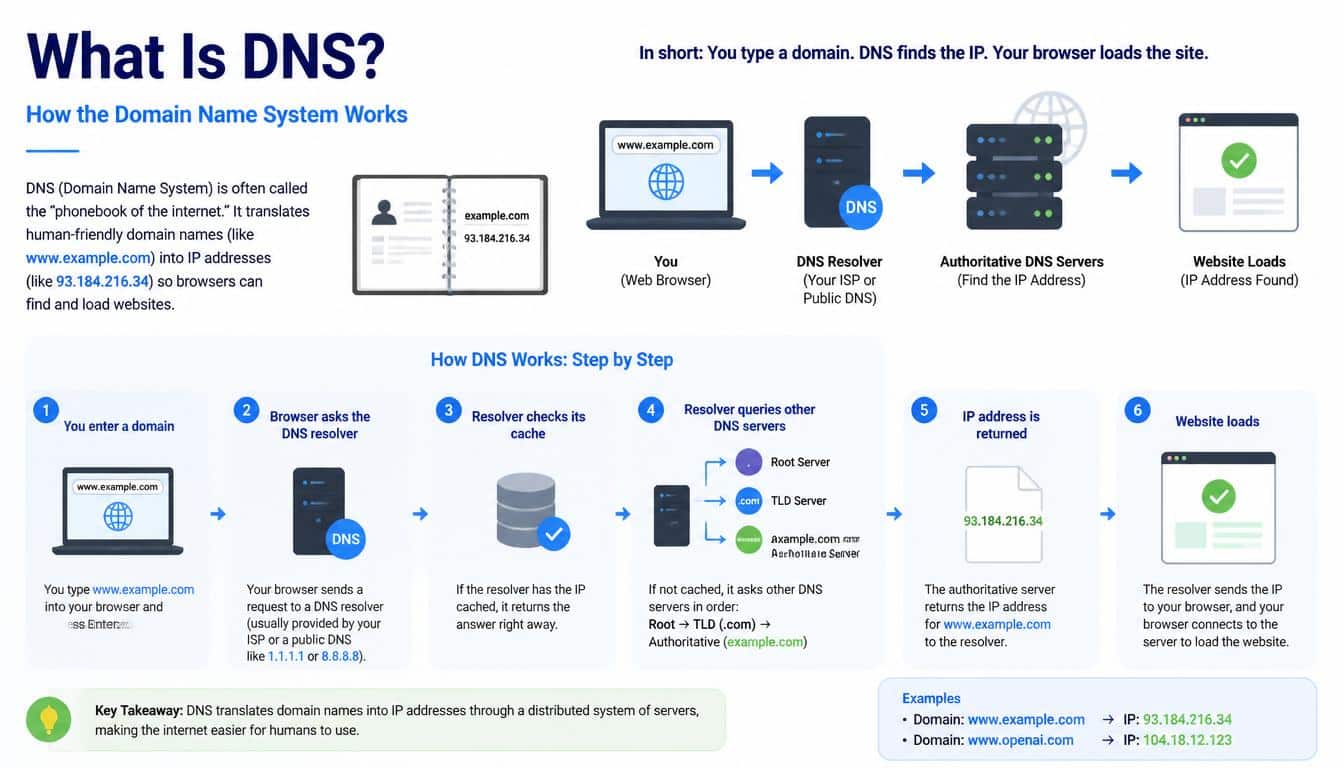
The Domain Name System is a distributed, hierarchical naming system that translates domain names into information computers can use to locate services on a network.
In the most familiar case, DNS helps a browser find the IP address associated with a website’s domain name.
Think of DNS as the internet’s address directory. You might know a local shop by its name rather than by its street coordinates, and you certainly wouldn’t want to memorize a different set of map coordinates for every business you visit.
DNS offers a similar convenience, allowing people to use recognizable names while network devices work with numerical addresses.
For example, when you enter example.com into a browser, the browser may need to discover an IP address before it can establish a connection to the website. DNS helps it find that information through a series of queries and responses.
There is one important detail, though: DNS does not download the website itself. It helps locate the destination. Other networking protocols, commonly HTTPS for modern websites, handle the secure exchange of the page’s content.
In other words, DNS is one of the essential systems that makes the internet usable without requiring everyone to become an expert in networking.
Why Does the Internet Need DNS?
Imagine a world where every website could only be reached by entering an IP address. You’d need to remember different numerical addresses for your email service,
online banking portal, favorite news website, shopping platform, and work applications. It would be possible, but hardly pleasant.
DNS separates the names people use from the addresses machines use. This arrangement also gives website owners flexibility,
because a domain name can continue to work even when the underlying server address changes, provided the DNS records are updated correctly.
Here are a few reasons why DNS matters so much:
- Easy navigation: People can remember domain names more easily than numerical IP addresses.
- Flexible infrastructure: Website owners can change hosting providers or server addresses without necessarily changing their domain names.
- Email delivery: DNS records help sending mail servers discover which servers accept email for a domain.
- Internet scalability: A distributed database allows DNS information to be managed across many organizations and servers.
- Better performance: DNS caching avoids repeating the same lookups unnecessarily, making many visits faster.
- Service management: Different DNS records can direct web traffic, identify mail servers, and support domain verification.
DNS isn’t the entire internet, of course. But without it, navigating the internet would be considerably less convenient, and managing online services would become much more complicated.
How DNS Works: A Simple Explanation
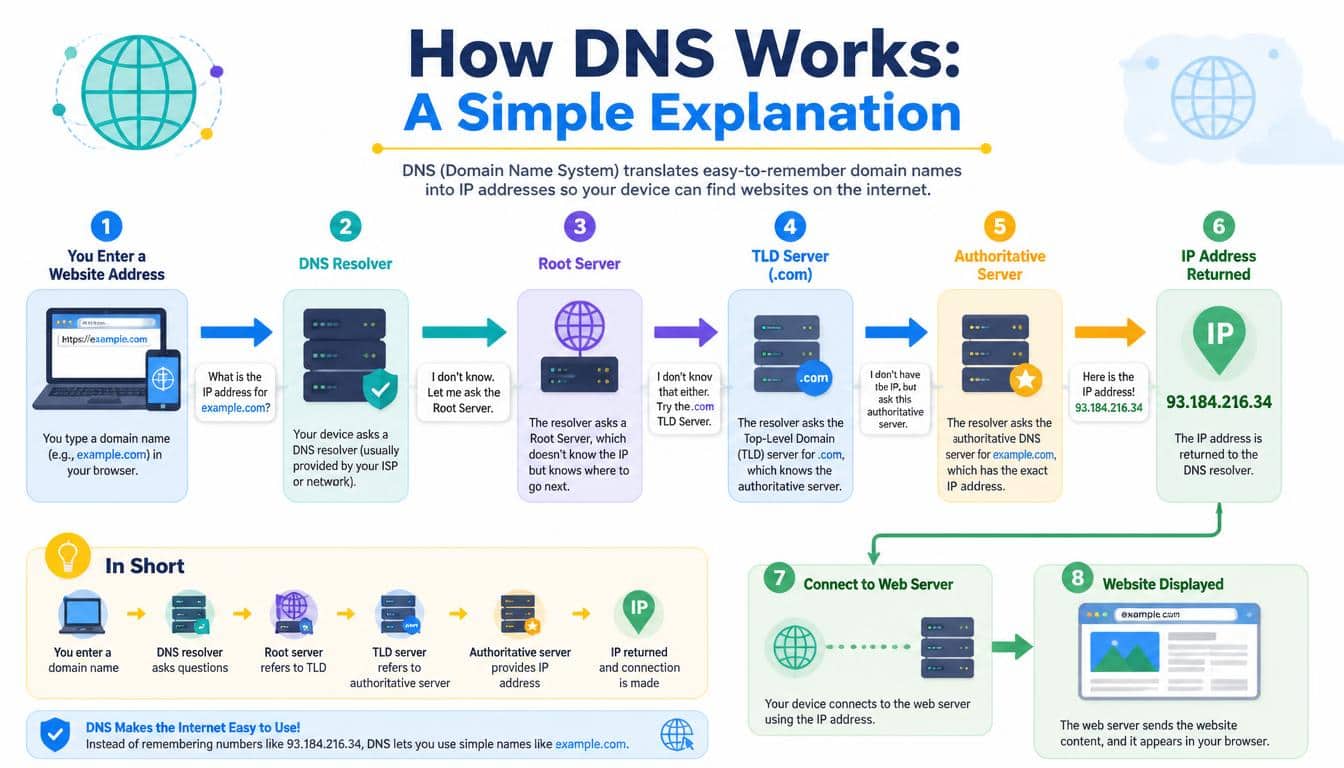
The DNS resolution process begins when a device needs information about a domain name. The device might be opening a website, connecting to an application programming interface (API), or trying to deliver an email.
Let’s use www.example.com as a fictional example. You type the address into your browser, and your device begins looking for the information required to reach the destination.
If a suitable answer is already available in a local or resolver cache, the lookup may finish quickly. If not, more servers may need to be consulted.
A typical DNS lookup can involve several important participants:
- Client device: Your computer, tablet, or smartphone initiating the request.
- DNS resolver: The service that processes the query and obtains the required answer.
- Root name server: A server that helps direct the resolver toward the appropriate top-level domain infrastructure.
- Top-Level Domain (TLD) server: A server that provides information about the authoritative name servers responsible for a domain.
- Authoritative DNS server: The server that supplies the definitive DNS information for the zone it serves.
These components work together through a hierarchy. They don’t all need to be contacted for every request, because cached information can shorten the journey dramatically.
Step 1: You Enter a Domain Name
You type a domain name into your browser, perhaps because you want to read an article or check your email. The browser needs to determine how to reach the relevant service.
Before sending a new DNS query, your device or browser may check information it already knows. Depending on the operating system and browser, this can include cached results or other locally available name-resolution information.
If a valid answer is found, the process may finish without a fresh trip through the DNS hierarchy. If no usable answer exists, the request can move to a configured DNS resolver.
Step 2: The Recursive Resolver Takes Over
A recursive DNS resolver handles lookup requests on behalf of clients. It is often provided by an Internet Service Provider (ISP), a company network, or a public DNS service.
The resolver checks its own cache to see whether it already has a valid answer. If the information is missing or has expired, it may need to query other DNS servers.
This is where the resolver earns its keep. Rather than asking you to contact several servers yourself, it handles the work and returns the result when it has enough information.
Step 3: The Root Name Server Points the Way
If the resolver needs to discover the answer from scratch, it can query a root name server. The root server generally does not provide the final IP address for the website.
Instead, it directs the resolver toward the appropriate TLD name servers. For a domain ending in .com, that means the infrastructure responsible for the .com namespace.
The DNS root system is globally distributed, using many server instances to provide resilience and reliable service. There are 13 named root server identities, commonly labeled A through M, but that does not mean there are only 13 physical machines. Anycast and distributed deployments allow these identities to be served from numerous locations.
Step 4: The TLD Server Identifies the Next Destination
The resolver then contacts a suitable TLD name server. This server holds information that helps identify the authoritative name servers for the domain in question.
For example, a lookup involving example.com can be directed toward the authoritative name servers responsible for example.com.
This process is known as DNS delegation. It allows responsibility for different portions of the domain namespace to be distributed among different operators, rather than forcing one central database to maintain every record on the internet.
Step 5: The Authoritative DNS Server Responds
Next, the resolver queries the authoritative DNS server. This server holds the DNS information for the relevant zone and can return the requested record, such as an A record containing an IPv4 address.
For our fictional example, the response might contain 93.184.216.34, an illustrative IPv4 address used here to explain the process. The actual response depends on the domain’s configuration and may differ across locations, networks, or record types.
The resolver can cache the answer according to its Time To Live (TTL), subject to DNS rules and resolver policies.
Step 6: Your Browser Connects to the Destination
Finally, the resolver returns the answer to your device. The browser can then use the resulting address to establish a network connection to the intended server.
For a typical secure website, the browser negotiates an HTTPS connection and requests the required page or application resources. The web server sends the content, and the page begins appearing on your screen.
That’s the journey behind a simple click. It can involve several independent systems, yet the entire process often happens quickly enough that you hardly notice it.
Understanding the DNS Hierarchy
The DNS hierarchy is organized like an upside-down tree. At its top sits the DNS root, followed by top-level domains and then individual domain names and their subdomains.
Consider this example:
- Root: .
- Top-level domain: .com
- Registered domain: com
- Subdomain: example.com
The final dot in a fully qualified domain name represents the root, although browsers and everyday users rarely need to type it.
This hierarchy makes DNS manageable on a global scale. Different organizations can operate different zones, and each zone can delegate responsibility for certain subdomains when appropriate.
A DNS zone is an administrative portion of the namespace managed by a particular operator. It may cover an entire domain or only part of one, depending on how delegation is configured.
For website owners, this structure explains why domain registration and DNS hosting are related but separate services. A registrar manages the registration of a domain, while DNS hosting provides the records that tell the internet how to find associated services.
What Are DNS Records? The Most Important Types Explained
DNS records are individual entries that contain information about a domain. Each record type serves a particular purpose, and choosing the correct type is an important part of website and email configuration.
Different DNS providers may display records in slightly different interfaces, but the underlying concepts remain broadly consistent.
A Record
An A record maps a hostname to an IPv4 address. If a website is hosted at a server with an IPv4 address, an A record may tell DNS resolvers where to find it.
For example, www.example.com could have an A record pointing to a configured IPv4 address. The value must match the intended destination, otherwise visitors might be directed to the wrong server.
AAAA Record
An AAAA record maps a hostname to an IPv6 address. IPv6 provides a much larger address space than IPv4 and is an important part of modern internet infrastructure.
A domain can have both A and AAAA records, allowing compatible clients to use IPv4 or IPv6 connectivity as available.
CNAME Record
A CNAME record creates an alias from one hostname to another canonical hostname. For example, www.example.com might point to example.com through a CNAME record.
The resolver follows the alias to find the relevant address information. However, traditional CNAME records generally cannot coexist with other ordinary record types at the same owner name, which is why using one at a zone apex can cause configuration problems.
MX Record
An MX record identifies the mail servers responsible for receiving email for a domain. It can include a priority value that helps sending mail servers choose among multiple destinations.
If MX records are missing or incorrect, email delivery can fail even while the website continues to work perfectly. The two services use DNS, but their records serve different purposes.
TXT Record
A TXT record stores text associated with a domain. It is frequently used for domain verification and email authentication.
For example, SPF (Sender Policy Framework) and DKIM (DomainKeys Identified Mail) rely on DNS-published information to help receiving systems assess whether email is authorized and whether a message’s signed content can be validated.
TXT records can also support third-party service verification. Their values should be copied carefully, because a tiny formatting mistake can cause verification to fail.
NS Record
An NS record identifies the name servers responsible for a DNS zone. These records are central to delegation, helping resolvers discover where authoritative information can be obtained.
Incorrect NS records can leave a domain pointing toward servers that do not contain the required zone data, resulting in lookup failures or inconsistent responses.
SOA Record
An SOA (Start of Authority) record contains important metadata about a DNS zone, including its primary name server field, administrative contact information in DNS format, a serial number, and timing parameters.
The serial number is especially important in traditional primary-secondary DNS arrangements because it helps secondary servers determine whether zone data has changed.
PTR Record
A PTR record supports reverse DNS lookups, mapping an IP address to a domain name. This is the reverse direction of a common A or AAAA lookup, though it does not automatically prove that the domain owns or controls the address.
Reverse DNS is useful in network administration, diagnostics, and some email-delivery checks.
ALIAS and ANAME Records
ALIAS and ANAME records are provider-specific features that can offer alias-like behavior at a domain apex. They are not standard DNS record types in the same way as A, AAAA, and CNAME.
Some DNS providers use these features to resolve a target hostname and publish suitable address records. Their behavior varies, so check your provider’s documentation before relying on them.
DNS Servers: Who Does What?
Not every DNS server performs the same job. Understanding the differences makes the DNS lookup process easier to follow and helps explain why changing one setting may not fix every DNS problem.
- Recursive resolver: Obtains answers on behalf of clients, often using its cache and querying other servers when necessary.
- Root name server: Directs resolvers toward the relevant top-level domain infrastructure.
- TLD name server: Provides delegation information for domains within a particular top-level domain.
- Authoritative DNS server: Supplies records for the zone it serves.
- Forwarding resolver: Passes queries to another resolver instead of performing the entire lookup independently.
A recursive resolver and an authoritative DNS server are particularly easy to confuse. The resolver’s job is to find the answer; the authoritative server’s job is to provide the official DNS data for its zone.
A public DNS resolver, such as the service available at 8.8.8.8, can be used instead of a resolver supplied by an ISP, depending on the device’s configuration. Switching resolvers can affect privacy, filtering, reliability, and lookup performance, so the choice is not purely about speed.
What Is DNS TTL and Why Does It Matter?
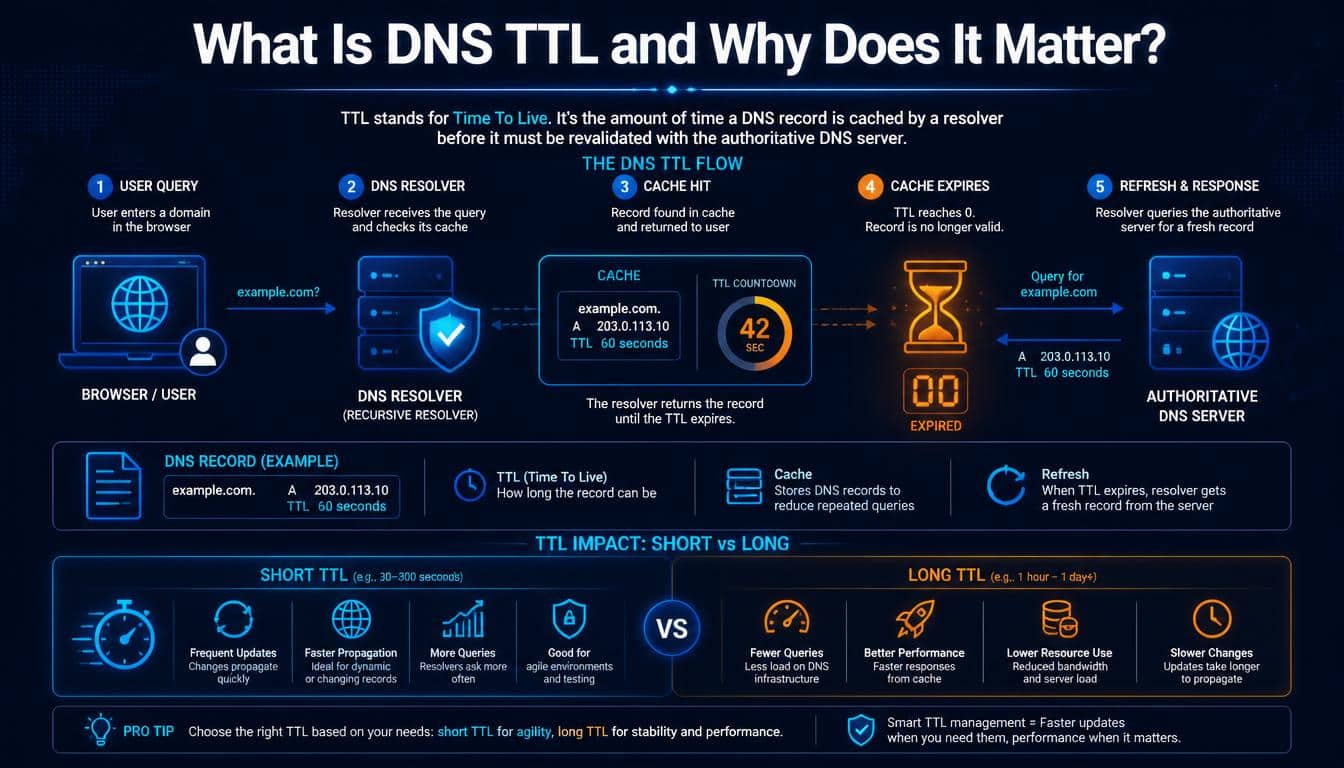
DNS TTL (Time To Live) tells compliant caching systems how long a DNS record may be retained before it should be refreshed. It is usually expressed in seconds.
For instance, a TTL of 300 means five minutes, while a TTL of 86400 means 24 hours. A shorter TTL can help clients and resolvers discover updated information sooner, but it may also increase the number of DNS queries made to authoritative infrastructure.
A longer TTL can reduce repeated lookups and improve cache efficiency, though cached information may remain in use for longer after a record changes.
There isn’t one ideal TTL for every situation. A stable website might use a relatively long TTL, while a team preparing for a planned server migration may lower the TTL in advance to reduce the expected waiting period for new answers to become widely visible.
One practical warning: lowering the TTL immediately before a change does not erase answers already cached under the previous TTL. If the old record had a long TTL, some resolvers may continue using it until that earlier cache entry expires.
DNS Propagation: Why Do DNS Changes Take Time?
DNS propagation is the everyday term used to describe the period during which DNS changes become visible across different resolvers and networks. It isn’t a single global switch that flips from old to new at the same instant.
When you update a DNS record, some resolvers may retrieve the new answer quickly, while others still hold a cached copy of the old one.
The result can be confusing: a website might work on your phone but fail on your office computer, even though both devices are trying to reach the same domain.
How long does DNS propagation take? It depends on factors such as previous TTL values, resolver behavior, delegation changes, and the accuracy of the new configuration.
Many ordinary record updates become visible within minutes or hours, but some situations take longer.
If a website remains unreachable after a DNS change, check these details before assuming the update simply needs more time:
- Confirm that the new DNS records contain the intended values.
- Check that the domain’s authoritative name servers are configured correctly.
- Verify that the registrar’s delegation matches the DNS hosting provider.
- Consider whether an old record is still cached.
- Test the domain through more than one resolver.
- Check for DNSSEC errors or conflicting records if the problem persists.
Patience helps, but so does verification. Waiting for an incorrectly configured record to propagate won’t magically make the configuration correct.
DNS Security: How DNSSEC, DoH, and DoT Help
DNS is essential, but traditional DNS queries do not inherently provide every security and privacy feature users might expect. Depending on the network and configuration, queries may be observed or manipulated in transit.
Several technologies help address these concerns, though they solve different problems.
DNSSEC: Checking DNS Data Authenticity
DNSSEC (DNS Security Extensions) uses digital signatures to help validating resolvers verify that DNS data is authentic and has not been altered without detection.
DNSSEC can help protect against certain forms of DNS spoofing and cache poisoning. It does not encrypt DNS queries, however, and it does not guarantee that a website itself is safe. A correctly authenticated DNS record could still point to a malicious website if the domain’s legitimate configuration has been compromised.
Proper configuration matters. Broken DNSSEC settings, missing signatures, or incorrect delegation records can prevent validating resolvers from accepting otherwise available DNS answers.
DNS Over HTTPS (DoH)
DNS over HTTPS (DoH) sends DNS queries through HTTPS connections. This can help prevent ordinary network observers from reading or modifying those queries in transit, although other aspects of a user’s browsing activity may still be visible.
DoH is supported by various browsers, operating systems, and DNS services. Its privacy benefits depend on the chosen resolver and the surrounding network configuration.
DNS Over TLS (DoT)
DNS over TLS (DoT) uses Transport Layer Security to encrypt DNS traffic between a client and a compatible resolver. Like DoH, it improves the confidentiality of DNS queries on the connection it protects.
The difference is mainly in how the encrypted traffic is carried. DoH uses HTTPS, while DoT uses a dedicated TLS-based DNS connection, commonly on port 853.
Neither technology makes a person completely anonymous online. They protect a particular part of the connection, not every piece of information exchanged during browsing.
DNS Performance: How Lookup Speed Affects Websites
A DNS lookup adds a step before a browser can connect to a destination, so DNS performance can influence the initial delay a user experiences.
The effect is particularly noticeable when a page depends on many different hostnames for images, scripts, fonts, APIs, or other resources.
A cache hit, when a valid answer is already available, can avoid a fresh trip to authoritative servers. A cache miss, by contrast, may require additional queries before the answer is returned.
A cached lookup can be very fast, sometimes completing in under a millisecond on a suitable local path.
A cold lookup may take several milliseconds or longer, depending on network conditions, resolver location, and the number of queries required. There is no universal timing guarantee.
Website owners can improve performance by taking a few sensible steps:
- Choose a reliable DNS hosting provider with appropriate geographic coverage.
- Use reasonable TTL values that suit the frequency of record changes.
- Avoid unnecessary hostname lookups where practical.
- Monitor DNS response times from the locations where visitors actually live.
- Consider Anycast DNS, which can direct queries toward a nearby network location.
- Remember that slow page loading can also come from the web server, application code, or network congestion.
Faster DNS can help, but it isn’t a replacement for good website performance practices. A lightning-fast lookup won’t save a page whose server takes several seconds to generate the content.
Common DNS Problems and How to Troubleshoot Them
Even a well-maintained domain can experience DNS issues. The trick is to identify whether the problem lies with the domain’s records, a resolver, the local network, or the destination server.
NXDOMAIN and DNS_PROBE_FINISHED_NXDOMAIN
An NXDOMAIN response indicates that the queried domain name does not exist in the DNS namespace, according to the responding DNS system.
In a browser, the error DNS_PROBE_FINISHED_NXDOMAIN often appears when the requested hostname cannot be resolved.
Start by checking the spelling of the domain. Then verify that the domain is registered, the required records exist, and the authoritative name servers are serving the correct zone.
If the domain was recently created or changed, review its delegation and DNS hosting settings as well.
DNS Server Not Responding
This error can indicate that a DNS resolver is unreachable, unresponsive, or unable to provide an answer in the expected time.
Try checking whether other websites work, restarting the network connection if appropriate, and testing with another trusted resolver. If only one device is affected, the issue may be local to that device rather than the entire network.
Website Unreachable After a DNS Migration
A website may stop resolving correctly after a DNS migration if records were omitted, the registrar still points to old name servers, or the new DNS zone contains incorrect values.
Before changing settings repeatedly, compare the old and new DNS configurations. Include website records, mail records, verification TXT records, and any important subdomains.
If email delivery matters to the domain, remember that moving website hosting does not mean MX, SPF, or DKIM information can safely be ignored.
DNS Cache Problems
A stale cache can make a domain appear to point to an old destination. Flushing the local DNS cache may help if the outdated answer is stored on your device, but it won’t clear caches maintained by every resolver across the internet.
For more detailed diagnosis, administrators can use tools such as nslookup, dig, and host to inspect DNS answers, record types, and authoritative responses.
Incorrect Delegation or DNSSEC Configuration
A domain can have correct-looking records in a DNS dashboard and still fail because its parent delegation points to different name servers. Similarly, DNSSEC configuration errors can cause validating resolvers to reject responses.
Check the records served by the authoritative servers, compare them with the delegation published by the parent zone, and inspect DNSSEC validation results where applicable.
The key lesson is simple: a DNS problem should be investigated systematically rather than treated as a mysterious internet failure.
DNS vs. DHCP: What Is the Difference?
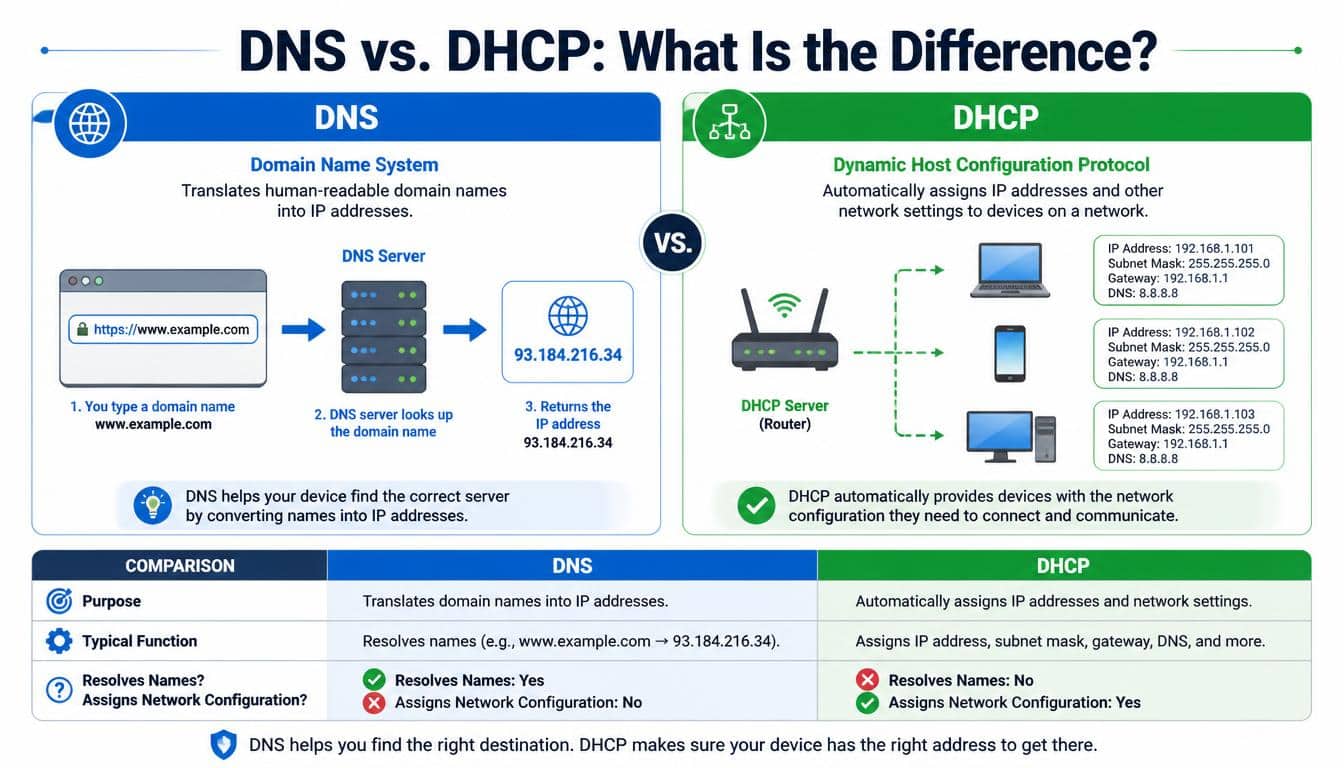
DNS and DHCP (Dynamic Host Configuration Protocol) both support everyday networking, but they have different responsibilities.
DNS helps devices find services by translating names into DNS information. DHCP, on the other hand, can automatically provide network configuration to a device, including an IP address, subnet information, a default gateway, and often the address of a DNS resolver.
Imagine connecting your laptop to a home Wi-Fi network. DHCP may help your laptop obtain the network settings it needs to communicate. Later, when you open a website by name, DNS helps it discover the destination’s address.
The two technologies often work together, but they are not interchangeable. Changing your DHCP settings may affect which DNS resolver your device uses, while changing a website’s DNS records affects how that domain is resolved.
Understanding the distinction is particularly useful when troubleshooting a network where the Wi-Fi connection appears healthy but websites still fail to load.
Reverse DNS Lookup: Finding a Name From an IP Address
Most familiar DNS lookups begin with a domain name and return address information. A reverse DNS lookup works in the opposite direction, using an IP address to look for a corresponding name through PTR records.
For IPv4, reverse lookups use the in-addr.arpa namespace. IPv6 reverse lookups use ip6.arpa.
Reverse DNS is useful for network diagnostics, server administration, and some email systems that check whether sending servers have sensible reverse DNS configuration.
However, a successful reverse lookup does not prove that the returned domain is trustworthy or that it is the only name associated with the address.
One IP address can serve many websites, and reverse DNS often reflects a server operator’s chosen hostname rather than every domain hosted on that machine.
A Practical DNS Checklist for Website Owners
If you own a website, blog, online store, or business domain, you don’t need to memorize the entire DNS specification. A handful of good habits can prevent many common problems.
- Keep a record of important DNS entries before making major changes.
- Confirm the authoritative name servers at your registrar and DNS provider.
- Check A and AAAA records when configuring a website.
- Verify MX, SPF, DKIM, and other relevant email records separately.
- Use a TTL appropriate to how frequently your DNS information changes.
- Plan DNS migrations in advance, especially when email and business applications depend on the domain.
- Protect access to your registrar and DNS hosting account with strong authentication.
- Consider DNSSEC when your provider and configuration support it, and ensure that signatures and delegation remain valid.
- Test changes from more than one resolver rather than relying on a single device.
- Keep a rollback plan for critical infrastructure changes.
Most DNS mistakes are not especially dramatic at first. A missing record, an old IP address, or a forgotten email entry can quietly disrupt a business. A little preparation goes a long way toward keeping things running smoothly.
The Future of DNS: A More Secure and Resilient Internet
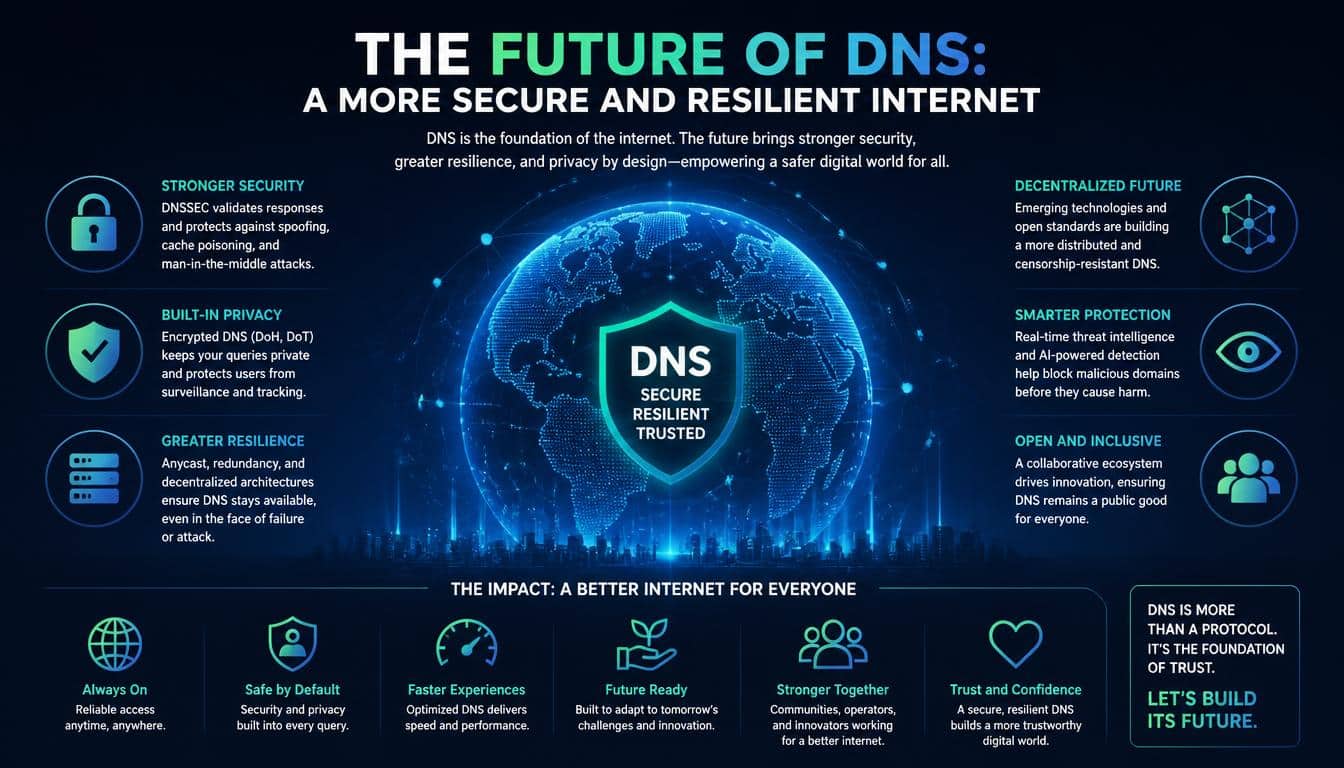
DNS continues to evolve as internet services become more distributed and security expectations grow. Encrypted DNS protocols, better monitoring, improved resolver infrastructure, and wider use of IPv6 all contribute to how names are resolved today.
Large-scale DNS operators also use techniques such as Anycast routing to serve users from geographically distributed locations. This can improve response times and resilience, although the benefits depend on network design and routing conditions.
At the same time, DNS administration is becoming more closely integrated with cloud hosting, content delivery networks, automated certificate systems, and modern application platforms. A single domain may have records that connect multiple services maintained by different providers.
These developments don’t change DNS’s basic purpose. The system still helps computers find the destinations associated with names, but the infrastructure around that process continues to become more sophisticated.
For users, that means a familiar experience: type a name, press Enter, and expect the internet to respond. Underneath that simplicity is a constantly maintained global system, and its reliability depends on thousands of organizations managing their parts correctly.
Frequently Asked questions
How dns works
DNS (Domain Name System) translates human-readable domain names, such as example.com, into IP addresses that computers use to connect to websites. It works by querying DNS servers and returning the correct IP address to the user’s browser.
DNS mean
DNS stands for Domain Name System. It is the internet’s naming system that connects domain names with their corresponding IP addresses, making websites easier to access without memorizing numeric addresses.
DNS working diagram
A DNS working diagram illustrates how a browser finds a website’s IP address through the DNS resolver, root server, TLD server, and authoritative name server before connecting to the website.
How does dns work
When you enter a domain name in your browser, DNS checks the local cache and queries DNS servers if needed to find the correct IP address. The browser then uses that IP address to connect to the website’s server.
DNSflow
The DNS flow typically follows this sequence: Browser → DNS Resolver → Root Server → TLD Server → Authoritative DNS Server → IP Address → Website. Cached DNS results can shorten this process by returning the IP address immediately.
Read More: https://gracethemes.com/how-to-update-motherboard-bios/
Conclusion: DNS Makes the Internet Easier to Navigate
So, what is DNS, and how does the Domain Name System work? It is the distributed naming system that helps translate memorable domain names into the information computers need to locate internet services.
Through recursive resolvers, root servers, TLD servers, authoritative name servers, and cached records, DNS connects a name entered into a browser with the next step in reaching the intended destination.
Understanding DNS resolution, record types, TTL, propagation, security, and troubleshooting gives you more than technical knowledge.
It helps you make better decisions when configuring a website, moving a domain, protecting email delivery, or diagnosing a connection problem.
The next time a website opens almost instantly, spare a little thought for the quiet work happening behind the screen.
DNS doesn’t usually ask for attention, and when everything is working well, you may never notice it at all. Yet this invisible directory helps billions of devices find their way around the internet, one name and one query at a time.
That is the beauty of good infrastructure: complicated systems working together to make something difficult feel wonderfully ordinary. And once you know how DNS works, the internet seems a little less mysterious and a whole lot more understandable.
