

What Does HTML Stand For?
Have you ever opened a website, clicked a link, read an article, or watched a video online and wondered what makes everything appear in the right place? Behind almost every webpage you visit is a language quietly doing an important job.
It may not be as visible as colourful buttons, beautiful images, or attractive animations, but without it, the internet would look like a rather confusing collection of scattered information.
That language is HTML, one of the most important foundations of the modern internet.
If you have searched for what does HTML stand for, you are probably looking for more than just four expanded letters.
Perhaps you are a student beginning your coding journey, someone interested in website creation, or simply a curious internet user who wants to understand how websites work.
Whatever brought you here, the good news is that HTML is much easier to understand than its technical name might suggest.
HTML stands for Hypertext Markup Language. It provides the basic structure of webpages, allowing browsers to understand where headings, paragraphs, images, links, tables, and other content belong.
Think of a website as a house. HTML provides the walls, rooms, doors, and basic arrangement, while CSS adds the paint, decoration, and visual personality. JavaScript brings movement and interactive features into the picture.
Let’s explore the meaning of HTML, how it works, its essential elements, and why learning this language can open interesting opportunities in the world of technology.
What Does HTML Stand For? Understanding the Full Form
The HTML full form is Hypertext Markup Language. Although the name sounds complicated at first, each word explains something useful about how the technology works.
- Hypertext: Refers to text containing links that connect one webpage or document to another. These links make it possible to move around the internet without starting from scratch every time.
- Markup: Means using special tags to identify and organize different types of content, such as headings, paragraphs, images, and lists.
- Language: Refers to a defined system of rules and instructions that browsers can understand and interpret.
Put these three meanings together, and the purpose becomes quite clear.
HTML is a markup language used to organize information on websites. It tells a web browser what different pieces of content represent, rather than directly controlling every visual detail.
For example, when a developer wants to display a heading, they use a heading element. When they want to create a clickable link, they use an anchor element. These instructions help browsers present information in an understandable format.
Interestingly, HTML is not technically a programming language because it does not contain the traditional programming logic used to calculate values, make decisions, or perform complex operations. Its primary responsibility is describing webpage structure.
What Is HTML? A Simple Explanation for Beginners
Imagine opening a newspaper. You immediately recognize the headline, paragraphs, photographs, captions, and advertisements because everything follows a recognizable structure.
A webpage works in a similar way.
HTML (Hypertext Markup Language) organizes the different parts of a webpage so that browsers can display them properly.
Without this structure, a website would struggle to communicate which information is a heading, which section contains an image, and where a particular link should appear.
For beginners, the easiest way to understand what is HTML is to think of it as the skeleton of a website.
It creates the foundation upon which other technologies build more advanced experiences.
For instance, a simple HTML document can contain:
- A main heading introducing the webpage.
- Paragraphs explaining the subject.
- Images supporting the written content.
- Links connecting visitors to other pages.
- Lists presenting information in an organized manner.
- Forms allowing visitors to enter information.
HTML is used across personal blogs, business websites, educational platforms, online stores, news portals, and web applications. Even the most visually impressive websites rely on some form of HTML structure.
A Brief History of HTML and Its Development
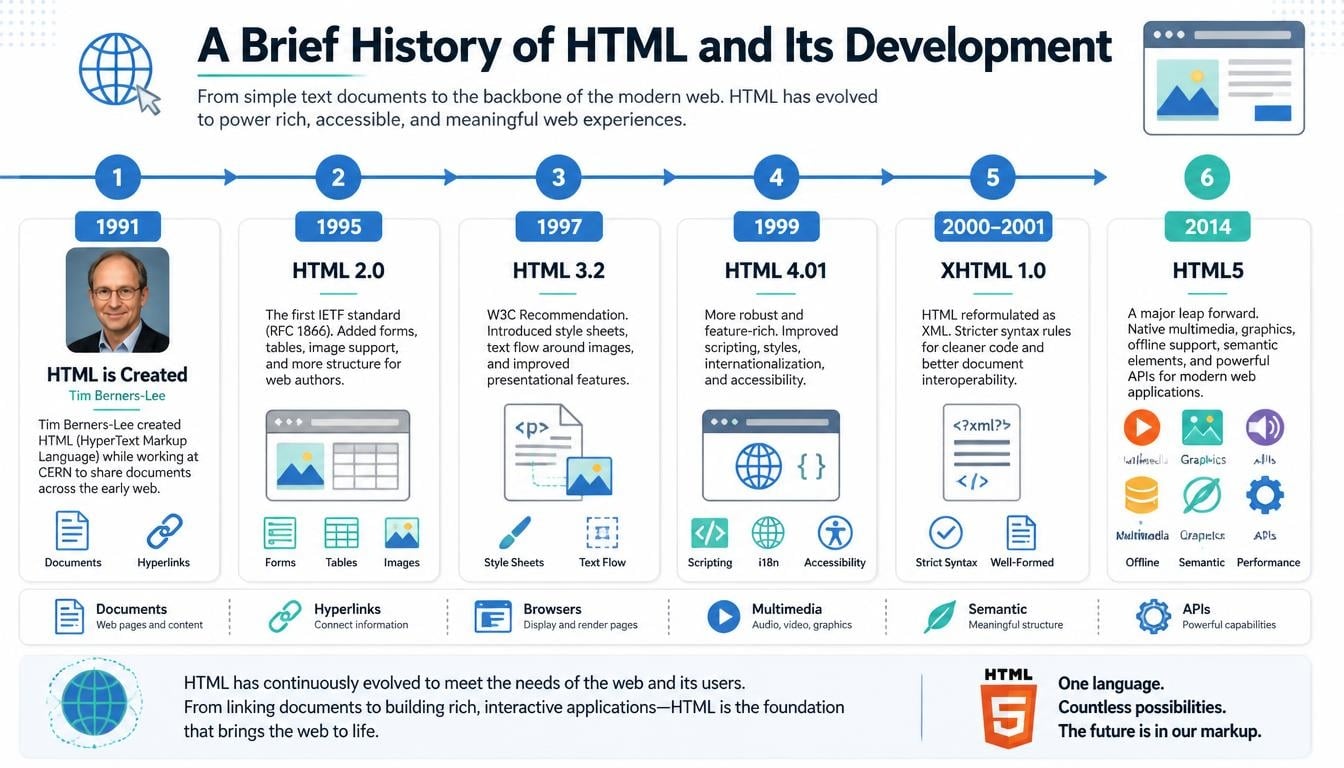
The story of HTML began with an idea that changed how people shared information.
In 1989, British computer scientist Tim Berners-Lee proposed a system for sharing information through connected documents while working at CERN. This idea eventually developed into the World Wide Web.
HTML became one of the essential technologies behind that vision.
The first version was relatively simple compared with what developers use today. It provided basic ways to organize documents and connect information through hyperlinks. Over the years, the language developed to support richer content and more sophisticated website experiences.
Some important stages include:
- HTML 1.0: Introduced the early foundations of webpage structure and hyperlinks.
- HTML 2.0: Helped establish a more standardized version of HTML.
- HTML 3.2: Expanded support for tables, scripting, and additional presentation features.
- HTML 4.01: Improved document structure and introduced stronger support for accessibility and styling through CSS.
- XHTML: Brought stricter XML-inspired syntax rules to HTML documents.
- HTML5: Introduced important modern capabilities, including native audio, video, semantic elements, and improved support for web applications.
Today, HTML continues to evolve through the work of web standards organizations and browser developers. The modern HTML standard is maintained as a living standard rather than being limited to occasional major numbered releases.
How Does HTML Work Behind a Website?
Have you ever wondered what happens after you type a website address into your browser and press Enter?
A surprisingly interesting process takes place in just a few moments.
Your browser requests the webpage from a server. The server sends the necessary files, which may include an HTML document, CSS stylesheets, JavaScript files, images, and other resources.
The browser then reads the HTML document and builds a structured representation of the webpage. It uses the CSS rules to determine how elements should look and JavaScript to handle interactive behaviour.
Here is a simplified explanation:
- HTML describes the content and structure.
- CSS controls colours, spacing, typography, and layout.
- JavaScript adds interactive and dynamic functionality.
- The web browser interprets these resources and displays the resulting webpage.
For example, imagine visiting a cooking website.
HTML identifies the recipe title, ingredient list, preparation instructions, and photographs. CSS makes the page attractive, while JavaScript might allow visitors to adjust ingredient quantities or open interactive cooking instructions.
This teamwork is one reason modern websites can offer such rich experiences.
Understanding HTML Tags, Elements, and Attributes
To understand the HTML basics, it is important to become familiar with three terms: tags, elements, and attributes.
They may sound similar, but each has a slightly different meaning.
What Are HTML Tags?
HTML tags are special keywords written inside angle brackets. They help browsers identify the type of content being presented.
For example:
HTML
Wrap linesCopy codePreview
<h1>Welcome to My Website</h1>
In this example:
- <h1> is the opening tag.
- </h1> is the closing tag.
- The words between them represent the heading content.
Tags are the basic building blocks used to organize webpage information.
What Are HTML Elements?
An HTML element generally consists of an opening tag, its content, and a closing tag.
For example:
HTML
Wrap linesCopy codePreview
<p>Learning HTML is a great starting point.</p>
The entire structure is called a paragraph element.
Some elements, such as images and line breaks, do not require separate closing tags in HTML.
What Are HTML Attributes?
Attributes provide additional information about an HTML element.
Consider this example:
HTML
Wrap linesCopy codePreview
<a href=”https://example.com”>Visit Website</a>
Here, href is an attribute that identifies the destination of the link.
Attributes can define image descriptions, links, identifiers, language information, accessibility details, and many other properties.
Understanding the relationship between HTML tags and attributes makes writing HTML code considerably easier.
What Is the Basic Structure of an HTML Document?
Every well-formed HTML document follows a recognizable structure. Beginners usually start by learning a small template that can be reused when creating new webpages.
Here is a basic HTML example:
HTML
Wrap linesCopy codePreview
<!DOCTYPE html>
<html lang=”en”>
<head>
<meta charset=”UTF-8″>
<meta name=”viewport” content=”width=device-width, initial-scale=1.0″>
<title>My First Webpage</title>
</head>
<body>
<h1>Hello, World!</h1>
<p>This is my first HTML webpage.</p>
<a href=”https://example.com”>Visit Example</a>
</body>
</html>
Let’s understand the important parts.
The <!DOCTYPE html> Declaration
This declaration tells the browser to interpret the document using modern HTML standards.
It appears at the beginning of an HTML document.
The <html> Element
The <html> element is the root element. Almost all other HTML elements are placed inside it.
The <head> Element
The <head> section contains information about the document, including metadata, stylesheet references, and the webpage title.
Most of this information is not displayed as ordinary page content.
The <title> Element
The <title> element defines the document title, which generally appears in the browser tab and can also be used in search results.
The <body> Element
The <body> element contains the main visible content of the webpage.
Headings, paragraphs, images, links, and other page content are generally placed here.
Once beginners understand these sections, the overall HTML document structure becomes much less intimidating.
Common HTML Tags Every Beginner Should Know
There are hundreds of HTML elements and related features, but you don’t need to memorize everything before creating your first website.
Start with the elements that appear frequently in ordinary webpages.
| HTML tag | Main purpose |
| <html> | Defines the HTML document |
| <head> | Contains document metadata |
| <body> | Holds visible webpage content |
| <title> | Sets the document title |
| <h1>–<h6> | Creates headings |
| <p> | Defines a paragraph |
| <a> | Creates a hyperlink |
| <img> | Displays an image |
| <div> | Groups content into a container |
| <ul> | Creates an unordered list |
| <li> | Defines a list item |
| <b> | Represents bold importance-free styling |
| <hr> | Represents a thematic break |
A few examples make these elements easier to remember.
Creating a heading:
HTML
Wrap linesCopy codePreview
<h1>My Favourite Things</h1>
Writing a paragraph:
HTML
Wrap linesCopy codePreview
<p>I enjoy learning new technologies.</p>
Adding an image:
HTML
Wrap linesCopy codePreview
<img src=”flower.jpg” alt=”A beautiful flower”>
Creating a hyperlink:
HTML
Wrap linesCopy codePreview
<a href=”https://example.com”>Explore More</a>
Creating a list:
HTML
Wrap linesCopy codePreview
<ul>
<li>Learning HTML</li>
<li>Practising CSS</li>
<li>Exploring JavaScript</li>
</ul>
These simple examples demonstrate how a few lines of code can turn ordinary text into organized webpage content.
What Is HTML5 and Why Is It Important?
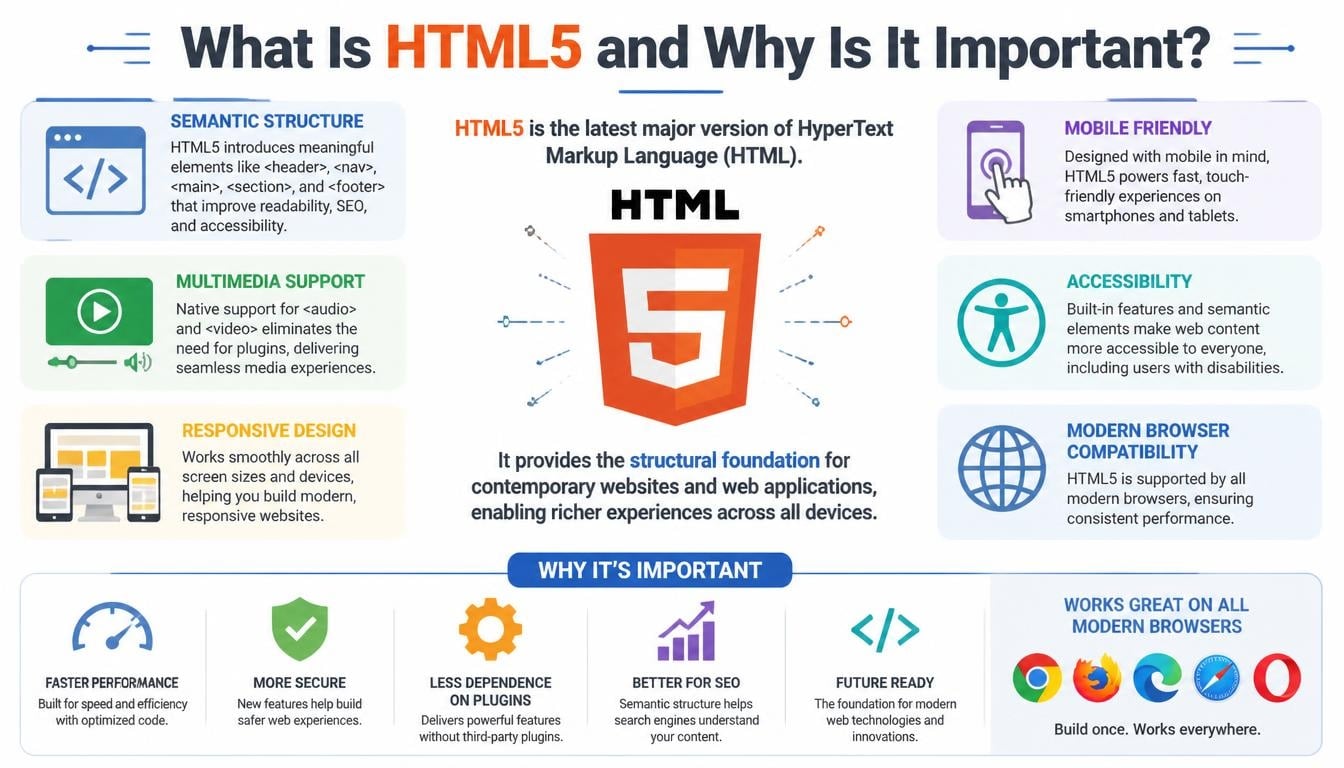
HTML5 refers to the major generation of HTML that introduced many features designed for modern websites and web applications.
Before these developments, website creators often depended on additional technologies or browser plugins to display certain types of media and interactive content.
HTML5 made many of these capabilities easier to implement directly in the browser.
Some important HTML5 features include:
- Semantic elements: Elements such as <header>, <footer>, <nav>, <article>, and <section> help describe the purpose of different webpage areas.
- Audio support: The <audio> element allows developers to include audio content without relying on external plugins.
- Video support: The <video> element makes it possible to display video directly within webpages.
- Canvas: The <canvas> element provides a drawing area that JavaScript can use for graphics and animations.
- Improved forms: Modern HTML includes additional input types and validation features.
- Mobile-friendly support: Features such as viewport metadata help developers create pages that adapt to different screen sizes.
These improvements made HTML more suitable for modern web development, where visitors expect fast, accessible, and interactive experiences.
What Is the Difference Between HTML, CSS, and JavaScript?
One of the most common questions beginners ask is whether HTML, CSS, and JavaScript perform the same job.
They are closely connected, but their responsibilities are different.
Imagine creating a birthday invitation website.
HTML would organize the invitation title, message, date, location, and photographs. CSS would make the invitation attractive with colours, fonts, spacing, and decorative layouts. JavaScript could provide an interactive countdown or a button that reveals additional information.
Here is a simple comparison:
| Technology | Main responsibility | Easy comparison |
| HTML | Content and structure | Skeleton |
| CSS | Appearance and design | Clothing and decoration |
| JavaScript | Behaviour and interaction | Movement and actions |
HTML and CSS
HTML and CSS work together to create the structure and appearance of websites.
CSS stands for Cascading Style Sheets. It controls the visual presentation of HTML elements, including background colours, typography, borders, spacing, and responsive layouts.
HTML and JavaScript
JavaScript adds functionality that goes beyond displaying static content.
It can respond to user actions, process information, update webpage content, and create dynamic web experiences.
Together, these three technologies form the foundation of front-end development.
What Is HTML Used For in Everyday Web Development?
HTML has an enormous range of practical applications. It is not limited to simple personal websites or basic online documents.
Developers use HTML in almost every area of modern website creation.
Creating Websites and Webpages
HTML provides the structure for personal blogs, company websites, educational portals, news websites, and online stores.
Every page needs a way to organize its content, and HTML provides that foundation.
Building Web Applications
Modern web applications use HTML to create their user interfaces.
For example, online banking platforms, email services, project management tools, and social media websites use HTML alongside other technologies.
Adding Images, Audio, and Video
HTML makes it possible to include multimedia content within webpages.
This is particularly useful for educational websites, online magazines, entertainment platforms, and digital portfolios.
Creating Online Forms
Registration pages, contact forms, search boxes, and feedback forms use HTML form elements.
These elements allow visitors to enter information and interact with websites.
Supporting Responsive Web Design
HTML provides the document structure, while responsive CSS adapts the layout to different screen sizes.
This combination allows websites to work across smartphones, tablets, laptops, and desktop computers.
How HTML Helps With Search Engine Optimization (SEO)
A website may contain wonderful information, but if search engines struggle to understand its structure, its visibility could suffer.
This is where HTML becomes useful for Search Engine Optimization (SEO).
Search engines use automated systems, often called crawlers, to discover and interpret website content. Well-organized HTML helps communicate the meaning and relationships between different sections of a page.
Some important SEO-related HTML elements include:
- Title tags: Provide descriptive titles for individual webpages.
- Meta descriptions: Offer summaries that may appear in search engine result pages (SERPs).
- Heading elements: Organize information into meaningful sections.
- Image alt attributes: Describe images for accessibility and help search engines understand their content.
- Descriptive links: Provide useful context about linked pages.
- Semantic HTML: Makes the purpose of webpage sections easier to understand.
For example, a blog article with a meaningful title, properly organized headings, descriptive images, and useful links is generally easier to navigate than a page containing an unorganized block of text.
However, HTML alone does not guarantee better rankings. Content quality, website performance, relevance, mobile usability, backlinks, and many other factors influence search visibility.
For an SEO specialist, understanding HTML is particularly valuable because it helps with technical audits, on-page optimization, and website structure improvements.
What Are the Main Benefits of Learning HTML?
Learning HTML is one of the most accessible ways to enter the world of website development.
Unlike some programming technologies that require an understanding of complex concepts before producing useful results, HTML allows beginners to create something visible quite early in their learning journey.
Here are some important advantages.
- Beginner-friendly: Its basic syntax is relatively straightforward, making it suitable for people with little or no coding experience.
- Free to learn: Numerous tutorials, documentation resources, and online exercises are available without requiring expensive software.
- Works across platforms: HTML documents can be opened using modern web browsers on different operating systems.
- Essential for web development: It provides the foundation for learning CSS, JavaScript, and modern front-end frameworks.
- Useful for website customization: Understanding HTML makes editing website layouts and content easier.
- Supports accessibility: Proper HTML elements help assistive technologies interpret webpage content.
- Valuable career skill: HTML knowledge is relevant to several technology and digital marketing professions.
Another lovely thing about HTML is that progress can be surprisingly satisfying. You write a few lines, open a browser, and suddenly your ideas have become something you can actually see.
Careers That Require HTML Knowledge
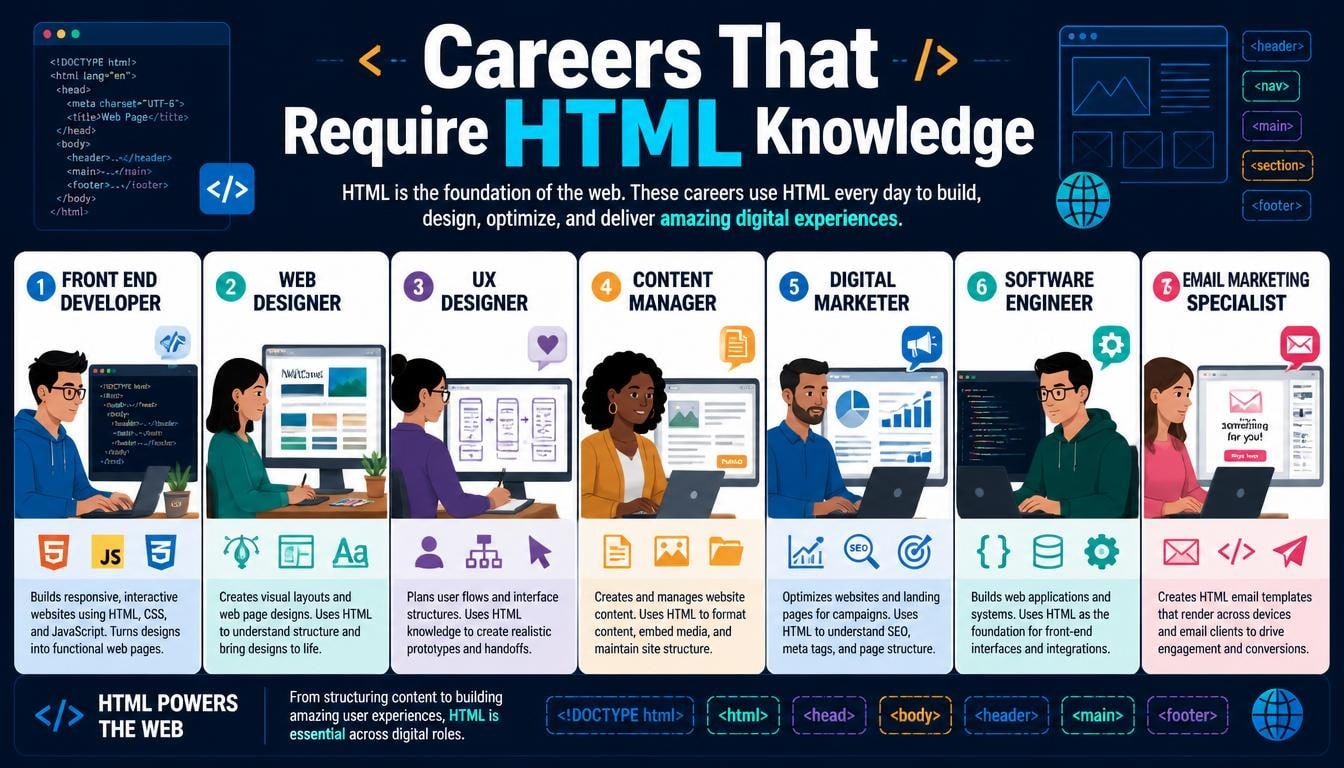
HTML is not only useful for students or hobbyists. It is also a practical professional skill used in several technology-related careers.
Although individual positions require different levels of expertise, HTML is a valuable starting point for many roles.
Web Designer
A web designer focuses on the visual presentation and usability of websites.
Knowledge of HTML and CSS helps designers understand how their layouts, typography, and design elements translate into actual webpages.
Tools such as Figma are also commonly used to create visual website prototypes.
Web Developer
A web developer builds, tests, and maintains websites and web applications.
HTML is one of the core technologies used to create the structure of these projects.
Front-End Developer
A front-end developer works on the parts of a website that visitors see and interact with.
This role commonly involves HTML, CSS, JavaScript, and frameworks or libraries such as Bootstrap and React.js.
Full-Stack Developer
A full-stack developer works with both front-end and back-end technologies.
HTML supports the front-end side, while other technologies may include Python, JavaScript-based server environments, databases such as MongoDB, and APIs.
SEO Specialist
An SEO specialist improves website visibility through technical optimization, keyword research, content improvements, and performance analysis.
HTML knowledge helps identify structural problems and improve important page elements.
UI and UX Professionals
UI designers focus on the appearance and interactive components of digital interfaces, while UX designers concentrate on the overall user experience.
Understanding HTML helps both professionals communicate more effectively with development teams.
How to Learn HTML for Beginners
Starting HTML doesn’t require an expensive computer, a complicated development environment, or years of technical experience.
A basic computer and a modern browser are enough to begin exploring the language.
Here is a practical learning approach.
Start With HTML Fundamentals
Begin with the basic document structure, tags, elements, attributes, headings, paragraphs, images, and hyperlinks.
Don’t rush through these topics. Understanding the fundamentals will make advanced concepts easier later.
Practise Writing Basic HTML Code
Reading tutorials is helpful, but writing code yourself is where the real learning happens.
Create a simple webpage about your hobbies, favourite books, educational background, or personal interests.
Make mistakes, correct them, and try again. That’s normal, and honestly, it is part of becoming comfortable with coding.
Learn CSS After HTML
Once you understand how webpages are structured, move towards Cascading Style Sheets.
Learn how to add colours, backgrounds, borders, typography, spacing, and layouts.
Eventually, explore responsive CSS so your websites work well on mobile devices.
Introduce JavaScript
After becoming comfortable with HTML and CSS, start learning JavaScript programming.
It will help you create interactive features, handle events, and develop more advanced web applications.
Build Small Projects
Practical projects turn theoretical knowledge into useful skills.
Some beginner-friendly ideas include:
- A personal profile webpage.
- A simple recipe website.
- A student portfolio.
- A basic business homepage.
- A contact form.
- A small educational website.
You can also explore learning platforms such as Coursera and official web documentation to strengthen your knowledge.
As your skills develop, Git and GitHub can help you manage code and showcase your projects.
Common HTML Mistakes Beginners Should Avoid
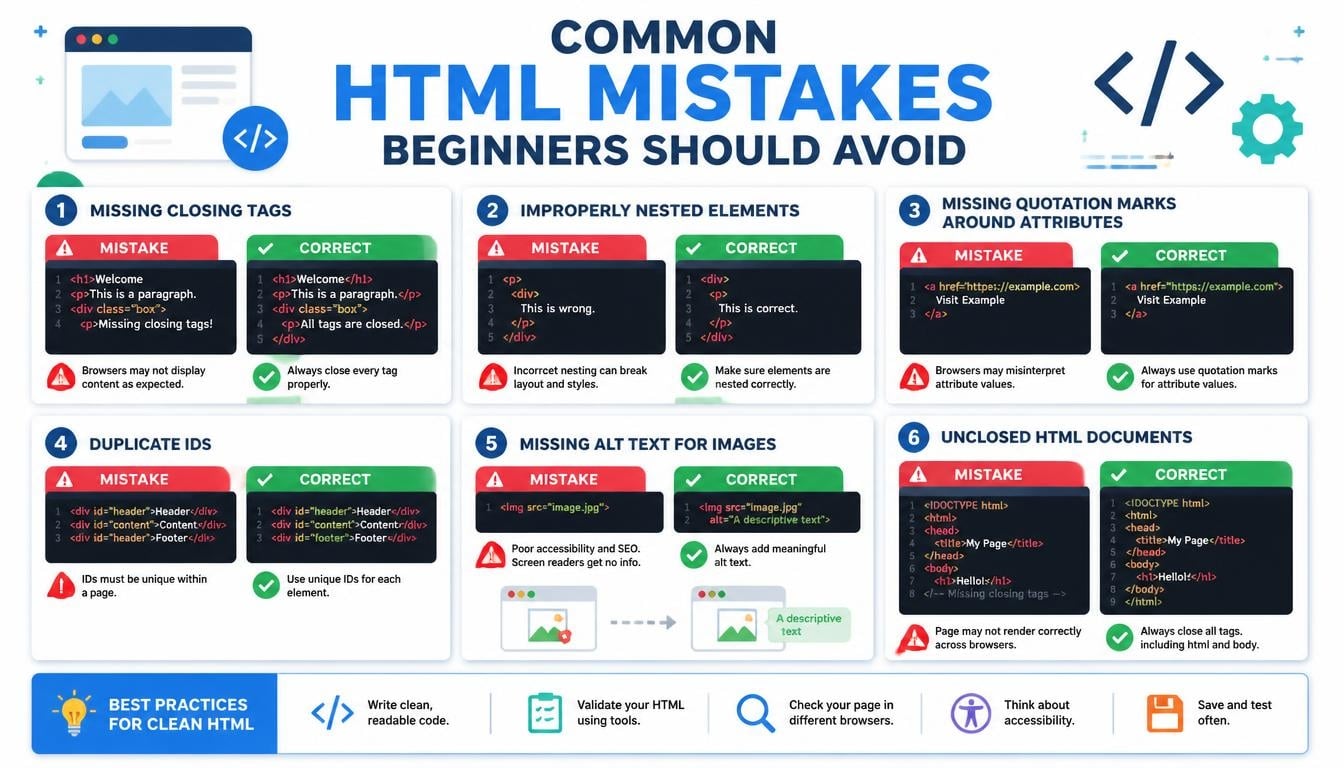
Every beginner makes mistakes. Even experienced developers occasionally overlook something small, so there is no need to feel discouraged when a webpage doesn’t behave as expected.
However, understanding common problems can save a lot of time.
- Forgetting closing tags: Some elements require closing tags, and forgetting them can affect document structure.
- Using headings incorrectly: Heading levels should represent a logical content hierarchy rather than simply being chosen for their visual size.
- Ignoring image alt text: Meaningful alternative text improves accessibility.
- Writing incorrect file paths: Images, stylesheets, and other resources may fail to load when their paths are incorrect.
- Misusing HTML elements: Choose elements according to their actual meaning and purpose.
- Ignoring mobile devices: A webpage should be tested at different screen sizes.
- Overusing <div> elements: Semantic elements often communicate content structure more clearly.
One more important habit is to keep your code organized. Proper indentation and meaningful naming make HTML documents easier to read, edit, and maintain.
Frequently Asked Questions About What HTML Stands For
What does HTML stand for in computer terminology?
HTML stands for Hypertext Markup Language. It is the standard markup language used to structure content on webpages and web applications.
Is HTML a programming language?
No. HTML is a markup language rather than a traditional programming language. It describes webpage content and structure but does not independently provide general-purpose programming logic.
What is the main purpose of HTML?
The main purpose of HTML is to organize webpage content into meaningful elements, such as headings, paragraphs, images, links, lists, and forms.
Is HTML difficult to learn?
HTML is generally considered beginner-friendly. Most learners can understand its basic structure and create simple webpages with regular practice.
What is the difference between HTML and HTML5?
HTML5 introduced major improvements to the HTML standard, including semantic elements, native multimedia support, and enhanced form capabilities. Modern HTML continues to evolve through the living standard.
Can I create a complete website using only HTML?
Yes, you can create a basic static website using HTML alone. However, CSS is generally needed for attractive layouts and styling, while JavaScript is useful for interactive functionality.
Do I need mathematics to learn HTML?
No advanced mathematics is required to understand basic HTML. You mainly need patience, attention to detail, and a willingness to practise.
What software is required to write HTML?
You can write HTML using a simple text editor or a code editor such as Visual Studio Code. A modern web browser is needed to view your webpage.
How are HTML, CSS, and JavaScript connected?
HTML provides structure, CSS controls appearance, and JavaScript adds behaviour. They work together to create modern interactive websites.
Is HTML useful for SEO?
Yes. Proper HTML structure supports search engine understanding, accessibility, and content organization. Elements such as title tags, headings, and image descriptions are particularly useful.
Read More: https://gracethemes.com/your-access-to-this-site-has-been-limited/
Final Thoughts: Why Understanding HTML Matters
So, what does HTML stand for?
It stands for Hypertext Markup Language, but its importance goes far beyond the expansion of four simple letters.
HTML is one of the fundamental technologies that makes the internet readable, organized, and accessible. It connects information, structures website content, and provides the foundation for the interactive digital experiences we use every day.
Whether you dream of becoming a web developer, want to build your own website, plan to work in digital marketing, or simply enjoy understanding how technology works, learning HTML is a worthwhile first step.
You don’t need to understand every tag on your first day. Start with a heading, add a paragraph, insert an image, and create a link. Little by little, those small pieces of code will become something much bigger.
And who knows? The simple webpage you create today might become the starting point of a skill, a career, or an idea you never imagined pursuing.
