

Two-Factor Authentication vs. Two-Step Verification: What’s the Difference?
Imagine opening your email one ordinary morning, only to discover that someone has already been there.
Your password still works, perhaps, but a stranger has read your messages, changed a few settings, or locked you out of an account you have used for years. It’s a deeply uncomfortable thought, and unfortunately, it is not as far-fetched as we might wish.
This is why online security needs more than a clever password and a little bit of luck. Two-factor authentication (2FA) and two-step verification (2SV) both add an extra checkpoint to the login process, making it harder for an unauthorized person to enter your digital life. Yet the terms are often used interchangeably, and that is where the confusion begins.
Are they actually different? Is one more secure than the other? And where do multifactor authentication (MFA), passkeys, authenticator apps, and hardware security keys fit into the picture?
Let’s untangle these concepts without drowning in technical jargon. By the end, you’ll understand how each method works, when the distinction matters, and which security choices make the most sense for your personal accounts or business.
What Is Two-Factor Authentication (2FA)?
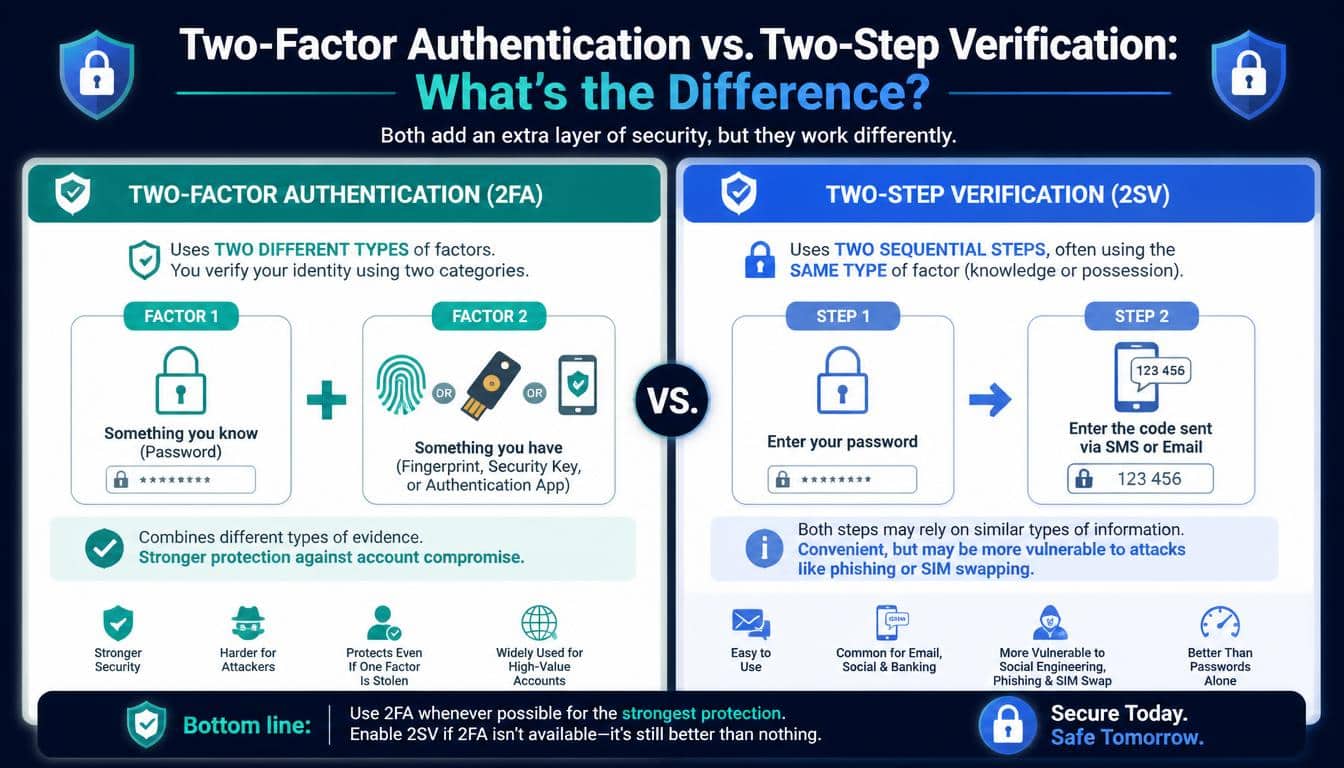
Two-factor authentication is a security method that requires a user to provide two different types of evidence to prove their identity. Instead of relying entirely on a password, the system asks for another credential belonging to a separate authentication category.
The word factor is the important part here. A password and a fingerprint are two different factors, whereas a password and a PIN are both things you know. Adding another piece of information doesn’t automatically mean you’ve added another independent factor, which is a detail worth remembering.
The three traditional authentication factors are:
- Knowledge factor: Something you know, such as a password, PIN, or security question answer.
- Possession factor: Something you have, such as a registered smartphone, security token, or hardware security key.
- Biometric factor: Something you are, such as a fingerprint or facial characteristic.
Consider logging in to your bank account with a password and then approving a notification on your registered phone. The password proves knowledge, while control of the registered device provides evidence of possession. When implemented properly, that combination qualifies as two-factor authentication.
The point isn’t to make logging in feel like passing through airport security every morning. It’s to ensure that a stolen password alone is not enough to open the door.
What Is Two-Step Verification (2SV)?
Two-step verification requires two separate steps before access is granted. These steps might involve entering a password, receiving a code, approving a prompt, or completing another verification action.
Here’s where the difference gets a little interesting. Unlike the strict definition of 2FA, the term 2SV does not necessarily guarantee that the two steps belong to different authentication categories.
For example, a service might ask you to enter a password and then answer a security question. Both steps rely on information you know, so this arrangement involves two verification steps but not two distinct authentication factors.
Another website might ask for a password followed by a code sent to your phone. That arrangement can qualify as both two-step verification and two-factor authentication, provided the second step genuinely verifies possession of the registered device or channel.
In everyday conversations, companies sometimes use 2SV and 2FA to describe the same feature. This isn’t necessarily a sign of poor security; it simply means you should look at the actual authentication method rather than judging it by the label alone.
Two-Factor Authentication vs. Two-Step Verification: The Main Difference
The easiest way to understand 2FA vs. 2SV is to remember that one term focuses on the type of evidence being used, while the other focuses on the number of verification steps.
Two-factor authentication requires two distinct authentication factors. Two-step verification requires two steps, but those steps may or may not represent different factors.
That distinction matters because security is not determined by the number of times a website asks you to do something. It depends on what each step proves, how independently the credentials are protected, and whether an attacker can bypass or intercept them.
Here is a quick comparison to make the difference clearer.
| Feature | Two-Factor Authentication (2FA) | Two-Step Verification (2SV) |
| Main requirement | Two distinct authentication factors | Two verification steps |
| Different factor categories required? | Yes | Not necessarily |
| Common example | Password plus hardware security key | Password plus security question |
| Can both terms describe one login? | Yes | Yes |
| Security level | Depends on the factors and implementation | Depends on the steps and implementation |
| Main advantage | Requires different types of identity evidence | Adds an extra checkpoint to login |
Neither acronym tells the entire security story. A well-designed two-step process can be robust, while a poorly implemented two-factor system can still leave weaknesses that an attacker may exploit.
How the Authentication Factors Actually Work
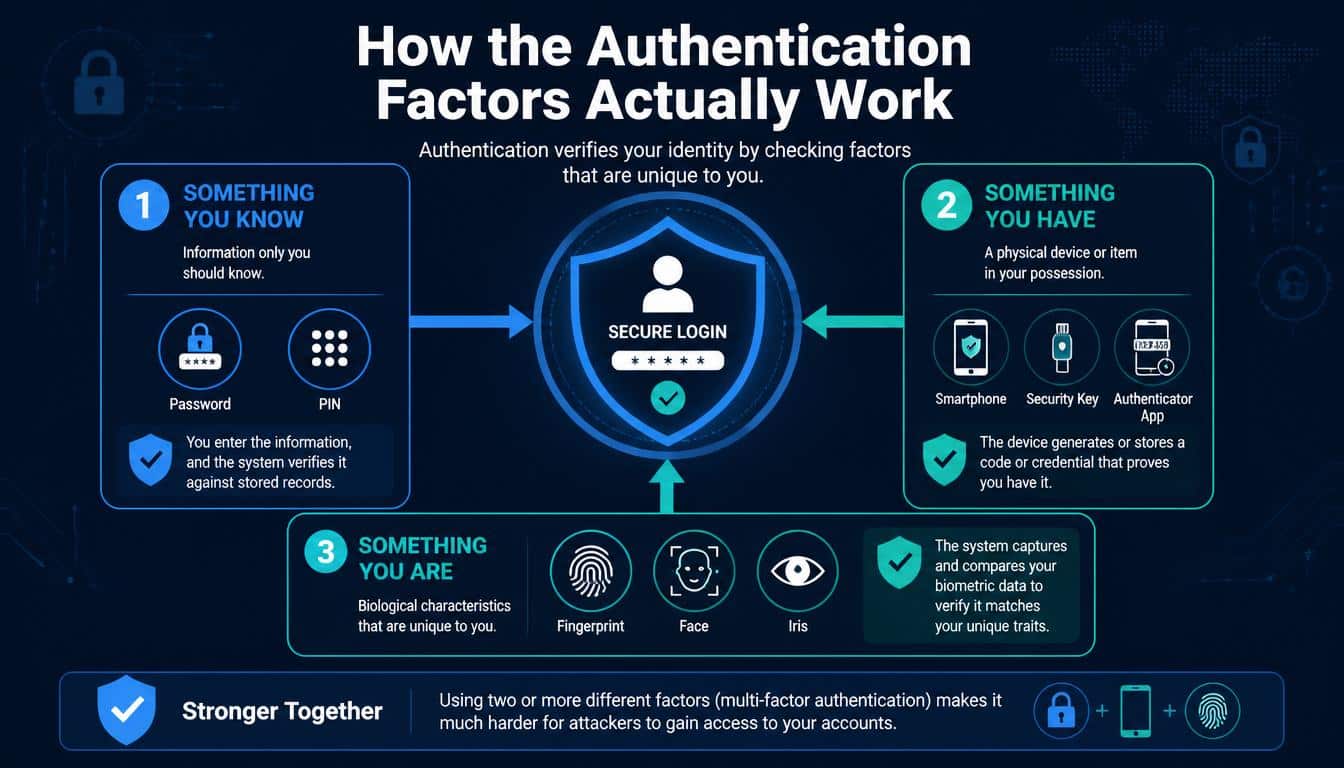
Understanding the factors makes the entire discussion much less mysterious. Once you know what each category represents, it becomes easier to judge whether a particular login process genuinely offers independent authentication factors.
Knowledge-Based Authentication: Something You Know
Passwords, PINs, and security question answers belong to this category. They’re familiar because most of us have been using them since our first email account, and they remain a common part of password-based authentication.
Unfortunately, knowledge-based credentials have a few troublesome habits. People reuse passwords, choose predictable combinations, or share personal details that may be discoverable online.
Attackers can exploit these habits through brute-force attacks, dictionary attacks, and credential reuse.
A password manager can help generate and store strong, unique passwords, but even an excellent password cannot guarantee that a login remains secure after a phishing attack or data breach.
Possession-Based Authentication: Something You Have
This category relies on control of a device or physical credential. Examples include a registered mobile phone, an authenticator app, a hardware security key such as a YubiKey, or a smart card used in an organization.
An authenticator app can generate a time-based one-time password (TOTP) that changes at regular intervals. Other systems send an OTP (one-time password) through a message or deliver a push notification asking the user to approve a login.
These methods are not equally resistant to attacks. Codes sent through SMS may be exposed through SIM-swapping or interception, while an authenticator code can still be stolen through a convincing phishing page.
Hardware security keys that use properly implemented cryptographic authentication offer stronger protection against many phishing attacks.
Biometric Authentication: Something You Are
Fingerprint recognition and facial recognition are familiar examples of biometric authentication. Your device may scan your fingerprint or face before allowing access to an account or releasing a cryptographic credential.
There is a useful distinction here: a fingerprint or face scan used directly by an authentication system can act as a biometric factor.
But when your phone uses your fingerprint to unlock a passkey, the fingerprint usually unlocks the credential locally; the remote website receives cryptographic proof rather than your fingerprint itself.
Biometrics are convenient, although they are not magic. Systems must account for false matches, spoofing attempts, device security, and recovery procedures. Unlike a forgotten password, a compromised biometric characteristic cannot simply be replaced with a new face.
Real-Life Examples of 2FA and 2SV
The difference becomes easier to spot when we move away from definitions and look at ordinary situations. These are the kinds of login experiences people encounter while checking their messages, managing money, or working remotely.
Example One: Password and Security Question
Suppose a website asks for your password and then asks for the name of your first school.
Both answers rely on information you know. This is an example of two-step verification, but it does not meet the strict definition of two-factor authentication because the two steps belong to the same factor category.
It may also be a weak arrangement if the answer to the security question can be discovered from social media or other public information. Two questions don’t necessarily make a stronger lock.
Example Two: Password and Authenticator Code
You enter your password and open an authenticator app on your registered phone to retrieve a temporary code.
The password is a knowledge factor, and possession of the registered authenticator device provides the second factor. When correctly configured, this is both 2FA and 2SV.
It is generally a stronger approach than password-only access, although phishing-resistant methods may be preferable for accounts containing highly sensitive information.
Example Three: Bank Card and PIN
Imagine withdrawing cash from an ATM. You insert your bank card and enter your PIN.
The physical card represents possession, while the PIN represents knowledge. This is a classic example of two-factor authentication because the two pieces of evidence belong to separate categories.
Of course, the arrangement still depends on the card not being stolen and the PIN remaining secret. A person who obtains both may be able to misuse them, which is why banks also employ transaction monitoring and other protective measures.
Example Four: Password and Fingerprint
A company requires an employee to enter a password and then authenticate with a fingerprint.
If the system independently checks the password and biometric, this is a straightforward 2FA arrangement. But if the fingerprint merely unlocks a device that automatically supplies another credential, the technical details matter.
The lesson is simple: look at what the system actually verifies, not just what appears on the screen.
Is 2FA More Secure Than 2SV?
This is one of the most common questions people ask, and the honest answer is that 2FA is not automatically more secure simply because it has a different name.
Two-factor authentication provides a clear security requirement: the system must use different categories of evidence. This can reduce the chance that one compromised credential will be enough to gain access.
Two-step verification is a broader description. A service using two steps might provide excellent protection if it combines a password with a phishing-resistant security key. Another service might offer weaker protection if its second step consists of an easily guessed security question.
The actual strength of account security depends on several factors:
- Whether the authentication factors are genuinely distinct and independently protected.
- Whether a verification code can be intercepted or stolen.
- Whether the login process resists phishing and fraudulent approval requests.
- Whether recovery procedures can be abused to bypass the extra security.
- Whether the service detects suspicious logins and responds appropriately.
In practical terms, choosing a strong authentication method matters more than memorizing acronyms. If a service offers a passkey or hardware security key, that option may provide better phishing resistance than an SMS code, depending on the implementation.
Common Types of Two-Factor Authentication and Verification
Not all authentication methods offer the same balance of convenience, recovery options, and security. The right choice depends on what you are protecting and how you normally access it.
SMS Verification Codes
SMS verification sends a temporary code to your registered phone number. It is familiar and relatively easy to set up, making it a useful starting point for people who have never enabled an additional login check.
However, phone numbers can be hijacked through SIM-swapping, and messages may be intercepted in certain circumstances. SMS is generally better than relying on a password alone, but it should not be the first choice for highly sensitive accounts when stronger methods are available.
Authenticator Apps
Authenticator apps generate temporary codes without requiring a text message for every login. They can offer a useful combination of accessibility and security, particularly when compared with SMS-based verification.
The downside is that codes can still be phished in real time. Users should also plan for phone loss, device replacement, and account recovery before an emergency arrives at an inconvenient hour.
Push Notifications
Some services send a prompt to a registered device, allowing users to approve or deny a login attempt. This can be convenient because it avoids manually entering a code.
Yet repeated unexpected prompts can become dangerous if users approve them just to make the notifications stop. Organizations should consider number matching, clear login details, and controls against push fatigue to reduce this risk.
Hardware Security Keys
A hardware security key is a physical device used to authenticate a login. Modern implementations based on standards such as FIDO2 and WebAuthn can provide phishing-resistant authentication by cryptographically binding the login response to the legitimate website or service.
These keys are particularly useful for administrators, business owners, and people with access to valuable information. Keeping a properly registered backup key in a secure place can prevent a lost device from turning into a major access problem.
Recovery Codes
Recovery codes help users regain access when their usual authentication device is unavailable. They are not a substitute for a strong primary authentication method, but they can be essential when a phone is lost or an authenticator app is removed.
Store them somewhere secure and separate from the device or account they protect. A recovery code sitting in an unprotected note inside the same email account offers rather less protection than people might expect.
Passkeys and Passwordless Authentication: What Comes Next?
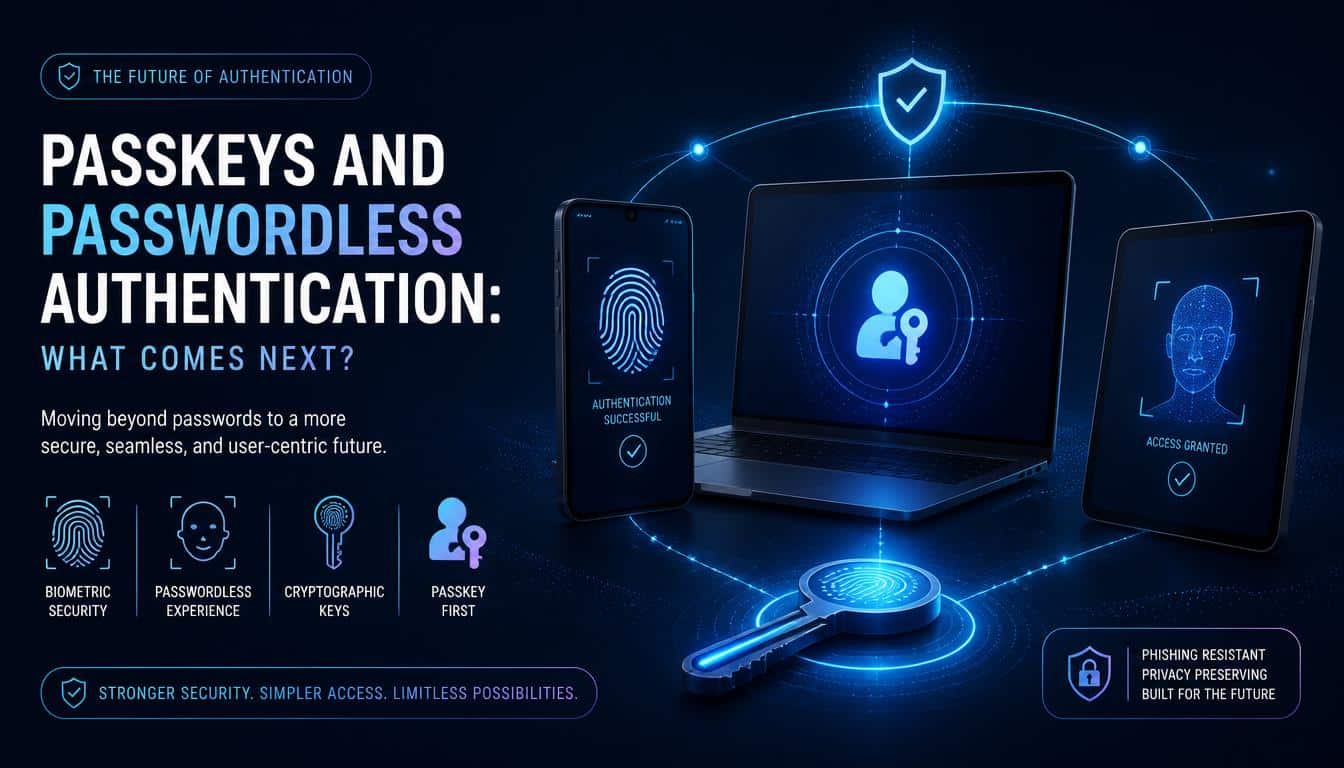
Authentication technology is gradually moving beyond the traditional combination of password plus verification code. Passkeys are an important part of that change, offering a way to sign in without entering a conventional password.
Passkeys use public-key cryptography. A device or credential manager holds a private key, while the service stores a corresponding public key. During sign-in, the system verifies a cryptographic response without requiring the private key to be sent to the website.
A passkey may be unlocked using a fingerprint, facial recognition, or a device PIN. The biometric or PIN typically unlocks the credential locally, while the passkey performs the cryptographic authentication with the service.
This approach can make passwordless authentication both easier and more resistant to phishing. Because the authentication process is tied to the legitimate website, a fake website generally cannot obtain a valid authentication response for the real one.
Passkeys do not eliminate every security concern. Device compromise, unsafe account recovery, credential synchronization, and poor implementation can still create risks.
Nevertheless, for many everyday users, they represent a substantial improvement over passwords combined with easily intercepted codes.
How Multifactor Authentication (MFA) Fits Into the Picture
Multifactor authentication (MFA) is the broader category that includes authentication requiring two or more distinct factors. Two-factor authentication is therefore a specific type of MFA.
For example, a company might require an employee to enter a password, approve a registered device, and complete an additional verification check for particularly sensitive operations. If the system uses three distinct factors, it may be described as three-factor authentication.
However, adding more steps does not necessarily mean adding more factors. A password, PIN, and security question still rely on knowledge, even though the user has completed three actions.
Businesses often implement MFA through an Identity Provider (IdP), which manages user authentication and access policies. An identity platform such as Okta or Microsoft Entra ID can help organizations enforce sign-in requirements across multiple applications, depending on their configuration and licensing.
This becomes especially useful with single sign-on (SSO), where employees access several approved applications through a central identity system.
Properly managed MFA policies can reduce exposure when credentials are stolen, while administrative controls help organizations apply consistent security requirements.
Enterprise Authentication: Protecting More Than Individual Accounts
For a business, authentication is not just a matter of helping employees remember their passwords. It is also about controlling access to customer records, financial systems, internal documents, and administrative tools.
A strong enterprise MFA policy should consider who is signing in, what they are trying to access, and how sensitive the information is. An employee reading a public-facing handbook may not need the same level of verification as an administrator changing security settings.
Organizations can use identity and access management tools to enforce authentication requirements, manage employee access, and respond when credentials appear to be compromised. An Admin Console may provide controls for enrollment, recovery settings, and policy enforcement, depending on the platform.
Some security tools also support credential risk detection, Password Health assessments, and dark web monitoring to help identify exposed or reused credentials. These capabilities can be valuable, but they complement authentication rather than replace it.
A password manager can help teams generate unique passwords, store credentials securely, and manage access to shared business accounts. For example, Dashlane offers password-management and security capabilities for individuals and organizations, with features varying by plan.
The goal is not to add every available security feature just because it exists. It’s to build a system where employees can work efficiently without leaving sensitive information exposed to unnecessary risk.
Practical Ways to Strengthen Your Account Security
You don’t need to be a cybersecurity professional to make meaningful improvements. A few careful decisions can significantly reduce the likelihood of an account takeover, and most can be completed without buying new equipment.
- Enable 2FA wherever possible. Start with your primary email, financial accounts, password manager, and work accounts.
- Prefer phishing-resistant methods. Use passkeys or hardware security keys where supported, particularly for high-value accounts.
- Avoid SMS when stronger alternatives are available. An authenticator app is often a reasonable upgrade, while a security key or passkey may provide stronger phishing protection.
- Use unique passwords. A password manager can make it easier to avoid repeating the same credentials across different websites.
- Protect recovery methods. Save recovery codes securely and review which phone numbers, email addresses, and devices can restore account access.
- Review login alerts. Unexpected authentication requests may indicate that someone knows your password or is attempting to access your account.
- Keep devices updated. Security updates help address vulnerabilities that attackers may otherwise exploit.
- Never approve a login you did not initiate. If an unexpected push notification appears, deny it and investigate rather than assuming it’s a harmless mistake.
These habits work best together. No single method can prevent every attack, but several well-chosen protections make unauthorized access considerably harder.
Common Misconceptions About 2FA and 2SV
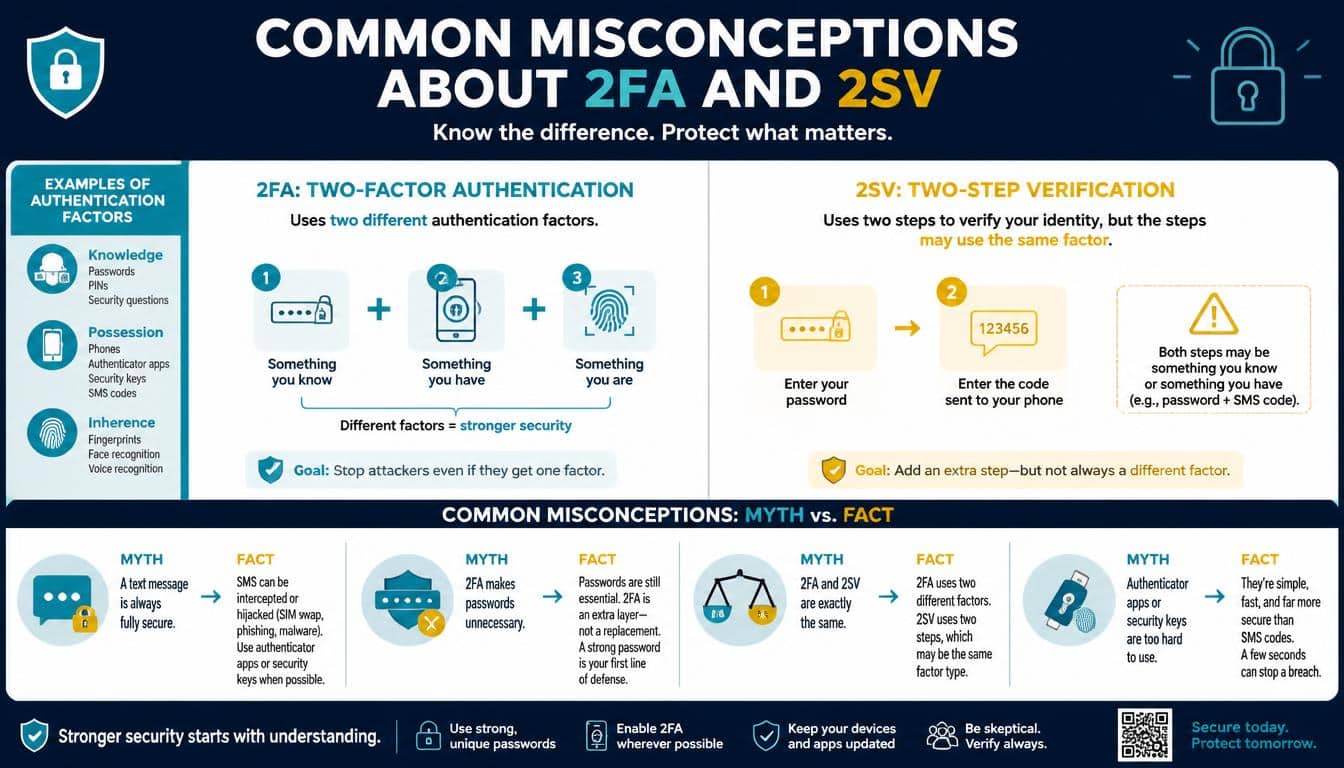
A few persistent myths make authentication more confusing than it needs to be. Clearing them up helps users choose sensible protections instead of relying on labels or assumptions.
Myth: Two-step verification always means two-factor authentication.
Not necessarily. Two steps may rely on the same category of evidence. Check whether the system actually uses distinct factors.
Myth: Every 2FA method is equally secure.
A password combined with an SMS code and a password combined with a phishing-resistant security key do not offer identical protection. The method and implementation matter.
Myth: Biometrics make an account impossible to hack.
Biometrics can improve convenience and contribute to secure authentication, but compromised devices, weak recovery processes, and other vulnerabilities may still put an account at risk.
Myth: MFA means using three or more factors.
MFA includes authentication systems using two or more distinct factors. Two-factor authentication is one form of MFA, not an alternative to it.
Myth: Once 2FA is enabled, you can stop worrying about passwords.
A strong password remains important when a service uses password-based authentication. Additional factors reduce risk, but phishing, recovery abuse, and device compromise remain possible.
Frequently Asked Questions About 2FA vs. 2SV
What is the difference between 2FA and 2SV in simple terms?
2FA requires two distinct authentication factor categories, such as a password and a hardware security key. 2SV requires two verification steps, which may use the same factor category or different ones.
Can two-step verification also be two-factor authentication?
Yes. A password followed by an authenticator code can qualify as both, provided the code verifies possession of a registered authenticator device and the system implements the factors appropriately.
Is an authenticator app safer than SMS verification?
Generally, an authenticator app is less exposed to SIM-swapping than SMS verification. However, authenticator codes can still be phished, so passkeys and properly implemented hardware security keys may provide stronger protection against phishing.
Is a passkey the same as two-factor authentication?
Not exactly. A passkey is a cryptographic authentication credential, not simply another verification step. It can support strong authentication without a conventional password, and its local unlocking process may involve a biometric or device PIN.
Do small businesses need MFA?
Yes, MFA is a valuable security measure for businesses of every size. Small organizations should prioritize email, financial services, administrator accounts, remote access, and password-management systems because these accounts can provide attackers with access to other valuable resources.
What should I do if I lose my authentication device?
Use the service’s official account recovery process and any recovery codes you saved in advance. Once access is restored, review trusted devices, replace lost authentication credentials, and check for suspicious account activity.
What is two factor vs two step?
Two-factor authentication (2FA) requires two different types of authentication factors, such as a password and a fingerprint. Two-step verification (2SV) requires two verification steps, which may use the same type of authentication factor.
Read More: https://gracethemes.com/record-the-screen-on-your-iphone-ipad-ipod-touch/
Conclusion: Choose Security That Works in Real Life
The difference between two-factor authentication vs. two-step verification comes down to a simple distinction: factors describe different categories of evidence, while steps describe the actions a user completes during verification.
Both approaches can strengthen login security, but the number of steps alone doesn’t tell you how well an account is protected.
For everyday users, enabling an additional authentication method is a worthwhile beginning. From there, consider moving toward authenticator apps, passkeys, or hardware security keys, depending on the service and the sensitivity of the account.
Businesses should also consider centralized MFA policies, secure recovery procedures, and identity management practices that make protection consistent rather than optional.
Most importantly, choose security measures that you can maintain. A complicated system that nobody understands can create its own problems, while a well-configured authentication method, backed by unique passwords and sensible recovery planning, offers meaningful protection.
Your digital identity deserves the same thoughtful care you give to the things that matter offline. Start with one important account, strengthen its login process, and then work through the rest. Small improvements, made consistently, can become a remarkably strong line of defense.
And if you’ve already made the switch to stronger authentication, share your favorite method or a useful security tip in the comments. Someone else may discover the one small change that helps them protect an account they’ve relied on for years.
