
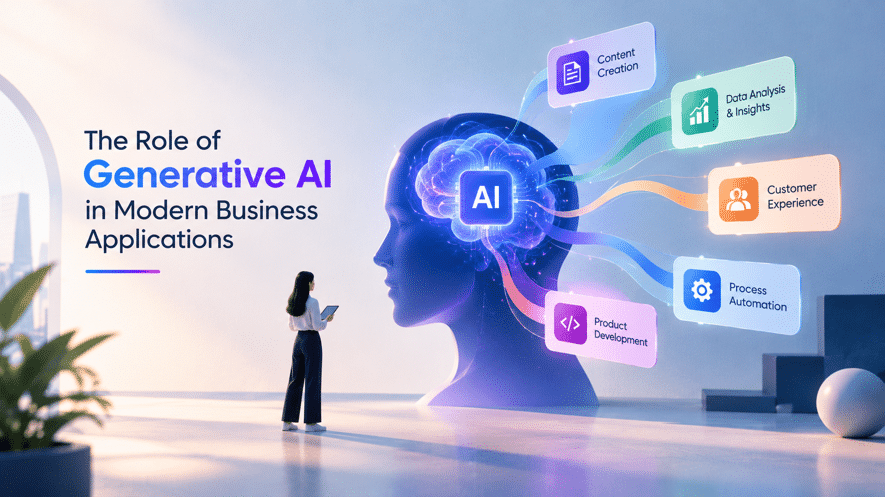
The Role of Generative AI in Modern Business Applications
Think about how much of your team’s week goes into typing out the same replies, hunting for a file on a shared drive, or boiling a forty-page report down to a paragraph. None of it is pointless, but it eats time. This is the kind of work where generative AI in business applications is starting to help in a very noticeable way.
What Generative AI Does Inside Business Software
Traditional software does what it was told to do, step by step, by rules someone coded ahead of time. Generative AI is different. You can ask it something in everyday language and it gives you something usable back: a summary, a draft email, a snippet of code, or an answer taken from your own documents.
A lot of business tools also rely on retrieval-augmented generation (RAG). Before the AI replies, it checks your approved company documents first. That means the answer comes from your material, not from a lucky guess.
Take a CRM. Before a client call, a sales rep usually has to scroll through months of notes. With AI built in, they get a short recap of the relationship and a sensible next step. An internal knowledge portal works the same way. Someone asks about the leave policy and gets an answer pulled straight from the HR documents.
You don’t have to throw out the systems you already use. The AI just makes them easier to work with.
Generative AI Business Use Cases Worth Looking At
The strongest generative AI business use cases begin with a real problem that people are already struggling with, not with the technology itself. These are the areas where companies are getting the most practical value right now.
Customer service
Support agents answer the same questions over and over. AI can draft replies, condense a long conversation into a few lines, and bring up the right help article while the agent is still on the chat. When it’s linked to approved knowledge bases and customer records, it can even suggest what to do next. That frees your people to spend their energy on tricky or sensitive cases.
This is one of the clearest applications of generative AI for customer experience, particularly for businesses that deal with a high volume of requests.
Marketing and content
Product descriptions, email variations, social posts and research summaries take up a surprising amount of time. AI can put together a first draft and shift the tone to suit different audiences. It can also go through customer feedback and summarize campaign reports. Still, a person needs to check the facts, the brand voice and compliance before anything goes live.
Software development and IT support
Developers use AI to make sense of unfamiliar code, write draft unit tests, document APIs and work through common bugs. On the IT side, an AI assistant can guide employees through basic troubleshooting so a ticket doesn’t always have to land on a human’s desk.
Finance and knowledge management
Finance teams can use AI to summarize documents, pull details from invoices and draft explanations for variances in reports. For everyone else, it makes finding something buried in thousands of internal files far quicker.
These business applications of generative AI can work in every department, provided you have proper access controls, checks on the output and human oversight.
Generative AI in Business Process Automation
Older automation tools tend to fall apart when the input is messy. Think of emails, contracts, support tickets and free-text reports. Generative AI copes with that kind of unstructured information far better.
Imagine a procurement team. A supplier sends a quote by email. The system reads it, picks out the key details, compares them with the purchasing policy and puts together a draft reply for someone to review. In HR, the same approach can summarize interview feedback or answer policy questions from approved documents.
Good generative AI in business process automation usually brings a few pieces together:
- Workflow automation takes care of tasks, approvals and system updates.
- Generative AI models read the requests and write the output.
- APIs and integrations link everything to the tools you already use.
- Business rules set limits on what the system is allowed to do.
- Human review handles exceptions and any decision that someone has to answer for.
The goal isn’t to hand over control. It’s to cut down repetitive work while the important decisions stay with you.
Benefits of Generative AI for Businesses
When it’s tied to a clear goal, the benefits of generative AI for businesses usually show up in a handful of places:
- Time saved: Less time goes into routine writing, searching and summarizing.
- Faster answers: Staff can ask questions in plain language and find information quickly, even in huge document libraries.
- Better customer response: Service teams reply sooner and don’t lose context from one conversation to the next.
- More consistent output: Shared templates, prompts and approved sources help standardize everyday work, although you’ll still need to keep an eye on quality.
- More from existing software: You can add AI to the tools you already have instead of rebuilding workflows from scratch.
All of this depends on the setup. Messy data, fuzzy processes and weak testing will hold back even the best models.
Challenges With Generative AI Adoption in Enterprises
Generative AI adoption in enterprises takes more than choosing a model and connecting an API. A few problems come up again and again.
Data security and privacy. Business tools handle customer records, financial data and confidential files. Sending that information to the wrong external service creates compliance and privacy risk. Sort out access rules, data-handling policies and vendor checks before anything goes live.
Accuracy. AI can sound completely sure of itself and still be wrong. That matters most in finance, legal and medical settings. Grounding answers in approved data, testing often and requiring a human to sign off on sensitive actions all help.
Integration. Older systems often have limited APIs or patchy data. Connecting AI to them can mean middleware, data cleanup and changes to how people do their jobs.
Cost and buy-in. Model usage, infrastructure, integration and monitoring all add up. And if employees can’t see how a tool helps them, they simply won’t use it. Start with one well-defined use case, measure the results, ask for feedback and expand only when the numbers back it up.
Enterprise Generative AI Trends to Watch
A few enterprise generative AI trends are changing how companies build and buy software:
- AI copilots: Help built right into the tools employees already use every day.
- Retrieval-augmented generation: Models connected to approved company knowledge, which makes answers more relevant and easier to trace back.
- Multimodal AI: Models that work with text, images, audio and documents together.
- AI agents: Systems that can plan and carry out a series of tasks within set permissions and supervision.
- Smaller, specialized models: Options designed for specific tasks, privacy needs and tighter budgets.
These are widening what AI-powered business applications can do, but each one still needs testing and governance. More autonomy doesn’t automatically mean better results.
If you’d like a solid background on the technology itself, the Wikipedia entry on Generative Artificial Intelligence is a good place to start.
A Practical Way to Get Started
Start with the business requirement and not the algorithm itself. Here’s how to do it in a straightforward manner:
- Pick one use case. Choose a workflow with an obvious pain point, such as internal knowledge search or support ticket summaries.
- Check your data. Make sure it’s accurate, easy to access and suitable for this purpose.
- Choose the right setup. Weigh model capability, integration options, security requirements and running costs.
- Run a small pilot. Test it with real users in realistic situations.
- Measure what happens. Track processing time, answer accuracy, adoption and cost per task.
- Keep governing it. Review outputs, check permissions and update workflows as your needs change.
If you’d like a hand putting this into practice, you can explore Generative AI solutions to see how artificial intelligence can fit into your existing software and workflows.
The Future of Generative AI in Business
Generative AI applications in enterprises would include increased integration with enterprise software, context-aware assistants, and automation of tasks that require more than one step. There would be no need to go through screens and reports; people would ask for the things they need from their systems.
However, technological solutions are not everything. Enterprises would have to secure accurate and reliable data, proper ownership, adequate security and training according to risks involved in each application. Generative AI proves most efficient in solving certain problems and assisting people in the process. Organizations that conduct thorough experiments, track their progress and develop their solution would reap the benefits from generative AI in the long term.
