
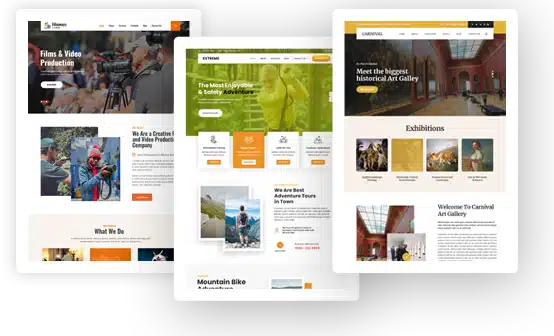
Business WordPress Themes
-
 $29
-
 $29
-
 $29
-
 $29
-
 $29
-
 $29
-
 $29
-
 $29
-
 $29
-
 $29
-
 $29
-
 $29
-
 $29
-
 $29
-
 $29


Business WordPress Themes for Startups, Agencies and Small Companies
Business WordPress themes are professionally designed website templates for companies that sell services, products or expertise. With one, a startup, a marketing agency, a consultant, a software company, a cleaning service or an online retail shop gets a professional business website that explains its services, proves the company can be trusted and turns visitors into leads.
Each design includes service sections, team bios, testimonials, pricing tables, contact forms and WooCommerce support, so a small business can look as polished online as a large enterprise.
This guide follows a clear path. It opens with key takeaways, a quick comparison of twelve themes from our business category at GraceThemes and short reviews grouped by industry. Next, it defines these themes, explains why every company needs a website and lists what a ready-made design gains you.
Planning comes next, then must-have features, a matching table and website guides for startups, agencies, consultants, finance firms, IT companies, local service businesses, retail stores, industrial firms and creative studios.
After that, we cover essential pages, the homepage, service and product pages, About pages and trust, conversion, design, accessibility and privacy, SEO, speed and security, measurement, marketing, content ideas and costly mistakes. The guide ends with a free vs premium comparison, tips on choosing, setup steps, our four price options, related designs, frequently asked questions and final thoughts.
Key Takeaways
- Business WordPress themes give companies a polished site with service pages, team sections and lead forms that are ready to customize.
- Our business category spans five pages of designs. Its first page features 12 premium themes at $29 each, plus three bundles.
- A theme built for your industry, such as coaching, finance, software, cleaning or retail, gives a faster and more convincing launch.
- Every company site needs foundational pages: home, about, services, contact, testimonials and legal pages.
- Trust signals, one clear call to action per page and a fast, mobile-friendly layout matter more than flashy effects.
- Every premium design comes with free setup, lifetime help and use on unlimited domains.
Business WordPress Themes at a Glance
These are the twelve designs on the first page of our business category. Each one is a $29 single theme. Select any name to read its details and open the live preview.
| Theme (details and live demo) | Price | Best for | Page builder | Online store | Stand-out detail |
| BrandZen PRO | $29 | Advertising and marketing agencies | Elementor | WooCommerce compatible | 1,300+ Google Fonts, Weglot and Polylang |
| DigiSell PRO | $29 | Digital marketing businesses | Elementor | WooCommerce compatible | MailChimp, services section |
| Strategist PRO | $29 | Business and life coaches, consultants, speakers | Not stated | WooCommerce compatible | WPML and Polylang, 4 page layouts |
| Persist PRO | $29 | IT and software companies, tech firms | Not stated | WooCommerce compatible | Services section, shortcodes |
| Sterling PRO | $29 | Finance, investment, loans, accountants | Elementor | WooCommerce tested | RTL support, WPML, Polylang, Weglot |
| Indostic PRO | $29 | Manufacturing, engineering, industrial services | Elementor | WooCommerce compatible | One-click installation, 1,300+ fonts |
| SmartTrack PRO | $29 | Postal, cargo, logistics, delivery | Not stated | WooCommerce compatible | Calendar and testimonial widgets |
| FreshSpin PRO | $29 | Laundry and cleaning agencies | Elementor | WooCommerce compatible | Google Analytics support |
| Cleanup PRO | $29 | Carpet, bed and house cleaning | Elementor | WooCommerce compatible | Services section, animation toggle |
| Goldstar PRO | $29 | Jewelry shops, showrooms and makers | Elementor | WooCommerce compatible | WPML, Polylang, Weglot |
| GiftHeart PRO | $29 | Gift shops, handicrafts, gift cards | Elementor | WooCommerce integrated | Rank Math and Yoast SEO integration |
| Filmways PRO | $29 | Filmmakers and movie studios | Elementor | WooCommerce compatible | Shortcodes, animation toggle |
Business Theme Reviews by Industry
All twelve designs share a clean, conversion-focused style, yet each one targets a different kind of company. We grouped them by field so you can go straight to yours.
Marketing and Advertising Agencies: BrandZen PRO and DigiSell PRO
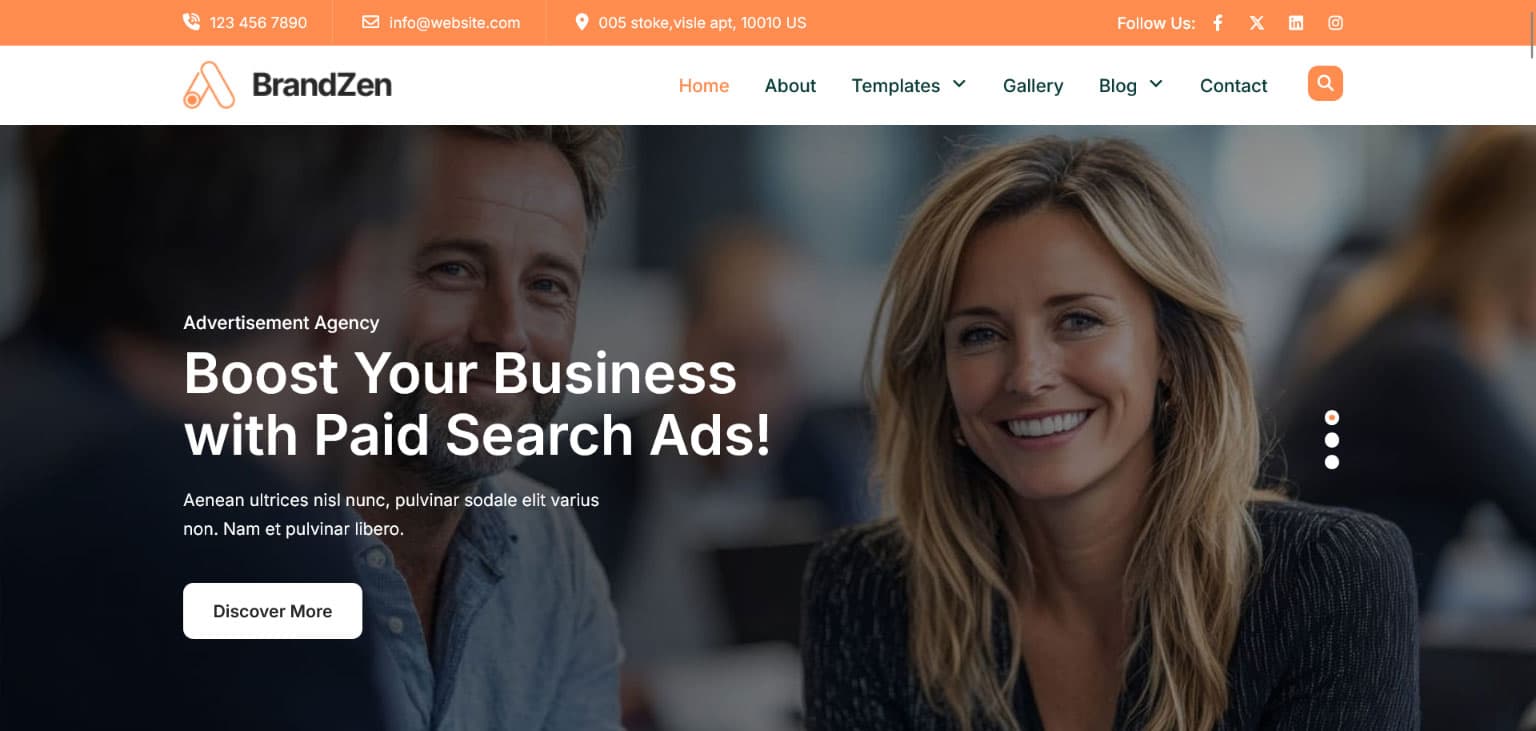
BrandZen PRO is built for advertising agencies, marketing firms and ad specialists. It runs on Elementor, is WooCommerce compatible and is translation-ready with Weglot and Polylang. It offers more than 1,300 Google Fonts, over 1,000 color schemes, a level-5 dropdown menu, widgets for clocks, calendars, clients and testimonials, and CSS3 motion effects. It suits a creative agency that wants a bold, memorable brand.
DigiSell PRO is our digital marketing theme, and its page also lists uses from eCommerce and law firms to hospitality and construction. It is Elementor-based and WooCommerce compatible, with 1,000+ fonts, CSS3 animations you can switch off, a five-level menu, a services section and MailChimp support for email lists. Choose BrandZen PRO for brand-led agency work and DigiSell PRO for a service-led digital marketing firm.
Coaches and Consultants: Strategist PRO
Strategist PRO serves business coaches, life coaches, motivational speakers and business consultants. It is WooCommerce integrated, so you can sell sessions and coaching packages, and it supports WPML and Polylang.
Its page mentions compatibility with popular builder plugins but does not name a visual page builder such as Elementor, so check the demo first. The theme also offers a five-level menu, four page layouts, 1,200+ social icons and an SEO-optimized structure. It fits experts who sell discovery calls, packages and workshops.
Software and IT Companies: Persist PRO
Persist PRO is our software company theme for IT companies, tech enterprises and marketing or consulting agencies. It is WooCommerce compatible and translation-ready, with shortcodes, widgets and a services section. Its page does not name a page builder, so check the demo if your team relies on a specific one.
Finance and Investment Firms: Sterling PRO
Sterling PRO targets loan, finance, investment and microfinance companies, accountants, banks and venture capital firms. It is built for Elementor, tested with WooCommerce and supports Weglot, WPML and Polylang.
It adds RTL support, 1,200+ Google Fonts, retina-ready images, an SEO-friendly structure and a five-level menu. A finance company or investment business that needs a calm, serious look will find it a natural fit.
Industrial and Logistics Companies: Indostic PRO and SmartTrack PRO
Indostic PRO serves manufacturing, factories, engineering, energy, construction and industrial services. It is Elementor-based, WooCommerce compatible and translation-ready with Weglot and Polylang, with 1,300+ fonts, 1,000+ color schemes, a level-5 menu and one-click installation with XML demo content.
SmartTrack PRO targets postal, cargo, logistics, delivery and packaging companies. It is WooCommerce compatible, supports Polylang and Weglot, and offers 1,000+ Google Fonts and color schemes, a five-level menu and calendar, clock and testimonial widgets.
Local Service Businesses: FreshSpin PRO and Cleanup PRO
FreshSpin PRO suits laundry services and room or house cleaning agencies. It is Elementor-based, WooCommerce compatible and translation-ready, with shortcodes, widgets and Google Analytics support.
Cleanup PRO serves carpet cleaning, bed cleaning and house cleaning companies. It is Elementor-based, WooCommerce compatible and multilingual, with a services section, an animation toggle, a five-level menu and 1,000+ social icons. Both themes suit firms that win work through quotes and service booking.
Retail Shops: Goldstar PRO and GiftHeart PRO
Goldstar PRO is made for jewelry shops, showrooms and makers. It is Elementor-based, WooCommerce compatible and supports Polylang, Weglot and WPML, with Google Analytics, SEO integration and 1,000+ social icons. Its page describes it as beginner-friendly, which helps a first-time eCommerce store owner.
GiftHeart PRO serves gift shops, handicrafts and gift card sellers. It is Elementor-based with WooCommerce integrated, pre-built page layouts, Rank Math and Yoast SEO integration and a five-level menu.
Creative and Film Businesses: Filmways PRO
Filmways PRO targets filmmakers and movie studios. It is Elementor-based, WooCommerce compatible and translation-ready, with shortcodes, widgets and an animation toggle. A film production company or post-production team that leads with video will find the right base here.
What Are Business WordPress Themes?
In WordPress, the theme decides the look of every page: page layout, header, navigation menu, footer, fonts and colors. Business WordPress themes are designs made to present a company professionally. They focus on clear service listings, company profile sections, client logos, case studies, pricing tiers and strong calls to action.
WordPress itself is a content management system (CMS). The theme sits on top of it and handles content presentation, while plugins add functions such as forms, stores and bookings. Most business designs ship with demo templates, ready-made sections and a theme settings panel, so you import the demo, swap in your text and images, and your company site is close to ready.
Who Uses Business Themes
The audience is broad:
- Startups and entrepreneurs launching a first product or service.
- Every small business owner, freelancer and solopreneur who needs a credible online presence.
- Agencies, consulting services and coaching practices.
- Financial firms, accountant services and insurance agents.
- Tech companies, IT providers and software makers.
- Service-based businesses such as cleaners, laundries and repair businesses.
- Online shops and offline business owners who want to sell online.
- Industrial, logistics and construction firms.
- Creative companies, including film, design and photography studios.
Core Building Blocks of a Business Theme
Every good design includes a few standard parts. The header and footer carry your logo, menu links, phone number, social media icons, company address and a copyright notice. A hero banner or hero image sits at the top of the homepage with a headline and a button. Below it, you will usually find a service section, team section, testimonial section, portfolio section, pricing table, FAQ section and blog section.
Layout options matter too. Look for a full-width layout for bold, modern pages and a boxed layout for a more traditional, framed look. Sidebar layouts help blogs and knowledge base pages, while a sticky header keeps the navigation menu in view as visitors scroll. Extra touches such as an image slider, lightbox galleries, tabbed content and a scroll-to-top button improve the reading experience without extra coding.
Block Editor or Page Builder
WordPress includes the block editor, also called Gutenberg. It lets you build pages from WordPress blocks such as headings, images, buttons and columns. Block-based themes go further with the site editor and full site editing, giving you navigation and layout control, so you can change templates, headers and footers visually.
A page builder such as Elementor offers a drag-and-drop interface with front-end editing and real-time editing, so you see changes as you make them. Many of our business themes are Elementor-based, which suits teams that want precise control over each section. Whichever route you choose, use a child theme for any custom CSS so updates do not overwrite your changes.
Niche Design or Multipurpose Design
A multipurpose theme can be shaped into almost any site, but it starts generic and often needs heavy setup. An industry design, such as one for cleaning, finance or coaching, already has the right sections, wording and imagery. You spend less time rebuilding and more time on your message.
A multipurpose layout still makes sense if you run several unrelated brands or want maximum design flexibility. For most single companies, niche-specific design gives a faster, more convincing result.
Why Every Business Needs a Website
A website is your digital front door and your virtual storefront. Customers check it before they call, visit or buy, and it shapes their first impression of your company. A strong company online presence also supports every other channel, from referrals to ads.
Customers Research Before They Buy
Most buyers research online before they contact a provider. They compare services, read reviews and look for proof of experience. A clear site answers these questions and keeps you on their shortlist. Without one, you may never learn that you were considered and then passed over.
Credibility and Trust
A professional site signals that your company is real, stable and serious. Visible contact details, team photos, client logos and customer testimonials build website credibility. An outdated site does the opposite and can make visitors doubt you before they read a word.
A Sales Tool That Never Sleeps
Your website is often your first-line sales tool. It explains your services, captures leads, books calls and sells products while you sleep. For a small team, that steady inquiry generation can be one of the most cost-effective marketing channels, and it scales with your business growth.
Stand Out in a Crowded Digital Landscape
Every industry now competes in a crowded digital landscape. A distinct site with a clear brand voice, consistent visuals and a sharp message helps you stand out online and stay ahead of competitors. Clear niche positioning tells the right buyers that you understand their problem, and a memorable brand earns stronger brand recognition each time they return. That competitive advantage often decides who gets the call.
Better Customer Service
A good site also supports existing customers. FAQ pages, guides and order or project updates answer customer queries at any hour, which reduces support inquiries and frees your team for complex requests. Quick answers raise customer satisfaction, and satisfied clients bring repeat business, stronger customer retention and higher lifetime value.
Benefits of Using Business WordPress Themes
A ready-made design spares you months of design and coding work and gives you a proven layout from day one.
Quick website setup. Starter sites, pre-built templates and one-click demo import put a complete-looking company site online within hours, with no coding required.
Low cost. A single design costs $29, far below a custom build, and WordPress itself costs nothing to use.
Professional appearance. Business themes follow proven web design principles: clear visual hierarchy, readable fonts, strong buttons and generous white space.
Ease of use. A visual editor and theme customizer let owners with no design skills customize the website visually and update text, images and colors themselves.
Search engine visibility. Clean code, schema integration and fast loading pages give your content a strong base for search engine ranking.
Full ownership. With self-hosted WordPress, you own your content and can move hosts at any time.
Scalable solutions. Later on, plugins let you bolt on a shop, a membership website, online courses, booking or multilingual content.
Planning Your Business Website
Good planning turns an attractive site into a working one.
Set Clear Business Objectives
Decide what your website must achieve. Common goals include quote requests, discovery calls, online sales, job applications and newsletter subscriptions. Follow the rule of one page, one purpose: give each main page one concrete goal, such as “book a call,” and measure it.
Know Your Ideal Client
Write down who your target audience is, what problem they face and what makes them choose a provider. A finance client wants security and expertise. A homeowner hiring a cleaner wants reliability and fair prices. A startup founder wants speed and clear pricing. Shape your website copy around that ideal customer and their buyer’s journey.
Budget, Timeline and Skills
Plan for a domain, hosting, a theme, photos and any premium plugins, and set a small business budget that covers all of them. Think honestly about your technical skill level and learning curve too. If you are new to WordPress, choose a beginner-friendly design with clear documentation and step-by-step tutorials, or ask us to install it for you.
Domain, Hosting and Business Email
Pick a domain that matches your business name, usually a .com for a US company. Choose reliable hosting with strong uptime, an SSL certificate and regular backups. A managed WordPress hosting plan handles updates and security for you, which suits busy owners. Then set up a business email on your own domain, such as [email protected], so your messages look professional and are less likely to land in spam folders.
Questions to Settle Before You Build
- What single action should a visitor take?
- Who is your ideal customer, and what worries them?
- Do you sell services, products or both?
- Do you need booking, quotes or online payments?
- Will you publish a blog or case studies?
- Do you serve customers in more than one language?
- Which page builder does your team know?
- Who will handle ongoing website management after launch?
Must-Have Features in Business WordPress Themes
For a company site, a handful of features decide whether visitors stay, trust you and get in touch. Put these at the top of your list.
Responsive Design
Your site must work on laptops and smartphones alike. A responsive layout with readable text and large tap targets is essential, since many buyers first visit on mobile devices. Test every demo on your own phone and tablet screens before you decide.
Customization Options
Compare theme customization options carefully. Look for typography options, a color palette editor, header customization, footer customization and background options so the site matches your brand. Drag and drop customization without coding is a key reason many owners pick a ready-made design. Sticky columns, page transitions and on-scroll animations are nice extras, but brand matching and clarity come first.
Business Sections and Widgets
A strong design includes ready sections for services, team members, testimonials, pricing, FAQs and client logos, plus theme widgets for calendars, contact details and recent posts. These blocks answer the questions every buyer asks.
Contact and Lead Forms
Forms are where interest turns into business. Check that the theme styles form plugins such as Contact Form 7 cleanly, and add spam prevention such as a CAPTCHA. We explain how to keep forms short in the conversion section.
WooCommerce Support
If you sell products, gift cards, courses or packages, WooCommerce brings in carts, checkout pages and payment gateways. Every theme in our featured table lists WooCommerce compatibility.
Multilingual and RTL Support
If you serve several markets, translation support matters. Several featured themes list WPML, Polylang or Weglot, and Sterling PRO adds RTL support for right-to-left languages. A multilingual WooCommerce store also needs store localization for currency and shipping text.
Demo Import and Starter Sites
A one-click import loads the demo’s pages, menus and widgets together. It saves hours and shows you how each section was built. Indostic PRO, for example, lists one-click installation with XML demo content.
Plugin Compatibility
Check WordPress plugin compatibility and page builder compatibility before you buy. Common business plugins include SEO plugins such as Yoast SEO and Rank Math, Google Maps for location pages, PayPal and Stripe for payments, LearnPress for course selling, BuddyPress for communities and membership plugins for gated content. A theme that works smoothly with your plugin ecosystem saves time and support requests.
Support and Updates
Clear guides, video lessons and regular updates keep your site stable as WordPress changes. Our premium themes include free lifetime support and updates.
Matching a Theme to Your Business
Use this table to match business WordPress themes to your field. The guides that follow close with our pick for each one.
| Business type | Main website goal | Suggested themes |
| Marketing or advertising agency | Show work and win clients | BrandZen PRO, DigiSell PRO |
| Coach or consultant | Book discovery calls | Strategist PRO |
| Software or IT company | Explain services and generate leads | Persist PRO |
| Finance or investment firm | Build trust and capture inquiries | Sterling PRO |
| Manufacturer or engineering firm | Present capabilities and projects | Indostic PRO |
| Logistics or delivery company | Explain services and win contracts | SmartTrack PRO |
| Cleaning or laundry service | Take quotes and bookings | Cleanup PRO, FreshSpin PRO |
| Jewelry or gift shop | Sell products online | Goldstar PRO, GiftHeart PRO |
| Film or video studio | Show reels and projects | Filmways PRO |
Website Guides by Industry
No two industries sell the same way. Below, each field gets its own checklist of content that wins clients.
Startups
A startup site must explain a new idea quickly. Lead with a clear value proposition, a short elevator pitch and one main action, such as “join the waitlist” or “book a free demo.” Add a simple product explanation, co-founders’ bios, early customer success stories and an investor section if you are raising money. Keep the site lean so you can update it as the product evolves.
Best theme fit: Persist PRO suits tech startups, and BrandZen PRO suits creative or marketing-led launches.
Marketing and Digital Agencies
An agency sells results. Show case studies with the problem, your solution and the outcome, plus client logos and testimonials. List services clearly, explain your process and offer a free discovery call. An online portfolio with filters by industry helps prospects find relevant work fast.
Best theme fit: BrandZen PRO for advertising and branding agencies, and DigiSell PRO for digital marketing firms.
Consultants and Coaches
Experts sell trust and professional expertise. A coaching site needs a strong About page, credentials, video testimonials, clear package options and a “book a call” button on every page. A free e-book or checklist grows your mailing list, and helpful emails keep prospects warm until they are ready to buy. Over time, this content also strengthens your personal branding.
Best theme fit: Strategist PRO targets business coaches, life coaches and consultants.
Finance, Investment and Accounting Firms
Financial clients need confidence above all. Show credentials, regulatory information where required, team experience and plain-language service descriptions. Financial calculators, secure forms and calm colors support client trust. Finance content falls into the “your money or your life” category, so accuracy and author expertise matter even more here.
Best theme fit: Sterling PRO lists loan, investment and accounting businesses and supports RTL and multilingual sites.
IT and Software Companies
Tech companies must explain technical services simply. Use benefit-led copy, short product demonstrations, integration lists and clear pricing or a “request a demo” button. A knowledge base website or help center cuts the customer service workload, and a careers page helps with hiring.
Best theme fit: Persist PRO serves IT companies, software companies and tech enterprises.
Local Service Businesses
Cleaners, laundries, repair firms and similar service-based businesses win work locally. Show your service area, prices or packages, a before and after gallery, reviews and a short service request form. Keep your business phone number visible on every page and offer a simple “get a quote” button.
Best theme fit: Cleanup PRO for carpet and house cleaning, and FreshSpin PRO for laundry and cleaning agencies.
Retail and Online Stores
An online store needs clear product categories, quality product galleries, honest product descriptions, visible prices and upfront shipping details. Add search filters and sort functions so shoppers find items fast, plus related products to raise order value.
Offer several payment options, such as credit card, PayPal and Stripe, and allow guest checkout so account creation never blocks a sale. Limited payment options lose buyers at the last step, so show secure payment badges near the checkout button.
Best theme fit: Goldstar PRO for jewelry, and GiftHeart PRO for gifts and handicrafts.
Industrial and Logistics Companies
B2B buyers in manufacturing and logistics want capability, reliability and compliance. Show equipment, certifications, project galleries, industries served and safety records. Make quote forms detailed enough for prospect filtering, and add downloadable spec sheets. Delivery firms can also add a shipment-tracking plugin, since a real-time tracking page answers the most common customer question before anyone calls.
Best theme fit: Indostic PRO for manufacturing and engineering, and SmartTrack PRO for logistics and delivery firms.
Creative and Film Businesses
Studios sell through visual content. Lead with a showreel, then group projects by type, show a client list and add crew bios. Use video embedding from YouTube or Vimeo so clips play smoothly, and avoid autoplay with sound.
Best theme fit: Filmways PRO targets filmmakers and movie studios.
Essential Pages for a Business Website
Most companies build their business website pages around six foundational pages: home, about, services, testimonials, contact and legal. Add more as your offer grows.
Homepage. Your main entry point, covered in detail in the next section.
About Us page. Your story, mission, values and team, covered later in this guide.
Services page. One overview with a short summary of each offer, linking to detailed service pages.
Testimonials and Reviews page. Client reviews, star ratings and case studies gathered in one place.
Contact page. Phone, email, physical business address, opening hours, an office map through Google Maps integration and a short form. Offer alternate contact options, such as a “request a call back” button.
Legal pages. A privacy policy, Terms of Service and a cookie notice. These often meet legal requirements and also reassure visitors.
Optional pages include a portfolio, a blog or news page, a careers page with current vacancies, a booking or appointment page, a membership area and a Custom 404 Error Page that sends lost visitors back to your core pages.
Building a Homepage That Converts
Your homepage has a few seconds to answer three questions: what you do, who you help and what to do next.
Hero Section and Headline
Start with a compelling headline that states your main benefit, then a short sub-headline that adds detail. Use a real hero image of your team, product or work, and place one clear CTA button beside it. This top area is your most valuable website real estate, so keep it free of clutter.
Value Proposition and Key Services
Below the hero, explain your unique selling proposition in one or two sentences. What makes you different from competitors? Then present your three key services with short descriptions, visual icons and links to their own pages.
Proof, News and Final CTA
Add a “trusted by” strip of client logos, two or three testimonials and a short results section. A featured products row works well for shops, and a latest news block shows that the company is active. End the page with a final call to action and a footer that repeats your contact details and social links.
Writing Service and Product Pages
Service and product pages do the real selling, so they deserve as much care as your homepage.
Service Pages
Give each main service its own page. Explain the problem it solves, who it suits, what is included, the process and the price or price range. Use benefit-focused descriptions first, then features. Answer customer objections, such as cost, timing and risk, before visitors need to ask. End each page with a single clear next step.
Product Pages
Product pages need sharp photos from several angles, including close-up images and staged images in real settings. Add short descriptions, full product specifications, sizes or variants, stock status and delivery times. Customer product reviews and ratings near the Add to Cart button help shoppers decide. A sticky Add to Cart bar and a mini cart make buying easier on mobile.
About Page, Trust and Credibility
Buyers often open the About page before they reach out. It is where they decide whether they trust you.
Write an About Page That Builds Trust
Tell your brand story in plain language: why you started, what you believe and how you help. Include your mission statement, a short vision statement, three to five company values and a brief company history with key milestones. Add team member bios with professional headshots and job titles. A short company video or founder quote adds a human connection.
Show Culture and Responsibility
Visitors like to see the people behind a brand. Share your company culture, working principles and community involvement, such as local sponsorships or charity projects. Real employee photos put faces to names and help future hires see what working with you is like.
Show Social Proof
Social proof convinces faster than claims. Show client logos, testimonials with full names and companies, star ratings, awards and recognition, partnerships and affiliations, and media mentions. Customer success stories with clear before-and-after results work best.
Display recent reviews with proper testimonial attribution, including names and roles, and link to independent review profiles where you have them. Never post fake reviews. A few honest negative reviews with thoughtful replies can even raise trust.
Use Trust Signals Throughout
Plan your trust signal placement carefully and add trust signals across the site: the SSL padlock icon, security badges at checkout, clear contact details, certificates, accreditations and transparent terms. If you offer a service guarantee or money-back pledge, explain it plainly on its own page. Avoid exaggeration; honesty and transparent communication build more trust than big promises.
Conversion: Turning Visitors Into Leads
A good-looking site that brings no leads is just a digital brochure. These elements help you convert casual visitors and transform visitors into clients.
Clear Calls to Action
Use at least one CTA per page, with one main action. Write specific button text such as “Get a Quote,” “Book a Free Consultation” or “Start Your Project.” Place CTA buttons above the fold and repeat them after key sections. A contrasting color makes them easy to spot.
Simple Lead Forms
Keep forms simple and ask only for what you need, usually name, email and a short message. Every extra field is one more reason to give up, so cut anything you do not truly need. Use generous form field spacing, large inputs and clear labels, and keep a phone or chat option for people who prefer to talk.
Reduce Friction
Fitts’s Law says larger, closer targets are easier to click, so keep button size generous and place key links where thumbs and cursors naturally land. Remove pop-ups that block content on mobile, avoid banner ads on service pages and use urgency offers only when the deadline is real. A pressure-free approach builds more long-term relationships than aggressive tactics.
Landing Pages
Create dedicated landing pages for campaigns, services or audiences. A focused page with one offer and one form often converts better than a general homepage. Many business designs include landing page templates, and Elementor makes it simple to mix and match templates.
Live Chat and Chatbots
Live chat or an AI chatbot answers quick questions and captures leads outside office hours. Keep replies human and pass complex questions to a real person on your customer service team.
Design for Business Websites
Good design builds trust in seconds.
Keep It Clean and Consistent
Use a clean, structured layout with generous spacing, clear headings and short paragraphs. Keep consistent branding in colors, brand fonts and tone across every page. A clutter-free design helps visitors focus on your message and your CTA.
Color, Type and Visual Hierarchy
Choose two or three brand colors plus a neutral. Minimal color use looks calm, so save bold colors for buttons and highlights. Strong visual contrast between text and background improves text readability. Set a clear heading structure so the eye moves from headline to subheading to body copy without effort.
Use Real Photos and Video
Real team photos, office photos and work samples beat generic stock images, because human faces build trust. Use parallax effects, hover effects and video backgrounds sparingly; they should support the message, not slow the page. Polished graphics and attention to detail signal quality, while good visual balance keeps a modern design calm and easy to read.
Write Scannable Copy
Because of visitor scanning behavior, most people skim a page before they read it. Use clear headings, bulleted lists, short sentences and scannable content. Lead with what the customer gains, then explain how you deliver it. Keep paragraphs to three or four lines on mobile screens.
Accessibility and Data Privacy for Company Sites
An accessible website reaches more customers and reduces legal risk. Use good color contrast, a readable type size, alt text on images, keyboard navigation support and clear form labels. These steps help people using screen readers and support digital accessibility standards in the US.
Protect visitor data with an SSL certificate, encrypted transmission on forms and a clear privacy policy that explains data usage and data sharing. If you serve European customers, review GDPR compliance and add cookie consent where needed.
SEO for Business Websites
Search engines bring a steady flow of new customers who are already looking for what you offer.
Optimizing Service and Product Pages
Follow SEO best practices: every page deserves its own title tag and meta description, matched to user intent. Use one H1, logical H2 tags, short descriptive URLs and image alt attributes. Link related services and articles with natural anchor text, and favor natural keyword use over keyword stuffing.
Ranking in Your Service Area
Companies that serve one region should verify their Google Business Profile, keep business details identical across directories and invite satisfied clients to leave reviews. Each city or service area page needs its own real local detail, such as projects completed there, rather than copied text with a new place name.
Sitemaps, Schema and Site Structure
Submit an XML sitemap through Search Console, check your robots.txt file and use canonical URLs to avoid duplicate content. Add schema markup for your organization, services, products and FAQs. A logical site architecture with breadcrumbs helps crawlers with indexing and helps visitors with site navigation.
Content and Authority
Publish helpful long-form content that answers long-tail queries, shows industry knowledge and earns links. Author bios, credentials and accurate facts strengthen E-E-A-T, which matters especially for finance, legal and health topics.
Keeping a Company Site Fast, Secure and Current
A business site keeps earning only when it stays quick, protected and up to date.
Page Speed
Aim for a page load time under three seconds on mobile, because website load speed shapes both visitor patience and Google search visibility. Compress images, serve adaptive images, use lazy loading and reduce page size and page requests.
A content delivery network serves files from servers close to each visitor, which helps global audiences. Run speed testing after every big change and keep an eye on Core Web Vitals in Search Console.
Security and Backups
Site security protects your reputation as much as your data. Use a firewall, strong passwords, malware detection and automatic updates for minor releases to block common website hacks. Make daily backups part of your data backup routine so a hack or error never means lost work. Good hosting with downtime prevention protects business continuity.
Ongoing Maintenance
Update WordPress, the theme and plugins regularly, testing big changes on a staging site first. Run a quick website audit each quarter to fix broken links, outdated offers and old photos. Content freshness tells both visitors and search engines that the business is active.
Tracking Leads and Website Results
Set up analytics tracking and conversion tracking for your key actions: form submissions, calls, bookings and sales. Watch bounce rate, time on site, click-through rate and conversion rate by page.
Behavior analytics tools with heat maps and screen recording show where visitors click, scroll and get stuck, while path reports reveal the behavior flow and the click path most people follow. Track CTA clicks, engagement rate and the share of repeat visitors to see whether content brings people back.
Use A/B testing to compare headlines, button text or form length one change at a time. Small data-driven changes add up. Steady conversion rate optimization (CRO) lifts your website conversion rate, and a reduced bounce rate and higher conversion rates on existing traffic can bring more leads than simply buying more visitors.
Marketing Your Business Website
A website grows faster with steady promotion.
Content marketing. Build a simple content marketing strategy and publish useful articles, guides and case studies on a schedule you can keep. Consistent publishing builds organic search traffic over time.
Email marketing. Grow your list with an email newsletter signup or a downloadable guide, then send helpful updates and offers.
Social media marketing. Share content and customer stories on the platforms your audience uses, and add social sharing buttons to your posts.
Paid ads and retargeting. Pay-per-click campaigns send fast traffic to landing pages, and retargeting reminds past visitors to return. Track cost per lead and adjust often.
Marketing automation. Automated welcome emails, follow-ups and reminders keep leads warm without extra work, and marketing attribution helps show which channel brought each sale.
B2B marketing. For larger deals, account-based marketing, audience segmentation and personalized landing pages help you reach decision makers at target companies.
Referrals and networking. Networking events, partnerships and word-of-mouth marketing still drive many sales. Add your website URL to proposals, invoices, email signatures and printed materials.
Content Ideas for Business Websites
Fresh content builds authority and gives people reasons to return:
- Case studies that show a problem, solution and result.
- How-to guides that answer common customer questions.
- Industry news with your expert view.
- Team introductions and behind-the-scenes posts.
- FAQ articles in a question-and-answer format about pricing, process and timelines.
- Customer-generated content, such as photos and reviews, shared with permission.
- Checklists, templates and e-books that grow your mailing list.
Business Website Mistakes That Cost Leads
Each of these slips quietly sends prospects to a competitor.
Vague communication. Visitors should understand what you do within seconds. Replace clever slogans with clear statements.
Too many choices. Several competing buttons create decision fatigue, so take a “less is more” approach and give each page one main button.
Hidden contact details. Keep your phone number and email easy to spot on every screen, never buried in a sub-menu.
Slow pages. Huge images, autoplay videos and background music slow sites and annoy visitors.
Outdated content. Old news, expired offers and broken links make a company look closed.
Long forms. Asking for too much information lowers lead form completion.
Information overload. Long walls of text hide your key message. Edit hard and use concise copy.
No proof. Claims without testimonials, logos or examples rarely convince buyers.
Even the strongest business WordPress themes need clear content and regular care to avoid these mistakes.
Free vs Premium Business WordPress Themes
Free designs from the WordPress repository can work for a very basic site. Premium designs add more layout options, niche features and professional support.
| Factor | Free WordPress themes | Our premium business themes |
| Cost | $0 | $29 one-time purchase per theme |
| Industry-specific design | Rare | Built for agencies, finance, IT, cleaning, retail and more |
| Page builder support | Varies | Many Elementor-based designs |
| Store support | Varies | WooCommerce compatible |
| Multilingual options | Limited | WPML, Polylang or Weglot in selected themes |
| Setup help | Usually none | Free installation and setup |
| Support and updates | Community support | Free lifetime support and theme updates |
A hobby project or early test can begin with a free version. A company that relies on its site for leads and sales usually saves time and money with premium features, regular updates and expert help from the people who built the design.
How to Choose Among Business WordPress Themes
Use these theme selection criteria to compare business WordPress themes side by side and decide with confidence.
- Start with your industry. Use the matching table to find designs built for your field.
- Define your main goal. Quotes, calls, sales or sign-ups each need different sections.
- Try the live preview. Test theme performance on mobile and desktop, checking speed, readability and how fast you find the contact button.
- Read the theme description. Confirm the builder, store support, translation tools and widgets you need.
- Check plugin requirements. Make sure your form, booking, translation or store plugins are supported.
- Plan for growth. Choose enough layouts for new services, pages and markets.
Launching Your Business Theme Step by Step
Most owners can get up and running in an afternoon by following this order.
- Complete your purchase and keep the downloaded ZIP package handy.
- Open your WordPress dashboard and choose Appearance, Themes, Add New.
- Choose Upload Theme, browse to the ZIP package and install it, then switch it on with Activate.
- Add the plugins the design suggests, for example Elementor for editing or WooCommerce for selling.
- Run the demo content import or load the XML file.
- Open the live theme customizer to add your custom logo and apply your brand palette and typefaces.
- Swap the sample text and photos for your own services, team and proof.
- Connect forms, analytics and email tools.
- Test every page, link and form, then launch.
Rather not do it yourself? We provide free theme installation with every premium purchase. You can reach us by email, live chat or our forum at any stage.
GraceThemes Pricing for Business Themes
Our business category lists four ways to buy, from one design to the full collection.
| Option | Price | What you get |
| Single theme | $29 one-time | One theme, lifetime updates and support, free installation |
| Elementor Themes Bundle | $59 one-time | 20+ Elementor-based themes, unlimited domains, free installation |
| All Theme Package | $79 per year | All 100+ premium themes for one year, one year of updates, lifetime support |
| Lifetime Package | $99 one-time | All 100+ premium themes, lifetime updates and support |
When owners compare business WordPress themes, most find that one design covers a single company. Web design agencies and freelancers who build client sites often save more with a bundle. The $59 Elementor bundle suits teams that build only with Elementor.
The $79 all themes package covers every design with a year of updates; the $99 lifetime membership keeps those updates coming for life. The single theme, the All Theme Package and the Lifetime Package each include use on unlimited sites, live chat help and free setup.
Explore Related Categories
Business sites often overlap with finance, consulting, insurance, education and architecture. These designs may also help.
| Related area | Theme | Link |
| Financial advisors | Advisory PRO | https://gracethemes.com/themes/advisor-wordpress-theme/ |
| Finance and consulting | Online Consulting PRO | https://gracethemes.com/themes/finance-wordpress-theme/ |
| Insurance | Insurer PRO | https://gracethemes.com/themes/insurance-company-wordpress-theme/ |
| eLearning and training | Learning Point PRO | https://gracethemes.com/themes/elearning-wordpress-theme/ |
| Architecture and design | Housing PRO | https://gracethemes.com/themes/architect-wordpress-theme/ |
Frequently Asked Questions
What are business WordPress themes?
They are website designs built to present companies professionally, with service sections, team pages, testimonials, contact forms and often store support.
Which business theme is best for a small company?
Pick a design built for your field rather than a general one. Cleanup PRO suits cleaning companies, Strategist PRO suits coaches and Sterling PRO suits finance firms.
Are these themes good for agencies?
Yes. BrandZen PRO targets advertising and marketing agencies, and DigiSell PRO is our digital marketing theme.
Can I sell products or services online?
Yes. Every theme in our featured table lists WooCommerce compatibility, so you can sell products, gift cards, packages or courses.
Do these themes work with Elementor?
Many do. BrandZen PRO, DigiSell PRO, Sterling PRO, Indostic PRO, FreshSpin PRO, Cleanup PRO, Goldstar PRO, GiftHeart PRO and Filmways PRO are Elementor-based.
Can I build a multilingual business site?
Yes. Several themes list WPML, Polylang or Weglot, and Sterling PRO adds RTL support.
What do business WordPress themes cost at GraceThemes?
One theme is $29 one-time. You can also choose the $59 Elementor Themes Bundle, the $79 yearly All Theme Package or the $99 one-time Lifetime Package.
Can I set up a theme without coding?
Yes. Most edits happen in a visual page builder or the WordPress customizer, and our team will install your theme for free if you prefer.
Final Thoughts
Your website is often the first meeting between your company and a new client, and a clear, fast and trustworthy site makes that meeting count. Our business WordPress themes give startups, agencies, consultants, service firms and shops a professional base with industry layouts, store support and free setup help.
Start with your industry and your main goal, test a few demos and choose the design that best reflects how you want clients to see you. Then add real proof, clear calls to action and helpful content, and your professional business site will keep bringing in leads and support sustainable business growth long after launch day.
