

Modem vs Router: What’s the Difference?
Imagine settling down after a long day, ready to stream your favorite show, join an online meeting, or simply scroll through your phone. You connect to WiFi, but nothing happens.
The internet seems to have disappeared without leaving a forwarding address. You look at the little blinking boxes near your desk and wonder: Is the problem with the modem or the router?
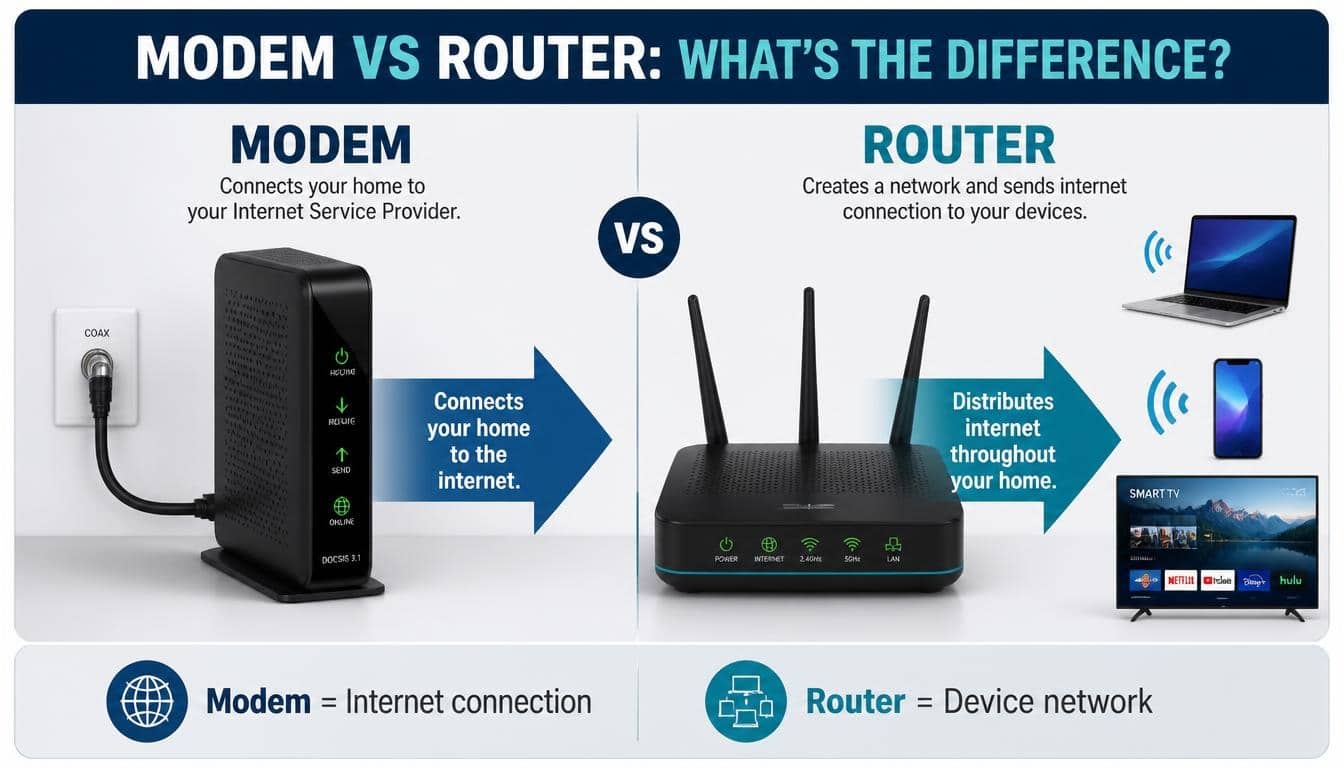
This is where understanding Modem vs Router becomes surprisingly useful. Although these two devices often sit next to each other and sometimes come inside the same box, they perform very different jobs.
One brings an internet connection into your home, while the other distributes that connection to your devices.
The confusion is understandable, especially when shopping for home networking equipment or setting up a new home internet connection. People frequently use the words modem and router as if they mean the same thing. Well, they don’t.
Whether you’re choosing a new internet setup, troubleshooting a frustrating connection, or trying to understand what your Internet Service Provider (ISP) installed, knowing the difference can save you money, time, and quite a few unnecessary headaches.
Let’s break down everything in a simple, practical way, without turning this into a complicated networking lecture.
What Is a Modem and How Does It Work?
A modem is a networking device that connects your home to your Internet Service Provider (ISP). Its main responsibility is to receive the internet signal coming from your provider and translate it into a form that your home network equipment can understand.
The word modem comes from combining two technical terms: modulator and demodulator. That sounds rather intimidating, but its job is actually straightforward.
Your ISP sends internet signals through a communication line, such as a coaxial cable, telephone line, or fiber connection. The modem handles the necessary signal conversion so your network can communicate with the wider internet.
Think of the modem as the front door through which the internet enters your house. Without an appropriate modem or equivalent network termination equipment, a traditional home network cannot establish its connection through that service.
How Does a Modem Work?
A modem communicates with your ISP using the technology supported by your internet connection.
For example, a cable internet modem receives data through a coaxial cable. It processes the incoming signals and makes the internet connection available through an Ethernet port.
Here’s what typically happens:
- Your ISP sends internet data through its network infrastructure.
- The modem receives signals through the appropriate connection.
- It translates and processes the signals into digital network data.
- The modem establishes communication with the ISP’s network.
- It provides an Ethernet connection to a router or compatible device.
It’s worth remembering that different internet technologies require different equipment. A cable modem, DSL modem, and fiber ONT are not interchangeable in every situation.
What Does a Modem Do for Home Internet?
The modem is responsible for establishing the connection between your home and your provider’s network. It doesn’t normally manage all your household devices or create a complete wireless network by itself.
Its major responsibilities include:
- Connecting your home to your ISP.
- Processing incoming and outgoing internet signals.
- Supporting communication with the provider’s network.
- Providing an internet connection to a connected router or computer.
- Helping maintain communication with the ISP.
- Reporting connection status through indicator lights or management software.
One important detail: a modem in a typical cable internet setup receives a public IP address from the ISP. However, the exact IP addressing arrangement depends on the network architecture and equipment being used.
What Is a Router and Why Do You Need One?
A router is a network device that connects multiple devices and directs data between your home network and other networks, including the internet.
While a modem establishes the internet connection, a router makes it possible for your laptop, smartphone, television, gaming console, and smart home devices to share that connection.
Without a router, you may still connect a computer directly to a modem in many traditional setups. However, sharing the connection among several devices becomes less convenient, and you lose many of the management and security features associated with a modern router.
A WiFi router adds wireless networking capabilities, allowing compatible devices to connect without needing individual Ethernet cables.
How Does a Router Work?
A router receives internet connectivity from a modem or another suitable network connection. It then directs network traffic between connected devices and external networks.
Here’s a simplified explanation:
- The modem provides internet connectivity to the router.
- The router creates or manages your Local Area Network (LAN).
- Devices connect through WiFi or Ethernet.
- The router assigns private or local IP addresses, usually through DHCP.
- It manages data traffic between devices and the internet.
- It uses network routing and, commonly, Network Address Translation (NAT) to facilitate communication with external networks.
For example, imagine your family is watching a movie, downloading a game, and attending a video conference simultaneously. The router manages the communication needed for all these activities.
It is doing quite a bit of invisible work, even when nobody in the house is thinking about networking.
What Does a WiFi Router Actually Provide?
A wireless router offers more than just a convenient way to avoid cables.
Depending on the model, its features may include:
- Wireless internet connectivity.
- Multiple Ethernet connections.
- Network traffic management.
- Local device communication.
- Firewall protection.
- Guest WiFi networks.
- Parental controls.
- Device prioritization.
- Network configuration and monitoring.
- Support for smart home devices.
Some routers also include advanced security features that help identify suspicious network activity, block certain threats, and protect connected devices.
However, security features vary considerably between manufacturers and models. A router’s firewall is useful, but it doesn’t replace antivirus protection, safe browsing habits, or awareness of phishing scams.
Modem vs Router: The Main Differences Explained
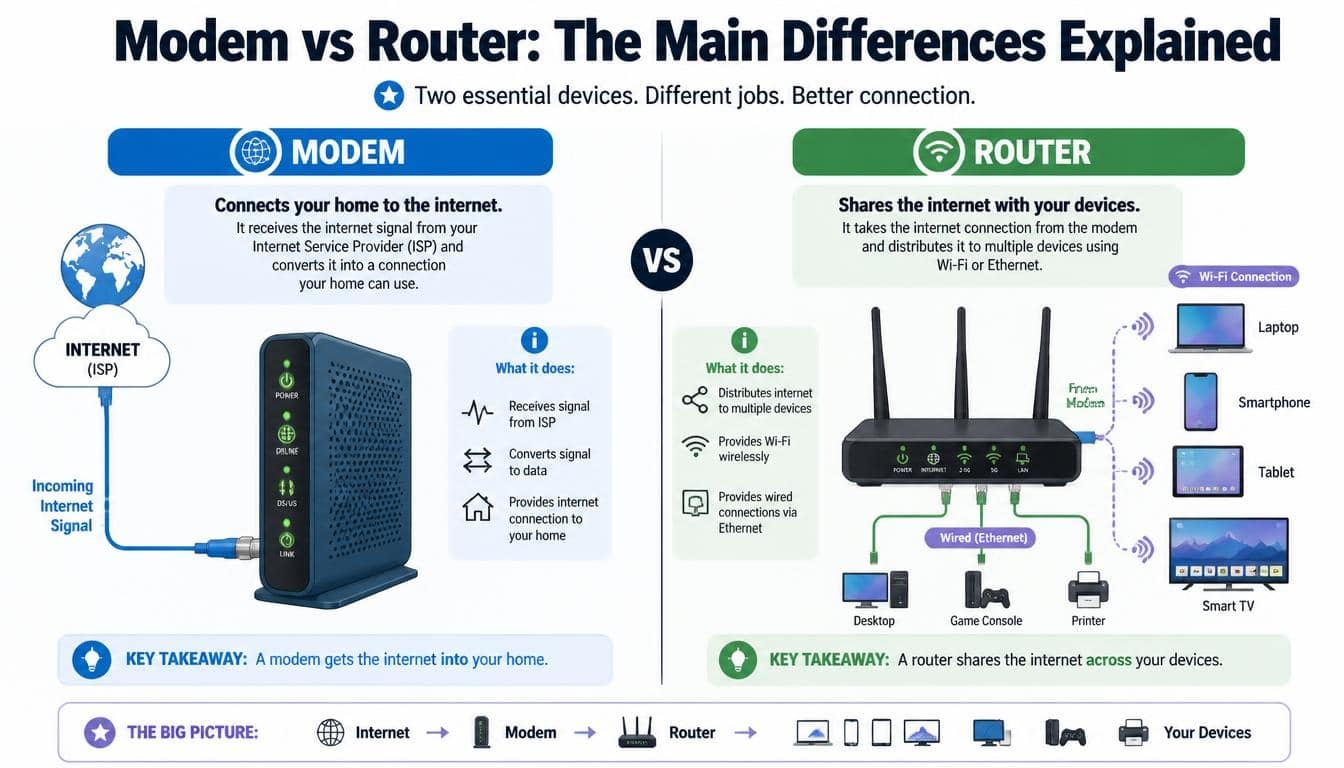
Now comes the question most people actually want answered: What is the difference between a modem and a router?
The simplest explanation is that the modem connects your home to your ISP, while the router connects your devices to one another and manages communication with external networks.
They work together, but their responsibilities are different.
Here is a closer comparison.
| Feature | Modem | Router |
| Main purpose | Connects to the ISP | Manages network connections |
| Internet access | Establishes the provider connection | Shares available connectivity |
| WiFi | Usually not included in a basic modem | Available in wireless models |
| IP addressing | Receives provider-side network addressing | Usually assigns local IP addresses |
| Device connections | Often supports a direct Ethernet connection | Connects multiple devices |
| Network management | Limited | More extensive |
| Firewall features | Varies by equipment | Commonly included |
| Ethernet ports | Often limited | Usually multiple |
| LAN management | Not its primary purpose | Main responsibility |
| ISP communication | Yes | Indirectly through the modem or network connection |
The difference becomes easier to understand when you imagine a household with ten connected devices.
The modem brings the internet connection into the house. The router makes that connection available to the devices that need it.
Neither device is simply a replacement for the other in a conventional separate-device setup.
Modem vs Router: Understanding LAN and WAN Connections
If you’ve ever looked at the back of a router, you might have noticed labels such as WAN, LAN, Internet, and Ethernet. These labels aren’t there just to make the equipment look more technical.
They describe how different parts of your network communicate.
What Is a Wide Area Network (WAN)?
A Wide Area Network (WAN) connects networks across larger geographical areas.
The internet itself is the most familiar example of a WAN. Your home network communicates with external networks through your ISP’s infrastructure.
On a traditional home router, the WAN or Internet port is generally where the modem connects.
This port receives connectivity from the external network and allows the router to distribute it across your household network.
What Is a Local Area Network (LAN)?
A Local Area Network (LAN) is the network inside your home, office, or another limited geographical area.
Your laptop, printer, smartphone, television, and other connected equipment can communicate through this network.
A router typically manages the LAN by assigning private IP addresses and directing traffic between devices.
For example, when your phone sends a document to a wireless printer connected to the same network, the devices may communicate locally without needing to send that data through the public internet.
Public IP Address vs Local IP Address
These two terms are another reason people get confused about modems and routers.
A public IP address identifies your connection on the wider internet, although some providers use carrier-grade NAT, meaning your home router may not receive a unique public IPv4 address directly.
A local IP address, also called a private IP address, identifies a device within your home network.
For example, your router might assign addresses such as 192.168.1.10 or 192.168.1.15 to connected devices.
The router keeps track of these connections so information reaches the correct device.
Do You Need Both a Modem and a Router?
For a traditional cable or DSL home internet setup, you generally need both modem functionality and router functionality.
However, that doesn’t necessarily mean you need to purchase two separate physical devices.
Some equipment combines both technologies into one unit, commonly called a modem router combo.
If you use fiber internet, the setup may involve an Optical Network Terminal (ONT) instead of a conventional modem. The ONT converts optical signals into an Ethernet connection, which can then connect to a router.
Your exact requirements depend on the internet technology and your ISP’s equipment.
When Do You Need a Separate Modem and Router?
A separate setup can be a good choice if you want more flexibility.
For example, you might want to upgrade your wireless router without replacing your modem. Alternatively, you may want a modem specifically approved for your ISP while choosing a router with better WiFi coverage.
Some advantages include:
- Greater flexibility when upgrading equipment.
- Easier replacement of individual devices.
- More choices for advanced wireless features.
- Better control over home network configuration.
- Freedom to select compatible equipment from different manufacturers.
There is a downside, though. Two separate devices require more space, additional cables, and a little more setup work.
When Is a Modem Router Combo a Better Choice?
A modem router combo combines the primary functions of a modem and router in one physical device.
It receives the internet connection from the ISP and distributes connectivity through wired and wireless connections.
This option is especially convenient for people who don’t want to deal with multiple networking devices.
Some benefits include:
- Less equipment around the house.
- Fewer cables and power adapters.
- Simpler installation.
- Easier everyday management.
- Potentially lower equipment costs.
However, combo devices can offer less flexibility when upgrading individual components. Before purchasing one, always check whether it supports your ISP and internet technology.
Can a Router Work Without a Modem?
Yes, but there is an important distinction between working as a network device and providing a conventional internet connection.
A router can create a Local Area Network without a modem. Devices can connect to one another, exchange files, and communicate locally, depending on the network configuration.
However, if you want to access the public internet through a conventional cable or DSL connection, you need an appropriate connection to your ISP.
That connection may come through a modem, an ONT, or another compatible network termination device.
Some routers also support alternative internet connections, such as mobile broadband or Ethernet from an existing network.
So, the answer to whether a router can work without a modem is yes, but its ability to provide internet access depends on the available connection.
Can You Use a Modem Without a Router?
Absolutely.
You can often connect a computer directly to a compatible modem using an Ethernet cable.
The modem establishes the connection with the ISP, and the computer uses that connection directly.
However, this arrangement isn’t ideal for most households.
You may be limited in how many devices can connect, and your computer won’t automatically receive the network management and wireless capabilities normally provided by a router.
There are also security considerations. Connecting a device directly to a modem may expose it more directly to the provider-facing network, depending on the setup.
For everyday home internet use, having a properly configured router is generally the more practical arrangement.
What Is an Xfinity Gateway and How Does It Fit In?
<PRIVATE_PERSON> If you’ve researched American internet providers, you’ve probably encountered Xfinity, a brand operated by Comcast.
Xfinity offers internet services and equipment designed to make home connectivity easier. One of its commonly discussed equipment categories is the Xfinity Gateway.
An Xfinity Gateway is a device that combines modem and router functionality, allowing customers to connect to their internet service and distribute connectivity throughout their homes.
Instead of having one standalone modem and another wireless router, the gateway handles both responsibilities.
Xfinity Gateway: Modem and Router in One
The Xfinity Gateway generally provides the following types of functionality, depending on the model:
- Connectivity to compatible Xfinity Internet services.
- Wireless networking through Xfinity WiFi.
- Ethernet connections for wired devices.
- Home network management.
- Supported security and parental control features.
- Compatibility with certain Xfinity network management tools.
This makes it convenient for households that prefer an integrated internet setup.
Understanding the Xfinity App
The Xfinity App gives eligible customers access to supported account and home internet management features.
Depending on the equipment and service, users may be able to manage WiFi settings, view connected devices, troubleshoot connection issues, and access available security options.
Some customers may also have access to Xfinity Advanced Security features, designed to help protect their home networks against certain online threats.
Features and availability can vary by gateway model, subscription, and service configuration.
What About Xfinity Pro, Unlimited Data, and Other Internet Features?
When comparing Xfinity Internet Plans, you may encounter terms such as Gig Speed Internet, Unlimited Data, and No Contract Internet.
These describe service or plan features rather than the basic difference between a modem and a router.
For example, a faster internet plan doesn’t automatically guarantee better WiFi coverage. Your router’s capabilities, home layout, interference, and connected devices all influence the actual experience.
Similarly, Xfinity Pro and other branded service offerings should be evaluated according to their specific terms rather than assumed to be hardware features.
Before purchasing or renting equipment, check the current plan details, compatible devices, and any applicable equipment charges.
A little research here can prevent an expensive surprise later.
Modem vs Router: Which One Affects Internet Speed More?
This is one of the most common questions people ask when their internet feels painfully slow.
The honest answer is that both devices can affect performance, but they do so in different ways.
The modem influences the quality and capability of the connection between your home and ISP. The router influences how that connection is distributed across your household devices.
Suppose you subscribe to a high-speed internet plan, but your wireless router supports an older WiFi standard. Your devices may struggle to achieve the speeds your plan can provide.
On the other hand, a powerful router cannot magically fix a modem that has a poor connection to the ISP.
Several factors influence your overall internet speed:
- Your subscribed internet plan.
- Modem compatibility and performance.
- Router hardware and WiFi standards.
- Ethernet cable quality and connection speed.
- Distance between devices and the router.
- Physical obstructions and wireless interference.
- Network congestion.
- ISP outages and service interruptions.
Does a Better Router Improve WiFi Performance?
It certainly can.
A modern wireless router may offer better coverage, improved network capacity, and more efficient handling of multiple connected devices.
Some models support WiFi 6 or WiFi 7, which can improve performance in suitable environments with compatible devices.
However, buying the most expensive router isn’t always necessary.
A well-positioned, appropriately selected router can often provide a more noticeable improvement than an expensive model placed behind a television or inside a cupboard.
What About Low Latency and Online Gaming?
For online gaming and video conferencing, speed isn’t the only thing that matters.
Latency refers to the time data takes to travel between two points. High latency can cause noticeable delays, even when your download speed looks impressive.
A stable wired Ethernet connection can help reduce wireless interference and provide more consistent performance.
For gamers, remote workers, and people who frequently make video calls, choosing reliable network equipment is often more important than simply chasing the highest advertised speed.
How to Improve Your Home WiFi Connection and Coverage
Even a good modem and router combination won’t perform perfectly in every home.
Thick walls, metal objects, neighboring wireless networks, and long distances can weaken your WiFi signal strength.
Fortunately, a few practical adjustments can make a meaningful difference.
Position Your Router Carefully
Try placing your router in a central, open location.
Avoid hiding it behind furniture, placing it inside enclosed cabinets, or positioning it directly next to large metal objects.
A slightly higher location can also improve wireless coverage in many homes.
Use Ethernet for Important Devices
If your desktop computer, gaming console, or smart television is close enough to the router, consider using a wired connection.
An Ethernet connection can offer greater consistency than WiFi, especially when wireless interference is an issue.
Consider WiFi Extenders
WiFi extenders help expand wireless coverage by extending an existing network into areas where the signal is weak.
They can be useful in larger homes or buildings with difficult layouts.
However, not every extender improves performance equally. Placement matters, and some extenders may reduce available throughput depending on how they communicate with the main router.
A mesh WiFi system may be a better solution for larger properties that need more consistent coverage.
Keep Your Network Equipment Updated
Manufacturers regularly release firmware updates to improve performance, address security weaknesses, and fix technical issues.
Check your router’s management settings or manufacturer’s application for available updates.
Also, use a strong WiFi password and modern wireless security settings, preferably WPA2 or WPA3 where supported.
Network Security: Can a Router Protect Your Home?
Your router plays an important role in protecting your home network.
Many modern routers include built-in firewall functionality that helps control incoming and outgoing network traffic.
Some also offer parental controls, guest networks, device restrictions, and other network management tools.
These features can help reduce certain security risks, but they don’t make a network completely immune to cybercrime.
Here are some useful practices:
- Change default administrator credentials.
- Use a strong and unique WiFi password.
- Enable WPA2 or WPA3 security where available.
- Install firmware updates regularly.
- Disable unnecessary remote administration.
- Create a separate guest network for visitors.
- Be cautious about suspicious communications and phishing scams.
- Keep computers and smartphones updated.
Some ISP-provided devices offer additional features under names such as Advanced Security or parental controls.
These can provide another layer of protection, although their capabilities vary by provider and equipment.
Remember, protecting your network is a combination of good equipment, sensible settings, and responsible online habits.
What Happens to Your Modem and Router During a Power Outage?
When electricity disappears, your traditional home modem and router usually stop working unless they have an alternative power source.
Even if your ISP’s network remains operational, your home equipment needs electricity to maintain connectivity.
This means your WiFi connection may disappear during a power outage.
A battery backup or compatible uninterruptible power supply (UPS) can keep selected equipment running temporarily.
However, powering your modem and router doesn’t guarantee internet access. Your ISP’s external infrastructure must also remain operational.
Some providers offer backup connectivity options, while certain gateways may support compatible battery solutions.
If uninterrupted connectivity is important for remote work or essential communications, check the backup capabilities of your equipment and service.
How to Troubleshoot Modem vs Router Problems
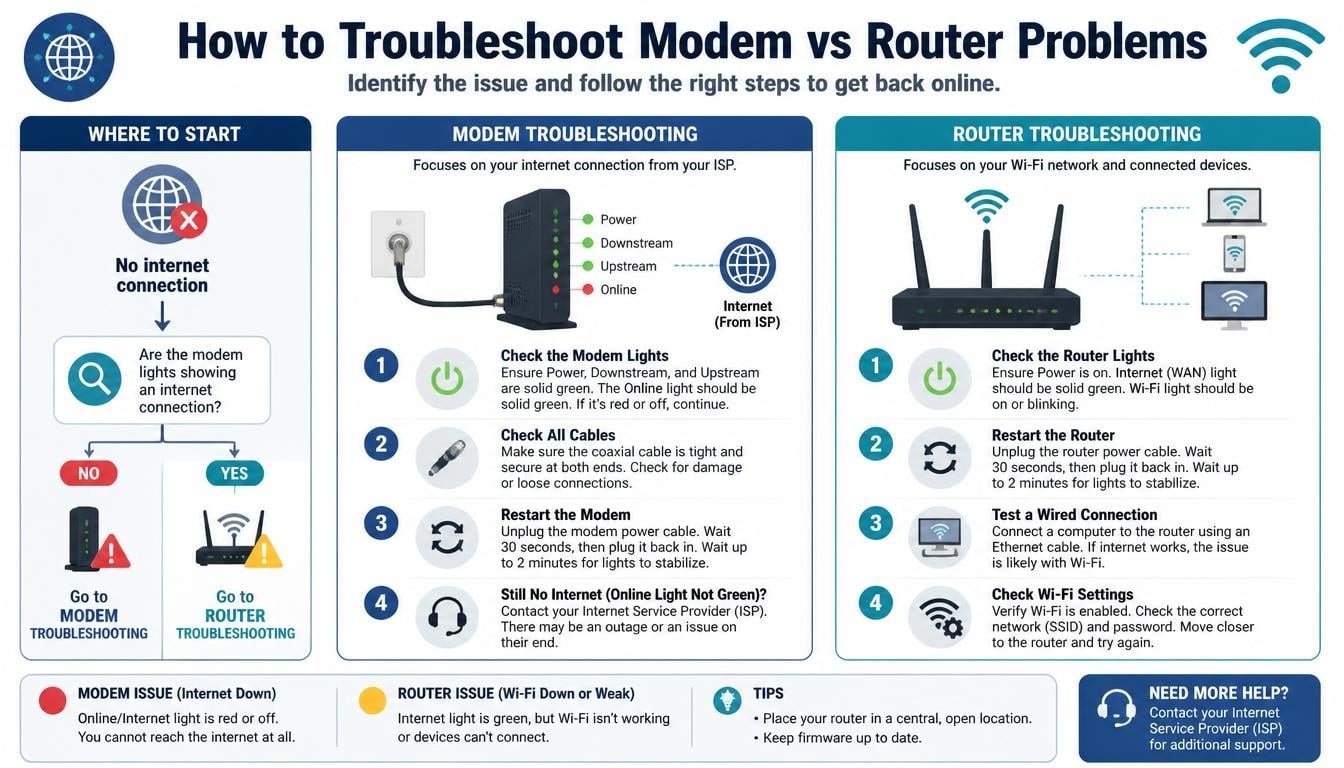
When the internet stops working, randomly unplugging every cable isn’t always the best first move.
A little troubleshooting can help identify which device is causing the problem.
If Your Modem Is Not Connecting
Check the following:
- Make sure the modem receives power.
- Inspect the coaxial, telephone, or fiber connection.
- Look at the modem’s status indicators.
- Check whether your ISP reports a network outage.
- Restart the modem according to the manufacturer’s instructions.
- Contact your provider if the connection remains unavailable.
If the modem cannot establish communication with your ISP, replacing the router probably won’t solve the problem.
If Your Router Is Not Providing WiFi
Consider these checks:
- Confirm that the router is powered on.
- Make sure WiFi is enabled.
- Check whether your devices can detect the wireless network.
- Restart the router if necessary.
- Inspect the Ethernet connection between the modem and router.
- Check your router’s management application for error messages.
- Review wireless settings and connected-device limits.
If the modem works correctly but the wireless network is unavailable, the router may be the source of the issue.
What If Both Devices Appear to Be Working?
Sometimes the problem isn’t either device.
An ISP outage, damaged cable, incorrect network configuration, DNS issue, or overloaded network can also interrupt internet connectivity.
Try connecting a computer directly to the modem only when your ISP’s instructions and network configuration support that approach.
Avoid repeatedly resetting equipment to factory settings unless you understand the consequences, because doing so may erase important network settings.
Frequently Asked Questions About Modem vs Router
What Is the Main Difference Between a Modem and a Router?
A modem establishes the connection between your home and your internet provider. A router manages your home network and distributes connectivity among connected devices.
They perform different but complementary functions.
Is a Modem the Same as a WiFi Router?
No. A traditional modem and a wireless router are different devices.
A modem connects to the ISP, while a wireless router creates and manages a WiFi network. Some combination devices include both functions.
Does a Modem Provide WiFi?
A basic modem generally doesn’t provide WiFi.
However, some modem devices include integrated wireless router functionality. In that case, the equipment can provide both internet connectivity and wireless networking.
Does a Router Provide Internet?
A router distributes an available internet connection, but it doesn’t normally create an internet subscription or independently connect to a traditional cable ISP.
It needs an appropriate external connection, such as a modem, ONT, or another supported network source.
What Happens If I Only Have a Router?
You can create a local network and connect devices to it, but accessing the public internet requires an appropriate upstream connection.
A router alone generally cannot replace the modem or ONT required by your internet service.
What Happens If I Only Have a Modem?
You may be able to connect one compatible computer directly to the modem.
However, you generally won’t have the convenience of a shared wireless network or the broader device management provided by a router.
What Is the Purpose of a Modem Router Combo?
A modem router combo combines the functions of both devices in one unit.
It connects to the ISP and distributes connectivity to multiple devices through WiFi and Ethernet.
How Do I Know Whether My Internet Problem Is the Modem or Router?
Start by checking the equipment status lights and your ISP’s outage information.
If the modem cannot connect to the provider, the problem may be related to the modem, cable, or ISP. If the modem is connected but WiFi is unavailable, investigate the router.
What is a router
A router is a networking device that connects multiple devices to the same network and allows them to share an internet connection through WiFi or Ethernet.
What is a modem
A modem is a device that connects your home to your Internet Service Provider (ISP), bringing internet connectivity into your home network.
Modem vs router
Understanding modem vs router helps you identify how these two devices work together: a modem connects to the internet, while a router distributes that connection to your devices.
Router vs modem
The main difference between a router and modem lies in their functions. A router manages your home network, whereas a modem establishes the connection with your internet provider.
What does a modem do
A modem receives internet signals from your ISP and converts them into a usable connection, allowing your router or compatible device to access the internet.
Read More: https://gracethemes.com/checksum-errors-explained/
Final Thoughts: Understanding Modem vs Router Makes Home Internet Easier
The difference between a modem and a router isn’t particularly complicated once you understand what each device contributes.
The modem brings the internet connection into your home, while the router manages your local network and allows multiple devices to share that connection.
Together, they create the foundation of a reliable home WiFi experience.
Whether you choose separate equipment or a convenient modem router combo, the important thing is to select compatible hardware that meets your internet plan, household size, and everyday connectivity requirements.
Before purchasing anything, check your ISP’s equipment requirements, consider the wireless coverage you need, and think about how many devices will use your network.
And the next time your internet suddenly stops working, you’ll have a much better idea of which little box deserves your attention.
After all, understanding your home network shouldn’t require an engineering degree. A little knowledge about modems, routers, and internet connectivity can make everyday technology considerably less confusing, and that’s a pretty good connection to have.
