

Checksum Errors Explained: How to Detect and Prevent Integrity Failures
A file can look perfectly healthy, download without interruption, and even open without showing an obvious problem.
Yet somewhere beneath its familiar name and neat extension, a tiny change in its contents may have taken place. One altered bit, an incomplete transfer, or an unexpected modification can be enough to make a system question whether that file can still be trusted.
This is where checksum errors enter the picture. They are among those technical warnings that developers, system administrators, and DevOps engineers occasionally encounter, sometimes during an ordinary package installation and sometimes in the middle of an
important production deployment. And while the message itself may seem rather mysterious at first, its purpose is quite straightforward: something about the data being checked does not match what was expected.
Understanding checksum errors is not simply about fixing a failed download. It is about protecting file integrity, maintaining reliable applications, and preventing potentially dangerous changes from slipping into software environments unnoticed.
In modern development workflows, where applications depend on hundreds of third-party libraries, container images, and automated build processes, checksum validation has become an important part of everyday security.
Let’s explore what these errors mean, why they happen, how to detect them, and what practical measures can prevent recurring integrity failures.
What Are Checksum Errors and Why Do They Matter?
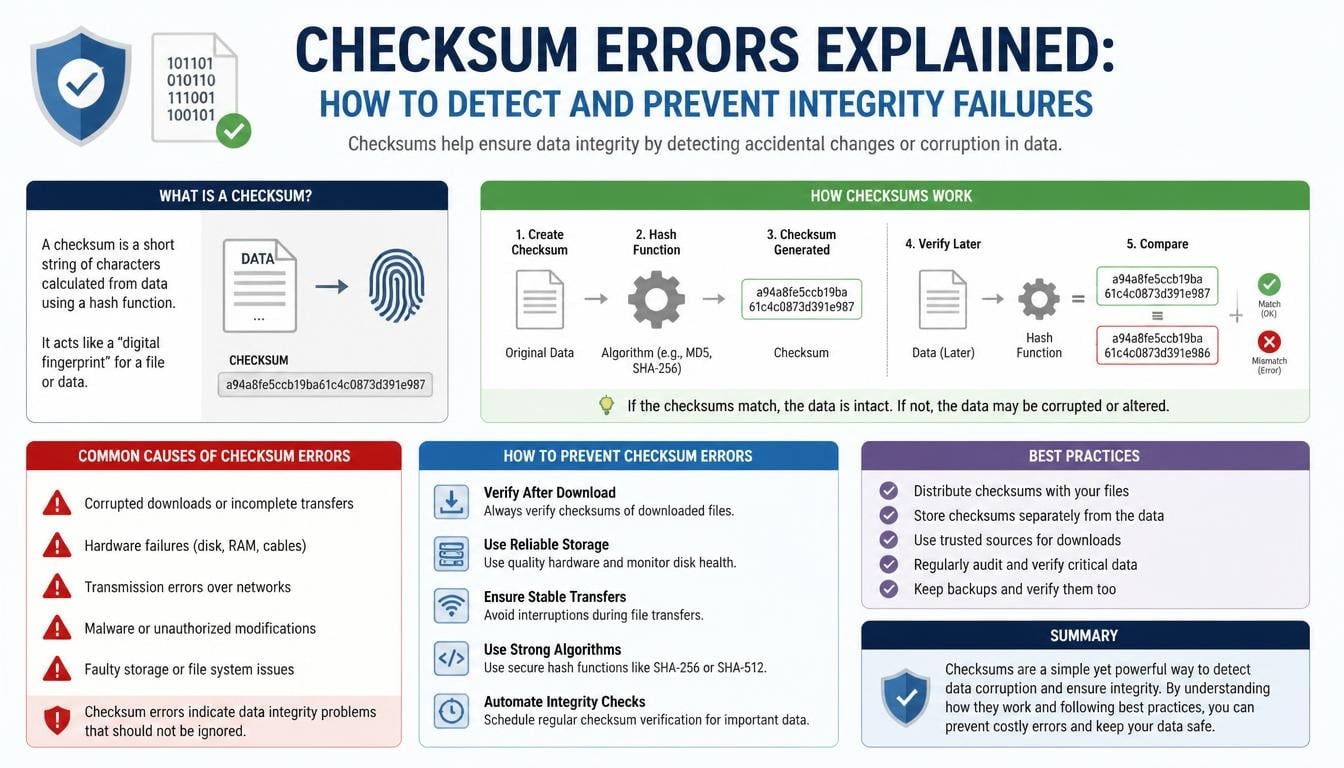
A checksum is a calculated value generated from a file or collection of data. Think of it as a digital fingerprint, although unlike a human fingerprint, even a tiny change in the underlying content can produce a completely different result.
When a system downloads a package, transfers a file, or retrieves a software artifact, it can calculate the checksum of the received content and compare it with an expected value provided by a trusted source.
If both values match, the integrity check passes. If they differ, the system reports a checksum mismatch.
This warning doesn’t automatically mean that somebody has attacked your system. A network interruption, damaged storage device, incomplete download, or outdated cache can cause the same problem. Still, ignoring the warning is a poor idea.
Consider a developer installing a Python library. The package manager downloads the archive, calculates its hash, and compares it with the expected hash recorded in its trusted package metadata. If the values differ, installation may stop rather than introduce potentially corrupted or modified code.
That little interruption can save hours of debugging later, and in some cases, prevent a serious security incident.
Understanding How Checksum Validation Works
The process behind checksum verification is easier to understand when broken into a few simple stages.
A file is passed through a mathematical function called a hash function. The function produces a fixed-length output known as a hash or digest.
For example, SHA-256 generates a 256-bit digest regardless of whether the original input is a tiny text document or a large software archive.
The verification process generally follows this sequence:
- A trusted source publishes an expected checksum for a file.
- The user or application downloads the file.
- A hashing algorithm calculates the downloaded file’s digest.
- The calculated value is compared with the expected checksum.
- A matching result indicates that the file has not changed relative to the trusted reference.
- A mismatch signals that further investigation is necessary.
A useful distinction here is that a checksum comparison establishes consistency with a reference value, not automatically the authenticity of the publisher. If an attacker can replace both the package and its published checksum, an ordinary comparison may still pass.
This is why secure systems combine hash validation with trusted repositories, authenticated metadata, digital signatures, and other security controls.
Common Causes of Checksum Errors
Checksum problems rarely appear without some underlying reason. Sometimes the cause is surprisingly ordinary, while in other situations it points towards a more serious weakness in the development environment.
Understanding the cause makes troubleshooting much easier.
1. Corrupted or Incomplete Downloads
One of the most common reasons for a checksum mismatch is an incomplete download.
Imagine downloading a 200 MB package over an unstable internet connection. The connection drops briefly, the download resumes incorrectly, or a proxy interrupts the transfer. The resulting file may have a different size or content than the original.
When the package manager calculates its hash, the expected and actual values don’t match.
Corrupted downloads can also happen because of temporary network failures, interrupted transfers, or storage problems.
The sensible approach is to download the file again from a trusted source and verify it before installation.
2. Stale or Damaged Package Caches
Package managers often save downloaded files locally so they don’t need to retrieve the same dependencies repeatedly.
This is useful, especially in projects with large dependency trees. But cached content can become outdated, incomplete, or corrupted.
A stale cache may contain a package that no longer corresponds to the expected repository metadata.
This can result in recurring package integrity errors even when the repository itself is working correctly.
Clearing the affected cache and allowing the package manager to retrieve a fresh copy can often resolve the issue.
3. Unauthorized Package Modifications
Not every checksum mismatch is an innocent technical inconvenience.
If somebody modifies a software package after its original checksum has been published, the calculated hash will change.
Such modifications might be accidental, but they can also indicate malicious tampering, dependency poisoning, or a compromised software distribution channel.
This is particularly important when dealing with third-party dependencies and open-source libraries.
A package that contains unexpected code can introduce vulnerabilities or backdoors into an otherwise trustworthy application. Therefore, checksum failures should always be investigated rather than blindly bypassed.
4. Incorrect Repository Metadata
Package managers depend on metadata to identify package versions, dependencies, and expected hashes.
If the metadata becomes outdated or inconsistent with the actual package files, verification can fail.
This situation might occur during repository synchronization, package replacement, mirror updates, or incomplete publishing operations.
Using reputable package repositories and ensuring that metadata is refreshed can help reduce these problems.
5. Hardware and Storage Problems
Occasionally, the problem has nothing to do with the internet or package repository.
Failing storage devices, memory errors, damaged file systems, and unstable hardware can alter data during storage or processing.
These failures may produce repeated integrity errors across unrelated files.
If the same problem keeps appearing after fresh downloads, it is worth investigating the underlying hardware rather than repeatedly reinstalling packages.
How to Detect Checksum Errors Before They Become Bigger Problems
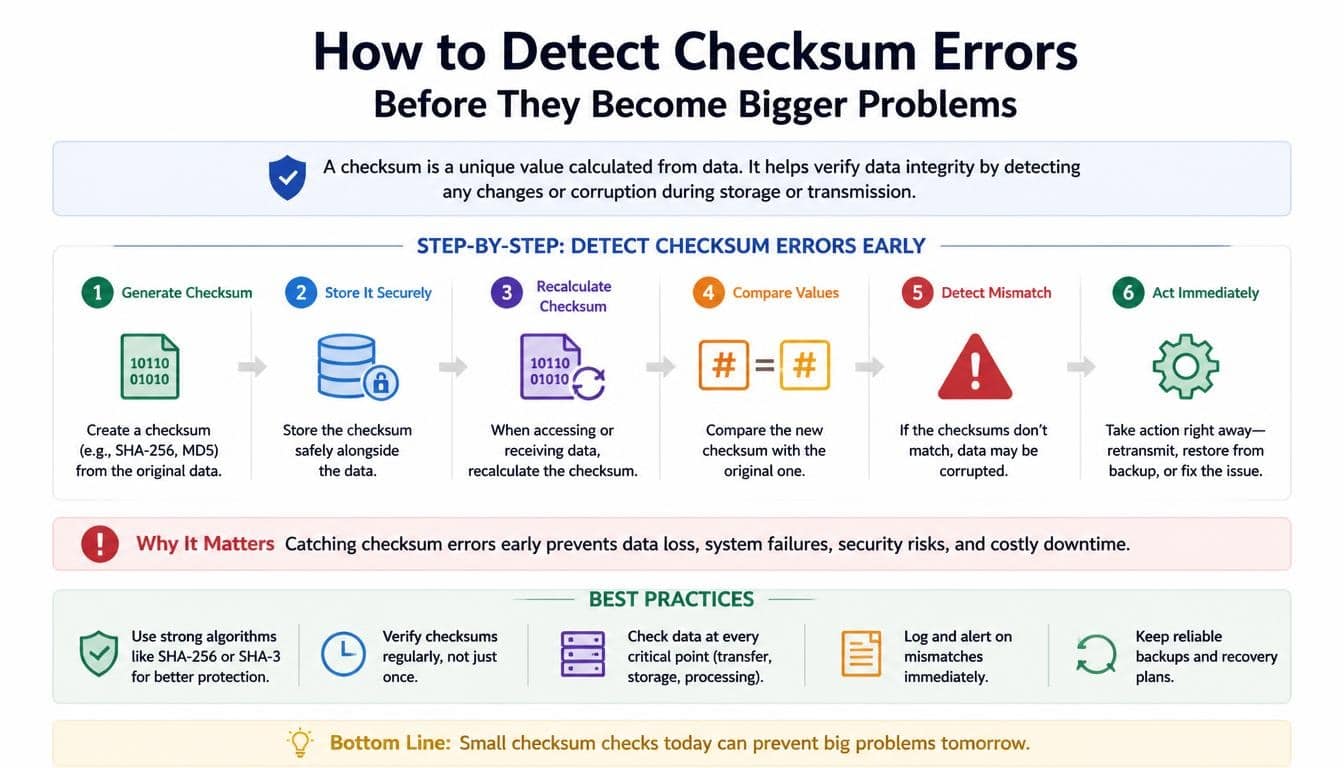
Detecting integrity failures early is much cheaper than discovering them after an application has already reached production.
Fortunately, several practical methods can help identify unexpected changes.
Compare SHA-256 Checksums
SHA-256 is one of the most widely used cryptographic hash algorithms for file verification.
On Linux, you can calculate a file’s checksum with:
bash
sha256sum application-package.tar.gz
On macOS, the equivalent command is:
bash
shasum -a 256 application-package.tar.gz
On Windows PowerShell, use:
powershell
Get-FileHash .\application-package.tar.gz -Algorithm SHA256
Each command produces a hash value that can be compared with the expected checksum published by a trusted provider.
A matching digest provides strong evidence that the file matches the referenced content, assuming the expected value itself is trustworthy.
Enable Automatic Package Verification
Most modern package managers perform some form of integrity checking during package installation.
For example, Python’s pip supports hash-based verification through requirements files.
A requirements file can include a pinned package version and its expected hash:
text
numpy==2.1.0 \
–hash=sha256:REPLACE_WITH_TRUSTED_SHA256
The example uses a placeholder intentionally. Replace it with the authentic hash for the exact distribution being installed.
Install dependencies using:
bash
pip install –require-hashes -r requirements.txt
This approach makes dependency installation more predictable and helps detect unexpected package changes.
Monitor Build and Deployment Logs
Checksum errors can also appear inside automated development environments.
Build logs from GitHub Actions, Jenkins, and GitLab CI may reveal:
- Package downloads that fail integrity verification.
- Unexpected changes in dependency archives.
- Repeated cache restoration problems.
- Container image verification failures.
- Differences between expected and actual build artifacts.
A useful practice is to make integrity-related failures visible in pipeline reports instead of burying them among ordinary installation messages.
Early visibility makes troubleshooting considerably less painful.
How to Fix Checksum Mismatch Errors
Once a checksum mismatch appears, the next step is finding out why it happened.
The solution depends on the source of the problem. Reinstalling everything might occasionally work, but it isn’t always the most sensible first move.
Redownload the Affected File
Start with the simplest possibility.
Delete the incomplete or corrupted download, retrieve the package again from its trusted source, and repeat the checksum comparison.
If the new file matches the expected value, the original issue may have been a temporary transfer problem.
However, if the mismatch continues, don’t keep repeating the same download without investigating the source.
Clear Stale Package Caches
Cached packages are convenient until they start creating confusion.
For Conda users, the following command removes unused package caches and temporary files:
bash
conda clean –all
Afterward, retry the installation.
If a particular environment is damaged beyond repair, you can remove it with:
bash
conda env remove -n my_environment
Replace my_environment with the actual environment name.
Remember that removing an environment deletes its installed packages and environment-specific configuration. Back up anything important first.
For pip, you can use:
bash
python -m pip cache purge
This clears the local pip download cache. The next installation can retrieve fresh package files.
Refresh Package Metadata
Sometimes the package itself is perfectly fine, but the information used to verify it is outdated.
Refresh repository information using the appropriate package manager command, then attempt the installation again.
For Conda, this may involve refreshing channel metadata or checking whether a mirror is temporarily inconsistent.
For pip, confirm that the configured package index is correct and that the package version being requested actually exists.
Verify Package Versions
Dependency version conflicts can complicate troubleshooting.
A project might expect one version of a library while another environment retrieves a different release.
Using explicit version constraints and reviewing dependency lock files helps keep installations consistent.
For Python projects, files such as requirements.txt and environment.yml provide useful records of the intended environment.
Still, pinning versions alone does not guarantee integrity. Pair version constraints with verified hashes whenever practical.
Preventing Checksum Errors in CI/CD Pipelines
Automated development workflows create opportunities for mistakes to travel quickly.
A developer might run a build locally, test it successfully, and push a change that triggers several automated jobs. If an unverified dependency enters that process, the same problem can spread across testing, packaging, and deployment.
This is why CI/CD pipeline security should include automated integrity verification.
Enforce Hash Validation During Dependency Installation
Build pipelines should verify dependency hashes rather than trusting package names and version numbers alone.
A package with the expected name and version could still contain unexpected content if its distribution source has been compromised.
Using hash-locked dependency files provides another layer of protection.
This is particularly useful for Python projects using pip and for environments where reproducible dependency installation matters.
Manage GitHub Actions Caches Carefully
GitHub Actions allows developers to cache dependencies between workflow executions.
The benefit is obvious: faster builds and less unnecessary downloading.
However, an incorrectly configured cache key can restore outdated dependencies or content from an unintended environment.
A better caching strategy includes relevant dependency lock files in the cache key.
For example:
yaml
– name: Restore dependency cache
uses: actions/cache@v4
with:
path: ~/.cache/pip
key: pip-${{ runner.os }}-${{ hashFiles(‘requirements.txt’) }}
When the requirements file changes, the cache key changes too.
This helps reduce stale-cache problems, although it does not replace package hash verification.
Strengthen Jenkins Build Integrity
Jenkins pipelines should treat dependency verification as part of the build process, not an optional step that can be skipped when a job is running late.
Useful measures include:
- Verify downloaded artifacts before using them.
- Retrieve dependencies from trusted repositories.
- Pin dependency versions.
- Avoid sharing writable caches across unrelated projects.
- Fail builds when required integrity checks fail.
- Preserve build logs for investigation.
A Jenkins build that fails because a dependency cannot be verified is doing something valuable. It is refusing to produce an artifact whose integrity has not been established.
Improve GitLab CI Security
GitLab CI workflows can also benefit from automated dependency verification.
Use trusted package sources, protected pipeline variables, version-controlled lock files, and controlled cache policies.
Where appropriate, validate downloaded artifacts before allowing subsequent deployment stages to consume them.
This creates a stronger connection between continuous integration security and continuous deployment security.
The objective isn’t to make pipelines unnecessarily complicated. It is to ensure that every important artifact has a trustworthy origin and a verifiable identity.
Protecting Docker Images and Build Artifacts
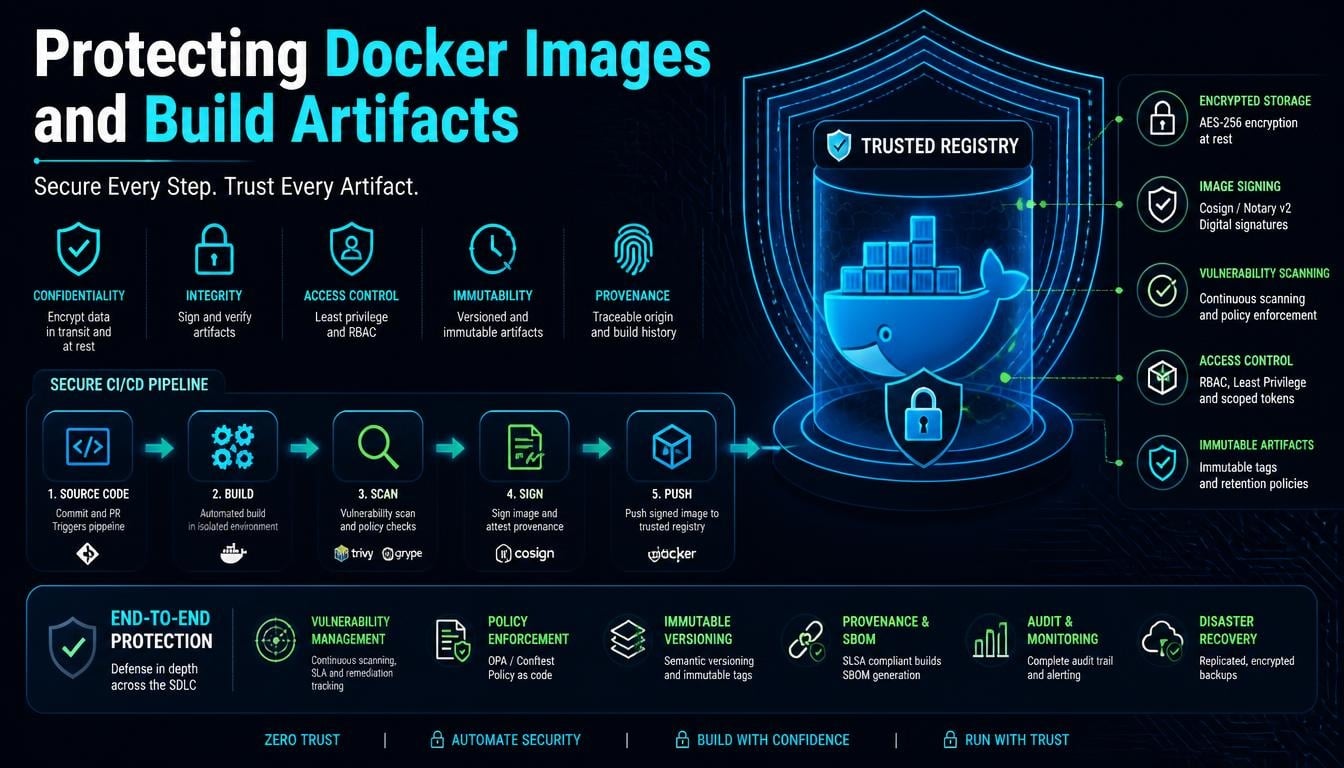
Containers have become a familiar part of modern software development, but they introduce another layer of integrity considerations.
A Docker image may contain an application, operating system components, third-party packages, and configuration files. If any of these components are modified unexpectedly, the resulting image may no longer represent the version that developers intended to deploy.
Verify Docker Image Integrity
Docker image digests provide a way to identify specific image content.
Instead of relying exclusively on a mutable tag such as latest, teams can reference images using immutable digests.
For example:
bash
docker pull nginx@sha256:IMAGE_DIGEST
Here, IMAGE_DIGEST is a placeholder for the actual digest published by the trusted registry.
This approach helps ensure that a deployment retrieves the intended image rather than an image that happens to use the same tag.
For stronger assurance, organizations can combine digest pinning with signed images, provenance verification, and container scans.
Validate Build Artifacts
A successful compilation does not automatically prove that the resulting artifact is trustworthy.
Build outputs should be checked before they move into release repositories or production environments.
Useful practices include:
- Generate checksums for release archives.
- Store artifact hashes alongside build metadata.
- Verify artifacts before deployment.
- Preserve information about source commits and build environments.
- Use authenticated storage and access controls.
These measures strengthen artifact integrity and make it easier to investigate unexpected differences between builds.
Reproducible Builds and Dependency Integrity
Reproducible builds aim to produce equivalent outputs when the same source code, dependencies, configuration, and build instructions are used.
They are valuable because they help developers distinguish legitimate build variations from unexpected modifications.
Imagine two separate build machines compiling the same application using identical inputs. If their outputs differ unexpectedly, the difference deserves attention.
It could be caused by timestamps, environment variables, changing dependencies, or an unauthorized modification.
A well-managed environment makes these investigations easier.
Use Locked Dependencies
Dependency lock files record the exact versions of packages used by a project.
Python developers may use pinned entries in requirements.txt, while Conda environments can be documented using environment.yml.
These files help avoid accidental upgrades and inconsistent package resolution.
However, locked versions should be accompanied by hashes or other verification mechanisms when stronger package integrity is required.
Keep Development Environments Consistent
Environment management becomes complicated when developers use different operating systems, package sources, or library versions.
Conda can help organize Python dependencies into isolated environments.
For example:
bash
conda env export > environment.yml
This creates an environment description that can be shared with other developers.
A consistent environment reduces unnecessary dependency differences, although it should not be treated as proof that every installed package is authentic.
Reproducibility and integrity verification work best together.
Software Supply Chain Security: Why Checksum Verification Is Essential
Modern applications rarely consist entirely of code written by one development team.
They rely on open-source libraries, external packages, container images, build tools, and third-party services.
This interconnected ecosystem is known as the software supply chain.
Unfortunately, it also creates opportunities for supply chain attacks.
An attacker may compromise a package repository, publish a malicious dependency, modify a build artifact, or exploit weak dependency management practices.
A malicious package might even retain the expected name and version while containing harmful code.
That is why software supply chain security requires more than simply checking whether a file downloaded successfully.
Important protective measures include:
- Verify package hashes against trusted metadata.
- Use authenticated and reputable package repositories.
- Review dependency updates before introducing them.
- Monitor third-party libraries for known vulnerabilities.
- Protect build systems and deployment credentials.
- Track artifact provenance.
- Use digital signatures where appropriate.
- Automate integrity checks throughout the development lifecycle.
Checksum verification helps identify unexpected changes, while software composition analysis can reveal vulnerable or suspicious dependencies.
Together, these controls contribute to stronger DevSecOps practices.
How Xygeni Can Help Strengthen Software Integrity
Managing dependencies manually becomes increasingly difficult as applications grow.
A project with a handful of packages may be easy to inspect, but enterprise applications can depend on hundreds or thousands of components.
This is where application security platforms become useful.
<Xygeni> can be mentioned as an example of a platform focused on application security and software supply chain protection. Its broader AppSec approach is relevant to organizations seeking to improve dependency visibility, identify software risks, and strengthen development security workflows.
An All-in-One AppSec Platform can help teams bring multiple security activities into a more coordinated process.
For organizations evaluating solutions, useful capabilities to consider include:
- Software composition analysis for identifying dependency risks.
- Detection of suspicious or malicious open-source packages.
- Monitoring for vulnerable third-party components.
- Security checks integrated into CI/CD workflows.
- Visibility into software supply chain risks.
- Automated security policies and reporting.
- Support for artifact and dependency protection.
It is important to understand that an AppSec platform does not make checksum verification unnecessary.
Instead, it complements lower-level integrity controls by helping teams identify broader risks that a simple hash comparison cannot detect.
For instance, a malicious package could have a perfectly valid checksum if that checksum was published alongside the malicious package itself. Additional security analysis and trusted provenance are needed to recognize such a situation.
Best Practices for Preventing Future Integrity Failures
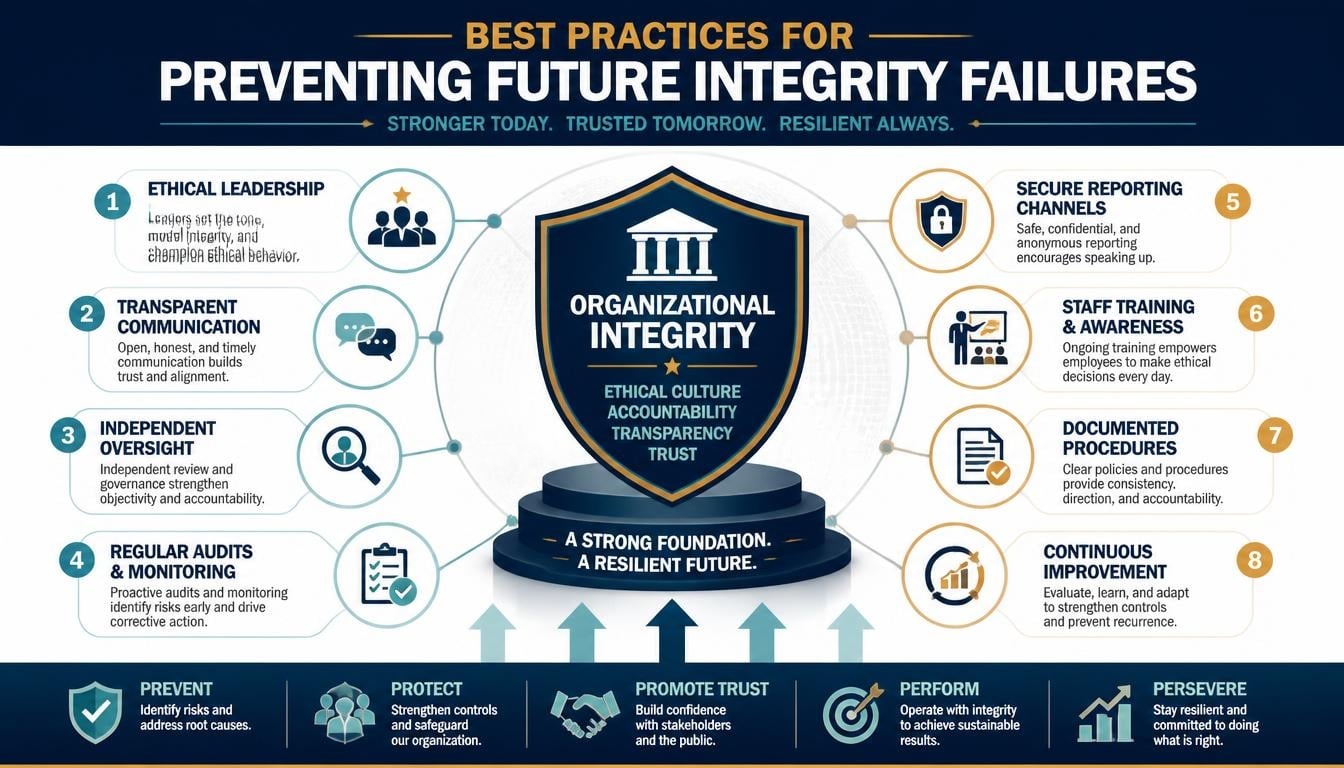
Preventing checksum problems is easier when integrity checks become an ordinary part of software development.
Rather than waiting for an installation to fail, teams should establish practices that identify problems before they reach important environments.
Here are some useful habits worth adopting:
- Always use trusted sources: Download packages from reputable repositories and verify their authenticity.
- Enforce checksum validation: Require hashes for important dependencies and downloaded artifacts.
- Keep dependencies locked: Use version constraints and lock files to reduce unexpected changes.
- Manage caches properly: Remove stale or corrupted cached packages when necessary.
- Automate verification: Include integrity checks in build, testing, and deployment workflows.
- Protect package repositories: Restrict access and monitor unexpected changes to published packages.
- Review security alerts: Investigate unusual dependency behavior and possible software vulnerabilities.
- Preserve artifact metadata: Keep checksums, provenance information, and build records together.
- Verify container images: Prefer digest-based references and trusted image sources.
- Investigate recurring failures: Repeated checksum mismatches may indicate a deeper problem with hardware, storage, repositories, or security controls.
One final point deserves attention: never disable verification simply because a build is taking longer than expected.
A failed integrity check is a useful warning, not an annoying obstacle to be removed.
Frequently Asked Questions About Checksum Errors
What does a checksum error mean?
A checksum error means that the calculated hash of a file does not match the expected hash value.
It can indicate incomplete downloads, corrupted files, outdated caches, incorrect metadata, or unexpected modifications.
The error should be investigated before the affected file is trusted or installed.
Are checksum errors always caused by malware?
No. Most checksum mismatches have ordinary technical explanations, including network interruptions and damaged cached packages.
However, unauthorized modifications and malicious tampering are also possible causes.
The safest response is to identify the reason rather than assume that the warning is harmless.
How do I fix a checksum mismatch?
Start by downloading the file again from a trusted source.
If the issue continues, clear the relevant package cache, refresh repository metadata, verify the package version, and check the expected hash against an authentic reference.
If multiple unrelated files continue failing verification, investigate possible storage or hardware problems.
Why does Conda show a hash mismatch error?
Conda may report a hash mismatch when a downloaded package does not match the checksum recorded in its repository metadata.
Possible causes include corrupted downloads, stale package caches, mirror synchronization problems, or unexpected package modifications.
Running conda clean –all can help remove cached files before attempting another installation.
If the error persists, investigate the channel and repository metadata rather than repeatedly retrying the same operation.
Can pip verify package integrity?
Yes. pip supports hash-based package verification through requirements files.
Using –require-hashes requires the expected hashes to be specified for the applicable dependencies.
This is a useful way to make Python dependency installation more controlled and predictable.
What is the difference between a checksum and a cryptographic hash?
A checksum is a general term for a value used to detect changes or errors in data.
A cryptographic hash is produced by a cryptographic hash function and is designed to provide stronger security properties, such as resistance to finding two different inputs with the same digest.
SHA-256 is a commonly used example.
Traditional checksums such as CRC values are useful for detecting accidental transmission errors, but they are not suitable for defending against deliberate tampering.
Do checksums prevent software supply chain attacks?
Not by themselves.
Checksums can detect unexpected changes when the expected value comes from a trustworthy source.
However, if an attacker compromises both the package and its published checksum, the comparison may still succeed.
For stronger protection, organizations should combine hash validation with digital signatures, trusted repositories, dependency scanning, provenance checks, and secure build processes.
What is a checksum error
A checksum error occurs when a file’s calculated hash value doesn’t match its expected checksum, indicating that the file may be corrupted, incomplete, or altered.
It helps detect data integrity issues and potential tampering during downloads, package installations, or software deployments.
Read More: https://gracethemes.com/mac-screen-recorder/
Conclusion: Make Data Integrity a Habit, Not an Afterthought
Checksum errors may appear as small interruptions in an otherwise ordinary development workflow, but their importance goes much further than a failed download.
They remind us that files, packages, and software artifacts should never be trusted simply because they arrived without an obvious problem.
A reliable development environment needs consistent verification, trustworthy package sources, carefully managed dependencies, and automated security checks. From a simple SHA-256 comparison to a complete CI/CD integrity strategy, every layer contributes something valuable.
Whether you are troubleshooting a Conda installation, resolving a pip package mismatch, managing Docker images, or strengthening software supply chain security, the underlying principle remains the same: know what you are installing, verify what you receive, and investigate anything that doesn’t match.
And perhaps that’s the most useful lesson of all. In software development, trust shouldn’t be a guess made at the end of a download. It should be something established through evidence, one verified file at a time.
Have you encountered a checksum mismatch in Conda, pip, Docker, or a CI/CD pipeline? Share your experience and the solution that worked for you in the comments. Your experience might save another developer a frustrating afternoon of troubleshooting.
