

How Certificate Chains Work: A Complete Guide to SSL/TLS Trust and Certificate Validation
Imagine visiting your favorite online store, entering your payment details, and clicking the checkout button. You probably don’t stop to wonder whether the website is genuinely owned by the business it claims to represent.
You simply expect the little padlock in your browser to mean something, and thankfully, a great deal of technology works quietly behind the scenes to help make that possible.
One important part of this process is understanding how certificate chains work. Although the name sounds like something reserved for cybersecurity engineers,
the underlying idea is surprisingly straightforward: your browser needs a reliable way to establish that a website’s digital identity can be trusted.
A website’s certificate rarely stands alone. It is connected to other certificates, which are linked through cryptographic signatures and established trust relationships.
Together, these certificates create a Chain of Trust, helping browsers, mobile devices, and applications determine whether a server’s identity is legitimate.
In this guide, we’ll explore the Certificate Chain, the role of an SSL/TLS Certificate, how an Intermediate Certificate connects to a Root CA Certificate, and what happens when something goes wrong.
We’ll also look at practical installation advice, common validation errors, and the small configuration details that can make a surprisingly big difference.
What Is a Certificate Chain?
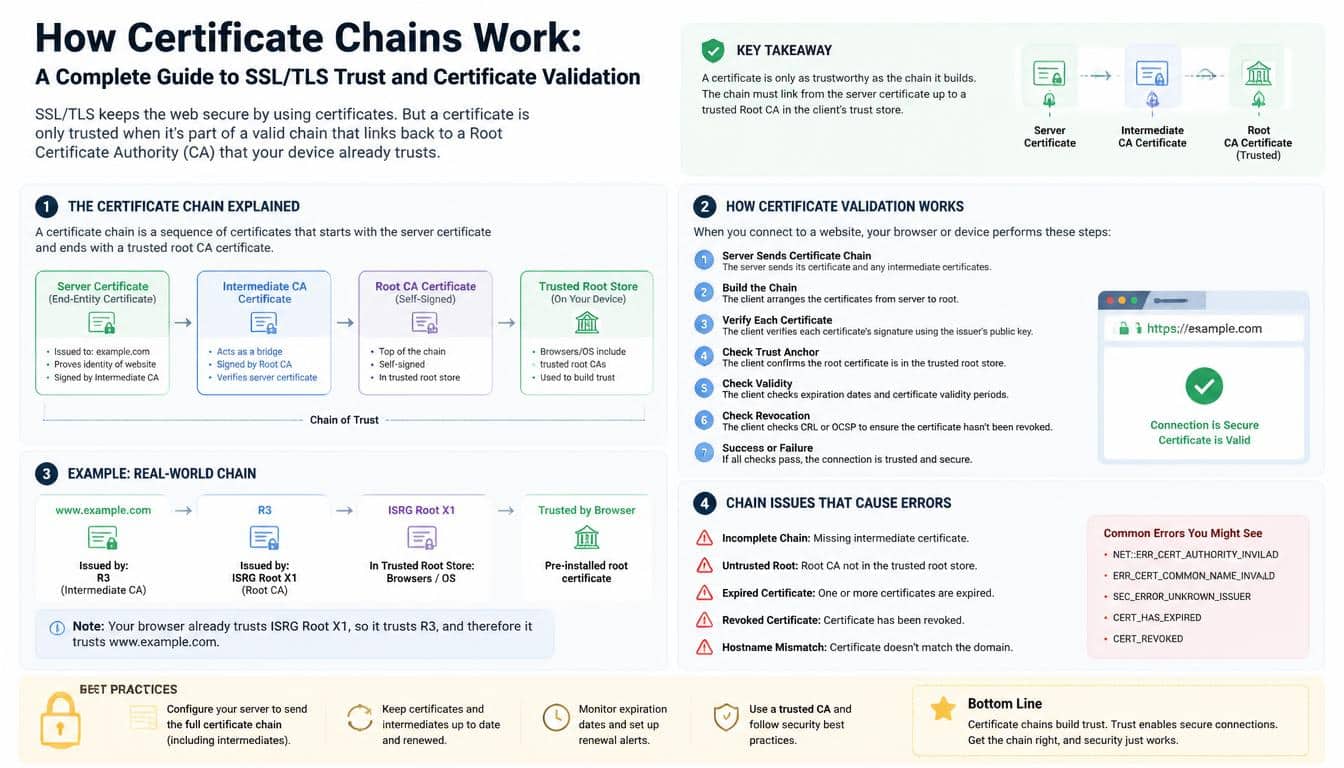
A Certificate Chain is an ordered sequence of digital certificates used to establish trust between a website or other digital entity and a trusted Certificate Authority (CA).
Each certificate in the sequence is connected to another through a digital signature, creating a path that a client can examine during certificate validation.
Think of it as a recommendation passed through people you already trust. A stranger introduces themselves, but instead of accepting their word alone, you ask who can vouch for them.
That person might be trusted because someone else has already established their credibility. Digital certificates follow a somewhat similar logic, except cryptography does the heavy lifting.
In a typical HTTPS connection, the chain contains three main roles:
- End-entity certificate: The certificate presented for the website or server, often called the leaf certificate.
- Intermediate certificate: A certificate issued to an intermediate Certificate Authority, which helps connect the website certificate to a trusted root.
- Root CA certificate: A certificate associated with a root Certificate Authority that the relevant client already recognizes as a trust anchor.
The sequence is often described as the website certificate, followed by one or more intermediate certificates, and ultimately a trusted root. However, the exact number of certificates varies depending on the issuing authority and the certification path available to the client.
A useful distinction here is that a certificate chain is not merely a collection of files. It represents a series of verifiable relationships. Each link must make sense cryptographically, and the entire path must satisfy the client’s trust requirements before the connection is accepted.
Why Certificate Chains Matter for SSL/TLS Security
When a browser connects to a website using HTTPS, it needs to establish an encrypted connection and authenticate the server’s identity. Encryption without authentication can leave room for an attacker to impersonate the intended destination, so both pieces matter.
An SSL/TLS Certificate contains information such as the subject’s identity, a public key, its validity period, and the issuer’s details. Modern websites use TLS, the successor to SSL, even though people still commonly say SSL certificate when discussing website security.
The certificate chain helps the browser decide whether the certificate was issued through a recognized and acceptable trust path. Without this mechanism, a browser would have no scalable way to evaluate the identity of every website it visits.
There are several practical benefits:
- Server authentication: The browser can evaluate whether the certificate is valid for the requested website.
- Cryptographic verification: Digital signatures help reveal whether certificates have been altered or improperly issued.
- Secure communication: Once authentication and the TLS handshake succeed, the connection can establish encryption using negotiated cryptographic parameters.
- Consistent trust decisions: Browsers and applications can use established trust stores and validation rules rather than relying on arbitrary claims from individual websites.
- Protection against impersonation: Proper certificate validation makes it harder for an attacker to pose as a legitimate server without presenting acceptable credentials.
It’s worth remembering that a certificate chain is only one part of a secure connection. A trusted chain doesn’t automatically mean a website is honest, free from malware, or safe to buy from. It means the certificate has passed particular identity and trust checks, subject to the client’s validation rules.
How Certificate Chains Work: Understanding the Three Main Layers
The easiest way to understand how certificate chains work is to look at the responsibilities of the certificates involved. Each layer has a distinct purpose, and the separation is intentional rather than accidental.
The End-Entity SSL/TLS Certificate
The end-entity certificate is the certificate associated with the server or service that the client is trying to reach. For example, a website might present a certificate containing the domain name example.com in its Subject Alternative Name extension.
This certificate includes a public key and is digitally signed by its issuer, commonly an intermediate CA. During the TLS handshake, the server presents its certificate, and the client checks whether it is suitable for the requested hostname and intended use.
The server also proves possession of the corresponding private key as part of the TLS handshake. This is important because a certificate by itself is public information; an attacker could potentially copy a public certificate, but should not be able to complete the relevant cryptographic proof without the private key.
A valid certificate therefore does more than display a company name. It binds identity-related information to a public key under the rules of the issuing authority and the client’s verification process.
The Intermediate Certificate
An Intermediate Certificate sits between the end-entity certificate and a root trust anchor. It is issued to an intermediate Certificate Authority and usually contains the appropriate extensions that allow it to issue other certificates.
Why not have the root CA sign every website certificate directly? Because separating the roles can improve security and make the system easier to manage. Root private keys can be kept under especially strict protection, while intermediate CAs handle routine issuance within defined constraints.
An intermediate CA can be dedicated to particular certificate types, environments, or issuance policies. If an intermediate is compromised or needs to be retired, the authority may be able to address the issue without replacing every root certificate in the ecosystem.
There can also be multiple intermediate certificates in a chain. One intermediate might issue another intermediate, which then issues the website certificate. This creates a longer certification path, but the underlying principle stays the same: each certificate must be linked to an issuer that the client can validate.
The Root CA Certificate
The Root CA Certificate sits at the top of a conventional certificate hierarchy. It is commonly self-signed, meaning the certificate’s signature is made using the key associated with that same certificate.
However, a self-signature does not automatically make a root trustworthy. Anyone can create a self-signed certificate, after all. Trust comes from the root being accepted as a trust anchor by the relevant operating system, browser, application, or managed environment.
Trust stores contain root certificates that a client has decided to recognize under its policies. These stores can differ between operating systems, browsers, enterprise networks, and applications, which is one reason a website might work correctly in one environment but produce a certificate error in another.
When the certification path reaches an acceptable trust anchor and the other validation checks succeed, the client can establish the required trust relationship. That final step is what gives the chain its practical meaning.
The Chain of Trust: How Certificates Connect
The Chain of Trust is the relationship through which a client connects a server certificate to a trusted certificate authority. The process relies on cryptographic signatures, certificate constraints, and the client’s trust configuration.
A simplified example looks like this:
- A website presents a certificate for com.
- The certificate was signed by Intermediate CA A.
- Intermediate CA A was signed by Intermediate CA B.
- Intermediate CA B chains to a trusted root CA.
The client verifies the signatures and evaluates the certificates along the path. It also checks relevant constraints, such as whether a certificate is authorized to issue other certificates and whether the certificates are suitable for the intended purpose.
One detail sometimes causes confusion: the order in which certificates are signed is not the same as the direction in which a client might describe validation.
The root may have signed an intermediate, and that intermediate may have signed the website certificate. Yet the client commonly begins with the website certificate and builds or evaluates a path toward a trusted anchor.
The root certificate is not always transmitted by the server. In many deployments, the server sends its own certificate and the necessary intermediate certificates, while the client already has access to a suitable root certificate in its trust store.
This design reduces unnecessary transmission and allows clients to apply their own trust policies. The chain is a relationship, not simply a stack of certificates that must always be copied in full.
How Browsers Verify an SSL/TLS Certificate
When someone asks, “How does a browser verify an SSL certificate?”, the answer involves several checks working together. The browser does not simply see a familiar certificate authority name and immediately decide everything is fine.
During a typical TLS connection, the client receives the server’s certificate and attempts to establish a valid certification path. It then checks whether that path is acceptable under its configured trust rules.
The process generally involves the following steps:
- Certificate parsing: The client reads the certificate fields, extensions, issuer information, and public key.
- Path building: It attempts to connect the end-entity certificate to an appropriate issuer and ultimately to a recognized trust anchor.
- Signature verification: It verifies certificate signatures using the public keys of the relevant issuing certificates.
- Hostname verification: It checks that the certificate identifies the requested hostname, generally through the Subject Alternative Name extension.
- Validity checks: It evaluates the certificate’s not-before and not-after dates.
- Policy and constraint checks: It examines applicable key usage, extended key usage, basic constraints, algorithm requirements, and other relevant restrictions.
- Revocation handling: Depending on the client and its configuration, it may consult revocation information through mechanisms such as OCSP or certificate revocation lists, or use other revocation-related policies.
Not every client performs every check in exactly the same way. Some checks are conditional, and revocation behavior can differ considerably between browsers and applications.
A successful Certificate Verification result means that the client accepts the certificate for the connection under its applicable rules. It is not a universal guarantee that every other device will make the same decision.
Certificate Authority (CA): Who Issues the Certificates?
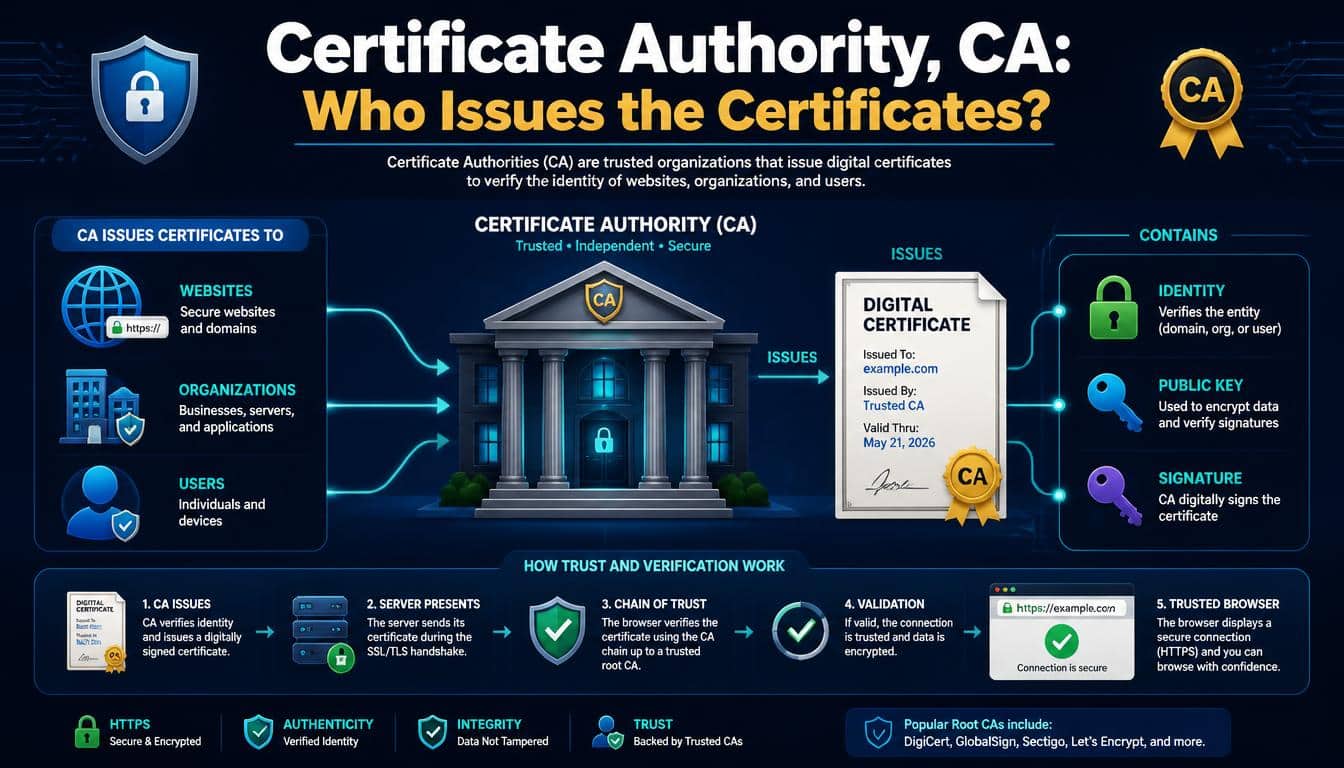
A Certificate Authority (CA) is an organization or service that issues and signs digital certificates under a defined set of policies.
In the public web PKI, certificate authorities follow applicable industry requirements and browser trust programs, although their specific operating practices can vary.
The CA is responsible for performing the validation required for the certificate type being issued. For a typical domain-validated TLS certificate,
this involves establishing control over the domain using an approved validation method. Other certificate types may require additional identity checks.
The certificate issuer signs the certificate using its private key. A client can then use the corresponding public key in the issuer’s certificate to verify that signature, provided it has established an acceptable path to a trust anchor.
Organizations such as DigiCert provide digital certificate services and certificate lifecycle management capabilities. Their role may include issuing certificates, operating certification infrastructure, and providing tools to help customers manage deployments.
For organizations handling large numbers of certificates, platforms such as DigiCert CertCentral can support issuance, renewal, monitoring, and other aspects of certificate lifecycle management.
Such tools can make administration less error-prone, although correct server configuration and client-side validation still matter.
It is useful to distinguish the CA’s reputation from the technical validation itself. A recognized issuer is important, but a certificate still needs to be appropriate for its intended purpose, correctly configured, and valid under the client’s trust rules.
What Is a Certification Path?
A Certification Path is the sequence of certificates that connects a target certificate to a trust anchor accepted by a client. Although people often use certification path and certificate chain interchangeably, path building can be more complicated than following one fixed sequence.
A client may have access to different intermediate certificates, cross-signed certificates, or alternate issuers. It can sometimes build more than one possible path from the same end-entity certificate to an acceptable trust anchor.
This becomes particularly important when a CA changes its infrastructure, introduces a new root, or supports clients with different trust stores. A certificate path that works on one system may not be suitable on another because the available issuers and trusted roots are different.
For instance, an older mobile device might lack a root certificate that a newer desktop operating system recognizes. Even if the website certificate itself is correctly issued, the device might fail to build an acceptable path.
The broader lesson is that certificate validation depends on both the certificates presented and the trust information available to the client. Path building isn’t simply a matter of checking whether the website certificate has a valid signature.
What Happens When an Intermediate Certificate Is Missing?
A Missing Intermediate Certificate is one of the most common causes of certificate-chain problems. A server may present a valid end-entity certificate but fail to provide an intermediate certificate needed by the client to complete the certification path.
The certificate itself may be genuine, and its signature may be correct. Still, the client may not know how to connect it to a trusted root because the relevant issuer certificate is unavailable.
Some clients may retrieve missing intermediates through supported mechanisms or find them in a local cache. Others may not, and relying on those workarounds can lead to inconsistent behavior across browsers, mobile devices, and applications.
Symptoms may include browser trust warnings, failed API requests, TLS handshake errors, or certificate verification failures in command-line tools. These errors can be confusing because the website owner might see a secure connection on their own computer while visitors experience a problem.
To resolve the issue, administrators should first identify the certificate chain the server is presenting. They can then obtain the correct intermediate certificate from the issuing CA, confirm its authenticity, and update the server configuration as needed.
Installing an intermediate certificate does not mean installing a new root certificate on every visitor’s device. Usually, the correct approach is to make sure the server presents the required intermediate certificates and lets clients use their own trusted roots.
How to Install an Intermediate Certificate on a Server
The exact steps for Intermediate Certificate Installation depend on the server software, hosting provider, load balancer, or content delivery network being used. Even so, the same general principles apply across most environments.
First, obtain the intermediate certificate or certificates from the issuing CA. Verify that they correspond to the issuer information in the server certificate and that the certificate signatures and chain are correct.
Avoid downloading certificate files from untrusted sources simply because their filenames look familiar.
Next, configure the server to present the leaf certificate and the required intermediate certificates. Some platforms use separate certificate and chain fields, while others expect a combined certificate bundle in a specific order.
A typical full-chain file includes the server certificate first, followed by the necessary intermediate certificate or certificates.
The root is generally omitted from the server-provided chain because clients are expected to have their own trust anchors, though deployment conventions and platform-specific requirements can differ.
After updating the configuration, reload or restart the relevant service if required. Then test the actual endpoint from outside the server environment, because a local configuration file looking correct does not prove that the live service is presenting the expected certificates.
It’s also important to check every endpoint that serves the site. A website might use multiple servers, regional load balancers, or different certificate configurations for its primary domain and API subdomains. Fixing only one endpoint can leave some visitors with the same old error.
Certificate Chain Errors and How to Troubleshoot Them
Certificate errors are not all caused by missing intermediates. A careful diagnosis saves time, especially when the website appears to work for some visitors but not for others.
Incomplete SSL Certificate Chain
An incomplete chain occurs when the server does not provide the certificates required for clients to build the intended certification path. Inspect the certificates presented during the live TLS handshake and compare them with the chain supplied by the issuing CA.
If an intermediate is missing, install the appropriate certificate and retest the endpoint. Don’t assume that adding every certificate you can find will help, because unrelated or incorrect certificates can make path building more confusing.
Expired or Not-Yet-Valid Certificates
Every certificate has a validity period. If a certificate in the path is expired or not yet valid, validation may fail even when all the signatures are correct.
Check the validity dates of the leaf certificate and the intermediates. Also confirm the system clock on the client, because a badly configured clock can make valid certificates appear to be outside their permitted dates.
Hostname Mismatch
A certificate can be validly signed and still be wrong for the website being visited. If the requested hostname is not covered by the certificate’s identity information, the client should reject it for that connection.
Check the Subject Alternative Name extension and ensure the server is presenting the correct certificate for the hostname. This is particularly important on servers that host several domains using the same IP address.
Untrusted Root Certificate
Sometimes the chain leads to a root certificate that the client does not recognize or accept. This may happen with older devices, specialized applications, private enterprise CAs, or environments that have outdated trust stores.
Determine whether the certificate is intended for public or private use and confirm that the client has the appropriate trust configuration. Never resolve the issue by blindly disabling certificate verification, as that removes an important security protection.
Incorrect Certificate Bundle
A certificate bundle may contain the wrong intermediate, omit a required issuer, or present certificates in an order that the server software does not expect. In these cases, the fix is to reconstruct the correct bundle according to the CA’s instructions and the server’s configuration requirements.
Testing should cover the real client environments that matter to the organization. Client Compatibility includes browsers, mobile devices, command-line tools, embedded systems, and application runtimes, all of which may handle certificate paths somewhat differently.
Root CA Certificate vs. Intermediate Certificate
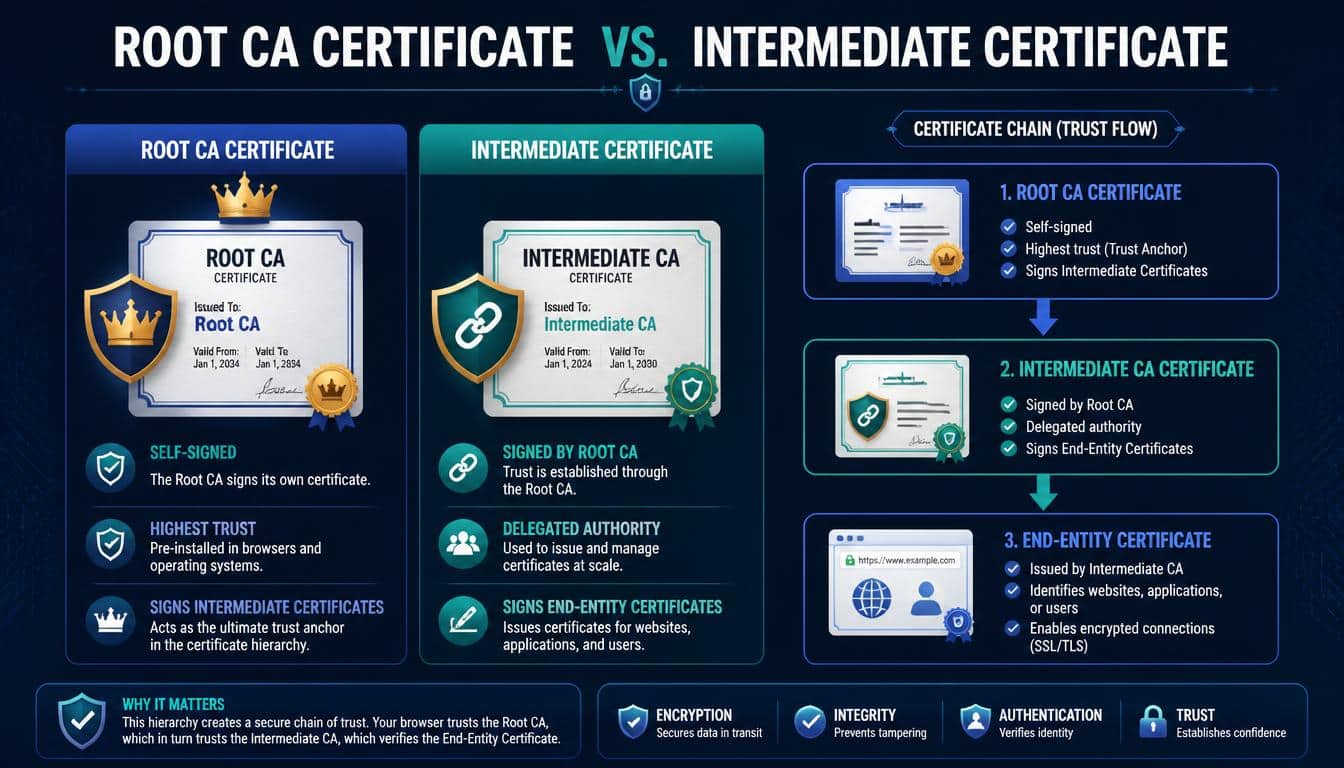
Understanding the difference between root and intermediate certificates helps explain why a seemingly small configuration issue can affect an entire website.
A root CA certificate is commonly self-signed and serves as a trust anchor when accepted by the client. Its associated private key is generally protected with strong operational controls because compromising it could have broad consequences.
An intermediate certificate, by contrast, is issued by another CA certificate and acts as a bridge within the hierarchy. It can issue additional certificates only when its constraints and the applicable CA policies permit that activity.
The two certificates are related, but they are not interchangeable. A server cannot fix a missing intermediate simply by sending an arbitrary root certificate, and a client should not treat an unfamiliar self-signed certificate as trusted merely because it appears at the top of a file.
Their separation supports a more manageable Public Key Infrastructure (PKI). Root keys can remain carefully protected while intermediate authorities handle routine certificate issuance and operational tasks.
How Certificate Signatures Establish Trust
A Certificate Signature is a cryptographic value generated by signing certificate data with the issuer’s private key. During validation, the client uses the issuer’s public key to verify the signature.
If the signed data has been altered, the verification should fail. However, a valid signature alone does not prove that the certificate should be trusted; it establishes a cryptographic relationship between the certificate data and the signing key.
The client must also determine whether that key belongs to an acceptable issuer and whether the issuer was authorized to issue the certificate in question. This involves examining the certification path, basic constraints, key usage extensions, and other applicable requirements.
For example, a certificate might be signed correctly by an intermediate CA, but that intermediate could be expired, revoked under the client’s policy, or unsuitable for the intended purpose. A successful signature check would not erase those problems.
Trust therefore emerges from several checks working together, rather than from a single mathematical operation. That’s the central idea behind Digital Signature Verification and modern certificate-based authentication.
Certificate Chains Across Browsers, Mobile Devices, and Applications
The same website can receive different certificate-validation results across different environments. It may look perfectly secure on a modern desktop browser and still fail in an older mobile application, which is frustrating for users and developers alike.
Browsers commonly rely on platform-specific or browser-managed trust stores, depending on the product and operating system. Mobile devices may use their system trust store alongside application-specific settings, while some applications ship their own trust configuration.
Enterprise environments can introduce another layer of complexity. An organization may install private root certificates on managed devices to support internal services, but those roots will not necessarily be trusted on personal devices or outside the company’s network.
Application developers should use established TLS libraries and preserve normal certificate verification. Custom certificate-handling code can accidentally bypass hostname checks, accept invalid chains, or behave differently from the platform’s standard security implementation.
For administrators, a good testing routine includes several representative clients rather than a single browser. Mobile Device Trust, browser compatibility, and application certificate validation are not just minor details; they can determine whether users are able to connect securely at all.
The Role of Certificate Lifecycle Management
Certificate chains require maintenance. Certificates expire, cryptographic algorithms evolve, issuing authorities change their infrastructure, and new device platforms introduce different trust requirements.
Certificate Lifecycle Management helps organizations keep track of issuance, deployment, renewal, and retirement. Without a reliable process, teams may discover an expired certificate only after customers begin seeing errors, which is rarely the best time to learn where a configuration file lives.
Automated monitoring can warn administrators before certificates expire. Centralized management platforms can also help inventory certificates, track ownership, and coordinate renewals across servers and services.
Tools such as DigiCert CertCentral may support parts of this workflow, depending on an organization’s deployment and licensing. Even with automation, someone should verify that renewed certificates are installed correctly and that the required intermediate certificates remain available.
A useful operational checklist includes:
- Maintain an inventory of certificates and their expiration dates.
- Identify the service, hostname, and team responsible for each certificate.
- Monitor certificate health and alert on approaching expiration dates.
- Confirm the correct intermediate chain after renewal or CA changes.
- Test production endpoints from representative browsers and applications.
- Keep private keys protected and replace compromised credentials according to an appropriate incident-response plan.
Good lifecycle practices reduce avoidable outages, but they also support security by making certificate ownership and renewal responsibilities clear. A certificate should never be treated as a one-time task that can be forgotten after the padlock appears.
How to Make Certificate Chain Validation More Reliable
Reliable certificate validation begins with using certificates from appropriate authorities and configuring the server to present the correct chain. From there, routine testing and careful operational practices help catch problems before users run into them.
Use trusted certificate-management tools and current server documentation when configuring TLS. If a CA provides a chain file or installation instructions, confirm that the instructions match your server software and deployment architecture rather than assuming every platform handles certificate bundles in the same way.
Keep server software, operating systems, and relevant trust stores updated. Older clients may lack newer roots or may reject certificates that use algorithms no longer accepted by their security policies, so compatibility testing is important when supporting a wide range of devices.
For public-facing websites, validate the actual hostname and production endpoint after each certificate change. Check more than whether the server responds: verify the certificate dates, chain construction, hostname coverage, and expected TLS behavior.
Finally, treat certificate warnings as meaningful signals. There may be a straightforward configuration error behind one, but disabling verification or telling users to ignore the warning can expose them to impersonation and interception risks.
Practical Ways to Explain Certificate Chains to Non-Technical People
Certificate chains become easier to understand when explained through familiar relationships. A simple analogy can communicate the idea without requiring someone to learn public-key cryptography before their morning coffee.
Imagine a new employee whose identity is confirmed by an authorized department. That department is recognized by a larger organization, and the organization itself is accepted by the institution responsible for the whole system. Each step relies on an established relationship rather than an unsupported claim.
The analogy is not perfect, because digital certificate signatures are mathematically verifiable and certificate policies have precise technical requirements.
Still, it gives non-technical audiences a useful starting point: a website’s certificate gains credibility through a verifiable path to a trusted authority.
Another explanation compares a certificate chain to a carefully checked set of references. The website presents its credentials, an intermediate CA connects those credentials to a recognized issuer, and the client checks that the relationships are valid.
For security training, emphasize one essential point: the chain helps authenticate the server’s identity, but it does not guarantee that the website’s content or business practices are trustworthy. That distinction keeps the explanation accurate without making it unnecessarily complicated.
Frequently aSked Questions
What Is an SSL Certificate Chain?
An SSL certificate chain is an ordered sequence of digital certificates that establishes trust between a website’s SSL/TLS certificate and a trusted Root Certificate Authority (CA). It typically includes the server certificate and one or more intermediate certificates.
Certificate Chain
A certificate chain is a series of certificates linked through digital signatures, allowing browsers and other clients to verify a website’s identity and establish a trusted connection. The chain connects the server certificate to a trusted root certificate.
SSL Certificate Chain
An SSL certificate chain contains the server certificate, intermediate certificates, and the trusted root CA certificate that establishes the chain of trust. Proper certificate chain configuration helps browsers and applications validate the website’s certificate successfully.
Certificate Chains
Certificate chains establish trust by linking an SSL/TLS certificate to a trusted Root CA through intermediate certificates. If a required intermediate certificate is missing or incorrectly configured, some browsers and applications may fail to validate the certificate.
Read More: https://gracethemes.com/two-factor-authentication-vs-two-step-verification/
Conclusion: Why Certificate Chains Deserve Attention
A certificate chain may seem like a quiet technical detail, but it supports one of the most important expectations of the modern internet: that a browser can check who it is talking to before establishing a secure connection.
The Certificate Chain connects an end-entity certificate to one or more intermediate certificates and, ultimately, to a trusted root CA when a suitable path is available.
Through signature verification, hostname checks, validity checks, and other applicable rules, clients decide whether that path can be accepted.
Understanding how certificate chains work makes it easier to diagnose SSL/TLS errors, install intermediate certificates correctly, maintain compatible server configurations, and plan certificate renewals without unnecessary disruption.
It also helps explain why a certificate can be correctly signed yet still fail validation on a particular device.
The next time you visit an HTTPS website, remember that the secure connection depends on more than a small padlock or a certificate file. Behind it sits a carefully designed system of cryptographic relationships, trust decisions, and ongoing maintenance.
And that is what makes certificate chains so valuable: they turn an abstract promise of digital identity into something a client can actually verify, one link at a time.
