

Best DNS Speed Test Tool Online – A Detailed Comparison
When you choose the right DNS server, you see a noticeable difference in your everyday internet experience. A slow DNS resolver can delay website connections. And a faster and more reliable one can help websites start loading sooner.
But not every DNS server works equally well in different locations, internet service providers and network conditions.
This is where online DNS speed test tools become useful. You can compare different DNS providers and measure their response times. It will also help to identify which resolver performs best on your network.
There are several DNS benchmarking tools available online. However every tool is different with respect to testing methods, features and customization options.
We are going to compare the five popular online DNS speed test tools. These are Control D, DNS Perf, DNS Speed Test Online, Fastest DNS Test and DNS Speed Tester.
We are going to analyze their features and testing methodologies etc. This will help you decide which is the best DNS speed test tool for your needs.
What is a DNS Speed Test?
A DNS speed test measures how quickly a DNS resolver responds to a domain name lookup request.
When you enter a website address into your browser, a DNS resolver translates that domain name into an IP address. Your device uses it to connect to the website.
The time required to complete this process is called DNS response time or DNS latency. It’s generally measured in milliseconds (ms).
A lower response time usually represents a faster DNS resolver.
For example:
- DNS Server A: 15ms
- DNS Server B: 35ms
- DNS Server C: 80ms
In this example, DNS Server A responds faster than the other two.
However speed is not the only thing that matters. There are some other factors that one should consider. These include consistency, availability, privacy, security and geographic location. All these can help you choose the best DNS provider.
An online DNS speed test makes it easier to compare these factors without manually configuring multiple DNS servers.
Control D – DNS Speed Test
Control D provides you with an online DNS speed test tool. This helps you compare popular DNS resolvers by displaying the response time, consistency and availability measurements.
It doesn’t focus on just average response time. It also measures jitter, median latency, tail latency and the difference between cached and uncached DNS lookups.
Because of this, users who want a more comprehensive understanding of DNS performance can use it.
Testing Methodology
When you go to this tool, you see a simple interface. You will also see a “Run Test” button. Click on that button to start the DNS speed testing process.
The testing process starts by warming up the connection. Afterward it gives you the proper results. The test takes approximately 28 seconds (as per the website)
Multiple DNS Provider Comparisons
Compare several popular public DNS providers. These include Cloudflare, Google DNS, Quad9, Control D and others.
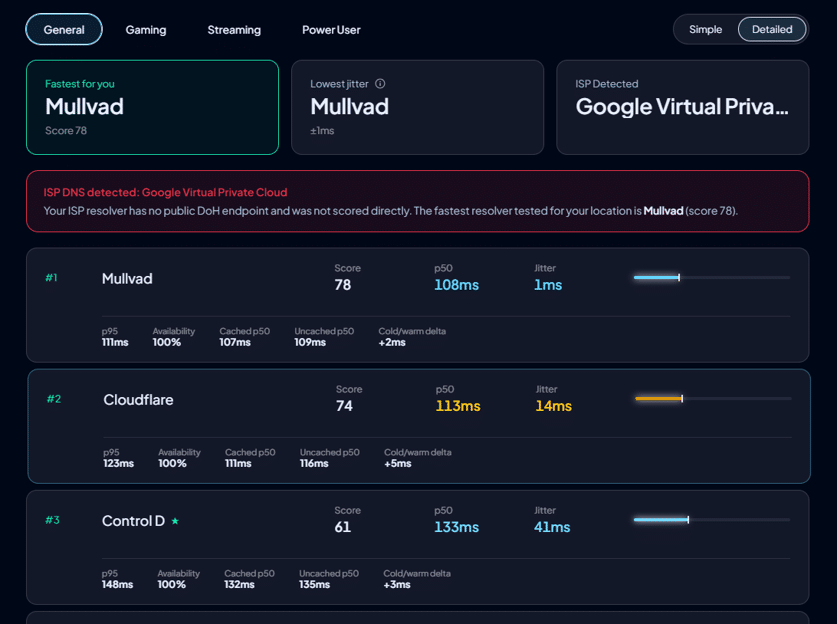
You can also add your own custom DNS-over-HTTPS (DoH) resolvers for testing. It will test your custom DOH resolver and will provide you with accurate results as well.
Jitter Measurement
Jitter measures how much DNS response time varies between queries. Suppose a DNS server is responding in 20ms continuously. This server will provide a smoother experience than the one responding in 100ms.
Control D gives so much importance to this metric for DNS performance evaluation.
Cached and Uncached DNS Testing
An important feature of Control D is that it can distinguish between cached and uncached DNS lookups.
- Cached lookups will measure the time a resolver takes to respond when the requested domain is already in its cache.
- Uncached lookups help determine the resolver’s ability to perform fresh DNS resolution.
This provides an overall evaluation of DNS server performance in different situations.
Detailed Performance Metrics
Control D provides several performance measurements. This includes p50, p95, Jitter and availability.
The tool combines these metrics into a performance score, with configurable scoring priorities. The tool works directly in your browser. It doesn’t require software installation or an account.
Fastest DNS Test
Fastest DNS Test is another DNS speed test tool which not only checks the DNS speed but also provides you with a thorough analysis of the DNS server. This tool focuses on accessibility and ease for users.
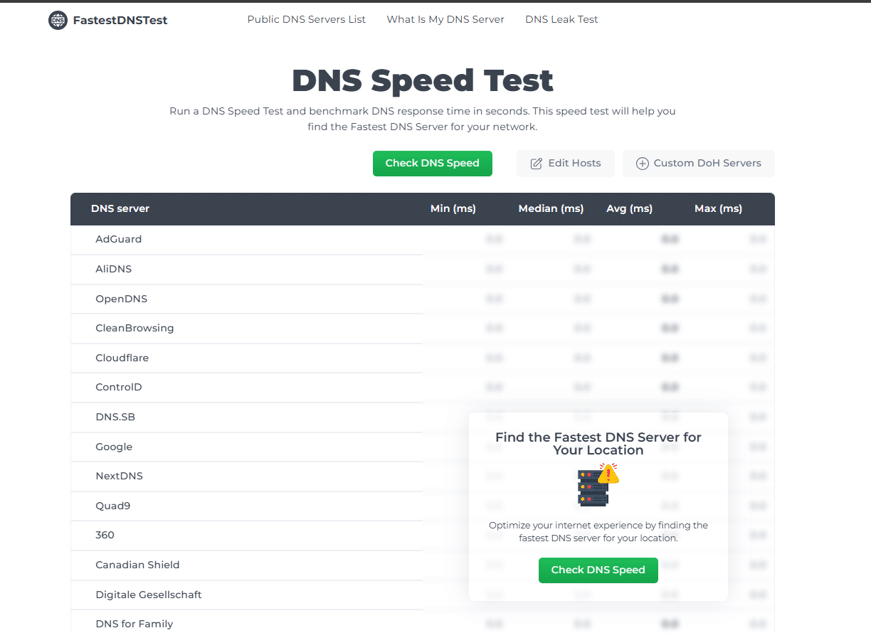
The tool provides several useful features for people who want to compare popular public DNS providers.
It supports custom DNS-over-HTTPS servers, multiple hostnames, bulk testing and graphical performance results
Testing Methodology
Fastest DNS test sends safe live DoH queries to test the speed. When you go to the website, you see a simple interface and a “Check DNS Speed” button. You just need to click on this button in order to start checking your DNS speed.
It will first of all warm up the activity before establishing actual connection. This ensures that the connections are consistent before you move on to check server speed.
Performance Metrics
This tool shows you multiple performance metrics. These are minimum, maximum, average and median response times.
This helps you to analyze the results accurately. You will also be able to decide the DNS server for you based on the results.
Graphical Results
After analyzing the speed. You will see 2 different variants of results. It can either be “Simple” or “Detailed”. Click on the “Detailed” option and choose any DNS server. This tool will give you detailed results for it.
You will see the latency profile, slowest and fastest ms, IPs (both IPv4 and IPv6) etc. Hence it gives you all the details in one place.
Custom Hostnames
Besides these features, Fastest DNS Test also allows you to edit the hostnames. Go to the website and you will see an option to edit the hosts. Click on that.
Add the hostname in the box and click “Add”. Then click on “Check DNS Speed” to start testing.
Custom DoH Servers
FastestDNSTest.com allows users to add their own DNS-over-HTTPS servers. When you go to this tool, you see a “Custom DoH Servers” option in it.
You can enter a server name and its corresponding endpoint to include it in the benchmark.
Global DNS Provider Coverage
The tool includes several well known DNS providers. These include Google DNS, Cloudflare DNS, OpenDNS, Quad9 and other public DNS servers.
Users can compare these providers using their current network connection.
Bulk DNS Testing
The most prominent feature of this tool is Bulk DNS testing. It means you don’t need to add DNS servers individually. Users can add multiple servers and test them together.
This saves time when comparing several DNS providers.
DNS Speed Test Online
DNS Speed Test Online allows its users to compare DNS resolver performance easily. They don’t need to install any additional software in order to check the DNS speed.
It is primarily concentrated on simplicity, accessibility and real time DoH testing.
This tool helps to analyze DNS response times using the current network environment. Afterwards it shows you the result in an understandable format.
Testing Methodology
DNS Speed Test uses the browser’s Fetch API and performance.now() timing functions to measure full DoH round-trip times.
When you click on the “Run Speed Test” button, it warms up the connections. Then it caches to minimize the impact of initial connection overhead.
The website also recommends running multiple tests because network conditions and browser performance can affect results.
Real-Time DNS Benchmarking
For testing accurately, this tool sends DoH queries from your browser to different DNS providers.
This helps users to see if DNS servers are performing appropriately under current network conditions.
Multiple Performance Metrics
This tool displays several useful measurements. These include Minimum response time, Median response time, Average response time and Maximum response time.
With the help of these measurements, users can easily understand typical response time along with the variation in DNS performance.
Custom Test Hostnames
An important thing is that it allows you to add custom hostnames. But to do that you have to click on test settings.
When you click on it, you will see the test hosts option. You can add a custom host in this tool as well. Just put it in that box and click the “Add” button.
Custom DoH Server Support
Users can add their own DNS-over-HTTPS endpoints. Go to the same test setting option. With the Test hosts option, you will see the “DoH servers” option. You need to click on that.
Add the server name and the URL. Afterwards click on the “Add” button.
Import and Export Settings
Another convenient feature is that you can also import DNS testing configurations as JSON files and export them later.
This can save time for users who regularly test multiple DNS providers or maintain customized test configurations.
DNS Perf
DNS Perf uses a different strategy for testing DNS performance. It doesn’t focus on comparing DNS providers from a single browser location. The tool determines DNS lookup performance from more than 200 locations globally.
This makes it useful for various individuals. It is especially useful for those who want to understand how their DNS infrastructure performs across different geographic regions.
Testing Methodology
DNS Perf performs A record lookups for the apex domain from its global testing infrastructure. You can see the World, Continents and Countries options here. Click on “Run Test” to start testing.
It uses the lookup time as the performance benchmark. This approach provides a distributed perspective on DNS resolution.
One thing worth noticing is that this tool doesn’t provide unlimited testing. It has a limit of only six benchmarks.
Global DNS Performance Testing
As we already described, this tool checks worldwide. It performs DNS A record lookups for a certain domain from over 200 locations.
This allows users to examine how DNS resolution behaves across different geographic regions.
Domain Based Testing
We saw earlier that we just have to click on the “Run test” button and the tool starts testing. However in this tool, you have to enter the domain name that you want to test.
The tool measures the time required to resolve the domain from its distributed testing locations.
Geographic Performance Analysis
Global testing is particularly valuable for websites that serve international audiences.
We did our own analysis and analyzed the details. The DNS server performs well in Sweden but experiences higher lookup times in the UAE or China. It helps identify these geographic differences easily.
DNS Infrastructure Troubleshooting
The benchmark is also useful for testing self hosted DNS servers and evaluating DNS routing configurations.
Developers can use it to investigate regional performance issues and identify potential DNS infrastructure problems.
Result Retention
The website states that benchmark results can be retained for up to 30 days. This provides an opportunity to revisit previously generated results.
DNS Speed Tester
DNS Speed Tester is for users who want greater control over their testing environment. It provides several configuration options. It allows users to customize how DNS performance is measured.
It also offers native applications and self hosting capabilities. This makes it interesting for advanced users and network professionals.
Testing Methodology
DNS Speed Tester offers a configurable testing environment. Users can select the query protocol, configure test domains and adjust concurrency.
It also provides a cache bypass option for testing fresh DNS resolution.
Multiple DNS Protocols
The tool supports several DNS testing protocols. These include UDP, TCP, DNS-over-HTTPS (DoH), DNS-over-TLS (DoT) and Ping-based testing.
This is useful for users who want to analyze different aspects of DNS infrastructure performance.
Custom DNS Provider Configuration
Users can add their own DNS servers and configure several details. They can add provider name, domain, DNS provider category etc.
This makes the tool highly customizable.
Concurrent Query Configuration
Users can configure the number of DNS queries that can run simultaneously.
This helps in advanced benchmarking scenarios where testing behavior under different query loads is essential.
Import and Export Configuration
Users can save their DNS provider configurations and testing settings. This makes it easier to repeat benchmarks without manually configuring everything again.
Detailed Comparison: Which DNS Speed Test Tool is Better?
Now that we’ve examined each platform individually, let’s compare their main features side by side.
| Feature | Control D | DNS Perf | DNS Speed Test Online | Fastest DNS Test | DNS Speed Tester |
| Main Testing Approach | DoH | Global DNS lookups | DoH | DoH | Configurable |
| Custom DNS Servers | Yes | Domain Based | Yes | Yes | Yes |
| Custom Hosts | No | No | Yes | Yes | No |
| Custom DoH Servers | No | No | Yes | Yes | No |
| Bulk Addition & Testing | No | No | No | Yes | No |
Conclusion
These tools are helpful for examining DNS performance. But they work for different purposes. You can find one thing in one tool but it can be absent in another.
If we have to give an overall recommendation, then we will recommend that you should choose a tool depending on the types of DNS performance information that you need.
In short it totally depends on you whether you want to get an in-depth analysis or want to add and check bulk servers. You can choose any of these tools that you want and that suit your needs.
Therefore the best tool is the one that can provide you with fast, consistent and reliable results from your actual location.
