
14 Free Logo Design Tools to Start Your Blog Off Right

Your logo is the first thing readers see on your blog, and it has to work everywhere: in the header, as the favicon in a browser tab and on your social profiles. Designing one from scratch takes time and design skill, which is why a good logo tool is worth trying before you spend money on a designer.
Logo tools work in different ways. Some let you pick a template and type in your blog’s name; others use AI to generate a logo from a short description, a photo or even a quick sketch. The right one depends on your budget, how original you want your logo to be, and the file formats you need. That matters even more if you want to create a blog as quickly as possible.
Below, we compare all 14 tools side by side, then look at each one in more detail so you can choose the one that fits your blog.
Logo design tools compared
| # | Tool | How it works | Free option | Pricing | Stands out for |
| 1 | Design.com | AI logo maker plus over 350,000 logo templates | Free to try | Premium downloads, priced in nine currencies | Rated 4.7 stars on Trustpilot; multiple file types; 24/7 support |
| 2 | Logo Diffusion | Generates original logos with its own AI models, from a text prompt, a photo or a sketch | Free plan: 24 credits a month, watermarked 512×512 downloads | Basic $24 a month, Pro $49, Elite $99; annual plans get two months free | Layered SVG and transparent PNG; 11 logo styles; Sketch to Logo; commercial licence on paid plans |
| 3 | BrandCrowd | Customizable logo templates | Free to explore; some templates are free | Monthly and annual subscriptions; premium logo packages | Business cards and email signatures; multiple file formats |
| 4 | Logogenie | Logo maker | Not listed | Not listed | Quick results for a logo you need fast |
| 5 | Zoviz | AI logo maker | Not listed | Not listed | Gradients and multi-color support; high-resolution and vector formats |
| 6 | Designhill | AI logo maker and AI text generator | Not listed | Pay to download | Many file types and sizes |
| 7 | GraphicSprings | Logo maker | Not listed | Not listed | Easy-to-use interface |
| 8 | DesignEvo | Drag-and-drop editor with a large logo library | Not listed | Described as inexpensive | Many logo categories |
| 9 | Logofury | Free, customizable logo maker | Free downloads | Free | Fully customizable |
| 10 | Brandmark | Logo maker | Not listed | One-time payment | Full copyright to your designs |
| 11 | LogoYes | Logo maker | Not listed | Not listed | Adaptable designs |
| 12 | Logomakerr.AI | AI logo maker (formerly Instant Logo Design) | Free logo maker, no sign-up needed | From $29 | Mockups, logo animation and feedback from in-house designers |
| 13 | Placeit | Templates, mockups and video in one platform | Basic plan is free | Unlimited plan from $7.47 per user a month | Unlimited downloads; mockup and video tools |
| 14 | Appy Pie Design | AI design platform with logo and banner tools | Not listed | Not listed | AI video generator; library of AI-generated templates |
-
Design.com

As the #1 logo maker in the world, Design.com makes it effortless for anyone, especially new bloggers and small business owners, to build a standout brand identity. With over 350,000 logo templates and more than a million design assets, you can create a professional logo in just a few clicks. All you have to do is enter your blog or business name, choose your style, and watch as the AI generates ready-to-use designs that look polished and unique.Even if you’ve never designed anything before, Design.com’s tools are made to guide you through every step. You can easily adjust colors, fonts, and icons until your logo perfectly reflects your vision. From there, you can instantly download your files in multiple formats for use across your website, social channels, and marketing materials. Trusted by thousands of creators worldwide and rated 4.7 stars on Trustpilot, Design.com makes professional branding accessible, affordable, and fun.
Key Features:
- Extensive Template Library: Access over 350,000 logo templates and a million total design assets.
- AI-Powered Logo Maker: Instantly generate unique logo designs tailored to your blog or brand.
- Easy Customization: Adjust fonts, colors, and layouts in just a few clicks with no design skills required.
- Multi-Format Downloads: Get your logo in multiple file types for print and digital use.
- 24/7 Support: Reliable customer service whenever you need help.
- Pricing: Free to try, with premium downloads available at affordable rates and in nine currencies
-
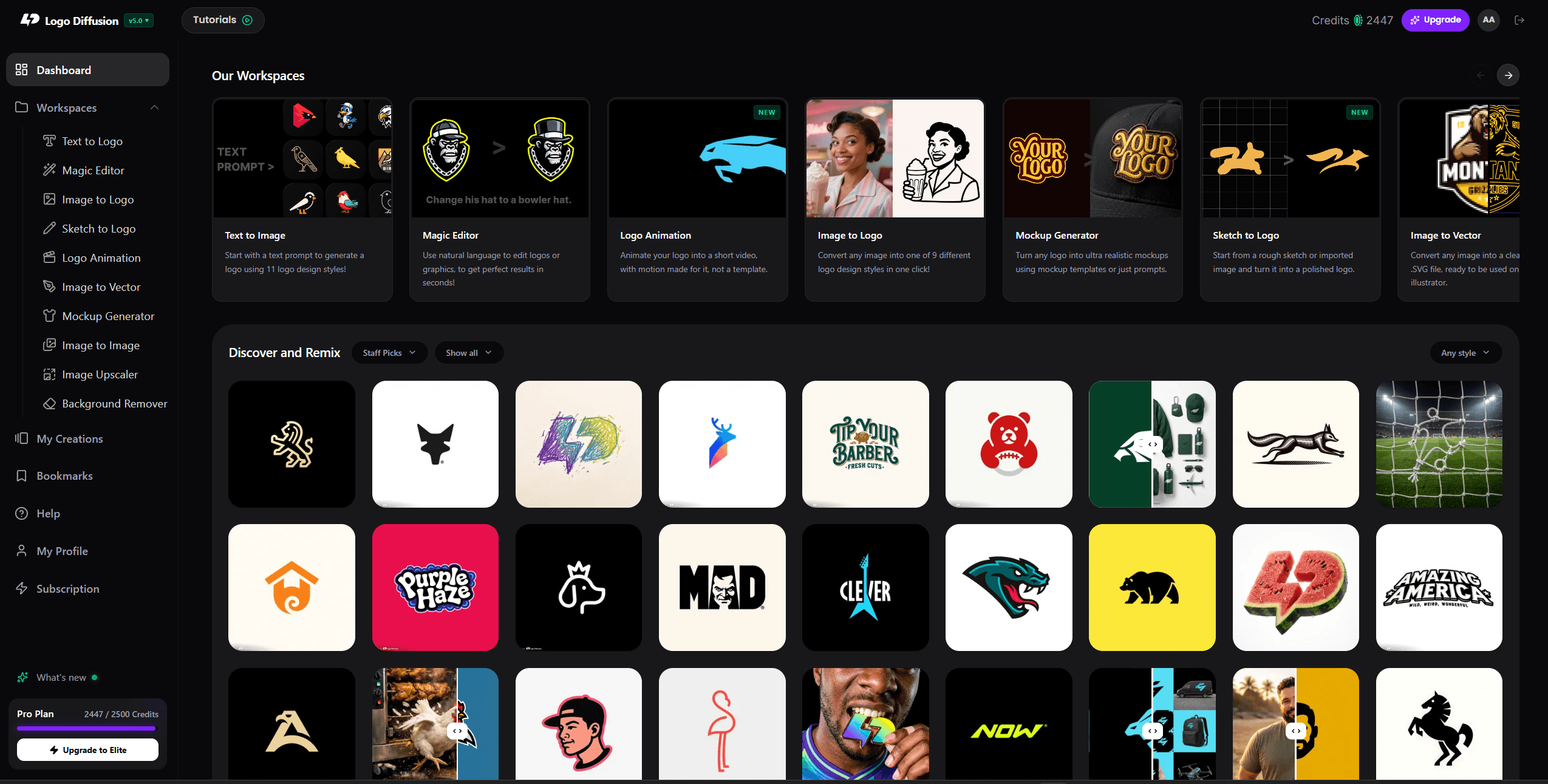
Logo Diffusion

Logo Diffusion is an AI logo generator built by logo designers, and it works differently from the template tools on this list: it runs its own trained models to create a new logo from your idea, so your blog’s logo is not shared with thousands of other sites. You can start three ways: describe it in words (Text to Logo), upload a photo (Image to Logo), or doodle a rough sketch on the canvas and let it redraw it properly (Sketch to Logo). For a blog that wants its own look, the sketch option is the fun part.Key Features:
- 11 logo styles, including Mascot, Retro Mascot, Badge/Crest, Line Art, Monogram and Logo Type
- Magic Editor with 8 workflows, for example turning one logo into a wordmark, lettermark, emblem and symbol, or into a matching icon set
- 70+ mockups to preview your logo on real products
- Exports as a layered SVG with real vector paths, plus a transparent PNG, so it stays sharp on your header, favicon and social profiles
- Built-in background remover, vectorizer and 2x/4x upscaler
Pricing:
- Free: 24 credits a month, watermarked 512×512 downloads, no commercial licence
- Basic $24 a month, Pro $49, Elite $99; annual plans get two months free
- Logos made on a paid plan carry a commercial licence that stays valid even after you cancel
Best for: bloggers and founders who want an original logo rather than a template, plus a vector file they can use everywhere.
-
BrandCrowd

If your problem concerns branding then you’re off to a great start with BrandCrowd. It provides self-help design tools such as a logo maker, a business card maker, an email signature creator, and many others. It has a proud collection of more than 75 thousand logo templates and other marketing materials. These are all customizable too. A few buttons enable the user to change the shape, size, template, color, layout, and font of the original design resulting in a more customized and suitable design.To try it out, visit BrandCrowd and click on the tool you want to use. Type in the search bar relevant keywords pertaining to the kind of design you’re looking for, e.g., tech, beauty, manufacturing, monogram, etc. Then, browse through pages of templates. Feel free to remodel the template to your liking and download some of these templates for free and some for a minimal price. Two subscription options are available: monthly and annually.
And to complete your overall branding campaign, use the business cards, flyers, and social media content posts. Pick a theme and an icon that complements your chosen logo design.
Key Features:
- Huge Template Collection: Browse through 300,000+ logo templates and over a million assets.
- Smart Editing Tools: Easily customize icons, text, and colors to match your brand style.
- Branded Assets: Create business cards, social media kits, and more using your new logo.
- Multiple File Formats: Download ready-to-use files for print and digital platforms.
- Extra Branding Services: Includes domain registration, color matching, and printing options.
- Pricing: Free to explore; premium logo packages start at budget-friendly fees and in multiple currencies
-
Logogenie

Logogenie is basically a genius tool that you can use if you want to create a powerful and exciting logo for your business. The interesting thing is that it’s an adaptable, reliable tool and one that has the potential to save you a whole lot of time and effort here.It’s super exciting and reliable, and at the same time it does bring in front some rewarding moments for you to check out. If you need a logo fast and you want some nice designs that you can’t find any other place, this might very well worth the way you want.
-
Zoviz
Zoviz stands out as the only AI logo maker that doesn’t rely on pre-made icons or templates. Every logo is uniquely designed from scratch by professional designers, ensuring your brand receives a one-of-a-kind identity. If you ever need to adjust or resize your logo, Uncrop is a great tool to help you expand your image while keeping it seamless and intact. Unlike other platforms, Zoviz’s focus is on custom-crafted logos, offering an all-in-one branding package that includes high-resolution and vector formats, business cards, social media covers, email signatures, and more—delivered with just a single click.
What sets Zoviz apart are its advanced customization options, allowing full control over features like multi-color support, gradients, and backgrounds. Whether you’re a startup or an established business, Zoviz provides everything you need to create a cohesive, professional brand identity. For those seeking a personalized, high-quality logo design without the cookie-cutter approach, Zoviz is the top choice.
-
Designhill
Designhill is one of the most well known logo design tools that you can use. Their primary focus is on offering you a very good logo creation experience that’s interesting and also very rewarding.
And honestly they give you all the control you want whenever you see fit thanks to the use of their AI-powered logo design maker and AI text generator.
The great thing about this tool is that it’s super intuitive and reliable, and can provide you with an unlimited supply of logo designs based on the colors, text, concepts, and design aspects you are looking for.
Once completed, users can pay and download the image in a wide range of file types and sizes.You have multiple logo categories that you can choose from, and there are plenty of visuals and nice options that you might want to check out. It’s a great system to consider and one that has the potential to pay off extremely well in the end.
We recommend you to give this website a shot because a lot of companies use it with great success, and it can really offer you all the guidelines and help you need in regards to creating a good blog. It’s definitely a nice tool to have for any blog owner.
-
GraphicSprings
GraphicSprings does a very good job at offering you a rewarding set of results no matter the situation. This is a great system to use just because it has a lot of cool and interesting features for you to try out.
It’s adaptable to your requirements and at the same time it definitely brings in that much-needed potential that you expect from a tool like this. The interface is easy to use, you have a lot of adaptability and in the end it’s just a nice app to have!
-
DesignEvo
DesignEvo’s primary strength is that it has a huge list of amazing logos that you can try out and use. You have so many options that it will be super easy to create an interesting logo whenever you want.
The most important thing about this tool is that it’s inexpensive and everything is as simple as drag and drop. There are also lots of logo categories for you to use, and in the end it’s one of the nicest logo tools on the market.
-
Logofury
Logofury is one of the free logo maker that add a lot of character and excitement to the logo creation process.
Not only is it a lot of fun to use, but it also offers some amazing features and the best part about it is that it’s always there to use whenever you see fit.
Everything is customizable and the best part is that you never have to pay anything in order to download what you just created. It’s simplicity at its best and it can certainly offer some of the nicest tools that you can find on the market.
-
Brandmark
Brandmark is all about offering you a way to create stunning brands without having to pay a lot of money for them. You receive full copyright, not to mention that every design is created on time and on budget, which is always a plus.
In addition, you just have to pay once and you can use their tools again and again if you want to.
It’s the type of logo design tool that’s interesting and also super reliable, and that’s what you really want in such a situation. You should totally check it out, as it’s amazing to use and super useful.
-
LogoYes
LogoYes is one of the online logo creation tools that help you express your business in ways you would not imagine. It puts control in your hands and it makes the process meaningful and exciting as a whole.
Even if there are some adjustments to be made, it’s safe to say that the outcome will always shine in ways you would not imagine. Everything here is adaptable and super reliable, which is what makes it such a good tool in the first place.
You might as well want to take it into consideration, just because it’s very hard to find a stellar and outstanding logo creation tool with amazing features nowadays.
-
Logomakerr.AI

Logomakerr.AI (formerly known as Instant Logo Design) is another ai logo generator website that targets small businesses, and startups who want to add a pinch of their design experience or preferences within the branding.Since they are a startup themselves, they offer an affordable pricing starting from $29. It already comes with several elements and options, along with mockup generator, logo animation, powerpoint generator or word publication, and many more!
And if you want to create or just try how your personalized logo will turn out, they offer a free logo maker process without you having to sign-up, or pay for anything (yet!)
They also offer help by assigning their in-house designers just in case their customers or visitors want professional feedback.
-
Placeit

If you’re looking for a platform where you can create all your branding designs, Placeit is a great tool! With more than 50K templates and a growing library of designs made by professionals each day, you can create eye-catching images. Make everything from logos and videos to your social campaign with branded images in minutes.Create a logo in seconds with hundreds of new logo templates every day according to your industry. Access all kinds of mockups and design templates with its mockup generator and video creator. Easily create your brand’s marketing assets and then just download your creation.
Key features:
- Unlimited downloads. Keep creating, you get to have the unlimited downloads you need for your brand.
- Fonts and audio selection. You can also customize the playback speed and quantity of slides to make a short or long video.
- New templates every day. Designers are always in the loop for trends and they create beautiful assets every day.
- Easy-to-use. You can create tons of designs, arts, videos, demos, Instagram stories, and social media marketing assets with no technical skills.
- Professional graphics. All graphics are made by a professional team, so you can rely on them being eye-catching templates for your campaigns.
Pros of Placeit:
- Wide range of graphic libraries, +85,000 exclusive design, music and photo assets.
- You can choose between tons of video formats for your marketing arsenal.
- Constant updates of the graphics and the tools
- Free tools available for everyone
- High-resolution graphics
Pricing:
Basic: Free
Unlimited: starting from $7.47 per user/month -
Appy Pie Design- AI Video Generator
If you are looking for a one-stop solution for all your design needs, Appy Pie Design has got everything covered. The platform serves you with various AI Design Tools for Graphic Design, Video, and Animation projects. It also provides access to a vast library of AI-generated templates to elevate your designs effortlessly.
It offers a variety of powerful tools to assist users in creating visually appealing content. One notable tool is the AI Video Generator, a feature that leverages artificial intelligence to automatically generate videos based on user inputs and preferences. This tool simplifies the video creation process, making it accessible to users without extensive editing skills. Additionally, Appy Pie Design provides tools for designing, logos, and banners, allowing users to customize their visual content.
With an intuitive interface, users can seamlessly navigate through the design process, making it suitable for both beginners and experienced designers. The inclusion of AI-driven tools demonstrates Appy Pie Design’s commitment to innovation and user-friendly content creation.



In conclusion, if you want to start off a blog, you should totally consider using logo design tools as much as possible.
It’s not just about knowing what type of blog you want, it’s also about managing your startup costs as well.
It’s the type of thing that can help you quite a lot if you want to launch a blog the right way. It’s not the simplest approach that you can find out there, and in the end it might very well help you reach the utmost results no matter what.
Of course, picking the best logo tool is tricky, and that’s why you have to study their websites and see every feature you get from them. Only then will you know what’s good and what’s bad. Once you do that, the results can be super impressive!1`
