

What Is llms.txt & Does Your WordPress Site Actually Need One?
People looking for your services are not always using Google. They ask an AI assistant, read the answer that comes back and decide who to contact from there. If your business is not part of that answer, the enquiry quietly goes to whoever was.
This is where llms.txt comes in. It is a small plain text file that sits at the root of your website and tells AI systems what you publish, which pages matter most and how to describe your business. Think of it as the AI-era counterpart to the XML sitemap you already have.
It is also important to understand what llms.txt does not do. It is not a Google ranking factor, not every AI system reads it and it cannot fix poor or low quality content. Creating an llms.txt file takes only a few minutes. In this guide, you will learn what to include in the file, who should use it and how to add it to your WordPress site safely.
What llms.txt File Actually Contains?
The file itself is far less complicated than the name suggests. It is a plain text document written in simple markdown, and you can open it in Notepad or TextEdit. It lives at the root of your domain, so anyone can find it at yoursite.com/llms.txt. Most small business versions run to less than a single page.
- A short description of your business written in normal prose
- A list of your most important pages, each with a one-line summary
- Optional sections for products, documentation, pricing or policies
- No code, no special syntax and nothing you need a developer for
Think of llms.txt as different from two files you may already know. A robots.txt file tells crawlers which pages they can access. A sitemap.xml lists the pages on your website.
An llms.txt file does something different. It explains what your website is about and points AI systems to the pages you want them to use or reference. If you want to learn more about the format, you can check the original llms.txt proposal, which includes examples.
Why AI Engines Read Your Site Differently from Google
Traditional search engines and AI assistants do genuinely different jobs, and they treat your website differently as a result. One of them wants to index everything you have. The other wants to find a handful of sources it can trust.
- Google crawls your whole site, then ranks your pages against everyone else
- An assistant retrieves a small number of sources, then writes a summary from them
- Google usually sends a visitor to your page. An assistant may answer without sending anyone at all
- Ranking on page one and being quoted in an answer are two separate outcomes

This is why a site can rank in Google yet never appear in an AI answer. If an assistant cannot quickly work out what your business does and which page covers what, it will simply use a source that made that job easier.
Does Your WordPress Site Really Need an llms.txt File?
The short answer is not every website does.
An llms.txt file is most useful for websites that publish helpful information people might ask AI assistants about. If your site has detailed content, service pages, documentation or product information, it can help AI systems understand and reference your website more accurately.
On the other hand, if your website is only a few pages with limited information, creating an llms.txt file is unlikely to make a noticeable difference.
Your Site Can Benefit from llms.txt If You Have:
- A local business with detailed service pages, such as plumbing, legal or healthcare services.
- A website with pricing, policies, FAQs or service information across multiple pages.
- A WooCommerce store with a large product catalog.
- A consultancy, agency or SaaS website that explains its services in depth.
- A blog, knowledge base or resource center that answers common questions in your industry.
You Can Wait If Your Website
If your website is a simple brochure with only a few pages, relies mainly on a marketplace or social media to attract customers or still has unfinished service and product pages, you can safely wait before creating an llms.txt file. In these cases, your time is better spent improving your website’s content and building out your key pages first.
Once your site offers more valuable information, adding an llms.txt file will be much more worthwhile.
Focus on Quality Content First
Before creating an llms.txt file, make sure your website has valuable content worth referencing. AI systems can only recommend information that already exists. If your service pages are thin or outdated, improving them should be your first priority.
Once your content is in good shape, adding an llms.txt file becomes a simple way to help AI assistants discover and understand it more effectively.
What to Put in llms.txt for a Small Business Website
Once you decide to create one, the temptation is to list everything you have. Resist it. The value of this file comes from curation because you are telling engines which pages represent you best. A short, focused file works better than a long, complete one.
| Include | Exclude |
|
➡️ Your homepage with one line explaining what you do and where you do it ➡️ Each core service page with a one-line summary ➡️ Your pricing or cost page if you have one ➡️ The three or four blog guides you are most proud of ➡️ Contact details and the areas you serve |
⬅️ Tag and category archives ⬅️ Author pages ⬅️ Thin pages you have not updated in years ⬅️ Anything sitting behind a login |
Write the summaries the way you would explain the page to a customer on the phone. Plain, specific and free of marketing language. ‘Emergency boiler repair across Leeds with same day callouts and fixed pricing’ is far more useful to an engine than ‘market leading heating solutions’.
Create & Manage llms.txt Easily with ThinkRank
Creating an llms.txt file does not have to be technical or time-consuming. Instead of writing and updating the file manually, you can generate and manage it directly from your WordPress dashboard.
ThinkRank makes the process simple by automatically creating an AI-friendly llms.txt file and keeping it updated whenever your website content changes. This helps AI assistants better understand your website and reference the right pages when answering user questions.
What ThinkRank Does for You
With ThinkRank, you can generate a complete llms.txt file for your website in just a few clicks. It includes your:
- Blog posts
- Pages
- WooCommerce products
The file stays updated automatically as you publish, edit or remove content, so you never have to maintain it manually.
You can also control which sections and links AI systems are allowed to use, giving you greater control over how your content is presented.
Set Up in Minutes
Getting started is straightforward.
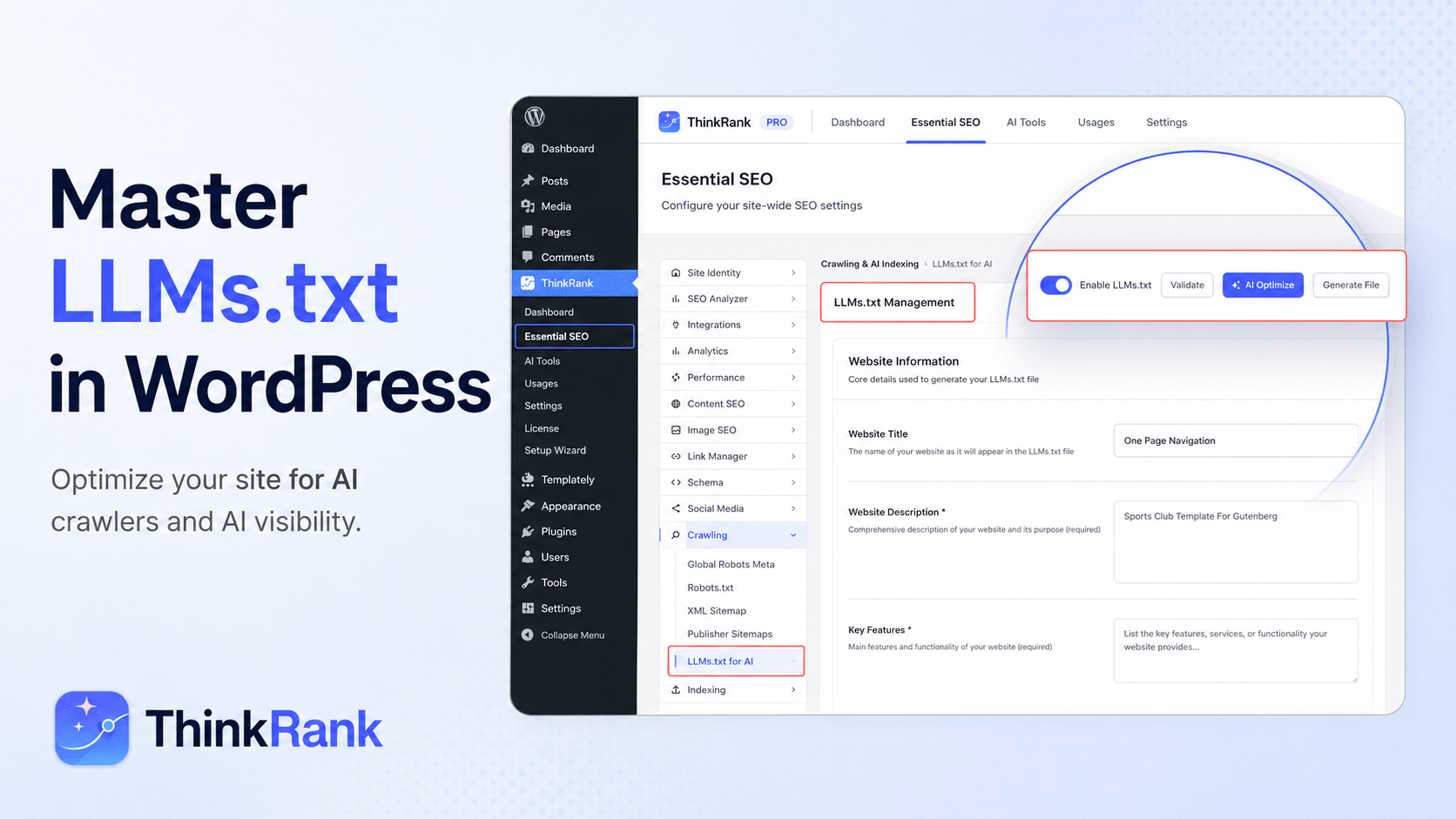
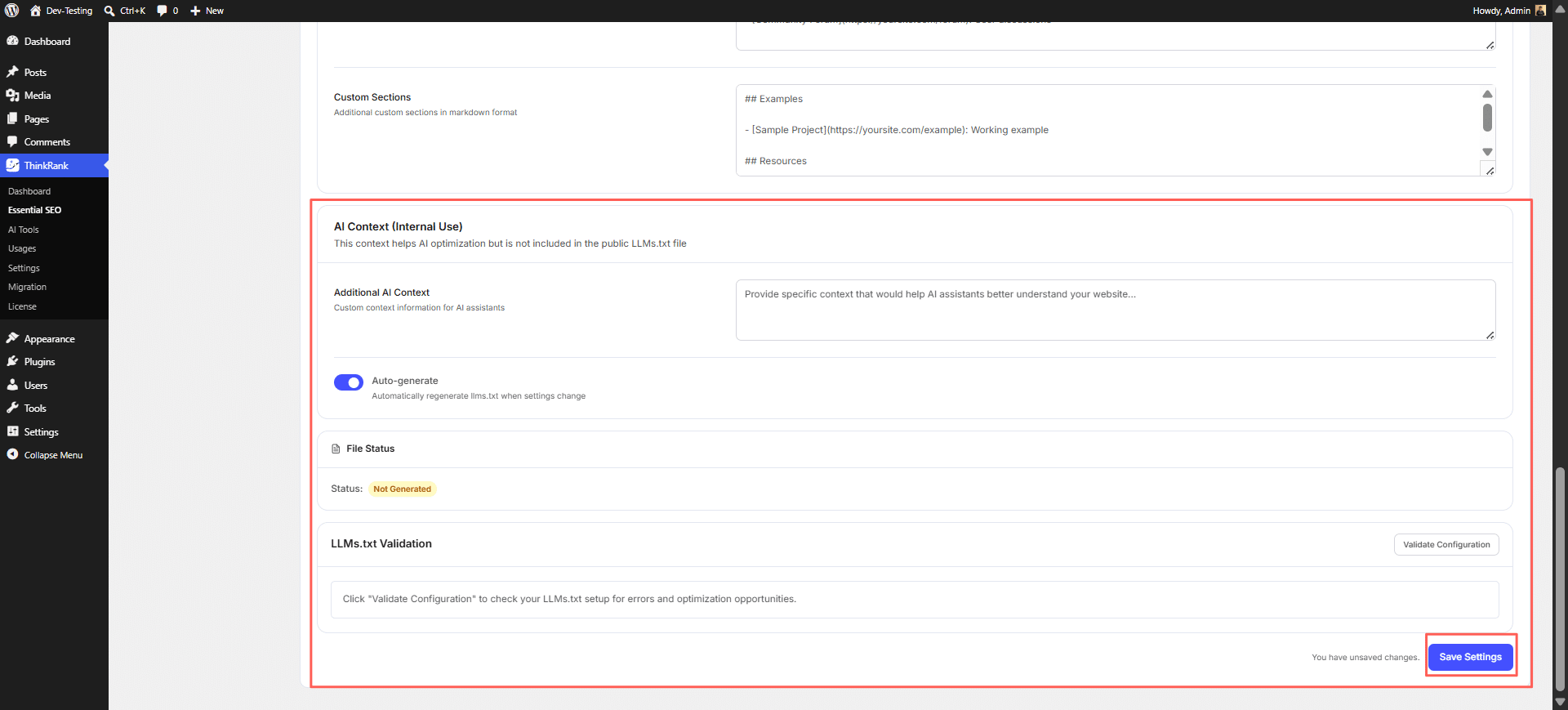
Enable LLMs.txt from the Crawling & AI Indexing settings. Enter your website title, description and key features. Optionally add documentation links, technical resources or custom Markdown sections. Save your settings and let ThinkRank generate the file automatically.
Once enabled, ThinkRank rebuilds the file whenever your website content or settings change, ensuring it always stays current.
Why Use ThinkRank for LLMs.txt?
A typical web page contains navigation menus, scripts and other elements that are not useful for AI systems. An llms.txt file provides a clean summary of your website and highlights the pages that matter most.
Instead of creating and maintaining this file yourself, ThinkRank automates the entire process. You get an AI-ready llms.txt without editing code, managing text files or worrying about updates. It is an easy way to prepare your WordPress website for AI-powered search while continuing to focus on creating quality content.
Create & Upload llms.txt Manually (Optional)
If you prefer, you can create an llms.txt file yourself and upload it to your WordPress site. This method works, but it is more technical and requires ongoing maintenance.
To set it up manually, you need to:
Create an llms.txt file using a plain text editor. Upload the file to your website’s root directory using FTP or your hosting file manager. Visit yourwebsite.com/llms.txt to make sure the file is accessible.
The biggest drawback is maintenance. Every time you publish new content, update important pages or change your site’s structure, you need to edit the file yourself to keep it accurate. Over time, this can become time-consuming, especially for websites that are updated regularly.
If you want to avoid managing the file manually, an automated solution like ThinkRank can generate and update llms.txt for you whenever your content changes.
💡 Whichever route you choose, open the file in a browser afterwards and check it loads. A file returning a 404 is by far the most common mistake, and it almost always comes down to the file sitting in the wrong folder.
Keeping the File Accurate as Your Website Changes
A stale llms.txt is worse than no file at all. If it points engines at pages you deleted or prices you changed last year, you have created a confident source of wrong information about your own business. Keeping it current is most of the job.
If you update your website often, automatic generation saves you from the one thing that always happens with manual files, which is forgetting. If you touch the site twice a year, a calendar reminder does the same job for free.
[✅] Review the file whenever you:
[✅] Add or remove a service page
[✅] Change your pricing
[✅] Move to a new domain or restructure your URLs
[✅] Retire a product line
[✅] Expand into a new service area or location
What llms.txt Cannot Do for You
This section exists because a lot of the advice circulating online quietly overstates the case. Being clear about the limits helps you spend your effort where it actually pays back. Here is what the file will not do for you.
Treat it as one small layer inside a wider effort. On its own, it is a signpost and signposts only help when there is something worth visiting at the other end.
- ❌ It will not force any engine to cite you
- ❌ It will not replace schema markup, which does a completely different job
- ❌ It will not fix thin, duplicated or badly structured content
- ❌ It will not stop crawlers that choose to ignore it
- ❌ It will not deliver measurable traffic on its own
The Things That Matter More Than the File
If you only have a few hours to spend on being visible in AI answers, spend them here first. These are the signals that decide whether an engine trusts your content enough to quote it in the first place. The file simply helps it find that content faster.
Most of that is ordinary good SEO, and that is not a coincidence. Engines that write answers still lean heavily on the same signals that tell a search engine a page is worth showing. Google’s own structured data documentation is still the best free starting point if the schema is the gap on your site.
- Clear question and answer structure inside your pages, using real questions as subheadings
- Schema markup for articles, FAQs, products and local business details
- Named authors and genuine business information, including address and opening hours
- Specific claims rather than generic ones, because specifics are what get quoted
- Internal links that show you cover a subject properly rather than in one shallow post
- Pages that load quickly and read well on a phone
How to Tell Whether It Is Working
Measuring AI visibility is genuinely harder than measuring search rankings and anyone who tells you otherwise is selling something. There is no equivalent of Search Console for assistants yet. You can still build a usable picture with a bit of manual effort each month.
Do not expect clean attribution. A fair share of AI-influenced traffic shows up as direct visits or branded search and that is simply how the channel works at the moment.
- Ask the major assistants the questions your business should be answering and note which sites they cite
- Repeat the same prompts monthly so you see movement rather than a single snapshot
- Watch your analytics for referral traffic coming from assistant domains
- Track branded search volume in Google Search Console, since people often hear about you in an answer then search your name
- Ask new enquiries how they found you and listen for ‘I asked ChatGPT’
Create Your llms.txt File in Minutes
Pulling it together, llms.txt is a low-cost and low-risk addition to a WordPress site with a small but real upside. It is not a growth strategy and it will not carry a weak website. What it does is remove one avoidable reason for an AI engine to overlook you.
Setting up an llms.txt file does not have to be complicated. With ThinkRank, you can generate and maintain it directly from your WordPress dashboard while also managing your sitemap, schema, metadata and other SEO essentials in one place.
The businesses that get quoted in AI answers next year will mostly be the ones that made themselves easy to read this year. Clear pages, honest detail and a small file at the root of the domain saying here is what we do and here is where to find it. None of that needs a large budget. It just needs doing before your competitors get round to it.
