

I Tested the Best One Page WordPress Themes (Here’s My Top 9)
There’s a particular kind of satisfaction in opening a website and realizing you don’t have to hunt for anything. The story is right there. The promise is right there. The button you actually need is, thankfully, not hiding three menus deep.
That is the little magic of a one page website.
A good single-page site can feel almost like a conversation. You arrive at the hero section, understand what the person or business does, scroll a little, meet the story, see the proof, and eventually reach the call-to-action.
No wandering around. No “Where on earth is the pricing page?” moment. It’s wonderfully simple, when it’s done well anyway.
But not every one page WordPress theme deserves your time. Some look gorgeous in a demo and become a slightly grumpy puzzle once you start customizing them. Others are light, flexible, and almost boring in the best possible way.
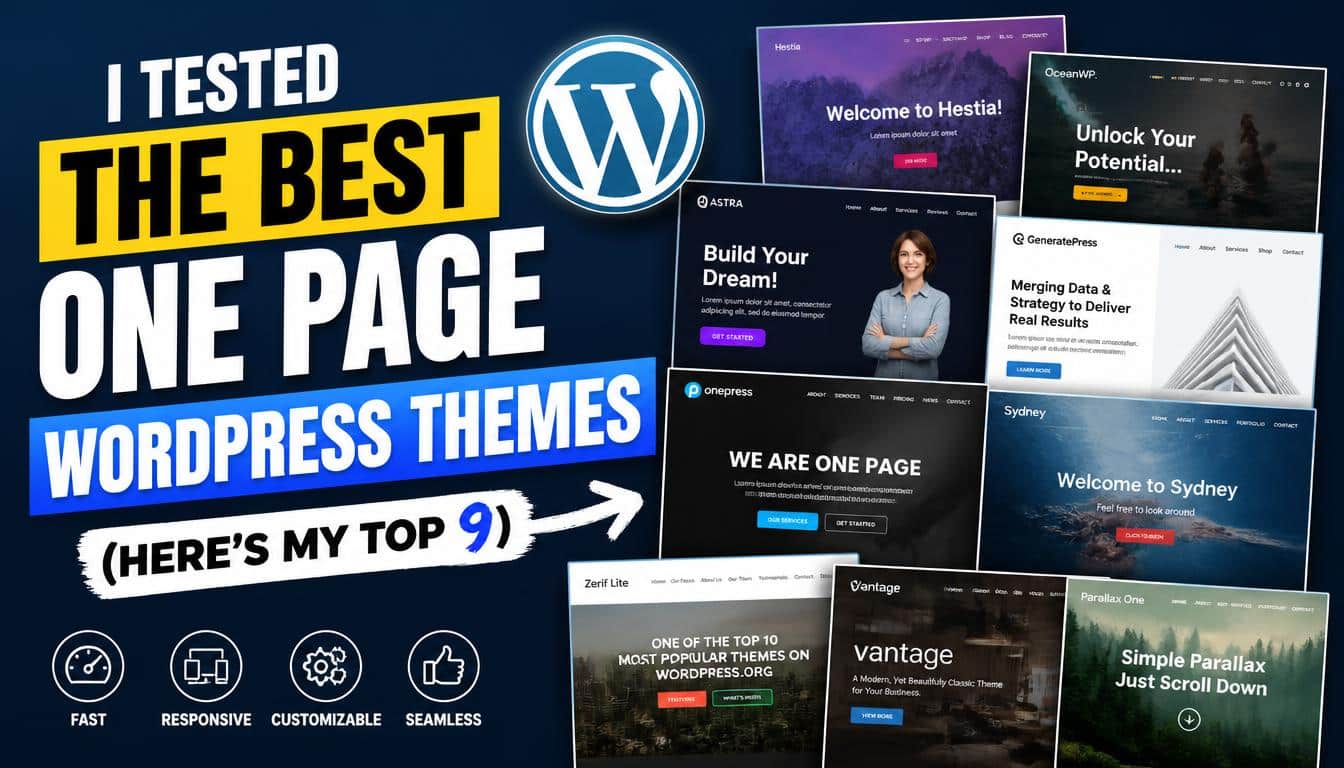
So I looked at nine of the strongest options around the current WordPress ecosystem, considering design flexibility,
responsive design, page speed, customization, builders, business use, portfolios, landing pages, and how much work is involved before a site starts looking properly yours. Here’s where they stand.
What Is a One Page WordPress Theme, Really?
A one page WordPress theme is designed around a single-page layout, where important information lives on one long, scrolling page instead of being spread across lots of separate URLs.
Think of it as a digital brochure, except it can sell, book, collect emails, display work, or tell a rather complicated story too.
Navigation normally relies on anchor links, smooth scrolling, and a compact navigation menu. A visitor might move from “About” to “Services” to “Testimonials” to “Contact” without leaving the page, which makes the user journey feel pleasantly linear.
That structure works beautifully for a small business website, consultant, photographer, personal portfolio, startup, event, product launch, or focused landing page.
It is less charming when you have 700 products, 200 blog posts and a customer who needs to compare seventeen nearly identical washing machines. A single page can only carry so much luggage.
There’s another important distinction: a theme and a page builder aren’t always the same thing. Elementor, SeedProd, Beaver Builder, and Themify Builder, for example, can handle much of the visual construction,
while the theme controls broader parts of the WordPress experience. SeedProd specifically positions itself around drag-and-drop landing pages and conversion-focused building, including opt-in forms, pricing tables and calls to action.
My Top 9 One Page WordPress Themes
The “best” theme depends heavily on what you’re building, so I’m not pretending there is one golden winner sitting on a tiny throne somewhere. A photographer and an online shop need very different things, and thats where this list gets useful.
1. Sydney Best for Storytelling and Business Websites
Sydney is a strong choice when your one page website needs to feel like a story rather than a pile of content blocks. It suits consultants, agencies, freelancers and service businesses especially well, where the visitor needs to understand who you are before deciding whether to contact you.
Its appeal comes from combining a professional appearance with visual features such as parallax backgrounds, smooth scrolling, anchor navigation and flexible header styles.
When those elements are used lightly, the page can have a lovely sense of movement without becoming a carnival ride.
Sydney is also a sensible option for people who want to work with Elementor instead of wrestling with code. You can build sections visually and shape the page around your own message, which is handy for beginners who know what they want but don’t particularly fancy learning PHP on a Tuesday night.
Best for: agencies, consultants, freelancers, service businesses and narrative-driven portfolios.
My take: Pick Sydney when personality matters, but you still want the site to look dependable.
2. SeedProd Best for Conversion-Focused Landing Pages
If your website has one measurable mission collect an email, sell something, promote a launch, get registrations or generate leads SeedProd deserves serious attention.
Technically, SeedProd is more than a traditional WordPress theme. Its landing page builder lets you construct standalone pages visually, and its documentation specifically describes pages for opt-ins, sales, webinars, lead generation and other focused goals.
The useful bit is the marketing mindset. You can work with Countdown Timer, Opt-in Form, testimonials, pricing tables, CTAs and other conversion-oriented blocks instead of assembling those pieces from a dozen unrelated WordPress plugins.
It also supports responsive editing, so the page can be adjusted for phones instead of simply hoping the desktop version survives the journey. Thats a surprisingly important difference.
Best for: landing pages, product launches, lead generation, email collection and sales funnels.
My take: If your measurable goal is a conversion, SeedProd is one of the easiest options to justify.
3. Hestia Best for Startups and Small Businesses

Hestia has that clean, polished personality that works particularly well for startups and smaller companies that want to look established without making the site feel like a bank.
Its design language leans toward Material Design, while the WordPress Customizer gives you a relatively approachable way to adjust typography, colors, layouts and sections.
It can also work alongside Elementor, which gives you more room when the built-in options eventually start feeling a bit snug.
For a one-page business site, Hestia makes sense because it can organize information into clear content sections introduction, services, portfolio, testimonials, contact and more without requiring the visitor to decode your navigation strategy.
The important thing here is restraint. Hestia looks strongest when you let the typography and spacing breathe instead of throwing every animation at the visitor because, well, the button was there.
Best for: startups, consultants, agencies, small businesses and professional websites.
My take: A dependable middle ground if you want modern design without excessive visual fireworks.
4. Divi Best for Deep Customization
Divi is the option I’d point toward when “simple customization” quickly turns into “I want control over literally everything.”
Its visual builder is built around real-time editing, allowing you to see design changes as you make them. That makes it particularly attractive for people who enjoy visual design and want detailed control over spacing, typography, colors, animations, sections and responsive behavior.
It also has features aimed at conversion work, including A/B testing and split testing, which can be useful when a site has moved beyond “does this look nice?” and into “does this actually make people click?”
The trade-off is obvious enough: more control can mean more decisions. Divi can become a playground, and playgrounds have a habit of eating entire afternoons.
Best for: designers, agencies, marketing sites, advanced customization and conversion testing.
My take: Excellent when flexibility matters more than absolute simplicity.
5. Ultra Best for Immersive Visual Experiences
Ultra, from Themify, is the adventurous one in this group. It’s built for people who don’t merely want visitors to scroll; they want scrolling to become part of the experience.
Its section scrolling can move visitors through full-width or full-height rows, with vertical and horizontal options. Themify’s documentation also describes parallax behavior and responsive controls for section scrolling.
That opens the door to cinematic landing pages, creative agency sites, portfolios and visual presentations where each section feels almost like a new scene.
Of course, there is a danger. If every section slides, zooms, fades and spins, the visitor may start wondering whether they accidentally entered a video game.
Best for: creative agencies, photographers, portfolios, visual storytelling and immersive presentations.
My take: Beautiful when used with discipline; exhausting when every animation gets invited to the party.
6. OceanWP Best for One-Page eCommerce
OceanWP makes more sense when your one-page project needs to sell something rather than simply introduce something.
Its reputation in the WordPress ecosystem is closely tied to flexibility and WooCommerce compatibility, making it a useful candidate for an online store, product-focused landing page or small eCommerce operation.
A one-page shop can work surprisingly well when there are only a few products. You can present the value proposition, product photos, features, pricing, social proof, FAQ and purchase route in one flowing experience.
But I’d avoid forcing an entire catalog onto one page. Your customer should not have to scroll through the geological history of your company before finding the checkout button.
Best for: WooCommerce sites, product launches, small online stores and eCommerce landing pages.
My take: Particularly interesting when the one-page concept and shopping experience need to live together.
7. Astra Best for Speed and Flexibility

Astra is the practical overachiever of the group. It’s lightweight, widely used, compatible with page builders and designed with performance in mind.
Astra’s own documentation emphasizes its lightweight architecture, page-builder compatibility and SEO-oriented features such as schema support.
That matters because page speed isn’t merely a technical trophy. A slow page can make a beautiful design feel broken. Especially on mobile, visitors tend to be remarkably impatient, and honestly, I can’t blame them.
Astra also has a large library of starter templates, including designs that can be adapted for different industries and page structures. Its current template ecosystem supports Elementor and the WordPress block editor through its Starter Templates approach.
Best for: beginners, performance-focused sites, business websites, portfolios and users who want a flexible foundation.
My take: If you care about keeping the underlying site relatively lean, Astra is one of the safest bets here.
8. Parallax Best for Creative Portfolios
Parallax is almost exactly what its name promises: a theme built around parallax scrolling and single-page presentation.
Themify describes it as combining parallax scrolling with single-page design, while also providing drag-and-drop building, responsive layouts, video backgrounds, animations and pre-designed layouts.
For a photographer, illustrator, artist or creative professional, this can be a great way to make images carry the narrative.
Instead of putting twenty thumbnails into a grid and calling it a portfolio, you can guide the visitor through work, biography, services and contact information as one visual journey.
The warning is image weight. High-resolution photography and video can make even a well-built theme feel heavy, so image optimization should be part of your setup rather than an afterthought.
Best for: photographers, artists, designers and creative portfolios.
My take: One of the more expressive options when your visual work is the actual product.
9. One Page Express Best for Beginners
If your priority is “I need this website online without becoming a part-time web developer,” One Page Express is worth looking at.
The theme is specifically built around one-page construction and currently promotes more than 50 predefined content sections, with responsive layouts and customizable section settings.
That section-based approach is its secret weapon. Instead of staring at an empty WordPress page wondering what humans normally put under a hero section, you can start with predefined pieces and edit the content.
For a beginner, this is comforting. You get a framework, but you’re not locked into one exact design.
Best for: beginners, freelancers, personal websites, small businesses and quick deployments.
My take: Perhaps the least intimidating choice if your biggest enemy is the blank screen.
Which One Page WordPress Themes Are Best for Different Goals?
Here’s the short version, because sometimes you just want somebody to point at the shelf and say, “That one.”
- Best for business storytelling: Sydney
- Best for conversion-focused landing pages: SeedProd
- Best for startups: Hestia
- Best for advanced customization: Divi
- Best for immersive design: Ultra
- Best for WooCommerce: OceanWP
- Best for speed and flexibility: Astra
- Best for creative portfolios: Parallax
- Best for beginners: One Page Express
That doesn’t mean one theme magically wins every category. A fast theme can still become slow if you install thirty resource-heavy plugins, upload enormous videos and ask your hosting server to perform miracles before breakfast.
What I Actually Look For in a One Page Website
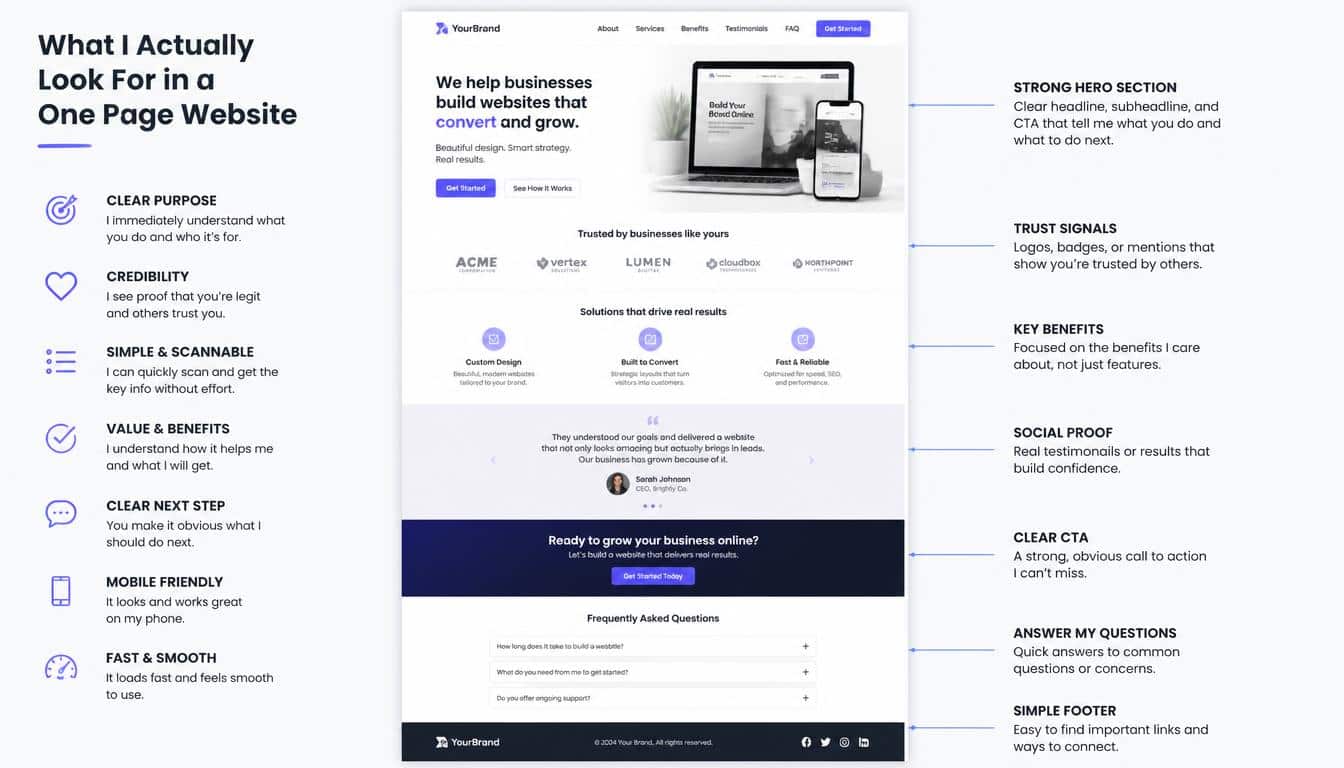
A pretty demo is only the beginning. When choosing a single page WordPress theme, I’d look at five things before caring about fancy gradients.
First is mobile performance. Your site needs to remain readable and usable on a phone, with buttons large enough to tap and forms that don’t feel like filling out tax paperwork through a keyhole.
Second is navigation. Sticky navigation, anchor links and smooth scrolling can make a long page feel organized, but they should help rather than distract.
Third is performance. Look at loading speed, image optimization, plugin requirements and the overall weight of your design. “Lightweight” is useful, but treat marketing performance claims as claims, not divine commandments.
Fourth is customization. Can you change the header, footer, typography, color palette and section spacing without touching CSS? If you need custom CSS eventually, that’s fine. Needing it just to change the font size of your phone number is less fine.
And finally, consider the actual visitor journey. Your hero section should explain the value proposition. Your middle sections should answer objections.
Your testimonials or reviews should provide social proof. Your final CTA should tell the visitor what to do next. A one-page layout is not automatically a good layout, and thats the bit people sometimes forget.
Are One Page Themes Good for SEO?
Yes, but “one page” itself is not an SEO strategy.
A one page website can rank when its content is useful, focused and technically sound. You still need sensible heading structure, descriptive text, relevant metadata, internal context, good WordPress SEO, fast loading and a mobile-friendly experience.
The challenge is breadth. A single page has fewer opportunities to target distinct search intents than a larger site with separate service, location, product and resource pages.
So if you’re building a local photographer’s portfolio, a consultant profile or a focused service business, one page can be perfectly sensible. If you’re trying to rank for fifty unrelated topics, your beautiful single scroll may become a very polite SEO disaster.
Do One Page Themes Work With Page Builders?
Usually, yes, and this is one reason WordPress remains so flexible.
A theme can provide the structure while a WordPress page builder handles visual editing. Elementor, Beaver Builder and Themify Builder are examples of tools that can change how you construct individual pages.
SeedProd takes the idea further by providing visual tools for standalone landing pages and even complete theme-building workflows in its higher-tier website builder.
The trick is not to stack builders on top of each other without a reason. Pick a system you understand, learn it properly, and let your website breathe a little. Three builders, four optimization plugins and seven animation add-ons is not “flexible”; it’s a cry for help.
Can You Add a Blog to a One Page Site?
Absolutely.
Your homepage can remain a single-page site, while your WordPress installation still contains separate blog posts. This is actually a sensible hybrid for many businesses.
The homepage tells the story: who you are, what you offer, why people should trust you and how they can contact or buy from you. The blog then handles deeper educational content, news, guides and search-focused articles.
That setup gives you the clean user experience of a one-page homepage without locking your entire content strategy inside one enormous scroll.
How to Make a One Page WordPress Website Feel Personal
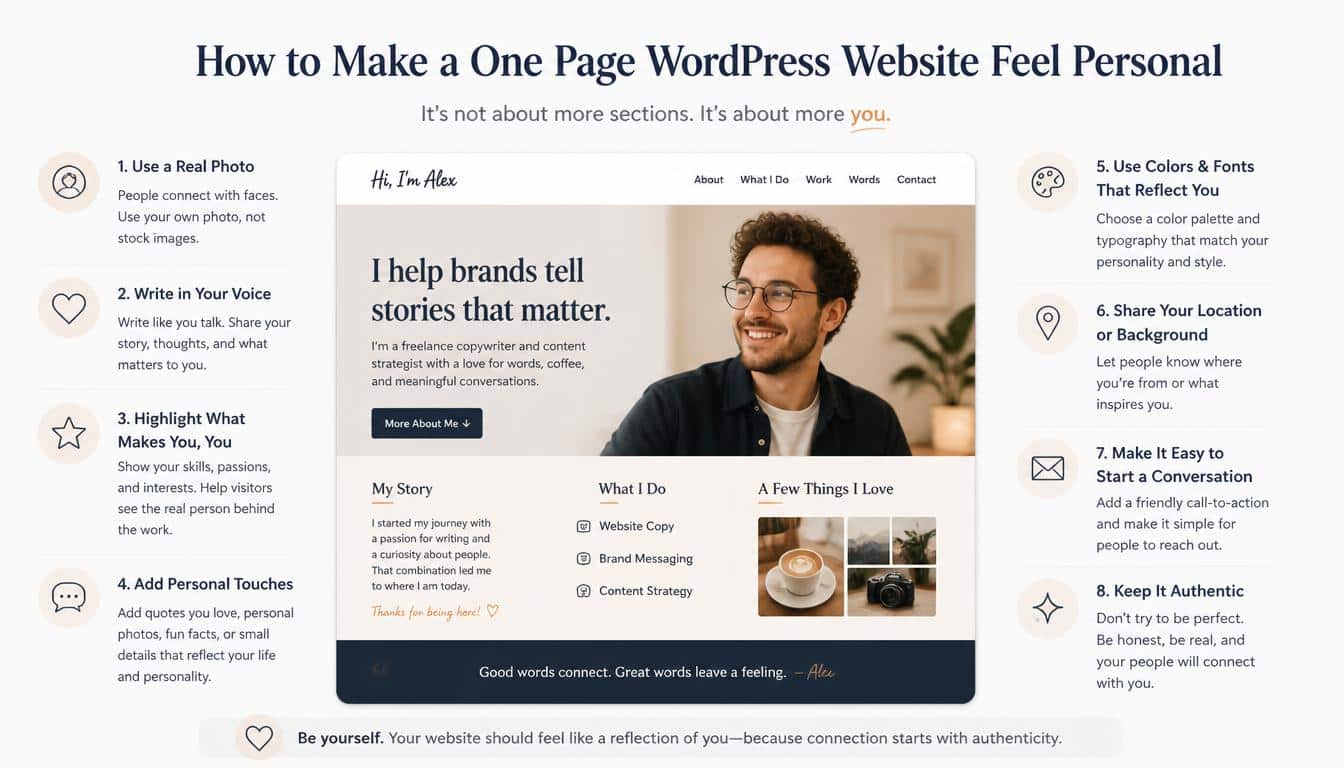
The best one-page sites don’t merely contain information. They have a point of view.
Start with one clear sentence explaining what you do and who you help. Then remove anything that doesn’t support that sentence. Yes, even that paragraph you spent forty minutes writing which you secretly know nobody will read.
Use your own photographs where possible. Add testimonials that sound like real people. Replace generic “Learn More” buttons with specific CTAs such as “Book a Consultation,” “See My Work,” or “Get the Free Guide.”
Keep the color palette consistent, give typography room to breathe, and use animations as seasoning rather than the meal. A little movement can create visual storytelling. Too much movement makes the page feel like it’s trying to escape your monitor.
Frequently asked questions
One page WordPress theme
A one page WordPress theme displays your website’s main content on a single scrolling page. It is ideal for portfolios, business websites, landing pages, and simple service websites.
Single page WordPress theme
A single page WordPress theme helps you present all important information in one smooth, organized layout. It can make navigation easier and keep visitors focused on your main message.
Best single page WordPress themes
The best single page WordPress themes offer a balance of speed, responsive design, customization, and ease of use. Popular options include Sydney, Astra, Hestia, Divi, and OceanWP.
WordPress one page theme
A WordPress one page theme lets you build a complete website using a single long-scrolling page. These themes often include customizable sections, smooth scrolling, responsive layouts, and page builder support.
Free one page WordPress themes
Free one page WordPress themes are a great option for creating a professional website without an upfront cost. Many offer essential customization, responsive design, and compatibility with popular WordPress plugins.
Read This Blog: https://gracethemes.com/best-cloud-hosting-services/
My Final Verdict on the Best One Page WordPress Themes
There isn’t one universally perfect one page theme because the right choice depends on what your site needs to accomplish.
If I were starting a straightforward business website, I’d lean toward Astra, Sydney or Hestia. For a conversion-heavy landing page, I’d put SeedProd near the top.
For a designer who wants enormous creative control, Divi is hard to ignore. Creative professionals may prefer Parallax or Ultra, while WooCommerce users should give OceanWP serious consideration.
And if you’re new to WordPress and mostly want to get the thing online without developing a sudden hatred of website design, One Page Express is an unusually friendly starting point.
The bigger lesson is this: don’t choose a theme because the demo made you whisper “wow” for six seconds.
Choose it because the structure fits your visitors, the mobile experience works, the customization process doesn’t frustrate you, and the theme can support the measurable goal of the website.
A great one page WordPress website should feel simple to the visitor, even if quite a bit of thought went into making that simplicity happen.
That, really, is the magic trick. The best one-page design doesn’t shout about its theme, its animations or its clever builder.
It quietly moves the right person from curiosity to confidence, and then gives them a very obvious next step. Thats what a good website should be doing all along.
