

Prompt-Based Data Extraction vs. Template-Based Extraction: What Changes for Your Team
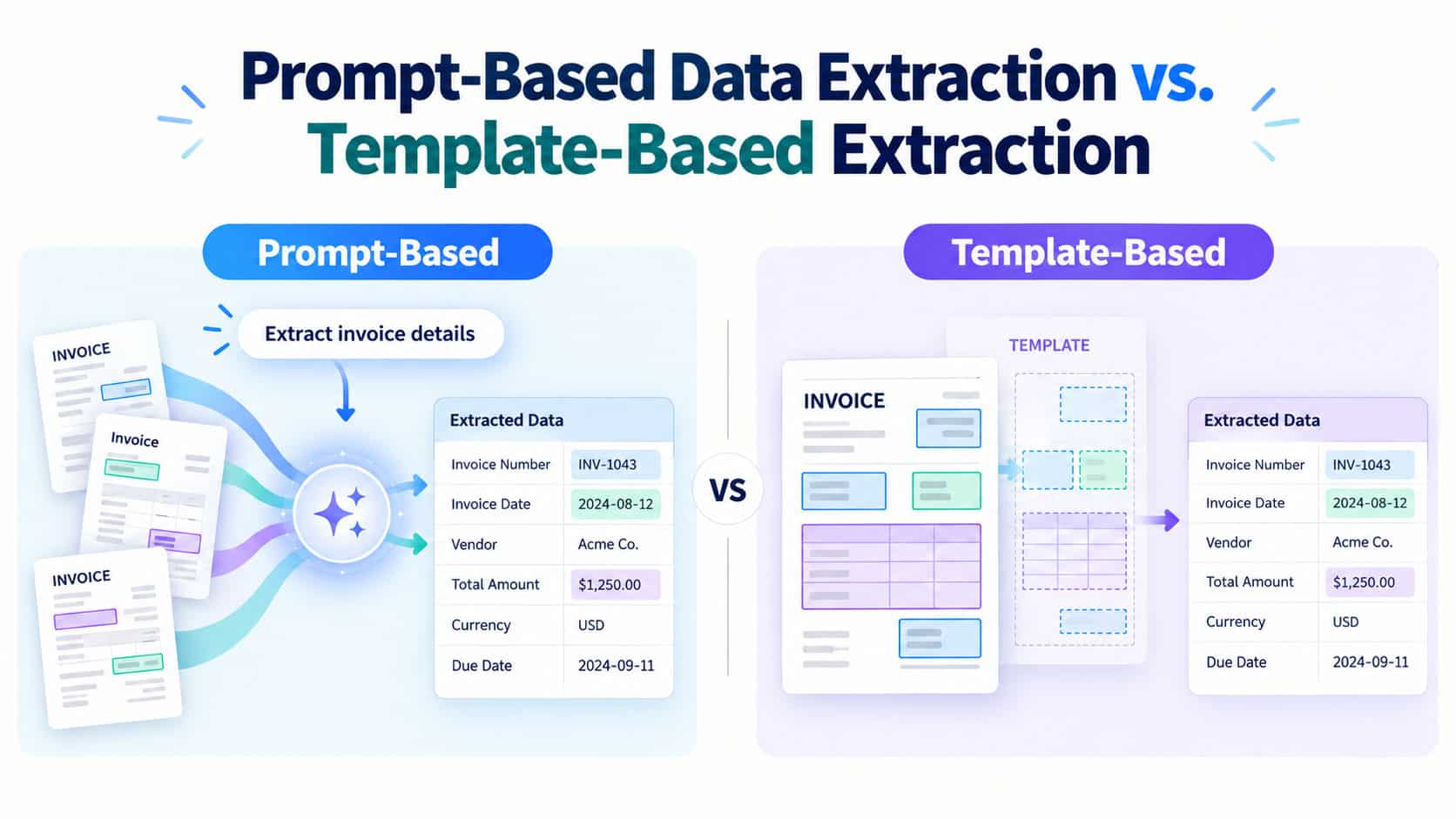
People who have dealt with many documents know the problem. All sorts of documents, such as invoices, referral letters, claims and lab reports, arrive in different forms, and someone has to extract the data from them. For a long time, templates were the solution. There is now a different option, and it affects the way a team operates in a way that is more significant than you may realise.
Let us examine both methods and the effect that each one has on the people carrying out the work.
How Template-Based Extraction Works
A template acts like a map; it shows the software where various items are located, for example, the invoice number is in this place, the date is in that place, and the line items are in this table. When a new document arrives, the system finds the right template and reads the data from those positions.
This approach works very well when the documents are always the same. The outcomes are consistent and easy for an auditor to understand since the rules do not change.
Problems occur whenever anything moves. If a vendor inserts a column or a scanner tilts the page slightly, the template then reads the wrong box or nothing at all. Someone has to detect the error, correct the template and test it once more. In the case of hundreds of senders, you could end up looking after hundreds of templates.
How Prompt-Based Extraction Works
Using prompt based extraction, you omit the need for a map. All you have to do is write an instruction in ordinary language, for example, “Find the patient’s name, date of birth, referring doctor and diagnosis.”
A language model processes the document by focusing on the meaning rather than on the position of the information. For instance, when it sees “Date of Birth” on one form and “DOB” on another, it uses the same instruction to identify both. Therefore, there is no need to create a different configuration for each layout.
There’s a drawback: the model may produce slightly different responses on different occasions, and at times it assigns an incorrect value while at the same time appearing certain. Therefore, it’s necessary to have methods of checking the output. We will return to this point.
Template-Based vs. Prompt-Based Extraction
| Feature / Criteria | Template-Based Extraction | Prompt-Based Extraction |
| Primary Approach | Map-based; uses fixed coordinates and positional rules. | Context-based; uses natural language to understand meaning. |
| Layout Flexibility | Fragile; minor formatting changes break extraction. | High; handles varied, messy, and changing layouts easily. |
| Setup & Expertise | Requires specialized training in template-building tools. | Requires domain knowledge to draft simple text instructions. |
| Maintenance Need | Heavy ongoing effort to rebuild and test broken layouts. | Low layout upkeep; focused on refining prompt clarity. |
| Primary Error Type | Missing fields or misaligned positional data. | Plausible-sounding but inaccurate answers (hallucinations). |
| Human Supervision | High effort for layout repairs and template updates. | Focused on reviewing low-confidence outputs and spot-checking. |
| Processing Cost & Speed | Faster per page and significantly cheaper at high volumes. | Slower per page and incurs higher processing costs. |
| Best Suited For | High-volume, standardized forms (e.g., standard invoices). | Diverse, multi-source records (e.g., varied medical files). |
Where Each Method Fits
It is not the case that one of them wins each time. Templates are quick, cheap, and predictable for processing many similar items.
Prompts work better in situations where your documents are sourced from a variety of different places or where the formats are constantly changing. They mean you spend a great deal less time on setup.
A number of teams make use of both methods: they keep templates for their standard forms and employ prompts for those unusual cases that don’t fit.
What Changes for Your Team
What matters more is the way people find ways to work around the software. A few things do change.
Who is responsible for setting it up? It usually takes a person who is trained in the tool to build templates, and someone who knows the documents is needed to write a prompt. This is because a claims analyst or a records manager is often able to write a good one since they already understand what each field means.
What maintenance involves. When using templates, a large part of the week is spent repairing broken layouts; but when using prompts, that time is spent on improving the instructions and examining odd results. It’s not much concerned with repair and instead is more about quality.
The way in which you carry out testing is that a template either identifies a field or it does not. It’s possible for a prompt to return something that appears correct but isn’t. Therefore, your team should create a small number of sample documents with known answers and then apply every new prompt to these before using the prompt in actual situations.
Here’s how the review process works: human reviewers are more important, so establish a rule that has low-confidence answers sent to a person, and keep a record of the changes they make; those changes show you how to improve the prompt.
The skills that people need are good judgment, since they no longer have to learn a complicated template editor. They have to write clear instructions, spot mistakes and know when it is not necessary to trust an answer.
Prompt-Based Extraction and RAG in Healthcare
Healthcare makes these changes obvious. One patient’s medical file can contain records from a hospital, a laboratory, a clinic and an insurance company, each of which uses its own format. Templates find it difficult to keep up.
That is also the area for RAG in healthcare. RAG is an acronym for retrieval-augmented generation. The concept is simple in that the system first locates the appropriate pieces of information from a set of trusted documents and then has the language model respond by using only those pieces, rather than making up answers from memory.
One idea supports the other. Extraction converts the dispersed documents into neat and well-organised data, and RAG then enables staff to ask questions regarding that data—for instance, ‘Which medicines were mentioned in the most recent discharge summary?’—and receive an answer that is linked to the actual record. The better the extraction, the better the answers will be.
In a clinical environment, the stakes are greater, which is why it’s worthwhile to develop some good habits. Make sure that each value you extract is linked to the specific place in the original document from which it was obtained so that a reviewer can check it at once. Comply with the privacy laws that are applicable in your area and simply ask your vendor where the data is sent and how it is protected.
Risks to Plan For
There are certain costs associated with flexibility. They are the main ones.
The main hazard is incorrect answers that appear correct. They can be detected using spot checks and sample tests, as well as by getting the system to indicate where it found each value.
Results can also change. Make sure that the output format specified in the prompt is fixed and that it is tested regularly.
We should also consider cost and speed since language models are slower and more expensive per page than templates, so use templates for your high-volume, fixed forms.
Lastly, make sure you check the way in which your documents are stored and processed since this is particularly important regarding health and financial data.
How to Get Started
Begin on a small scale by selecting one document type that currently causes you the most difficulty, typically the one that has the most layouts. Gather between fifty and a hundred actual examples and record the correct answers. Use a prompt-based method with these examples and then compare the accuracy of the results to that which your current templates provide.
Now consider all the relevant factors: setup time, the amount of maintenance required, error rates, the effort involved in reviewing the documents, and the cost. Choose the option that suits your documents and your team rather than one that sounds the most up-to-date.
Final Thoughts
With templates you obtain control and consistent results for documents which never change, while with prompts you get speed and flexibility for those that do. For your team the true change lies in the type of work carried out: there is less need to fix faulty layouts and more involvement in writing, testing and reviewing. Should you plan for this, making the switch will mean that your document process becomes easier to manage and easier to expand.
