

Nano Banana: How to Create AI Image Assets for Your Website (Hero Images, Banners & More)
From Generic Stock to Nano Banana Website Images
You have seen the same stock photos a thousand times. The smiling office team with matching laptops. The mountain landscape with white overlay text. The handshake close up against a blurred corporate hallway. When every site uses the same library, every site looks the same.
Custom visuals fix this, but they are slow and expensive. A professional photoshoot for a homepage hero, a set of blog featured images, a few promotional banners – that creative process can eat weeks and thousands of dollars. And when you need seasonal updates or dark-mode variants, you start over.
Nano Banana changes the equation. Google’s Gemini-based image model lets you generate cohesive, on-brand website graphics – hero images, banners, blog featured images, product visuals – using natural-language prompts. Instead of searching stock libraries or waiting on a designer, you describe what you want and get a final image that matches your brand’s colors, camera angles, and artistic styles.
With a platform like Apiframe, teams can plug Nano Banana into their site or CMS via API or no-code tools to create ai generated visuals at scale. This article covers what Nano Banana is, why it excels at website assets, how to design hero images and other graphics, how to keep a consistent style across your site, and how to technically optimize and upload assets to WordPress or anything else you run.
What is Nano Banana?
Nano Banana is Google DeepMind’s image model family built on the Gemini architecture, designed specifically for image generation and editing. The name started as a community nickname during testing on LM Arena and stuck.
There are three versions worth knowing:
- Nano Banana (Gemini 2.5 Flash Image) – launched August 2025. A fast, Flash-tier model optimized for quick edits, multi-image blending, and character consistency. Nano Banana is faster for rapid image generation than its Pro sibling, making it ideal for rapid prototyping and iteration.
- Nano Banana Pro (Gemini 3 Pro Image) – launched November 2025. The higher-quality tier. Nano Banana Pro generates images with 4K resolution, offers advanced creative controls like the ability to adjust camera angles and depth of field, and integrates real world knowledge for accurate visual generation via Search grounding. It also features a “thinking mode” for complex prompt reasoning.
- Nano Banana 2 (Gemini 3.1 Flash Image) – launched February 2026. Merges Pro-level features with flash speed, becoming the default image model across many Google products.
All versions are available in the Gemini app, Google AI Studio, and through third-party API platforms. Since launch, more than 5 billion images have been generated using Nano Banana features across Google’s ecosystem.
The model is particularly strong at editing existing images – replacing a background, updating banner text, swapping a white shirt for a branded jacket – as well as generating new compositions from scratch. This combination of image generation and editing in a single model is what makes Nano Banana a game changer for website asset creation.

Why Nano Banana is Great for Website Assets
Website assets – hero images, banners, featured images – need both visual quality and visual storytelling consistency across many pages. A homepage hero, an about-page portrait, and a blog illustration should feel like they belong to the same brand, not three different stock libraries. Conventional image generators often produce inconsistent characters and styles, forcing teams to regenerate or heavily edit every asset.
Nano Banana excels here because of several capabilities that map directly to website work:
- Character consistency. Nano Banana maintains character consistency across multiple edits and scenes. You can place the same character – same facial features, same skin tone, same outfit – across your homepage hero, pricing section, and blog illustrations. Pro maintains this for up to five people in multi character scenes.
- In-image text rendering. The model generates readable text directly inside images, supporting multiple languages. This means you can create sale banners, call-to-action strips, or anything with embedded headings without opening Photoshop. Nano Banana Pro generates clearer multilingual text in images, making it useful for localized sites.
- Camera angles and aspect ratio control. You can specify a medium shot, a close up, or a wide overhead angle. You can set aspect ratio to match banners (e.g., 4:1), social cards (1.91:1), or square tiles (1:1) – all feeling part of the same visual system.
- Conversational editing. Edit images using simple text instructions without complex workflows. Tell it to transform scene lighting to dramatic lighting, change a background, or remove objects. Each edit preserves the rest of the scene (scene preservation), so you do not lose what already works.
- Multi-image fusion. Nano Banana allows multi-image fusion for cohesive visuals. Users can combine multiple images into a single visual seamlessly – blending product shots, backgrounds, and reference characters into one composition.
This fits naturally into a creative workflow: marketing or design teams generate concepts in the Gemini app or Apiframe Studio, refine them through conversational editing, then developers use the API for batch production across the site.
Creating Hero Images with Nano Banana
A website hero image is the topmost, full-width visual section of a page – typically a large photograph or illustration with a headline and call-to-action layered on top. Common hero image sizes range from 1600×900 px to 1920×1080 px, with some retina-ready themes going up to 1920×1200 px.
Here is how to approach hero image creation with Nano Banana:
- Plan your prompt carefully. Use detailed prompts for better image generation control. Specify your subject, environment, brand colors (include hex codes like “#0B1F3B”), camera angle, and composition space. For example: “professional woman in a navy blazer standing in a modern clinic lobby, soft studio lighting, medium shot, open space on the right third for headline text.”
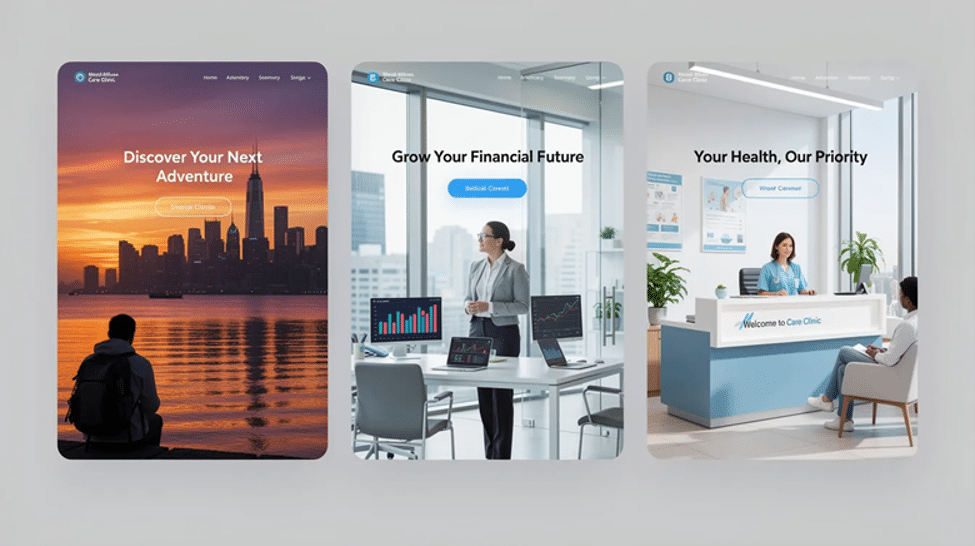
- Match your industry. For a travel site, prompt a sunset city skyline with a traveler in the foreground, cinematic lighting, warm palette. For a finance site, try a calm, dimly lit office scene with charts on a monitor, bokeh effect in the background, clean desk. For healthcare, generate a friendly clinic reception with a doctor greeting a patient, natural daylight, welcoming tones.
- Generate variants. Create multiple images for the same hero slot – light and dark mode versions, different angles, seasonal variations. Nano Banana Pro supports 4K image resolution for high-quality visuals, so you can generate at the highest resolution and downscale for web delivery.
- Design for mobile cropping. Place your subject and focal point toward the center or slightly off-center. Avoid putting critical elements at the edges where mobile crops will cut them off.
- Scale production. Once you have dialed in a hero style you like, teams can generate them at scale through the Nano Banana image API via Apiframe – submitting prompts programmatically and receiving assets stored on a CDN, ready to drop into any CMS.
- Choose the right format. Export hero images as WebP (primary) with JPEG fallback. Aim for 150–300 KB after compression to keep load times fast without sacrificing quality.
Nano Banana Pro maintains character consistency across multiple scenes, so if your hero features a specific person or mascot, that same character can appear throughout your site with the same likeness.
Other Website Image Assets You Can Create with Nano Banana
Beyond hero images, most sites require dozens of smaller assets. Nano Banana handles all of them.
- Promotional banners and strips. A “50% Off Summer Sale” bar across the top of your site, or a pricing discount banner with bold text overlay. Nano Banana’s in-image text support means the model renders the heading directly – no manual text layer needed. It supports multilingual text rendering in images, so you can create localized banners for different markets.
- Section backgrounds. Feature rows, testimonial sections, and pricing tables often need lightly textured, low-contrast backgrounds. Prompt something like “soft abstract gradient, deep navy to teal, subtle geometric texture, minimal detail” and you get a background that does not overpower foreground text.
- Blog featured images. For WordPress, standard featured image sizes are typically 1200×630 px or 1200×675 px. Generate detailed illustrations or photography style images at this aspect ratio, keeping a consistent palette and lighting across all posts. This eliminates the “random stock photo” look that plagues most blogs.
- Icons and illustrations. Nano Banana can produce sets of flat, outline, or 3D-style icons with consistent line weight and color palette. Prompt a reference image of your desired style, then generate variations for each feature or service you offer.
- Product shots and mockups. For SaaS teams, generate UI screens placed on laptops or phones with realistic scene lighting and camera angles. The model allows for precise localized editing through simple text prompts – swap a screen, change a device color, adjust the background – without regenerating the entire composition. You can simply upload your uploaded image of a UI screenshot and place it into a device mockup scene.
- Whimsical images and creative projects. Not every asset needs to be corporate. Nano Banana can produce beautiful images in illustration styles – handwritten notes aesthetics, macro photography compositions, or anything in between – for brands with a more playful identity.
Nano Banana Pro allows for complex compositions with up to 14 reference images, meaning you can blend product photos, lifestyle backgrounds, and brand elements into a single cohesive visual.
Keeping a Consistent Style Across Your Site with Nano Banana Prompts
A professional-looking site has visual coherence. Every image should feel like it belongs to the same family – same color temperature, same lighting style, same level of detail. When you are creating images with AI models, consistency requires intentional prompting.
Here is how to build that consistency with Nano Banana prompts:
- Standardize your base prompt. Define core attributes that appear in every prompt: brand colors (“deep navy #0B1F3B, accent coral #FF6B5A”), lighting (“soft studio lighting, minimal harsh shadows”), and style (“minimalist, clean, modern web illustration, photography style”). This becomes your template.
- Reference consistent characters. Upload a reference image of your brand mascot, spokesperson, or product and instruct Nano Banana to keep the same character across scenes. The model preserves facial features, skin tone, clothing, and posture across different angles and environments.
- Reuse camera and composition patterns. If your homepage hero uses a medium shot with the subject on the left third, carry that framing convention into section images and about-page portraits. Consistency in camera angles creates subconscious visual unity.
- Use conversational editing to match. When generating a new image, tell the model to “match the style of the homepage hero” or “use the same color palette and cinematic lighting as the pricing section image.” This is where Nano Banana’s advanced ai technology for scene preservation shines.
- Build a prompt library. Keep a shared document – a team wiki, Notion page, or design system file – where marketers, designers, and developers all reference the same base Nano Banana prompts. Include variations for different asset types (hero, banner, blog, icon) so anyone on the team can start creating without guessing at style parameters.
- Leverage reference characters across campaigns. Nano Banana Pro can blend reference characters from multiple images, so you can maintain a cast of consistent characters across an entire marketing campaign or website redesign.
A prompt library is to AI image generation what a brand style guide is to traditional design – the single source of truth that keeps everything aligned.

Optimizing Nano Banana Images for the Web
Even insanely good AI-generated images need optimization before they hit your site. A 4K output straight from Nano Banana Pro might be 8 MB – beautiful, but a performance killer.
- Convert to modern formats. Export or convert generated images to WebP as your primary format, with AVIF as an option where browser support exists. Keep JPEG or PNG as fallback for older browsers.
- Hit compression targets. Hero images should land in the 150–300 KB range after compression. Smaller assets like blog cards, icons, and banners should be under 100 KB. Tools like Squoosh, ShortPixel, or Apiframe’s built-in processing can handle this.
- Choose sensible dimensions. Do not upload a 3840×2160 px image for a 1200 px-wide blog card. Size your final image to the maximum display width needed – 1920 px for full-width heroes, 1200 px for blog featured images, 600 px for card thumbnails.
- Implement responsive delivery. Generate multiple sizes of each asset and use srcset/sizes attributes so the browser picks the right resolution for each device. A mobile user on a 375 px-wide screen should not download a 1920 px hero.
- Lazy-load below-the-fold images. Any image not visible on initial page load should use native lazy-loading (loading=”lazy”). This directly improves Largest Contentful Paint and overall Core Web Vitals.
- Write descriptive alt text. Every image needs meaningful alt text for accessibility and SEO. “Doctor greeting patient in modern clinic reception, warm lighting” beats “image1” or “hero-banner-final-v3.”
These steps ensure your images generated by Nano Banana look sharp and load fast – the combination that actually drives conversions.
Adding Nano Banana Images to WordPress and Your Theme
The easiest way to add Nano Banana images to WordPress is to connect Gemini to your WordPress site through an MCP server.
InstaWP provides a WordPress MCP server that allows supported AI clients to interact directly with your site. Once connected to Gemini, you can generate images with Nano Banana and push them directly to the WordPress Media Library without manually downloading and uploading each file.
Most small and mid-sized sites run on WordPress, so getting Nano Banana images into your theme is a practical concern.
- Upload to the Media Library. Drag your optimized Nano Banana images into WordPress’s Media Library (Media → Add New). WordPress now supports WebP uploads natively, so you can upload directly in that format.
- Set featured images. In the post or page editor, use the “Featured Image” panel to assign a Nano Banana image. For WordPress featured image size, most themes default to 1200×630 px or 1200×675 px. Check your active theme’s documentation – themes like Astra, OceanWP, and GeneratePress each have slightly different recommended dimensions.
- Configure hero and header images. Many modern themes handle hero images through the Customizer (Appearance → Customize → Header), Elementor sections, or Gutenberg cover blocks. Upload your Nano Banana hero graphic to the appropriate slot. For full-width heroes, aim for 1920×1080 px minimum.
- Watch for cropping on mobile. If your theme uses a full-width layout on desktop but crops to a taller aspect ratio on mobile, place your subject centrally. Test on multiple breakpoints before publishing.
- Consider full-width vs. boxed layouts. Full-width themes need wider images (1920 px+), while boxed layouts with a max-width container (e.g., 1200 px) can use smaller files, saving bandwidth.
- Automate the pipeline. Teams using Apiframe can generate Nano Banana images via API, store them on Apiframe’s CDN, then automatically sync or import them into WordPress via automation integrations like Zapier, Make, Pipedream, or n8n – eliminating manual uploads entirely.
Using Apiframe to Scale Nano Banana Across Your Site
Crafting one or two hero images manually is straightforward. Producing fifty assets across a full site redesign – hero images, category headers, blog illustrations, ad creatives, product photos – requires a system.
Apiframe is a unified REST API that exposes Nano Banana, Nano Banana Pro, and 70+ other AI models behind a single integration. One API key, consistent request/response schema, async job handling with webhooks, and permanent CDN storage for every output.
Here is a typical workflow for scaling Nano Banana across a website:
- Marketing defines prompts and visual guidelines – brand colors, character references, lighting style, composition rules.
- A developer integrates the Nano Banana endpoint via Apiframe’s API or one of the official SDKs (Go, Node.js, PHP, Python).
- Images are generated asynchronously – submit a prompt, receive a jobId, get a webhook callback when the image is ready on the CDN.
- CMS or front-end consumes the CDN URLs – WordPress, headless CMS, or static site generators pull the image URLs directly.
For non-technical team members, Apiframe Studio provides a no-code interface to generate and enhance images without writing API calls.
The pay-as-you-go pricing means you can mix Nano Banana with other tools in the same pipeline – upscalers, background removal, or other best-ranked AI image models – to build a complete website graphics workflow.
FAQ: Nano Banana for Website & WordPress Images
What is Nano Banana?
Nano Banana is Google’s Gemini-based ai image model family – including Nano Banana (Gemini 2.5 Flash Image), Nano Banana 2, and Nano Banana Pro – that generates and edits high-quality images with accurate text rendering and character consistency. It integrates real-world knowledge for accurate visuals through Search grounding, and it is available in the Gemini app, Google AI Studio, and via API platforms like Apiframe.
What size should a website hero image be?
For full-width heroes, aim for 1920×1080 px or 1600×900 px. Some themes recommend 1920 px wide and at least 800–1000 px tall for crisp results on modern displays. Always check your theme’s documentation and test on mobile.
Can AI generate website images?
Yes. Tools like Nano Banana can produce entire visual systems – hero images, banners, icons, product shots – with consistent style and characters. Using a platform like Apiframe, teams can integrate this generation directly into their websites and creative workflow through documented APIs and automation tools.
What is the best model for website images?
If you need speed and iteration, choose Nano Banana (Flash tier). For maximum quality, 4K resolution, and advanced controls, Nano Banana Pro is the best model. Nano Banana 2 offers a strong middle ground with Pro-level features at Flash-tier speed.
What is the best image format for websites?
WebP is the recommended primary format – it offers strong compression with minimal quality loss, and WordPress now supports WebP uploads natively. AVIF provides even better compression where browser support exists. Keep JPEG or PNG as fallback. Many WordPress performance plugins automatically convert and serve optimal formats.
Can Nano Banana keep my brand characters consistent?
Yes. You can upload a reference image of your character or mascot, and Nano Banana will preserve the same facial features, skin tone, clothing, and posture across different scenes, camera angles, and backgrounds. This works for up to five people in a single scene.
Why is the model called “Nano Banana”?
The name originated as a community nickname during LM Arena testing. Interestingly, “nano banana” is also a real field of scientific research. Banana skins are a rich nutrient source, constituting up to 33% of the fruit, and banana peels contain high levels of nutrients for effective bio-fertilizer production. Researchers have found that banana peels can be converted into nanofertilizers to improve agricultural efficiency – nanoscale particles in nanofertilizers allow better absorption of nutrients by plants, and nanotechnology improves the delivery of nutrients and crop protection in agriculture. Beyond fertilizers, nanoparticles from banana plant extracts show antibacterial and antifungal qualities, and reducing banana peel extracts to nanoscale boosts antioxidant properties. Bio-plastics and bio-fuels can be produced from organic waste of bananas, and using waste banana peels reduces environmental impacts associated with landfills while utilizing banana peels as nanofertilizers reduces waste disposal costs. Nanotechnology is also creating new ways to utilize banana plants in human diets. While Google’s AI model shares only the catchy name, the coincidence highlights how “nano” and “banana” intersect in both cutting-edge AI and agricultural science.
Launch a Cohesive, AI-Designed Website with Nano Banana
Generic stock photos make websites forgettable. Nano Banana gives you the tools to enhance images across your entire site with a consistent visual identity – same characters, same lighting, same brand palette – from homepage hero to blog thumbnail to promotional banner.
The workflow is straightforward: choose Nano Banana as your core image model, design prompts and style guidelines for consistency, generate and refine images through the Gemini app or Apiframe Studio, optimize for web delivery (WebP, compression, responsive sizes), and add them to WordPress or your chosen theme. Apiframe makes scaling this approach practical with a unified API for Nano Banana and dozens of other models, plus SDKs and no-code tools for fast implementation.
Start with a small set – two or three hero images and a handful of blog featured images. Refine your prompts until the style feels right. Then expand to a full image system. The creative work that once took weeks and a design agency budget now fits into an afternoon and a text prompt.
