

How to Run a Gift Card Promotion in WooCommerce (Step-by-Step)
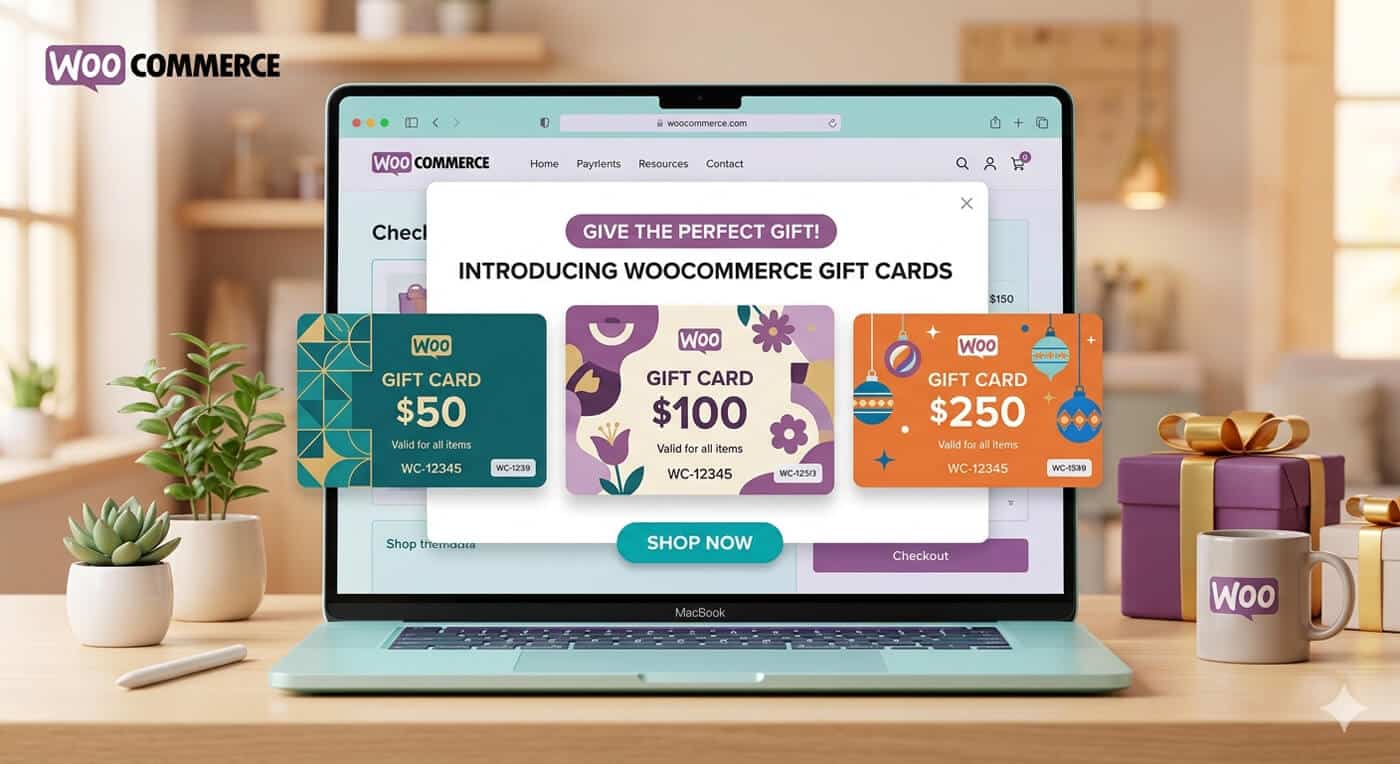
The best promotion that WooCommerce stores can conduct includes giving out gift cards because they ensure advance payments, draw new customers into your store due to the gift card redemption, and, if you offer some bonus for it, make current customers purchase now instead of postponing their purchases.
The most common form of this campaign is quite straightforward – “Buy a gift card, get a bonus”. If someone purchases a $50 gift card, he gets a $10 discount on his next order. The customer feels that he has received an extra benefit, and at the same time, you have a sale today and a guaranteed return of the client tomorrow.
The guide will teach you how to implement it from scratch. Two complementary plugins will be used for the process – one that allows selling gift cards, and another that gives customers a bonus. None of the actions require coding.
What You’ll Need
Two plugins handle the whole campaign:
- WooCommerce Gift Cards — to create, sell, and manage the gift card products customers will buy.
- Smart Coupons for WooCommerce — to create and automatically deliver the bonus coupon that makes the promotion compelling.
The two are designed to work together, so the bonus-coupon mechanic below runs without custom development once both are installed and active.
How the Promotion Works
Before the steps for setting up, here is the process that the client undergoes as well as what transpires at your end:
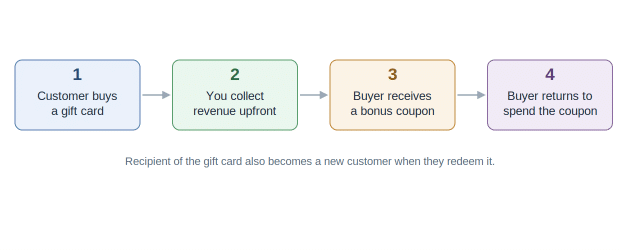
The buy-a-gift-card, get-a-bonus-coupon flow, from purchase to return visit.
The key idea is that the gift card is the product the customer pays for, and the coupon is the reward that pulls them back. One creates immediate revenue; the other drives the repeat visit.
Step 1: Create Your Gift Card Product
Once the WooCommerce Gift Cards plugin is installed, create a gift card product the same way as you would create any other product. You will need to determine how users will select the denomination – whether to use predefined values such as $25, $50, $100, or allow the user to create his own value up to a certain limit. For promotions, it is advisable to go with predefined values since the arithmetic of ‘Buy $50, Get $10’ will be easier for the buyer to comprehend.
In this stage, it is also possible to select a design for the gift card that recipients will receive. The plugin provides a variety of templates ranging from Birthday, Anniversary, Christmas, and New Year templates or you can upload your own that fits your branding. If your promotion is seasonal, it is better to opt for a themed template.
Step 2: Set the Delivery and Redemption Options
The Gift cards may be delivered through e-mail right away once the order is completed, or may be scheduled to deliver it on a date chosen by the customer – helpful for customers who are shopping in advance for their birthday or Christmas celebrations. The recipient can redeem the value in full at the time of purchase; it will be deducted from the order’s total amount and covers the total including taxes and shipping cost so that there are no unexpected costs that would hinder redemption.
In case you have any restrictions on the usage of gift card, they may be specified here – either restrict the redemption to particular items, or categories of items, or specify a minimum spending limit, or expiry date – all as per your shop’s policy. If it is for a wide promotion campaign, then generally the card remains open.
Step 3: Create the Bonus Coupon
Now switch to Woocommerce coupon plugin to build the reward side of the promotion. Create a coupon for the bonus value you’re offering — a fixed amount like $10, or a percentage discount, whichever fits your margins. This is the coupon the buyer receives as a thank-you for purchasing a gift card, to use on their own next order.
Give the coupon sensible guardrails so the promotion stays profitable: a minimum order value so the bonus applies to a real purchase, an expiry date to create gentle urgency, and — if you prefer — a restriction preventing it from stacking with other active discounts. These settings keep the incentive attractive without eroding your margins.
A typical bonus coupon for this campaign looks something like this:
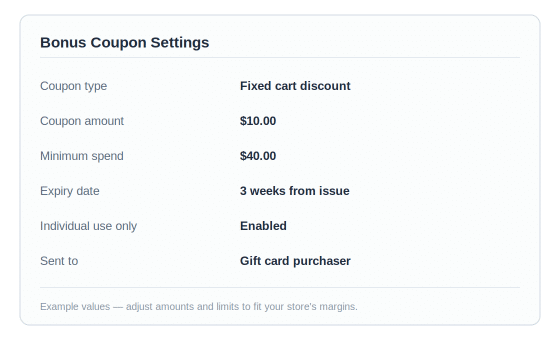
Example settings for a $10 bonus coupon with a minimum spend and expiry date.
Step 4: Connect the Coupon to the Gift Card Purchase
The final setup step is making the bonus coupon reach customers automatically when they buy a gift card, so you’re not emailing codes by hand. There are two common ways to do this, depending on how hands-on you want to be:
- Automatic delivery: configure the coupon to be sent to the customer after a qualifying purchase, so buying a gift card triggers the bonus coupon email on its own.
- Manual or bulk send: generate a batch of coupon codes and email them to gift card buyers as a group – workable for smaller or one-off campaigns where volume is low.
For an ongoing promotion, the automatic route is worth setting up once because it removes you from the loop entirely: the customer buys, the bonus arrives, and no one on your team has to touch it.
Step 5: Announce It and Track Results
Now that we have set up our mechanics, advertise the campaign wherever your customers spend their time: homepage banner, email sent to your list, and a mention when they check out. Be clear about the value of the offer: “Purchase a $50 gift card and get a $10 coupon,” rather than a vague “Gift card sale.”
Monitor two important metrics when you see orders roll in: the number of gift cards being sold, and the number of coupons that are being redeemed later on. If the first metric is high, then you know that people saw and accepted your offer. If the second one is high, too, then you know that you’re succeeding in making them return.
A Few Tips to Get the Most From It
A handful of small choices tend to separate a gift card promotion that performs from one that fizzles:
- Time it well. These campaigns work hardest in the run-up to gift-giving occasions — the winter holidays, Mother’s and Father’s Day, graduation season — when shoppers are already looking for something to give.
- Make the bonus feel worth it, but keep it sustainable. A bonus in the range of 15–20% of the gift card value is generous enough to motivate without cutting too deep into margin.
- Put gift cards in your main navigation. Shoppers looking to gift often search for them explicitly; if they can’t find the option quickly, they leave.
- Give the bonus coupon a real expiry. An open-ended coupon gets forgotten; one that expires in a few weeks brings the customer back sooner.
Wrapping Up
A gift card promotional offer is the exceptional type of campaign because it will work for your store from three sides at once – it gives money right away, makes your store known among new people due to those who will use the card, and finally, because of the coupon, it makes the person who initially bought the card come back and buy something else.
It takes just an afternoon to set up, and after you have put the automated coupon system in action, it will do almost everything by itself.
Start with something basic: one gift card offer, one bonus coupon, and one proper announcement. Monitor its performance and tweak amounts and timing for the next campaign.
