Headless CMS vs. Traditional CMS: Which Architecture Is Best for Modern Website Development?
Almost every business has its own online presence, whether it is an informational website about its services, a full-fledged e-commerce platform, or mobile applications. Accordingly, there are many different approaches to developing these products. The particular approach a business chooses depends on very different factors. It may be a limited budget, a desire to launch faster without overcomplicating things. Others, on the contrary, are tired of generic approaches. They want to invest in a unique interface, cool animations, and have maximum freedom when it comes to customization. And they choose a corresponding CMS as the foundation for their website.
But how do you understand which option is right for a specific business, headless CMS vs traditional CMS? Let’s look at a simple example. Imagine that we are building a website for a pizzeria. What does a visitor see? A website with photos of pizzas, a menu, prices, and an order button. What does an employee see? An admin panel where they can change a pizza description, price, or photo. We have two tasks: 1) Where should we store information about the pizza, and how should we edit it? 2) How should we display this information to visitors on a beautiful website? And this is where two approaches come in! Usually businesses know many traditional CMS platforms (for example, WordPress). Let’s say we buy or install a ready-made WordPress theme for a restaurant. WordPress already has everything inside: an admin panel where dishes can be added, page templates, and appearance settings. An employee adds a new pizza in the admin panel. WordPress saves it and automatically inserts the information into the appropriate place on the website. In other words, WordPress is both a system for managing information and a system that builds a website from that information. We get an almost ready-made solution.
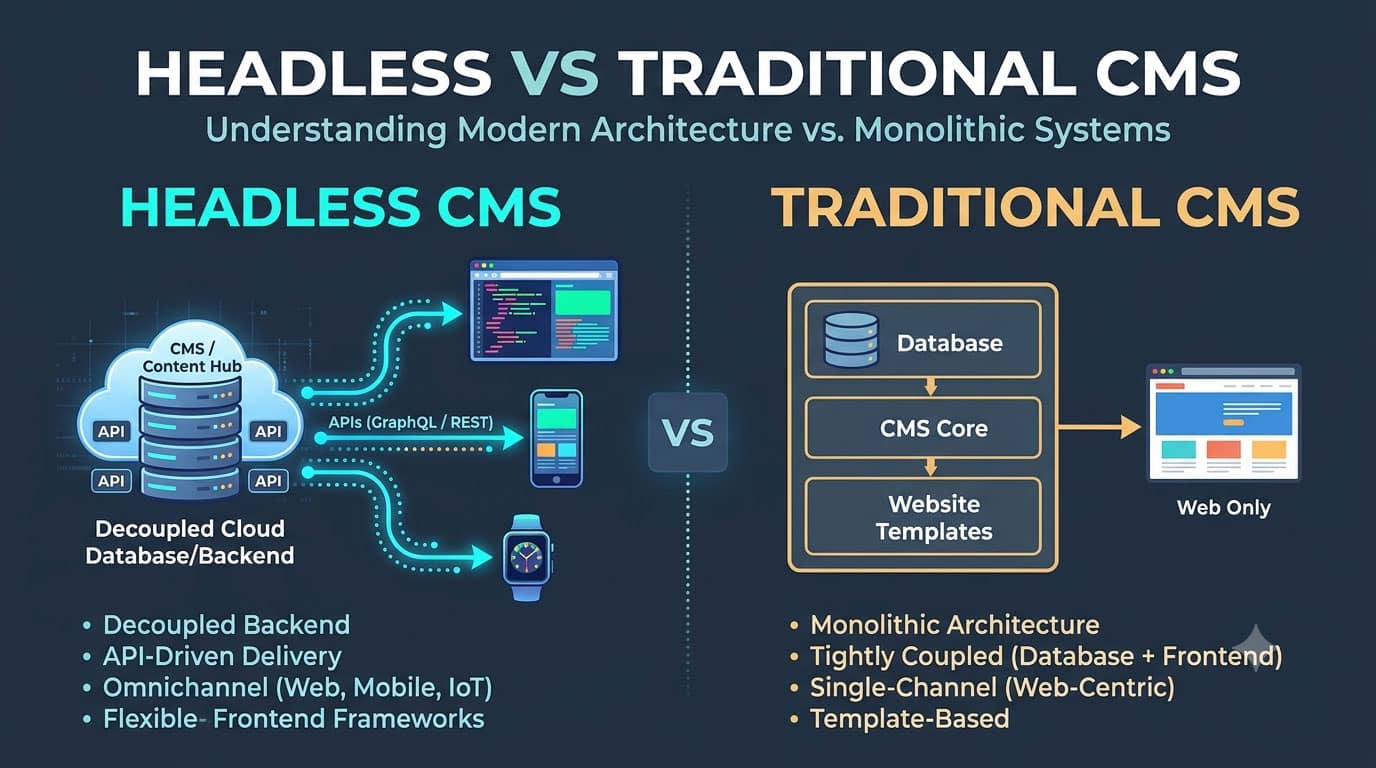
But there is also another option: Headless CMS. We can consider it if we want to order a completely unique website from developers: with unusual animations, an interactive menu, and custom ordering logic. In a Headless CMS, a pizzeria employee adds information: 1) Name: Margherita. 2) Price: €10. 3) Description: tomatoes, mozzarella, basil. 4) Photo. Headless CMS stores this information. But it does not decide where the photo will be placed on the website, what size the heading will be, or what the product card will look like. At the same time, developers create the website separately, for example, using React or Next.js. They determine what the menu looks like, how visitors select pizzas, and how the shopping cart works. When the website needs information about a pizza, it requests it from the Headless CMS through an API and receives it.
But why separate these things in the first place? Let’s assume that a business has decided to launch a mobile application. It also needs to display pizza names, prices, photos, and descriptions. If the information is stored in a Headless CMS, the application can get it from the same place as the website. There is no need to enter all the pizzas separately into the mobile application’s management system! Moreover, a company can launch a second website for another region, a delivery application, or a menu screen inside the restaurant itself. All of them can use the same information from the CMS but display it differently!
In this article, we suggest looking at both approaches in detail and evaluating all WordPress vs headless CMS benefits, so that you can decide for yourself which modern website development approach is closer to your business!
Traditional CMS vs. Headless CMS: Key Differences, Pros, Cons
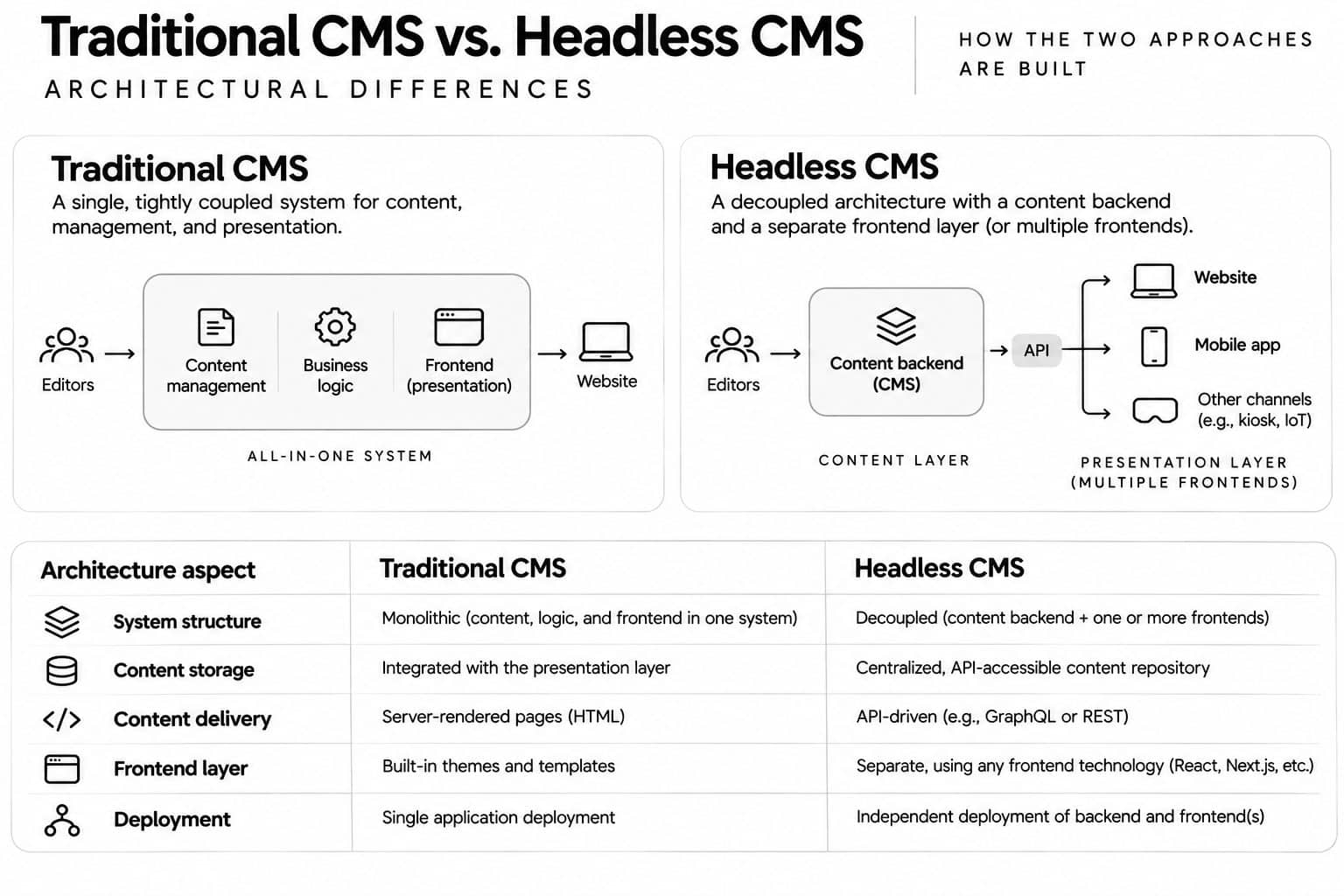
Traditional CMS already combines content management and website presentation within a single platform. It has an admin panel for creating and editing materials, a database for storing them. There is a clear mechanism that transforms content into ready, nice-looking web pages. There is plenty of themes that define the website’s appearance. There are also different plugins that extend its functionality, so it basically works like Lego.
You have definitely heard of one of the best-known examples of this architecture — WordPress. A company does not need to develop every website component from scratch. A business can choose a ready-made theme, install the necessary plugins, and add its own content. In other words, it can launch a website in a relatively short time.
When Should You Choose a Traditional CMS?
Let’s agree that the requirements for many websites are quite standard. Many businesses do not need to reinvent the wheel; they simply need to establish an online presence. They can tell visitors about their services, publish news and articles, attract visitors from search engines, and provide a convenient way to get in touch. These can be local businesses, restaurants, and professional service providers. These can also be online stores with standard requirements. Plus, startups at early stages of development or even freelancers.
In other words, the process is simple. Traditional CMS allows businesses to implement these tasks without additional expenses. It is not profitable for a business to allocate funds to developing a separate frontend. The platform already provides the basic infrastructure. The company simply adapts it to its needs.
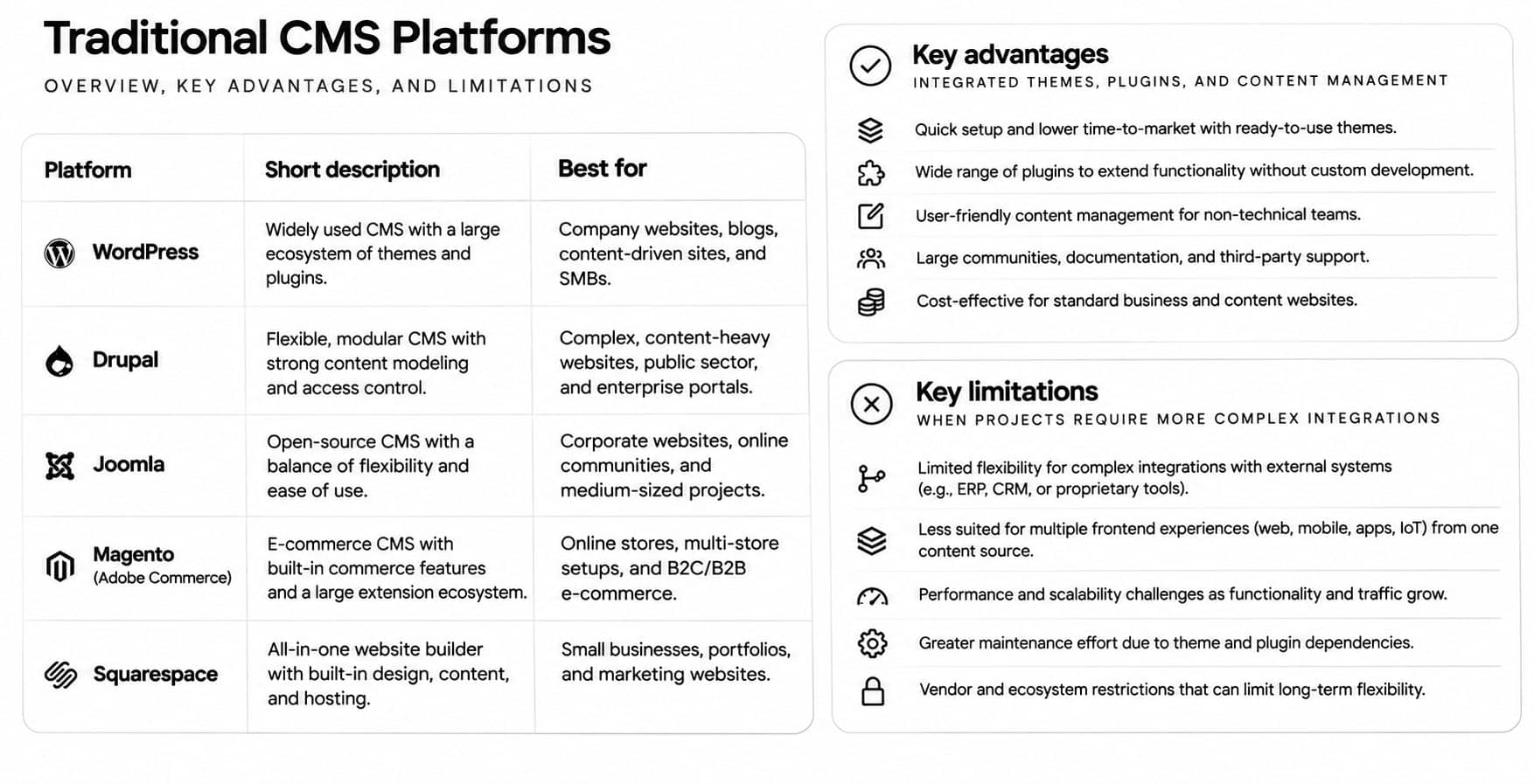
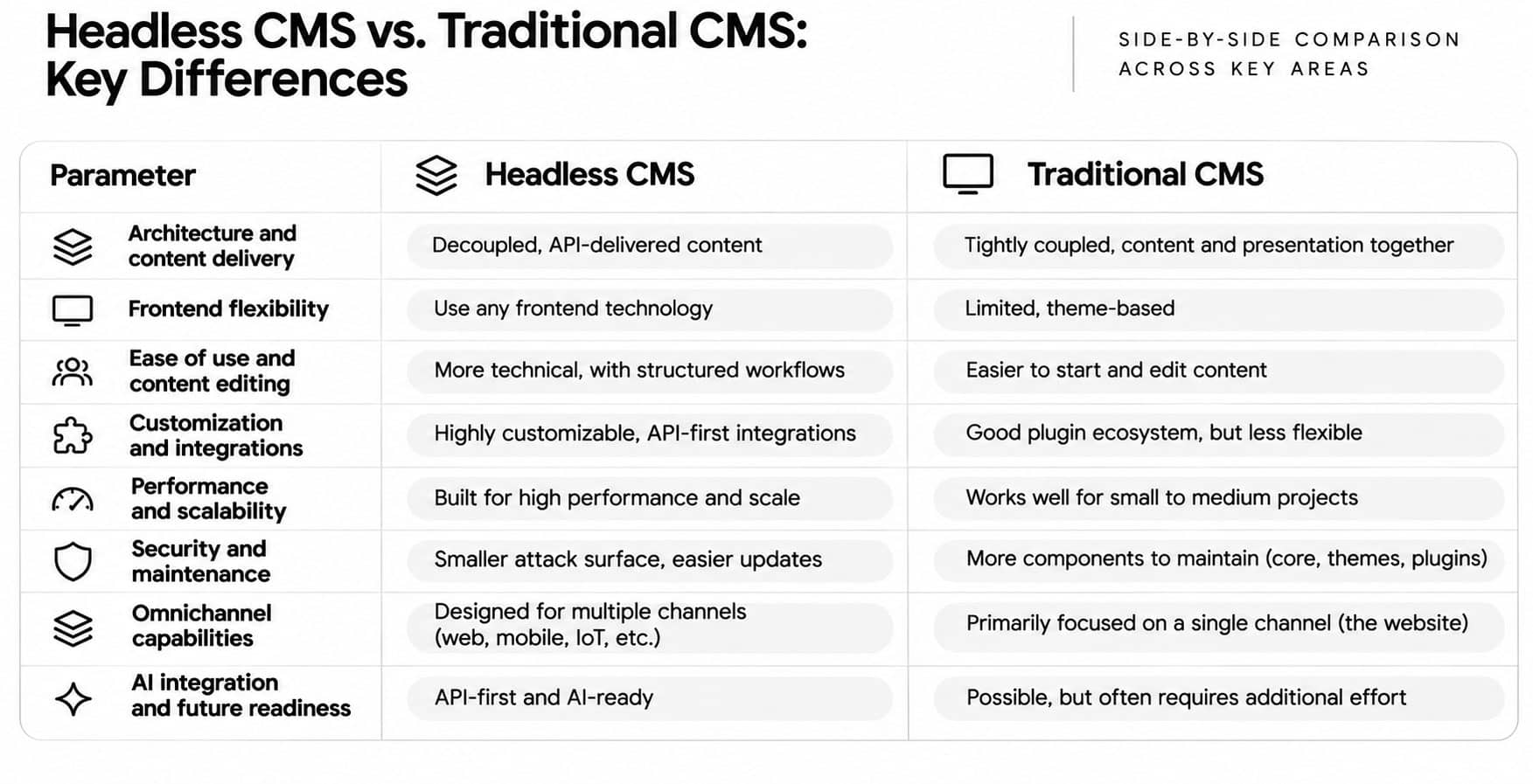
However, as the website grows and the infrastructure becomes more complex, some limitations become more noticeable and start getting in the way of the business. Yes, WordPress themes and builders make it easier to customize the appearance. But at the same time, they also influence the frontend structure. The website is still closely tied to WordPress’s rendering mechanism; dependence on plugins makes maintenance more complicated. And, of course, if a company wants to use the same product descriptions, articles or service info simultaneously on a website, in a mobile app and other portals, it will need a mechanism for centralized delivery of this data! Scaling a complex digital ecosystem basically becomes more labor-intensive.
When Should You Choose a Headless CMS?
Let’s get back to our pizzeria. At the first stage, it needs an ordinary website. WordPress with a ready-made theme handles this perfectly. But imagine that the business has grown. Now it has:
- A chain of 30 restaurants in several countries.
- Separate websites for different markets.
- A mobile ordering application.
- A loyalty program.
- A partner portal.
- Interactive menus on screens inside restaurants.
Instead of just a website, the company now deals with a more complex digital ecosystem. As a result, a problem appears: information about products, prices, ingredients, promotions now needs to be used in different places. The company can continue developing WordPress and adding additional integrations on and on. But gradually, the CMS stops being just a tool for managing a website. The business needs headless CMS architecture to manage content for several independent digital channels. This is exactly when, for a company, there is not just a random headless CMS vs traditional CMS choice. A Headless CMS becomes a much more logical choice.
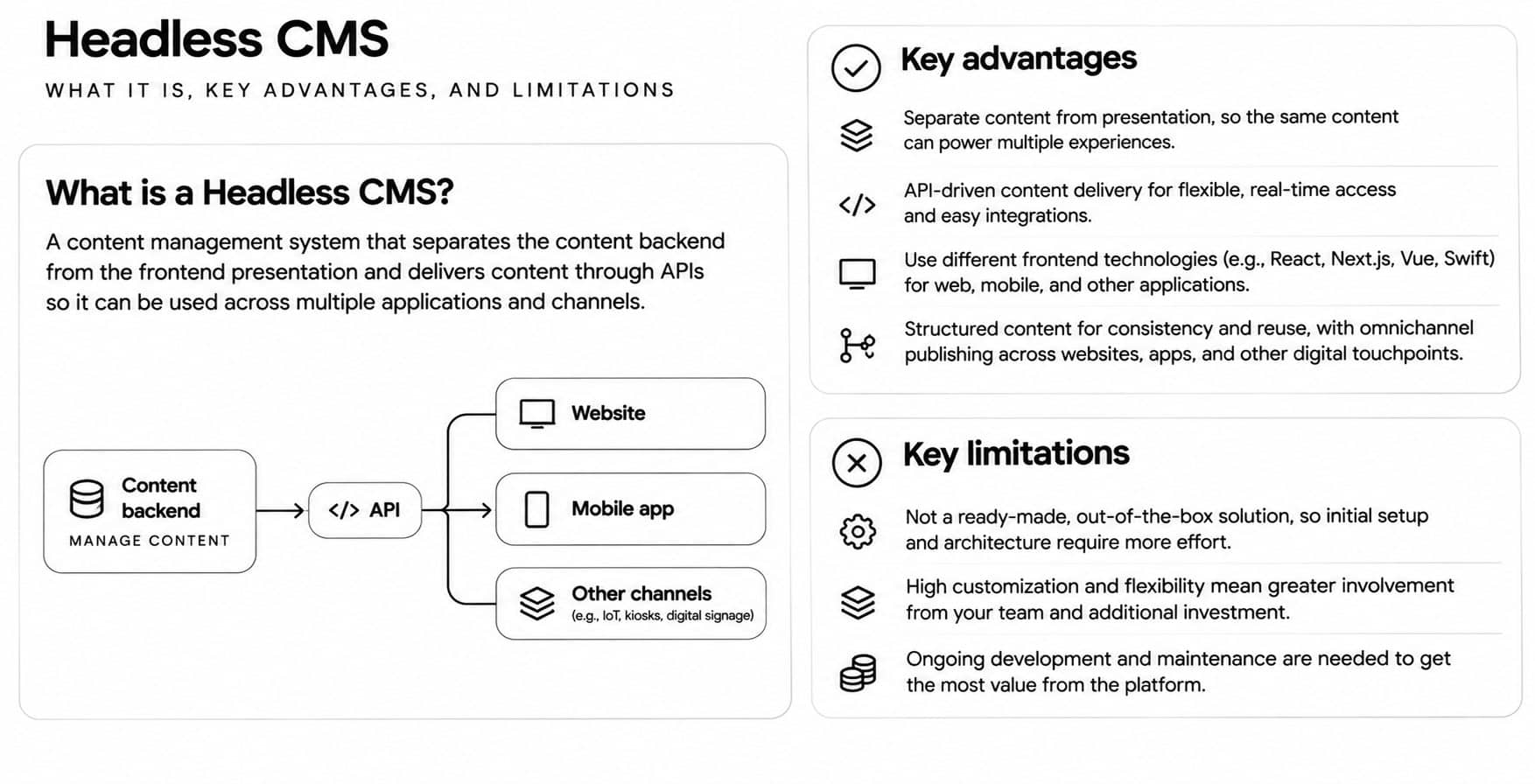
What does separating the backend and frontend give a business? The ability to develop the content system and user interfaces independently! This is practically the main traditional CMS vs headless CMS distinction that matters most. The CMS stores information about products, services, articles, categories, and other entities. Developers can create several interfaces that receive the necessary data through an API. And this is why proper, structured content management is important! Each interface still gets its own design, structure and operating logic. This eliminates the need for a company to create and maintain separate copies of the same materials in different systems.
How Modern Headless CMS Platforms Support AI-Powered Websites
So, our pizzeria chain has grown to 30 locations. The company now has a website for customers browse the menu and place orders, also a mobile client app and POS systems in each restaurant. Let’s say they plan to add an AI assistant to the website that will be able to answer customers’ questions like “How much does Margherita cost at the restaurant in the central square? Can I order it right now?” Why can’t AI simply look at the information on the website?
Because the website does not necessarily know, how much this pizza costs at a specific restaurant. The price could be different, depending on the location. And, for example, whether this restaurant is currently accepting orders at all. Usually this information is stored in other systems. A traditional CMS like WordPress, is primarily used to manage a website to create pages and add photos and edit texts.
But Headless CMS works differently. It stores content separately from the website and provides other applications with access to it, through an API. In our example AI needs not only pizza descriptions from the CMS, but also up-to-date data from other company systems!! And the best headless CMS platforms allow such easy integration with external data sources! For example, a POS system to retrieve current prices and availability, not transferring all this data directly into the CMS. This is why Content Federation exists, for example. The technology allows content from the CMS to be combined with data from external systems and provided through a single GraphQL API. This way, the AI assistant can retrieve the pizza description and photos from the CMS, while current prices and availability information come from the connected POS system. The GraphQL API allows the required information to be retrieved through a single interface.
Popular Headless CMS Platforms to Consider
Hygraph
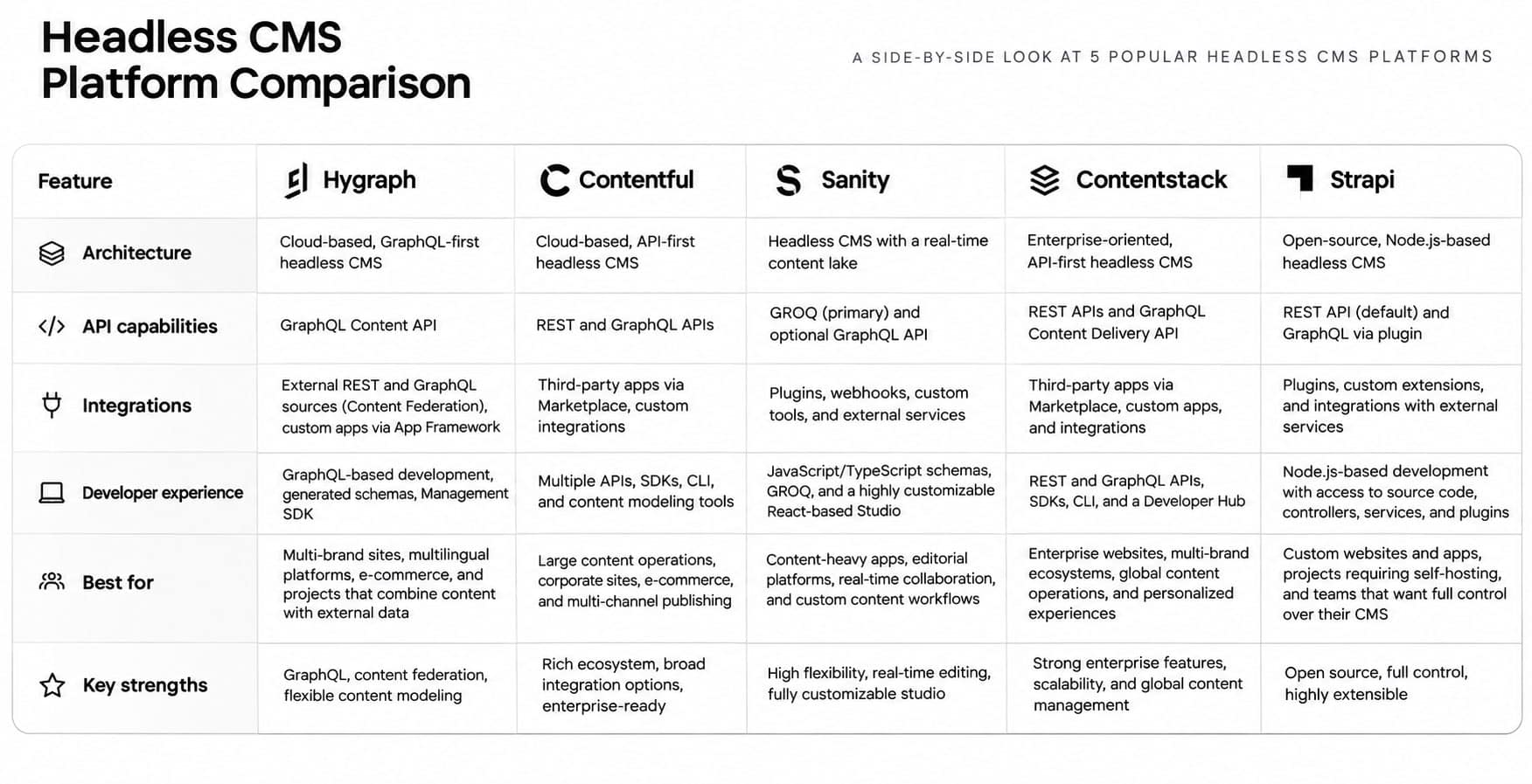
Hygraph is a GraphQL-native content platform. With Hygraph, developers can create structured content models, define relationships between entities and deliver content through a unified GraphQL API. Its advantage is the Content Federation functionality. It connects external REST and GraphQL APIs making distributed data accessible, but without requiring its migration into a single repository. Provides support for modern frontend frameworks, MCP Server and AI Agents, so suited to multi-channel digital products and AI-powered apps.
Contentful
This API-first CMS provides REST and GraphQL APIs for managing and delivering structured content for websites and applications. Its ecosystem includes SDKs, webhooks, integrations. The platform also offers customizable editorial tools. Works for enterprises with multiple digital channels and teams.
Sanity
A structured content platform that’s built around Content Lake and its customizable React-based Sanity Studio. It provides GROQ and GraphQL APIs, real-time collaboration and also offers developer tools to integrate content into custom apps. Works for projects, that expect highly customized editorial workflows.
Contentstack
This enterprise-focused headless CMS for website development with API-driven content management and delivery is supporting REST and GraphQL. Its platform includes content workflows, localization, webhooks, SDKs.
Strapi
An open-source headless CMS, that provides REST APIs by default, supporting GraphQL through an official plugin. Its customizable backend, plugin ecosystem, self-hosting options give developers control over infrastructure, data, integrations. Suitable for teams, that prioritize open-source software and deployment flexibility and also custom backend development.
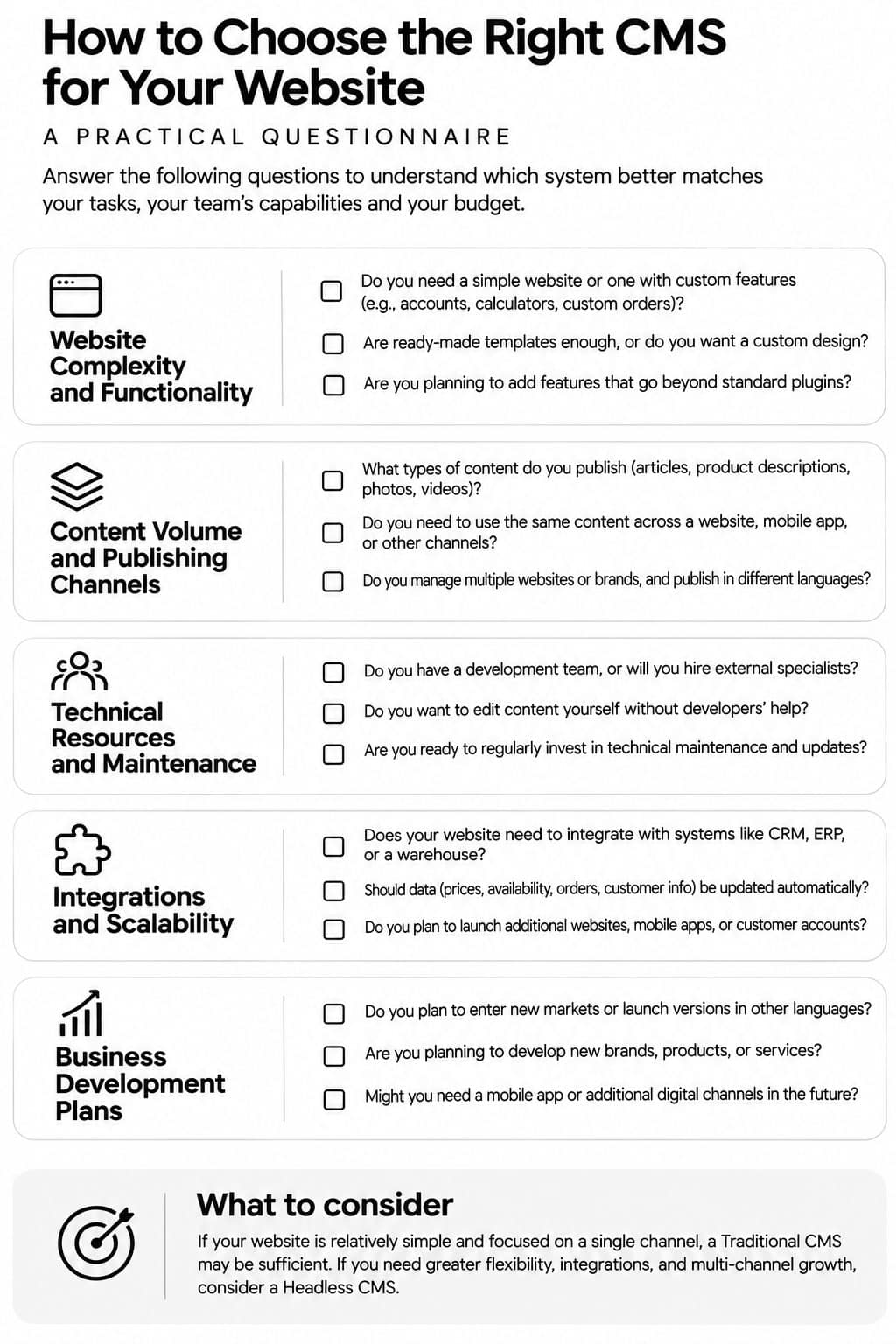
How to Choose the Right CMS for Your Website