

From Template to Launch: How to Build a High-Conversion WordPress Website
WordPress powers a remarkable portion of the web. It operates over 43% of all the global websites, and more than 61% of sites are using its content management system. Yet, despite this dominance, many businesses struggle to build a high-conversion WordPress website that can turn visitors into buyers. Such an issue is not because of visual design alone. More often, conversion failures happen because of user flow, performance, messaging, and search visibility that are not aligned with business goals.
This gap increases when performance and user experience are overlooked during a website’s development. For instance, recent industry audits have shown that even a well-designed WordPress site loses engagement when page speed or mobile usability does not meet a visitor’s standard. Visitors exit from a website even before they feel like interacting with it. They see the site is slow, confusing, or difficult to navigate. This shows that successful WordPress sites require strategic decisions instead of selecting a theme.
Many developers are still using templates to launch a website quickly without considering the standard requirements of users, like browsing through content, seeing pages load on mobile devices, or how effectively the site supports search discovery. This is like traffic arrives on a website, but engagement is low, and conversions fail to materialize.
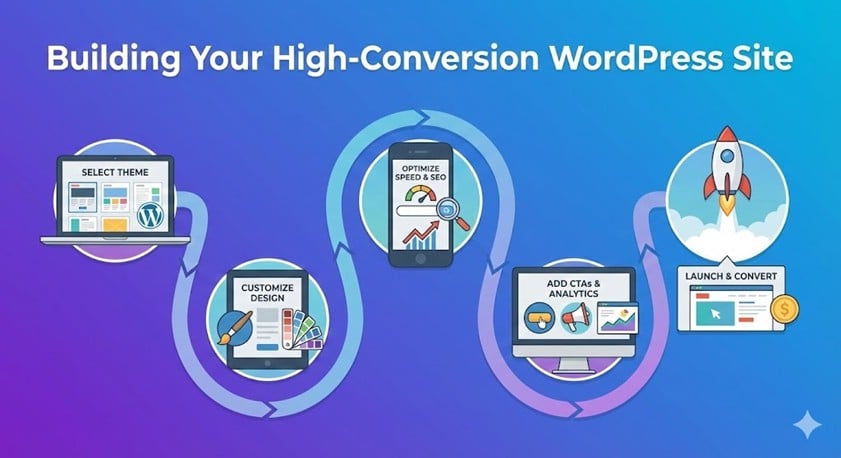
To really have a high-conversion WordPress website, the elements of design, UX, performance, and SEO must work together. This guide provides you with a step-by-step roadmap from choosing the right WordPress theme to preparing the site for launch, which focuses on improving conversions and supporting long-term business growth.
These practical actions will help you launch your website more effectively. Please read through it.
Choosing the Right WordPress Template for Conversion
With the groundwork set for a conversion-focused website, the process now begins with selecting a WordPress template that supports usability, performance, and growth.
Why Not All WordPress Themes Are Conversion-Friendly?
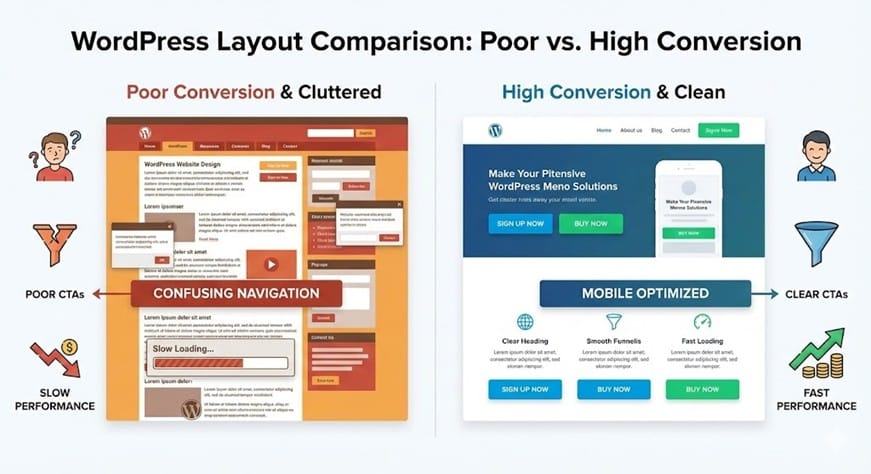
It is necessary to note that not all WordPress themes are designed to convert visitors into leads or customers. Many focus heavily on visuals while ignoring how users navigate, interact, and take action on a page. This design usability mismatch often leads to problems such as bloated code, slow loading times, and poorly placed calls to action.
When a theme lacks flexibility or relies on excessive scripts, performance and user engagement suffer. Even high-quality content cannot provide good results if users are unable to find key information on the site. This is why conversion-focused WordPress design starts at the theme phase.
Key Features to Look for in a High-Converting WordPress Theme
Here are some of the features that you must look into before choosing a high-converting theme:
Mobile Responsiveness and Core Web Vitals
The right WordPress template for conversion is mobile responsive by default. Since most users browse a site on mobile devices, themes should be optimized in that manner. In simple terms, it should meet core web vitals, including fast load times and stable layouts.
Clean Structure and Visual Hierarchy
Pages with a clean layout are able to guide users towards performing primary actions, such as form submissions or contact requests.
Built-in CTA Sections and Page Builder Compatibility
When themes come with built-in CTA sections, flexible homepage layouts, and reusable content blocks, it is easier to customize and make them compatible with modern editors like Gutenberg and page builders such as Elementor without damaging performance.
Free vs Premium WordPress Themes — Which Is Better for Conversion?
Free WordPress themes are good for developing early-stage websites. They have basic responsiveness and limited customization options, which are considered good enough to be an informational platform.
However, when websites grow with time, they do not work best with free themes in comparison to premium themes. Premium themes have cleaner code systems, greater layout control, and better support. It reduces dependence on using multiple plugins and improves a website’s performance.
When conversions, scalability, and long-term reliability matter, premium themes or customized solutions are considered the better choice. So, selecting the right theme is not just a design decision; it impacts usability, performance, and conversion potential.
Customizing the Template for Brand Identity and UX
Once the right WordPress template is selected, the next step is to customize it to connect it with your brand identity while enhancing its user experience. By having a well-tailored template, visitors are able to recognize your brand and navigate the site naturally.
Structuring Pages Around User Intent
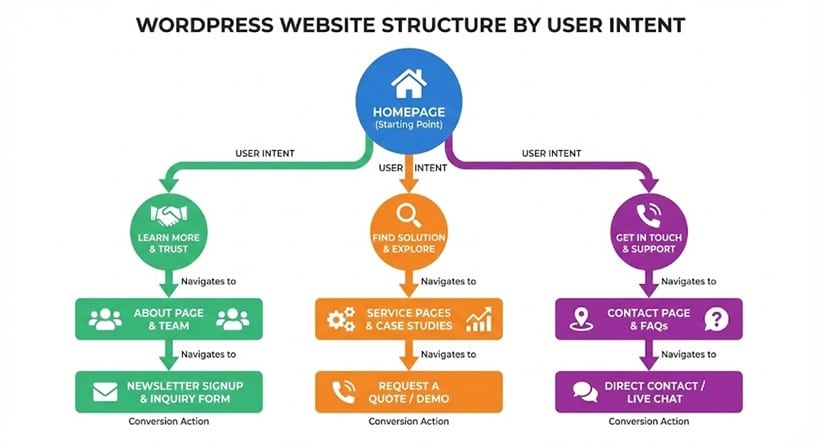
Every page should be structured around the user’s goals and expectations. The following are the pages that need to be well-organized:
Homepage Structure
The homepage is the face of your brand and sets the first impression. Organize content on it clearly, as it communicates what your business offers and guides visitors toward registering on it or directly contacting you.
Service Pages Layout
These pages should be clear and readable, highlighting benefits, features, or packages, along with calls to action that help users understand the relevance of the page.
About and Contact Pages
On these pages, information must be brief and easy to understand. This section enhances trust signals and clearly conveys the path to get in touch with you without creating confusion.
Creating a Visual Hierarchy That Drives User Action
Visual design guides users toward conversion actions and is not meant only for aesthetics.
Clear Headings and White Space
Headlines, subheadings, and white space must be clear, with ample spacing to help users browse content and identify key information.
Strategic Call-to-Actions
CTAs should stand out visually and appear at logical points for users to click on them.
Trust Elements and Credibility Signals
A site should demonstrate credibility for visitors to do business with it. Including logos, testimonials, certifications, or awards helps build user confidence.
Navigation and Internal Linking Best Practices
With smooth site navigation, users are able to engage more easily, which further reduces bounce rates.
- Keep Menus Simple – Avoid overly complex menus on the website. Prioritize essential links that matter most to users.
- Easy Path for Users – Users need to be directed toward important pages, so there should be a logical flow and clear labeling across the site.
- Reduce Friction and Bounce Rate – Broken links or confusing layouts should be avoided, as they can frustrate users and drive them away.
Essential WordPress Plugins for Performance and Conversions
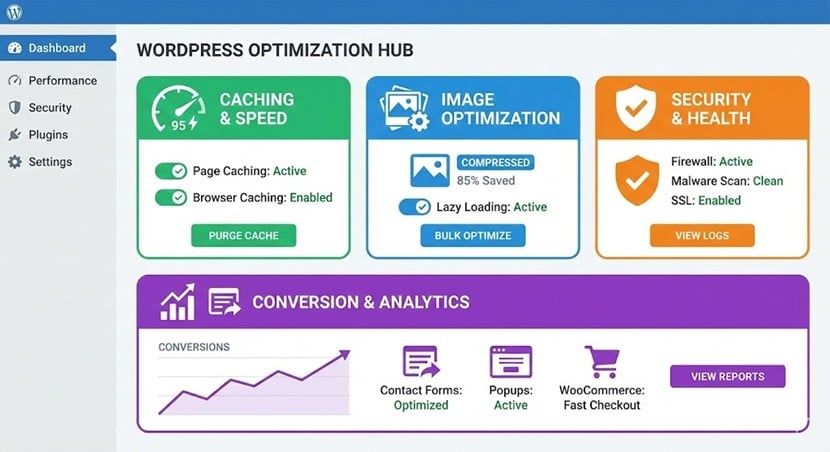
After customizing the template for brand identity and user experience, the site is to be strengthened with the right plugins. Plugins play a critical role in performance, usability, and WordPress website conversion optimization. So, they must be chosen carefully and used with some limit. Here are some plugins that are good for your WordPress website.
Performance and Speed Optimization Plugins
A website’s speed affects user experience and conversion rates. If the site has slow-loading pages, it increases bounce rates and reduces trust on mobile devices.
Caching Plugins
Caching plugins help reduce server load and improve page load times by serving preloaded versions of pages to users. This creates a faster browsing experience for users while supporting better core web vitals scores.
Image Optimization Plugins
These optimization plugins compress images without sacrificing quality. They help pages to load faster while maintaining visual clarity, as large, uncompressed images slow down websites.
Lazy Loading for Media
This means that a website’s images and media load only when they appear on the screen. This helps the initial page load time to reduce while improving performance, particularly on pages that have heavy content.
Conversion-Focused WordPress Plugins
Beyond speed, there are conversion-focused plugins that actively support lead generation and user engagement.
Form Builder Plugins
Form plugins make it easy to create contact forms, inquiry forms, and lead capture forms. They encourage users to interact with a website.
CTA, Popup, and Engagement Tools
Users are guided on a website with the help of CTA buttons, banners, and popups. Having them on the push a user to sign up, request a quote, or download the resources.
Heatmaps and User Behavior Tracking
These plugins provide you with insights into how users interact with pages. Seeing where a user clicks, scrolls, or drops off helps a site to have a refined layout, which further helps identify conversion-focused decisions.
Security and Backup Essentials for Trust
Trust is a key factor for a user to convert. Users will not engage with a website when they feel it is unsafe or unreliable.
Basic security plugins protect the site from malware, brute-force attacks, and unauthorized access. So, it is necessary to have a backup to ensure that the data can be restored quickly in case of errors or failures. Together, security and backups build confidence, protect performance, and support a stable environment for long-term growth.
On-Page SEO Setup Before Launch
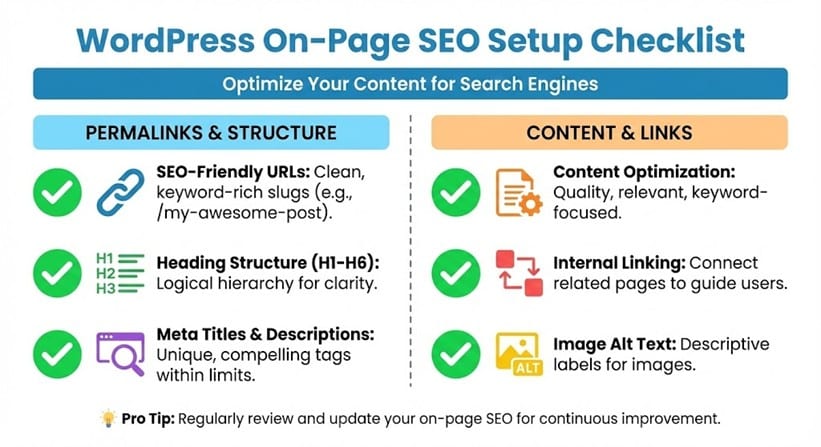
Before launching a WordPress website, its on-page SEO must be configured so that the search visibility and user relevance remain in place. A proper WordPress SEO setup guides the search engines to understand a site’s structure, ensuring that content aligns with user intent. Here are the on-page aspects that you need to keep in order:
SEO-Friendly URL Structure and Permalinks
The URLs should be clean, readable, and descriptive. There should be no unnecessary parameters or numbers that add no value.
Have a logical URL hierarchy as it helps users and search engines to understand how pages relate to each other. This also improves crawlability and navigation.
Optimizing Meta Titles, Descriptions, and Headings
Keep the meta titles and descriptions to reflect the search intent. This clearly communicates a page’s value. So, each page should have a unique title and description for the user to click.
Headings must have a clear hierarchy and be readable. Keyword usage in headings should remain natural, as over-optimization reduces clarity and harms user experience.
Content Optimization for Rankings and Engagement
The site’s content should be easy to read and structured for scanning. Have short paragraphs, clear subheadings, and concise explanations on a site to improve engagement. Use semantic keywords to help search engines understand a topic’s relevance.
Also, have internal linking between related pages to strengthen context, authority, and to guide users toward important actions.
Designing Conversion-Focused Pages
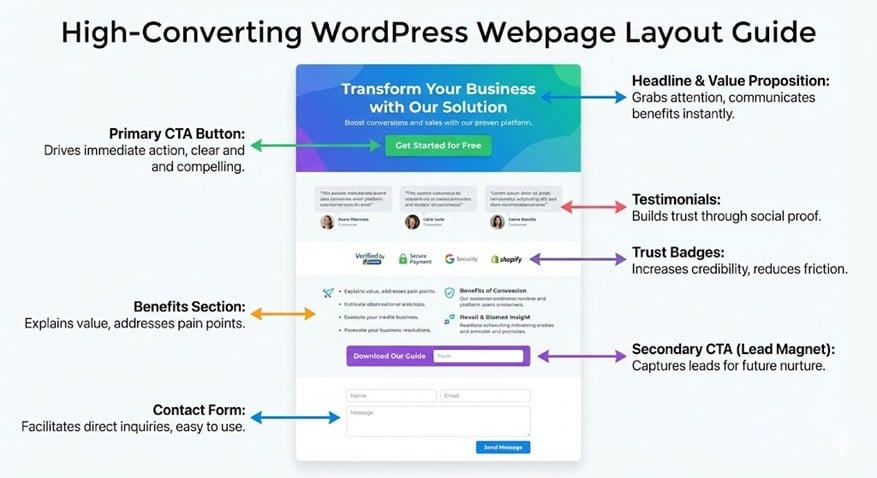
Once structure and SEO are set in place, the next step is the page design that must guide users through the buying process. This is called conversion-focused pages that balance clarity, trust, and intent-driven layout.
High – Converting Homepage Elements
A homepage should communicate the value proposition very quickly, say, in a few seconds. Users need to understand what a brand is offering and who will benefit from it. Elements such as an above-the-fold call to action help visitors take the next step without scrolling. Also, social proof, such as testimonials, should appear early to build credibility.
Service Pages That Turn Visitors into Leads
Service pages perform the best when they are structured around a problem, such as explaining how your service will solve their issue. It is necessary to focus on offering benefits rather than presenting technical features, so place your CTAs at natural decision points to encourage users to make inquiries or convert.
Trust Signals That Improve Conversion Rates
Trust plays a major role in converting prospects into buyers. To help validate your claim, have reviews, testimonials, and short case studies on the site. At this stage, many businesses find it difficult to do what is required, so they choose to work with a professional Website development company to ensure design, SEO, and conversions are aligned for long-term growth.
Pre-Launch Checklist for a WordPress Website
Every WordPress website, before its launch, goes through a final check, as it helps to avoid performance or usability issues.
Technical Checks
Here, all internal links should be tested to ensure that there are no broken paths on the site. The site must be fully responsive across devices and on major browsers.
Speed and Performance Testing
Page speed should meet Core Web Vitals benchmarks. Slow-loading pages negatively impact search visibility and engagement.
Tracking and Analytics Setup
Analytics tools must be configured before a site is launched. It helps to measure where a site is lagging. Google Analytics and Search Console help monitor performance, while conversion tracking measures form submissions or lead actions.
Post-Launch Optimization and Continuous Improvement
The final step is not publishing a website on the internet, as there are optimizations that take place at regular intervals to ensure a site achieves sustained performance and growth. Such optimizations are:
Monitoring User Behavior
User behaviour has to be monitored with heatmaps and session recordings. It shows how users interact with pages and where they left the page.
A/B Testing for Better Conversions
What helps improve conversion rates over time? Testing CTAs, layouts, and messaging through data-backed decisions.
When to Scale with Professional Help
As the needs of a business grow, so do the requirements of customisations, deeper SEO strategies, and structured conversion rate optimization. These variations are to be handled professionally in order to achieve long-term scalability and performance for your website. Working with an experienced website development company helps a lot in such cases.
Final Thoughts: Building a Scalable High-Conversion WordPress Website
A high conversion WordPress website is built through strategy. Working with a web design company helps your site to have a theme and design elements that align with your conversion goals. However, to enhance usability, search visibility, and overall performance for complex or critical projects, the expertise of a website development company ensures your website is scalable, reliable, and positioned for long term growth. So, get in touch with the experts.
