

Filling the Video Gap on a Small-Business Website Without a Studio
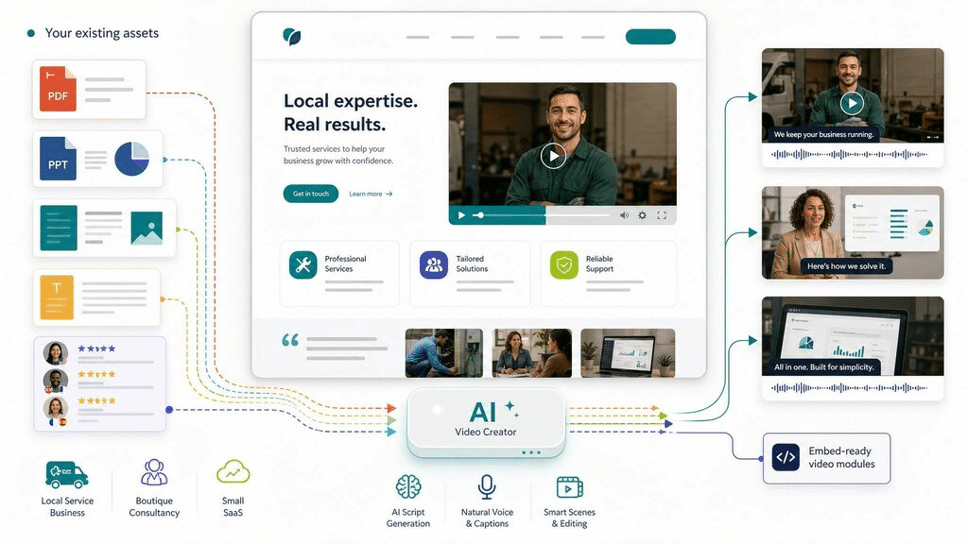
Most small-business websites I audit have the same quiet gap. The copy is decent, the theme is clean, the contact form works — and then there’s the empty space on the homepage where a short video should be. The owner knows it. They’ve read that pages with video hold attention longer and convert better. But the cost of producing one, weighed against everything else a five-person company is juggling, keeps pushing it to next quarter. And next quarter. For two years, in one case I remember.
That hesitation is rational. For a long time, a single explainer video genuinely cost more than a small business could justify for a “nice to have.”
Why the Video Gap Is So Stubborn
Video has always sat in an awkward place for website owners. It’s clearly useful — a 60-second walkthrough on a services page does more than three paragraphs of text ever will. But the traditional path to getting one was expensive and slow.
A professional explainer historically ran into the thousands of dollars and took weeks of back-and-forth: scripting, a voiceover artist, an editor, revision rounds. For a plumber, a boutique consultancy, or a local SaaS tool, that math rarely closes. So the page stays text-only, the bounce rate stays high, and the gap quietly persists.
The deeper issue isn’t even the first invoice. It’s that a small business changes constantly — a new service, a price update, a seasonal offer. Every change to a professionally produced video meant either living with stale content or paying for another edit cycle. You weren’t buying a video; you were buying a snapshot that expired.
What the New Tool Category Actually Does
The category closing this gap is narrower and more practical than the broad “AI video” noise suggests. The useful version doesn’t ask you to be a filmmaker. It takes content you already have — a Word doc, a PDF, a slide deck, or plain text — and turns it into a structured, narrated explainer video, generating the outline, the scenes, the on-screen layout, and the voiceover automatically.
That’s the relevant shift for website owners specifically. The bottleneck was never your ideas; it was the production labor between your ideas and a finished file. Removing that labor is what makes video finally viable for a small site.
This is where a platform like Leadde.ai fits. It’s positioned as an all-in-one AI video tool, and for a small-business owner that “all-in-one” framing matters more than it sounds — you’re not stitching together a script writer, a stock-footage subscription, a voice generator, and an editor. You upload your document or paste your text, and the system builds a draft you can refine. There’s no manual editing pass required to get something watchable.
Three Practical Use Cases for a Small Site
Not every page needs video, so it’s worth being specific about where it earns its place.
Turning an existing PDF or one-pager into a homepage explainer. Most owners already have a services PDF or capabilities deck. Feeding that into a document-to-video workflow produces a narrated overview without writing anything from scratch.
Converting a slide deck into a dynamic walkthrough. If you have a PowerPoint you use in sales calls, a Slide Presenter feature can convert those static slides into an editable, narrated video — useful for an “About” or “How it works” page where you’d otherwise paste a flat screenshot.
Reaching customers in more than one language. For businesses serving multilingual communities, the multilingual support means a single script can become versions in other languages, with 200+ avatars to present them. That’s reach a small team couldn’t previously buy.
The Honest Limitations
This isn’t a magic button, and treating it like one is how people get disappointed.
AI avatars still read as synthetic. For an explainer, a how-to, or a product overview, that’s perfectly fine. For anything trading on raw emotional authenticity — a personal founder story, a customer testimonial, on-the-ground field footage of your team at work — a synthetic presenter undercuts the message. Keep those genuinely human.
Output quality is downstream of your input. The system structures and narrates what you give it; it won’t rescue a vague, poorly written brief. A clear script produces a clear video.
Deep brand customization has limits. You can stay broadly on-brand, but if your differentiation depends on bespoke motion design or a singular visual signature, this won’t deliver that. And content that’s heavy on dense charts or intricate diagrams often translates poorly to a narrated format — some things still belong on the page as text or a static graphic.
A Low-Risk Way to Test It
If there’s an empty video slot on your site, the sensible move isn’t a full production budget. It’s a small experiment.
Take one page you’ve been meaning to improve — a services overview, a how-it-works section — and run a single piece through a free plan. Judge the result not against a glossy studio render, but against what you’d realistically have shipped otherwise, which for most small sites is nothing at all. That’s the honest comparison, and it’s usually the one that decides it.
Written by a freelance web consultant who helps small businesses and WordPress site owners get more from their content.
