

An AI Video Generator Guide to Deadpan Kitchen Comedy

Introduction
A serious basset hound, a cupcake, and a toaster are enough for an eight-second kitchen joke. The dog concentrates on its task until one slice of toast lands on its chef hat. I used CapCut’s AI video generator to build the scene around that interruption and a quiet upward glance. The key is timing: establish the ordinary task, show exactly what disrupts it, and let the dog’s reaction finish the joke.
Why Realistic Absurd Comedy Works
Realistic absurd comedy works when the opening looks ordinary and the disruption is singular. Viewers should understand the delicate task before one harmless event ruins it. That contrast creates anticipation without requiring explanation.
The kitchen scene therefore uses one dog, one cupcake, one toaster, and one slice of toast. Keeping the camera and setting believable makes the impossible landing feel funnier and easier to verify.
Build the Joke Around One Impossible Event
Before opening an AI video generator, reduce the concept to one sentence:
A serious basset hound carefully decorates a cupcake until a toaster pops one slice of bread onto its chef hat.
That sentence establishes the performer, task, interruption, and payoff. It also prevents the prompt from expanding into a montage. The generated video only needs to answer four visual questions:
- Can viewers identify the ordinary kitchen and cupcake?
- Does the dog appear focused before the interruption?
- Is there exactly one slice of bread?
- Does the reaction remain visible after the bread lands?
Use those four questions to refine the prompt. They keep attention on the setup, toast, and reaction throughout the shot.
Plan Five Story Beats in Eight Seconds
Short slapstick needs enough time for cause and effect without feeling slow. I planned the clip as five continuous beats:
- Setup: the basset hound and cupcake are already readable.
- Precision: the dog concentrates on the decorating task.
- Trigger: the toaster clicks and one slice rises.
- Impact: the toast lands flat on the chef hat.
- Reaction: the dog freezes, then looks upward without exaggeration.
Starting with the action already in progress is important. An entrance, establishing pan, or spoken introduction would consume the time needed for the interruption and reaction.
Prompt for the Original Kitchen Scene
A strong text-to-video AI prompt describes the shot in viewing order and explicitly protects the objects that matter. This was the revised production prompt:
Create one continuous 8-second vertical 9:16 photorealistic comedy shot in a bright, ordinary home kitchen, filmed like stable casual smartphone video at counter height. A single realistic basset hound sits at the counter wearing one plain white chef hat. One small cupcake sits directly in front of the dog. A two-slot toaster sits behind the dog and contains exactly one visible slice of bread. The dog studies the cupcake with a serious, patient expression. At about 3.5 seconds, the toaster clicks and ejects that same single slice of bread upward once. The camera does not cut. The one slice arcs forward and lands flat on top of the chef hat. No other bread appears before, during, or after the action. The dog freezes, slowly lifts its eyes toward the toast, and holds a dry, confused expression until the end. Natural daylight, believable fur, consistent anatomy, realistic toaster motion, restrained physical comedy, no dialogue, no music, original scene. No extra animals, people, duplicate bread, extra toast, morphing objects, text, logos, camera cuts, zooms, fantasy glow, destruction, danger, or horror tone.
The prompt follows the same slice from its starting point to the hat. Repeating its identity at each stage makes the requested path explicit while leaving the reaction simple.
Create the Kitchen Scene in CapCut
Enter the kitchen prompt in CapCut’s AI video generator, choose a realistic style, and use a portrait composition that keeps the dog, toaster, and hat visible. Set the duration around the short launch-and-reaction sequence.
After generation, watch the toast from the toaster to the hat. Keep a brief pause on the dog’s eyes before the ending. CapCut’s editing options let you refine the pacing and sound around those two moments.
Watch the Complete Kitchen Scene
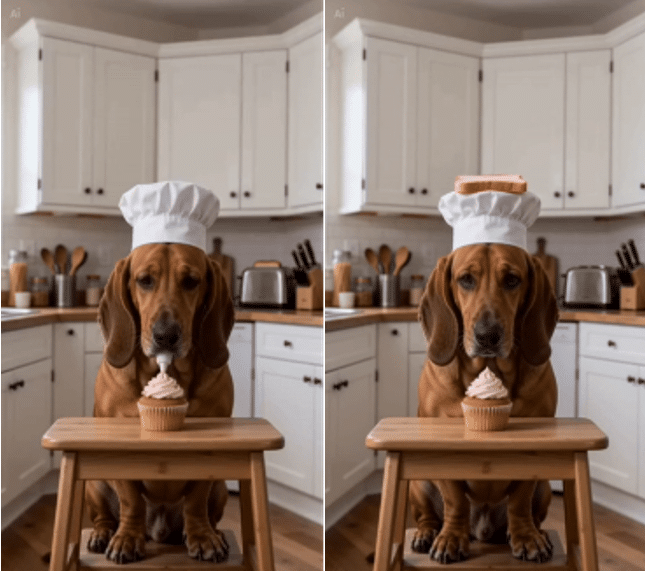
The opening establishes the dog, hat, cupcake, and kitchen. The toast interrupts that quiet setup, and the held upward glance gives the surprise a dry finish.
Keep the Toast Easy to Follow
Introduce one visible slice before it moves, refer to it as “that same slice” during the launch, and name its final position on the hat. The audience should follow one continuous path from cause to consequence.
The held reaction completes the path emotionally. The dog does not need to jump or gesture; a small upward glance lets the audience notice the toast and then share its surprise.
Edit the Joke Without Adding Distractions
An AI video maker creates the unusual event; the final timing gives it a comic rhythm. In CapCut, keep the edit focused on the toaster cue and the dog’s reaction.
Keep the setup visible
Do not trim directly to the toast launch. Viewers need a brief look at the focused dog and delicate cupcake task; otherwise the interruption has nothing to disrupt.
Let the toaster provide the audio cue
A clean toaster click and pop can carry the transition from setup to payoff. If the generated sound is weak, replace only that cue. Loud background music or a stack of meme effects would compete with the visual cause and effect.
Protect the deadpan reaction
The upward eye movement is the button on the joke. End after the reaction registers, not at the instant of impact. At the same time, avoid a long outro that breaks the loop.
Use text only when it adds context
A short opening caption can establish the dog’s serious mood. Keep text away from its eyes, the cupcake, and the toast’s path, and let the reaction explain the joke.
Refine the Action Before Adding Effects
A seated dog and a fixed camera keep attention on the toast. Specify a single arc and a flat landing on the chef hat, then describe the upward glance as a separate action.
Natural daylight, visible fur texture, and an ordinary countertop establish the realistic setting. An AI video tool can then focus on the one unusual event that changes it. Remove extra props or reactions if they compete with that event.
Create New Episodes Without Repeating the Story
The same structure can support a series without repeating the basset-hound video. Keep the grammar—ordinary task, harmless interruption, deadpan reaction—but replace every visible element:
- A raccoon alphabetizes spice jars until one jar quietly sneezes.
- A pelican checks hotel guests in until a room key flies into its beak.
- A tortoise repairs a watch until the second hand starts chasing its tool.
For each episode, write the premise in one sentence, limit the video to one location, and assign the moving object a clear count. This keeps the online AI video generator focused while giving the series a recognizable comedic rhythm.
Summary
Deadpan comedy gives an ordinary task just enough time to feel important before a small interruption changes it. Keep the toast’s path clear and hold on the dog’s quiet reaction. Try CapCut’s AI video generator to build your own kitchen gag: begin with one sentence, specify the moving object, and shape the pause after the surprise.
