


Many digital creators and marketers face the frustrating reality that static images often fail to capture the rapidly shrinking attention spans of modern audiences. In an era where visual storytelling is dominated by short-form video, high-quality photography can feel stagnant and unable to convey the full depth of a brand narrative. The barrier to entry for professional animation has traditionally been high, requiring expensive software and years of technical training, leaving many projects stuck in a two-dimensional world. Fortunately, the emergence of Image to Video AI provides a sophisticated bridge, allowing users to transform dormant pixels into fluid, cinematic sequences that resonate with viewers on a deeper emotional level.

The Evolution Of Generative Motion In The Digital Age
The shift from still imagery to dynamic video represents more than just a trend; it is a fundamental change in how information is consumed and processed. As social platforms prioritize movement, the demand for accessible motion tools has skyrocketed. Generative models have evolved to meet this demand by learning the underlying physics of our world, enabling the synthesis of realistic movement from a single reference point. This technology does not merely animate an image; it reimagines the scene in three dimensions, predicting how light, shadow, and texture should behave over time.
Analyzing The Technical Foundation Of Frame Interpolation Processes
At the heart of modern motion synthesis lies a complex architecture often based on diffusion models and neural networks. These systems are trained on vast datasets of video content to understand the relationship between consecutive frames. When a user provides a static input, the AI identifies key features and predicts a trajectory of motion that maintains visual consistency. In my testing, the stability of these generated clips has improved significantly, showing a remarkable ability to keep the subject intact while introducing natural-looking environmental changes.
How Motion Vectors Enhance The Fluidity Of Generated Sequences
Motion vectors are the invisible guides that tell the AI where pixels should move from one frame to the next. By calculating these vectors across the entire image, the system ensures that the foreground and background move in a synchronized manner. This prevents the jarring distortions often seen in earlier iterations of generative video. In my observations, using a high-contrast source image allows the neural network to more accurately map these vectors, resulting in a much smoother transition between the start and end of the clip.
A Practical Guide To Creating Professional Motion Content
Navigating a new creative tool can be daunting, but the current generation of motion synthesis platforms emphasizes a streamlined user experience. By removing the need for complex keyframing and manual rigging, the process becomes accessible to everyone from hobbyists to professional art directors. Success in this field relies on a balance between the quality of the original asset and the clarity of the instructions provided to the machine. Understanding the specific steps required to reach a high-quality output is essential for anyone looking to incorporate AI into their professional workflow.
-
Step One Uploading Your High Resolution Source Imagery
The journey begins with the selection of a high-quality base image, which acts as the DNA for the entire video sequence. Users simply upload their chosen file to the platform to start the process. It is best to use images with clear focal points and well-defined lighting, as this gives the AI a solid foundation for motion estimation. In my tests, the system handles 1080p source files with high fidelity, ensuring that the final video maintains the professional look of the original photograph without losing sharpness or detail.
Optimizing Image Composition For Better Movement Results
Composition plays a critical role in how the AI perceives potential motion. Images with a clear sense of depth, such as a landscape with a foreground subject or an interior with leading lines, tend to produce more immersive 3D-like effects. When preparing an image for upload, I have noticed that leaving some breathing room around the edges of the main subject allows the AI more flexibility to move that subject without clipping. This foresight during the preparation stage can significantly reduce the need for multiple generation attempts.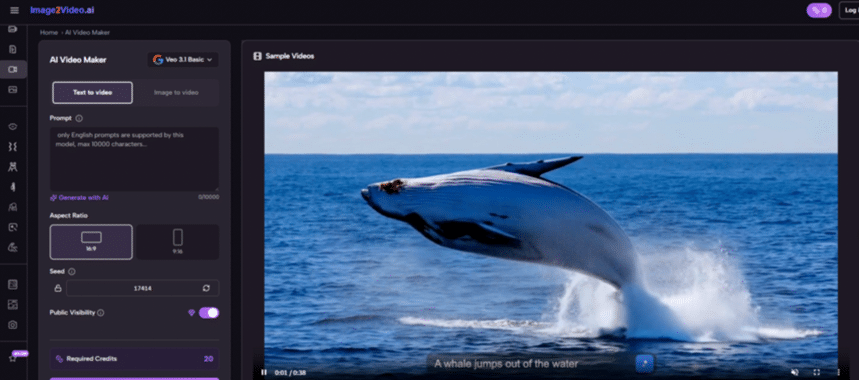
-
Step Two Providing Descriptive Prompts For Motion Guidance
Once the image is uploaded, the next phase involves adding a text prompt to guide the AI’s creative direction. This step is where the user defines the type of motion they wish to see, whether it is a subtle breeze through hair or a dramatic cinematic camera pan. The prompt acts as a set of constraints that keep the generative process aligned with the user’s vision. Clarity is key here; using specific verbs like “flowing,” “rotating,” or “cascading” provides much better results than vague adjectives.
Refining The Semantic Instructions For Precise Execution
The relationship between the visual input and the text prompt is a delicate one. The AI must reconcile what it sees in the image with what it reads in the prompt. If the prompt asks for a movement that is physically impossible given the image’s structure, the results may be unpredictable. Based on my observations, it is helpful to describe both the subject’s movement and the camera’s movement separately. For example, “the ocean waves gently crash while the camera slowly zooms in” provides the model with a clear two-layered instruction set. -
Step Three Executing The Final Video Generation Process
With the image and prompt in place, the user initiates the generation. The backend servers then take over, performing the heavy lifting of rendering and frame synthesis. This stage is where the neural network applies its learned knowledge to create a coherent sequence of frames. Depending on the complexity of the request and server load, this usually takes a few moments. It is fascinating to watch how the system interprets the static data, often adding subtle details like atmospheric particles or lighting shifts that weren’t explicitly requested but add to the realism.
-
Step Four Previewing and Downloading Your Generated Clip
The final step is the review and acquisition of the content. After the rendering is complete, a preview is generated for the user to inspect. This is the time to check for motion consistency and ensure the prompt was followed accurately. If the result is satisfactory, the video can be downloaded in a high-definition format ready for use. It is worth noting that generative processes are inherently stochastic, meaning that running the same prompt twice might yield slightly different results, which is a great way to explore various creative iterations.

Comparing Traditional Animation With AI Driven Motion
To understand why this technology is gaining so much traction, it is helpful to look at how it compares to conventional methods of video production. The following table highlights some of the key differences in approach and output.
| Feature Category | Traditional Manual Animation | AI Motion Generation |
| Creation Time | Days or weeks of manual work | Minutes of automated processing |
| Technical Barrier | High expertise required | Low entry level for all users |
| Resource Cost | Expensive software and labor | Subscription or per-use models |
| Creative Flexibility | Precise control over every pixel | Iterative exploration of ideas |
| Consistency | Highly predictable and exact | Occasional variance in results |
Understanding The Potential Constraints Of Generative Media
While the progress in this field is undeniable, users should remain aware of certain limitations to manage expectations effectively. Generative models are not yet perfect and can sometimes struggle with highly complex human anatomy or rapid, overlapping movements. In my testing, I have found that very long videos may eventually lose some structural integrity if not carefully managed. Furthermore, the quality of the output is inextricably linked to the quality of the prompt; a vague or contradictory command will likely result in a less-than-ideal clip.
Navigating Challenges In Temporal Consistency And Detail
Temporal consistency—the ability of an object to remain the same throughout a video—is one of the hardest challenges in AI research. Occasionally, a subject might change slightly in color or shape between the first and last frame. Researchers often discuss these issues in academic papers found on platforms like arXiv (arxiv.org), where the ongoing struggle to perfect these models is documented. For users, this means that achieving a flawless result might sometimes require a second or third generation, or a slight adjustment to the initial prompt to simplify the requested motion.
Developing A Resilient Workflow For Professional Results
The best way to overcome these hurdles is to adopt a mindset of experimentation. Rather than expecting perfection on the first try, view the tool as a collaborative partner. If a specific movement looks unnatural, try changing the camera angle in the prompt or adjusting the image composition. I have noticed that by providing the AI with a very clear, uncluttered background, it can focus more of its processing power on the main subject’s movement, which almost always leads to a higher quality output.