

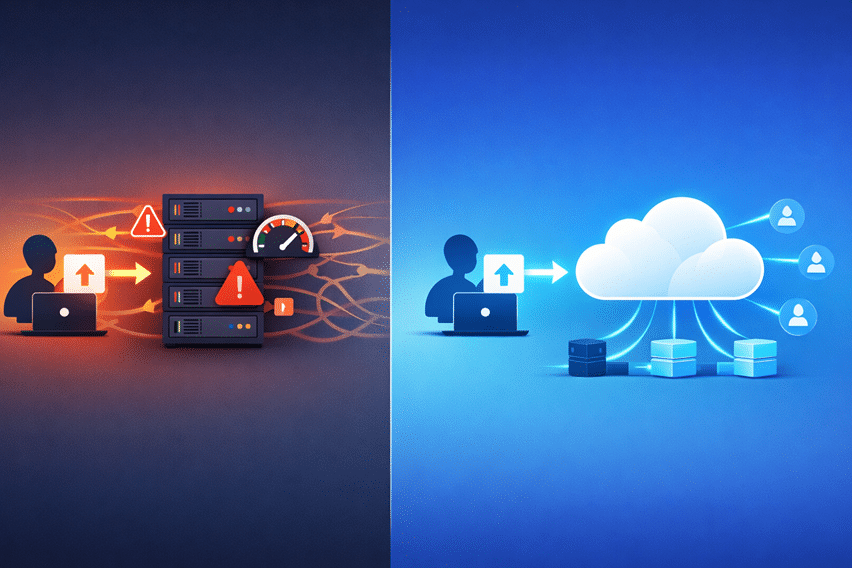
Most file upload systems aren’t slow because of poor internet speeds. They’re slow because of how they’re designed.

Picture this: you build a file upload feature where users send files to your backend, your server processes them, and then uploads them to cloud storage. It works perfectly in the beginning. Everything feels smooth, predictable, and easy to control.
But then your product grows:
- Uploads start taking longer.
- Servers get overloaded.
- Costs creep up.
- Failures become more common.
At that point, it’s no longer a “small issue.” It’s an architectural problem.
And the truth is, many developers fall into this trap because they default to traditional upload patterns without realizing they don’t scale.
In this guide, you’ll understand:
- The difference between traditional and direct-to-cloud uploads
- The most common mistakes developers make
- How to choose the right approach before problems start
Key Takeaways
- Traditional uploads route files through your backend, creating bottlenecks
- Direct-to-cloud uploads bypass your server and scale far better
- Server load and latency are often underestimated in upload systems
- Security concerns around direct uploads are widely misunderstood
- Tools like Filestack make implementation significantly easier
What Is a Traditional File Upload Architecture
Before diving into more scalable approaches, it’s important to understand how most file upload systems are built by default. Traditional file upload architecture is the pattern many developers start with because it feels intuitive and easy to control, especially in the early stages of a project.
How It Works
In a traditional setup, files are routed through your backend before they reach cloud storage. The flow typically looks like this:
User → Backend Server → Cloud Storage
Here’s what happens behind the scenes:
- The user uploads a file to your server
- Your server processes or validates the file
- The server then uploads it to storage (such as Amazon S3)
- Finally, the server sends a response back to the user
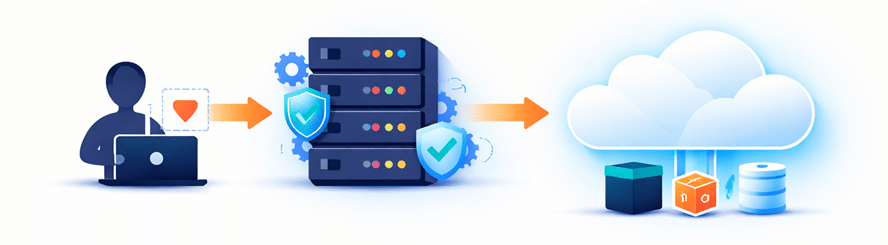
At first glance, this flow seems perfectly reasonable. Everything passes through your backend, giving you full visibility and control over the process.

Why Developers Start With This
There’s a reason this approach is so common; it works well in the beginning.
- It’s simple and quick to implement
- You have complete control over validation and processing
- It follows familiar backend-driven development patterns
- Debugging and monitoring are easier in early-stage applications
However, what feels like an advantage early on can quickly become a limitation as your application grows. That initial simplicity doesn’t scale well, and that’s where the real challenges begin.
What Is Direct-to-Cloud Upload Architecture
As applications grow and file uploads become more frequent, developers start looking for ways to remove bottlenecks and improve performance. That’s where direct-to-cloud upload architecture comes in.
Instead of routing files through your backend, this approach allows users to upload files directly to cloud storage. Your server is no longer responsible for handling the actual file transfer, which significantly reduces load, improves speed, and makes the entire system more scalable.

How It Works
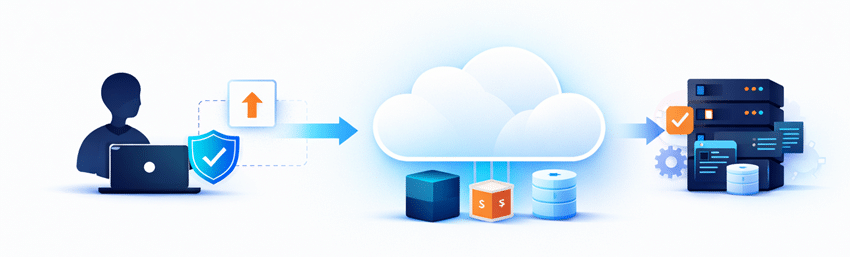
In a direct-to-cloud setup, the upload flow is streamlined:
User → Cloud Storage (via signed request or upload API)
Here’s how the process typically works:
- The client requests secure upload permissions (such as a signed URL or temporary token) from your backend
- Using those credentials, the file is uploaded directly from the client to cloud storage
- Your backend then handles post-upload tasks like validation, metadata processing, or triggering workflows
This approach shifts the heavy lifting away from your server and leverages cloud infrastructure for what it does best, handling large-scale data transfers efficiently.
Why It Exists
Direct-to-cloud architecture exists to solve the limitations of traditional upload systems.
By removing the backend from the critical upload path, you eliminate one of the biggest performance bottlenecks in file handling. Files no longer need to “pass through” your server, which reduces latency and avoids unnecessary duplication of data transfer.
More importantly, uploads can now scale independently of your backend. Whether you have 10 users or 10,000 uploading files at the same time, the system can handle the load because it relies on cloud infrastructure rather than your application server.
This shift not only improves performance but also enhances reliability, reduces infrastructure costs, and creates a smoother experience for users, especially in applications that deal with large files or global audiences.
Traditional vs Direct-to-Cloud Uploads (Core Differences)
Both approaches get files from users to storage, but the way they handle that process leads to very different outcomes as your application grows. What feels simple in the beginning can quickly turn into a bottleneck, while a slightly more advanced setup can save you significant time, cost, and effort in the long run.
| Aspect | Traditional Uploads | Direct-to-Cloud Uploads |
| Architecture | Backend is always in the upload path | Backend is bypassed during upload |
| Performance | Slower due to double transfer | Faster with direct client-to-cloud transfer |
| Scalability | Limited by server capacity | Scales with cloud infrastructure |
| Cost | Higher compute and bandwidth usage | Reduced server load and lower costs |
| Complexity | Simple initially, complex at scale | Slightly complex initially, simpler long-term |
What Developers Get Wrong
Even experienced developers make incorrect assumptions when designing file upload systems. These mistakes usually don’t show up in small-scale applications, but as usage grows, they start causing performance issues, higher costs, and poor user experience. Understanding these common pitfalls early can save you from major architectural rework later.
-
Assuming Backend Routing Is “Safer”
It’s natural to think that sending files through your backend gives you more control and therefore more security. But in reality, that’s not always the case.
Modern upload systems use secure mechanisms like signed URLs and policy-based access to tightly control what users can upload and where those files go. Validation doesn’t always need to happen before the upload; it can be handled after the file reaches storage.
When configured properly, direct-to-cloud uploads can be just as secure, if not more secure, than traditional approaches.
-
Underestimating Server Bottlenecks
A common assumption is:
– “Our server can handle uploads.”But file uploads are resource-intensive. Every upload consumes:
- CPU
- Memory
- Bandwidth
As the number of concurrent uploads increases, the load doesn’t just grow, it multiplies. This leads to sudden performance drops, slower response times, and even system failures under pressure.
-
Ignoring Network Latency
In traditional architectures, files don’t just travel once; they travel twice:
- From the client to your server
- From your server to cloud storage
This extra step increases upload time and introduces more points where things can go wrong. The result is slower uploads, higher failure rates, and a frustrating experience for users, especially on unstable networks.
-
Delaying the Shift Until It’s Too Late
Many teams stick with traditional uploads until problems become impossible to ignore. By the time they decide to switch, they’re already dealing with:
- Performance bottlenecks
- Rising infrastructure costs
- User complaints
At that stage, migrating to a better architecture is more complex, risky, and time-consuming than if the decision had been made earlier.
-
Overcomplicating Direct Upload Implementation
There’s a common belief that direct-to-cloud uploads require complex infrastructure and deep cloud expertise. This often discourages teams from adopting it early.
In reality:
- Modern APIs abstract most of the complexity
- SDKs handle authentication and upload logic
- Implementation can be much simpler than expected
What seems complicated at first is often easier than maintaining a scaled traditional system.
-
Misunderstanding Validation Strategies
Traditional thinking focuses on validating files before they are uploaded. While this works in simple systems, it doesn’t scale well.
A more scalable approach is:
- Upload the file first
- Validate it asynchronously
- Then accept, reject, or process it
This shift reduces bottlenecks and keeps the upload flow fast and efficient.
-
Ignoring User Experience
File uploads are a direct user interaction, yet they’re often treated as a backend concern.
Traditional upload systems tend to:
- Feel slower
- Provide limited or inaccurate progress feedback
- Fail more often on poor network connections
Direct-to-cloud uploads, when implemented correctly, offer faster uploads, better progress tracking, and a smoother overall experience, making a noticeable difference for users.
When Traditional Uploads Still Make Sense
While direct-to-cloud uploads are ideal for most modern applications, traditional uploads still have their place in certain scenarios.
They work well for very small files, where the extra server hop doesn’t significantly impact performance. They’re also suitable for low-traffic applications, where your backend isn’t under heavy load and scalability isn’t a concern.
In cases where you need strict real-time validation before storage, routing files through your server can simplify control and processing. Similarly, internal tools or admin systems with a limited number of users can rely on this approach without major issues.
However, these are exceptions. As file sizes grow or traffic increases, traditional uploads quickly become a bottleneck, making direct-to-cloud the better long-term choice.
When You Should Use Direct-to-Cloud Uploads
As your application grows, file uploads can quickly become a bottleneck if they pass through your backend. Direct-to-cloud uploads help you avoid that by offloading heavy file transfer work to cloud infrastructure. If your use case matches any of the scenarios below, this approach is the better choice.
- Handle large files: Large uploads (images, videos, documents) can slow down your server. Direct uploads reduce delays and prevent backend overload.
- Expect high user traffic: When many users upload files at once, server limits become an issue. Direct-to-cloud scales easily with cloud infrastructure.
- Serve global audiences: Users in different regions experience lower latency when uploading directly to distributed cloud storage instead of a single backend server.
- Build media-heavy applications: Apps with frequent uploads (e.g., social or content platforms) benefit from faster, more efficient file handling.
- Care about performance and reliability: Direct uploads improve speed, reduce failures, and provide a smoother user experience overall.
In most modern applications, using direct-to-cloud early helps prevent scaling and performance issues later.
How to Implement Direct-to-Cloud Uploads
Implementing direct-to-cloud uploads may seem complex at first, but the process becomes straightforward when broken down into clear steps, each handling a specific part of the upload flow.
Step 1: Generate Secure Upload Permissions
- Signed URLs: Generate time-limited URLs that allow users to upload files directly to storage securely.
- Temporary tokens: Issue short-lived credentials that restrict access and ensure controlled uploads.
- Policy-based access: Define rules that limit file size, type, and destination to enforce security.
Step 2: Upload Directly From the Client
- The client uses the provided credentials to upload files directly to cloud storage without routing through your backend.
Step 3: Handle Post-Upload Processing
- Validation: Verify file type, size, or content after upload to ensure compliance.
- Metadata extraction: Capture useful details like file size, format, or dimensions.
- Transformations: Process files (e.g., resize images or compress videos) as needed.
- Notifications: Trigger events or alerts once the upload and processing are complete.
Step 4: Store and Serve Files
- Store files in cloud storage and deliver them through a CDN to ensure fast and reliable access for users.
Why Building This Yourself Becomes Complex
Direct-to-cloud uploads may look simple on the surface, but real-world implementation involves much more than just sending files to storage. As you move beyond basic setups, you’ll need to handle multiple layers of reliability, security, and scalability.
- Secure credential generation: Create and manage signed URLs or temporary tokens safely
- Upload state tracking: Monitor progress, status, and completion of uploads
- Retry logic: Handle network interruptions and ensure uploads can resume
- Failure handling: Manage errors gracefully without breaking the user experience
- Validation pipelines: Verify and process files after upload
- Storage integration: Connect and manage cloud storage services efficiently
All of this adds up to significant engineering overhead, especially as your system scales.
How Managed Upload APIs Simplify This
Building and maintaining a direct-to-cloud upload system from scratch can quickly become time-consuming and complex. That’s why many teams choose managed solutions like Filestack to handle the heavy lifting.
Key Benefits
- Direct-to-cloud uploads out of the box: Enables immediate implementation without building custom upload pipelines.
- Built-in security and validation: Handles authentication, file restrictions, and compliance automatically.
- Global infrastructure for faster uploads: Optimizes upload speeds using distributed cloud networks.
- File transformations and processing support: Allows you to modify, compress, or analyze files without extra setup.
- Simple SDKs for quick integration: Provides developer-friendly tools to integrate uploads in minimal time.
This approach removes a significant amount of complexity and lets you focus on building your core product instead of managing infrastructure.
Example Implementation
With a managed API like Filestack, implementing direct-to-cloud uploads becomes much simpler. Instead of building everything from scratch, you can rely on SDKs and prebuilt workflows to get started quickly.
Here’s what a typical implementation looks like:
-
Initialize the SDK in Your Frontend
Start by installing and initializing the Filestack JavaScript SDK.
<script src="https://static.filestackapi.com/filestack-js/4.x.x/filestack.min.js"></script> const client = filestack.init('YOUR_API_KEY'); -
Generate Secure Upload Credentials
You can optionally secure uploads using policies and signatures generated from your backend.
const security = {
  policy: 'YOUR_BASE64_POLICY',
  signature: 'YOUR_SIGNATURE'
};

const client = filestack.init('YOUR_API_KEY', { security });
This ensures uploads are restricted by rules like expiry time, file size, or allowed operations.
-
Upload Files Directly From the Client
Use the built-in picker or upload methods to send files directly to cloud storage.
Option A: File Picker (UI-based)
client.picker().open();
Option B: Programmatic Upload
client.upload(file).then(result => { console.log('File uploaded:', result); }); -
Handle Results via Callbacks or Webhooks
You can handle upload success or failure directly in your frontend:
client.picker({
  onUploadDone: (res) => {
    console.log('Uploaded files:', res.filesUploaded);
  }
}).open();
For more advanced workflows, you can configure webhooks on your backend to process files after upload (e.g., validation, transformations, or notifications).
Conclusion
Traditional file upload architectures work well at small scale. But they don’t hold up under growth.
Direct-to-cloud uploads offer:
- Better performance
- Improved scalability
- Lower infrastructure load
But adopting them requires a shift in mindset, especially around validation, security, and system design.
The earlier you make that shift, the easier everything becomes.
And if you don’t want to handle all the complexity yourself, platforms like Filestack can take care of the heavy lifting.
Because in the end, this isn’t just about uploading files.
It’s about building systems that scale.